
1. Pwodwi souview
The Retrospiler LP-602 is a versatile 3-speed record player designed to bring the classic vinyl experience into the modern era. It features built-in stereo speakers for immediate playback and a range of connectivity options including Bluetooth for wireless streaming, FM radio, USB, and SD card playback. The unit also supports vinyl-to-MP3 encoding, allowing for digital preservation of your record collection. Its retro wooden design complements various home decors.
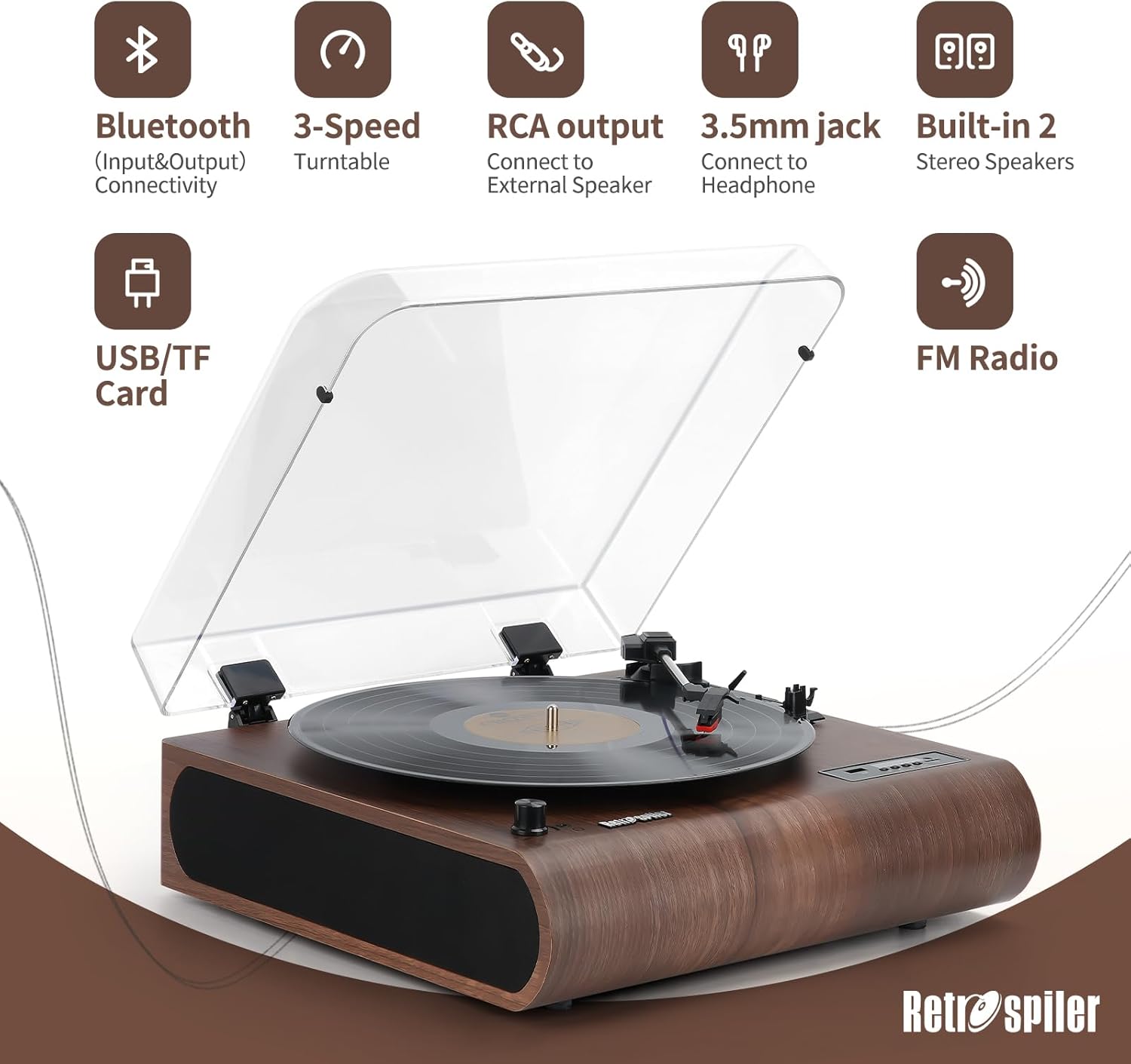
Imaj 1.1: Plis paseview of the Retrospiler LP-602 Record Player, showcasing its key features including Bluetooth, 3-speed turntable, RCA output, 3.5mm jack, built-in speakers, USB/TF card slot, and FM Radio.
Karakteristik kle:
- Platin 3 vitès: Sipòte disk 33 1/3, 45, ak 78 RPM.
- Koneksyon Bluetooth: Both input and output for seamless music streaming from devices or to external Bluetooth speakers.
- Oratè Stereo entegre: Dual speakers for direct audio playback.
- Radyo FM: Integrated FM tuner for radio listening.
- Vinyl-MP3 Encoding: Digitize your vinyl records directly to USB drives or TF cards.
- USB & SD Playback: Jwe odyo dijital files from USB flash drives and TF (Micro SD) cards.
- Dirije ekran: Provides clear display for mode selection and track information.
- Aux-in & Headphone Jack: Additional wired connectivity options.
- RCA Sòti: Konekte ak ekstèn amplifiers oswa oratè ki mache ak pisans.
- Kouvèti pousyè: Pwoteje platin lan kont pousyè ak debri.
2. Ki sa ki nan bwat la
Upon unboxing your Retrospiler LP-602 Record Player, please ensure all the following components are present:
- Retrospiler LP-602 Turntable Unit
- Adaptè pouvwa
- 45 rpm adaptè
- Manyèl Enstriksyon (dokiman sa a)
3. Product Controls and Components
Familiarize yourself with the various controls and components of your record player for optimal use.
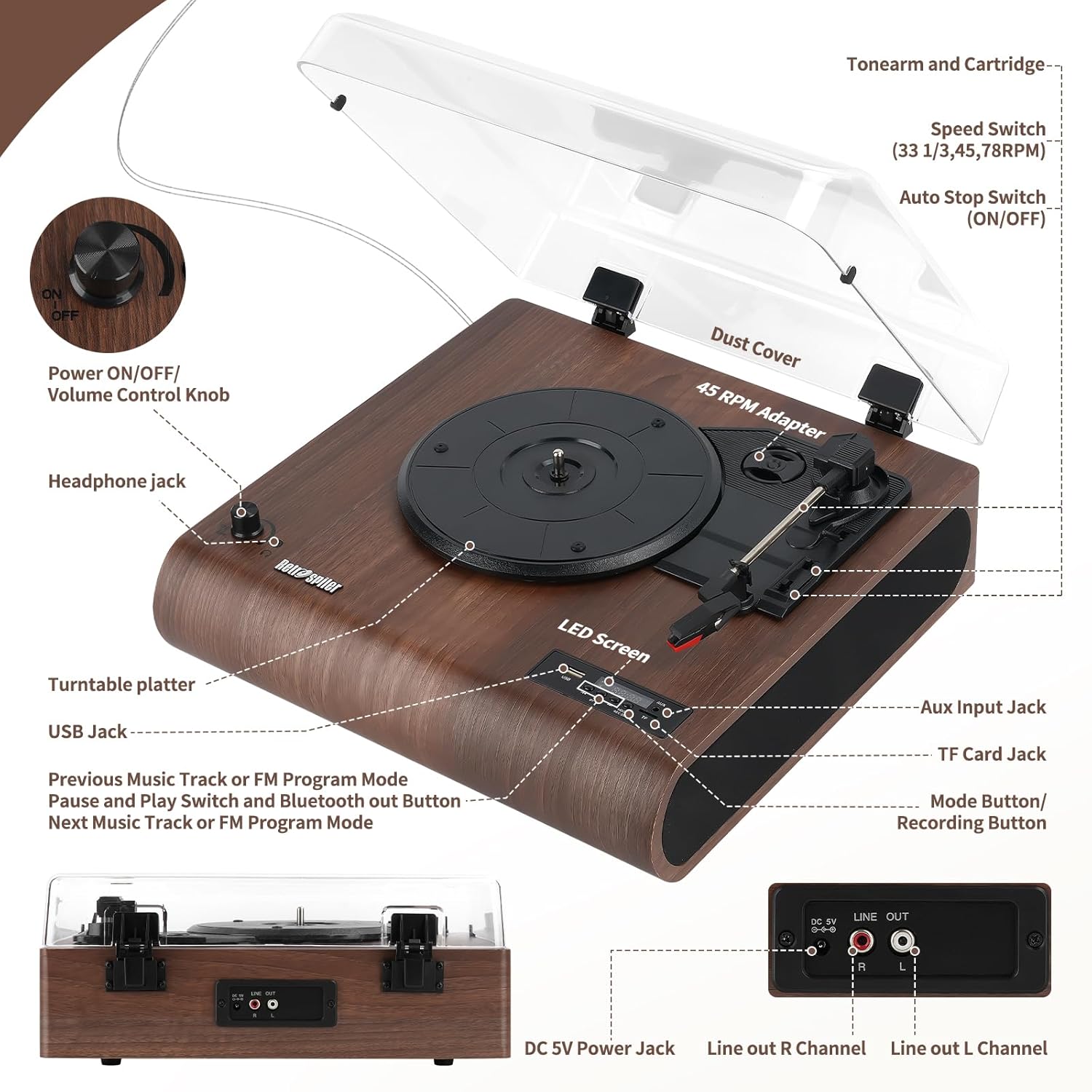
Image 3.1: Detailed diagram illustrating the location and function of all controls and ports on the Retrospiler LP-602 record player.
- Power ON/OFF/Volume Control Knob: Turn clockwise to power on and increase volume; turn counter-clockwise to decrease volume and power off.
- Kas ekoutè Jack: Konekte kas ekoutè pou tande prive.
- Plato platin: Place your vinyl records here.
- USB Jack: Insert a USB flash drive for MP3 playback or recording.
- Previous Music Track or FM Program Mode Button: Navigate tracks or FM presets.
- Pause and Play Switch and Bluetooth Out Button: Controls playback and initiates Bluetooth output pairing.
- Next Music Track or FM Program Mode Button: Navigate tracks or FM presets.
- Dirije ekran: Displays current mode, track number, or FM frequency.
- Aux Input Jack: Connect external audio devices via a 3.5mm cable.
- TF Card Jack: Insert a TF (Micro SD) card for MP3 playback or recording.
- Mode Button/Recording Button: Switches between modes (Phono, Bluetooth, FM, USB, TF, Aux) and initiates recording.
- Kouvèti pousyè: Protects the turntable when not in use.
- Tone Arm and Cartridge: Kenbe stylus la pou jwe disk.
- Speed Switch (33 1/3, 45, 78 RPM): Select the appropriate playback speed for your record.
- Auto Stop Switch (ON/OFF): Enables or disables automatic stopping of the platter at the end of a record.
- Adaptè 45 RPM: Yo itilize li pou jwe disk 7 pous ki gen yon gwo twou nan mitan an.
- DC 5V Power Jack: Konekte adaptè kouran ki founi an.
- Line Out R Channel (RCA): Dwa kanal pwodiksyon odyo.
- Line Out L Channel (RCA): Pwodiksyon odyo chanèl gòch.
4. Enstriksyon Enstalasyon
- Debake: Carefully remove the record player from its packaging. Remove any protective films or ties from the unit, especially from the dust cover and tone arm.
- Plasman: Place the record player on a stable, level surface away from direct sunlight, heat sources, and excessive dust.
- Koneksyon pouvwa: Connect the provided power adapter to the DC 5V Power Jack on the back of the unit, then plug the adapter into a wall outlet.
- Premye pouvwa sou: Turn the Power ON/OFF/Volume Control Knob clockwise to power on the unit. The LED screen will light up.
- Tone Arm Preparation: Gently unlock the tone arm clip. Remove the stylus protector from the needle.
5. Operasyon Enstriksyon
5.1. Jwe Disk Vinil
- Pouvwa sou: Turn the Power ON/OFF/Volume Control Knob clockwise to power on the unit.
- Chwazi Mòd Phono: Press the Mode button until "PHON" appears on the LED screen.
- Dosye Kote: Place a vinyl record on the turntable platter. If playing a 7-inch record with a large center hole, use the 45 RPM adapter.
- Chwazi vitès: Set the Speed Switch to the correct RPM (33 1/3, 45, or 78) for your record.
- Oto Stop: Set the Auto Stop Switch to ON if you want the platter to stop automatically at the end of the record. Set to OFF for continuous play or if your record has a non-standard run-out groove.
- Kòmanse Lekti: Gently lift the tone arm using the cue lever. Position the tone arm over the desired starting point of the record. Slowly lower the tone arm onto the record using the cue lever. The platter will begin to spin, and music will play through the built-in speakers or connected audio output.
- Ajiste Volim: Use the Power ON/OFF/Volume Control Knob to adjust the listening volume.
- Fen Lekti a: At the end of the record (if Auto Stop is ON), the platter will stop. If Auto Stop is OFF, manually lift the tone arm using the cue lever and return it to the tone arm rest. Secure the tone arm with the clip.
Video 5.1: Demonstration of unboxing and basic operation of the Retrospiler record player, including placing a record and starting playback.
5.2. Bluetooth Operation (Input)
Stream music wirelessly from your smartphone, tablet, or other Bluetooth-enabled devices to the record player's built-in speakers.
- Pouvwa sou: Turn the Power ON/OFF/Volume Control Knob clockwise to power on the unit.
- Select Bluetooth Input Mode: Press the Mode button until "BT IN" appears on the LED screen. The unit will enter pairing mode, indicated by a flashing Bluetooth icon.
- Pè aparèy: On your external Bluetooth device, enable Bluetooth and search for "Retrospiler" in the list of available devices. Select it to pair.
- Jwe Mizik: Once paired, you can play music from your device, and it will sound through the record player's speakers.

Image 5.2: The Retrospiler LP-602 record player demonstrating wireless music streaming from a smartphone.
5.3. Bluetooth Operation (Output)
Stream audio from the record player (e.g., vinyl playback) to external Bluetooth headphones or speakers.
- Pouvwa sou: Turn the Power ON/OFF/Volume Control Knob clockwise to power on the unit.
- Chwazi Sous: Choose your desired audio source (e.g., Phono, USB, TF, Aux).
- Activate Bluetooth Output: Press and hold the Pause and Play Switch and Bluetooth Out Button for a few seconds until "BT OUT" appears on the LED screen and the Bluetooth icon flashes.
- Pair External Device: Put your external Bluetooth headphones or speaker into pairing mode. The record player will automatically search and connect to the nearest available Bluetooth device.
- Konfime Koneksyon: Once connected, the Bluetooth icon on the LED screen will stop flashing. Audio from the record player will now be routed to your external Bluetooth device.

Image 5.3: The Retrospiler LP-602 record player illustrating its Bluetooth output capability, connecting to various external audio devices like headphones, speakers, and soundbars.
5.4. Operasyon radyo FM
- Pouvwa sou: Turn the Power ON/OFF/Volume Control Knob clockwise to power on the unit.
- Chwazi Mòd FM: Press the Mode button until "FM" appears on the LED screen.
- Oto Scan: Press and hold the Play/Pause button to initiate an automatic scan for FM stations. The unit will scan and save available stations.
- Estasyon mizik: Use the Previous/Next Track buttons to navigate through the saved FM stations.
5.5. Lekti Kat USB/TF
- Pouvwa sou: Turn the Power ON/OFF/Volume Control Knob clockwise to power on the unit.
- Mete medya: Insert a USB flash drive into the USB port or a TF (Micro SD) card into the TF card slot.
- Chwazi mòd: Press the Mode button until "USB" or "TF" appears on the LED screen. The unit will automatically begin playing MP3 files soti nan medya yo mete a.
- Kontwòl Lektur: Use the Previous/Next Track buttons to skip tracks and the Play/Pause button to pause or resume playback.
5.6. Vinyl-to-MP3 Encoding
Digitize your vinyl records directly to a USB flash drive or TF card.
- Prepare medya: Insert a USB flash drive or TF card into the corresponding slot. Ensure it has sufficient free space.
- Chwazi Mòd Phono: Press the Mode button until "PHON" appears on the LED screen.
- Start Record Playback: Begin playing your vinyl record as described in section 5.1.
- Kòmanse anrejistreman: Press the Mode/Record button. "REC" will appear on the LED screen, indicating that recording has started.
- Sispann anrejistreman: Press the Mode/Record button again to stop recording. The recorded audio file will be saved to your USB drive or TF card.
6. Antretyen
- Netwaye inite a: Siye deyò platin vinil la avèk yon twal mou epi sèk. Pa sèvi ak pwodui netwayaj abrazif oswa solvan.
- Kouvèti pousyè: Keep the dust cover closed when the unit is not in use to prevent dust accumulation on the platter and stylus.
- Swen Stylus: Handle the stylus (needle) with extreme care. Avoid touching it with your fingers. Use a soft brush designed for stylus cleaning to gently remove dust from the tip, brushing from back to front. Replace the stylus if you notice a decrease in sound quality or visible damage.
- Swen Dosye: Kenbe disk ou yo pwòp epi san pousyè. Sere yo vètikalman nan manch yo pou anpeche yo defòme.
NAN. Depanaj
| Pwoblèm | Kòz posib | Solisyon |
|---|---|---|
| Pa gen pouvwa | Power adapter not connected; Power knob off. | Ensure power adapter is securely connected and plugged into a working outlet. Turn the Power ON/OFF/Volume Control Knob clockwise to power on. |
| Pa gen son oswa volim ki ba | Volume too low; Incorrect mode selected; Stylus protector still on; External speakers not connected/powered. | Increase volume. Ensure correct mode (e.g., PHON for vinyl) is selected. Remove stylus protector. Check connections and power for external speakers if used. |
| Record skips or sound distortion | Dirty or damaged record; Dirty or worn stylus; Unit not on a stable surface. | Clean record. Clean or replace stylus. Place unit on a stable, level surface. |
| Pwoblèm appariement Bluetooth | Incorrect Bluetooth mode; Device too far; External device not in pairing mode. | Ensure "BT IN" or "BT OUT" mode is selected. Keep devices within range (approx. 10 meters). Put external device in pairing mode. |
| Vinyl-to-MP3 recording not working | USB/TF card full or not inserted correctly; Recording not initiated. | Ensure USB/TF card is inserted correctly and has free space. Press the Mode/Record button to start recording (LED shows "REC"). |
8. Espesifikasyon
- Mak: Retrospiler
- Non modèl: Dosye jwè
- Nimewo Modèl Atik: LP-602
- Dimansyon pake: 17.13 x 16.22 x 8.35 pous
- Pwa atik: 9.26 liv
- Materyèl: Bwa
- Koulè: Walnut
- Maksimòm vitès wotasyon: 78 RPM (sipòte 33 1/3, 45, 78 RPM)
- Kalite motè: Motè AC
- Karakteristik espesyal: Adjustable Speed, Built-In Speaker, Built-In Bluetooth Receiver (Input & Output), Dust Cover, RCA Output
- Aparèy konpatib: Headphone, Smartphone, Speaker, Tablet
9. Garanti ak sipò
For warranty information, technical support, or service inquiries, please refer to the contact details provided with your purchase documentation or visit the official Retrospiler websit la. Kenbe resi acha ou kòm prèv acha pou reklamasyon garanti.