
1. Entwodiksyon
Thank you for choosing the Cyrank Z73 Smart Watch. This manual provides essential information for setting up, operating, and maintaining your device. Please read it carefully to ensure proper use and to maximize your experience with the smart watch.

Imaj 1.1: Devan view of the Cyrank Z73 Smart Watch, showcasing its elegant design with a floral pink watch face.
2. Pake kontni
Tanpri verifye ke tout atik yo prezan nan pakè ou a:
- Cyrank Z73 Smart Watch
- Data Cable (Charging Cable)
- Mare ajisteman
- Manyèl Itilizatè (dokiman sa a)

Image 2.1: The Cyrank Z73 Smart Watch displayed alongside its included data cable and strap adjuster tool.
3. Espesifikasyon
Detailed technical specifications for the Cyrank Z73 Smart Watch:
| Karakteristik | Spesifikasyon |
|---|---|
| Main Control Platform | XC2806 |
| memwa | 16+128M |
| Manyen Mode | G+F Single Touch |
| Gwosè ekran | 1.09 pous (2.77 cm) |
| Rezolisyon ekran | 240x240 piksèl |
| Dial Dyamèt | Apeprè 36mm (1.4 pous) |
| Epesè kadran | Apeprè 11.5mm (0.5 pous) |
| Longè senti | Approx. 220x16mm (8.7x0.6in) |
| Batri-an batri | 200mAh ityòm batri |
| Tan Itilizasyon Nòmal | Anviwon 7 jou |
| Tan sibstiti | Anviwon 15 jou |
| Koneksyon | Bluetooth, USB, GPS (via smartphone) |
| Pwa atik | Apeprè. 180g (6.3oz) |
| Dimansyon pwodwi | 0.39 x 0.39 x 0.39 pous |

Image 3.1: Diagram illustrating the dimensions of the Cyrank Z73 Smart Watch, including dial diameter and thickness.

Image 3.2: Visual representation of the Cyrank Z73 Smart Watch strap length, measuring approximately 220mm (8.7 inches).
4. Enstalasyon
4.1. Chaje mont entelijan an
Before first use, fully charge your smart watch. Connect the provided data cable to the charging port on the watch and plug the USB end into a compatible power adapter (not included) or a computer's USB port. The watch display will indicate charging status.
4.2. Enstalasyon aplikasyon an
To unlock the full functionality of your Cyrank Z73 Smart Watch, you need to install the companion application on your smartphone. Scan the QR code provided in the quick start guide (if available) or search for the recommended app name in your smartphone's app store (e.g., Google Play Store for Android, Apple App Store for iOS).
4.3. Konekte ak telefòn entelijan ou
The Cyrank Z73 Smart Watch utilizes Dual Bluetooth (BT) connectivity. One BT connection (Z73) is for data transmission, and the other (Z73 Audio) is for audio transmission (calls, music playback).
- Asire w ke mont entelijan ou an chaje epi li limen.
- Pèmèt Bluetooth sou smartphone ou.
- Open the companion app on your smartphone and follow the on-screen instructions to add a new device.
- The app will search for available devices. Select 'Z73' from the list to establish the data connection.
- Once the data connection is established, go to your smartphone's Bluetooth settings and manually pair with 'Z73 Audio' for call and music functions.
- Confirm any pairing requests on both your watch and smartphone.
5. Operasyon Enstriksyon
5.1. Navigasyon debaz
- Ekran manyen: Swipe left, right, up, or down to navigate through menus and functions. Tap to select an item.
- Bouton bò: Tipikman yo itilize li pou reveye ekran an, retounen nan ekran prensipal la, oswa jwenn aksè nan meni prensipal la.
5.2. Health Monitoring Functions
The smart watch offers various health tracking features:
- Multiple Exercise Modes: Track different sports activities.
- Etap: Counts daily steps taken.
- Siveyans dòmi: Analyzes sleep patterns.
- Batman kè: Monitors heart rate throughout the day.
- GPS Running: Utilizes smartphone GPS for tracking outdoor runs.
5.3. Reminder Functions
Stay informed with timely reminders:
- Revèy Alam: Set alarms directly on the watch or via the app.
- Rapèl sedantèr: Notifies you to move after periods of inactivity.
- Rapèl pou bwè: Prompts you to drink water.
- Pouse mesaj: Receives notifications for calls, SMS, WeChat, QQ, Messenger, and other apps.
5.4. Daily Functions
Convenient features for everyday use:
- Apèl: Fè epi resevwa apèl dirèkteman nan mont lan.
- Kontak: Access your phone's contacts.
- Dosye apèl: View istwa apèl ou a.
- Lektur Mizik: Control music playing on your smartphone.
- Dial Custom: Personalize your watch face.
- Sipò pou plizyè lang: Chwazi lang ou pi pito.
- Anrejistreman: Use the watch as a voice recorder.
- Kontwòl vwa: Kominike avèk mont lan avèk kòmandman vokal.
- Tan: Get current weather updates.
- Kalkilatris: Fè kalkil debaz yo.
- Stopwatch & Countdown: Timing functions.
- Kamera Remote: Kontwole kamera smartphone ou a adistans.
- Jwenn telefòn mobil: Jwenn telefòn entelijan ou ki konekte a.
- Anviwònman: Adjust watch settings like brightness, screen time, and themes.
- Leve ponyèt pou eklere ekran an: Li limen ekran an otomatikman lè ou leve ponyèt ou.
- Pa deranje mòd: Fèmen notifikasyon yo sou silans.

Image 5.1: The Cyrank Z73 Smart Watch screen showing an incoming call notification, demonstrating its call answering capability.
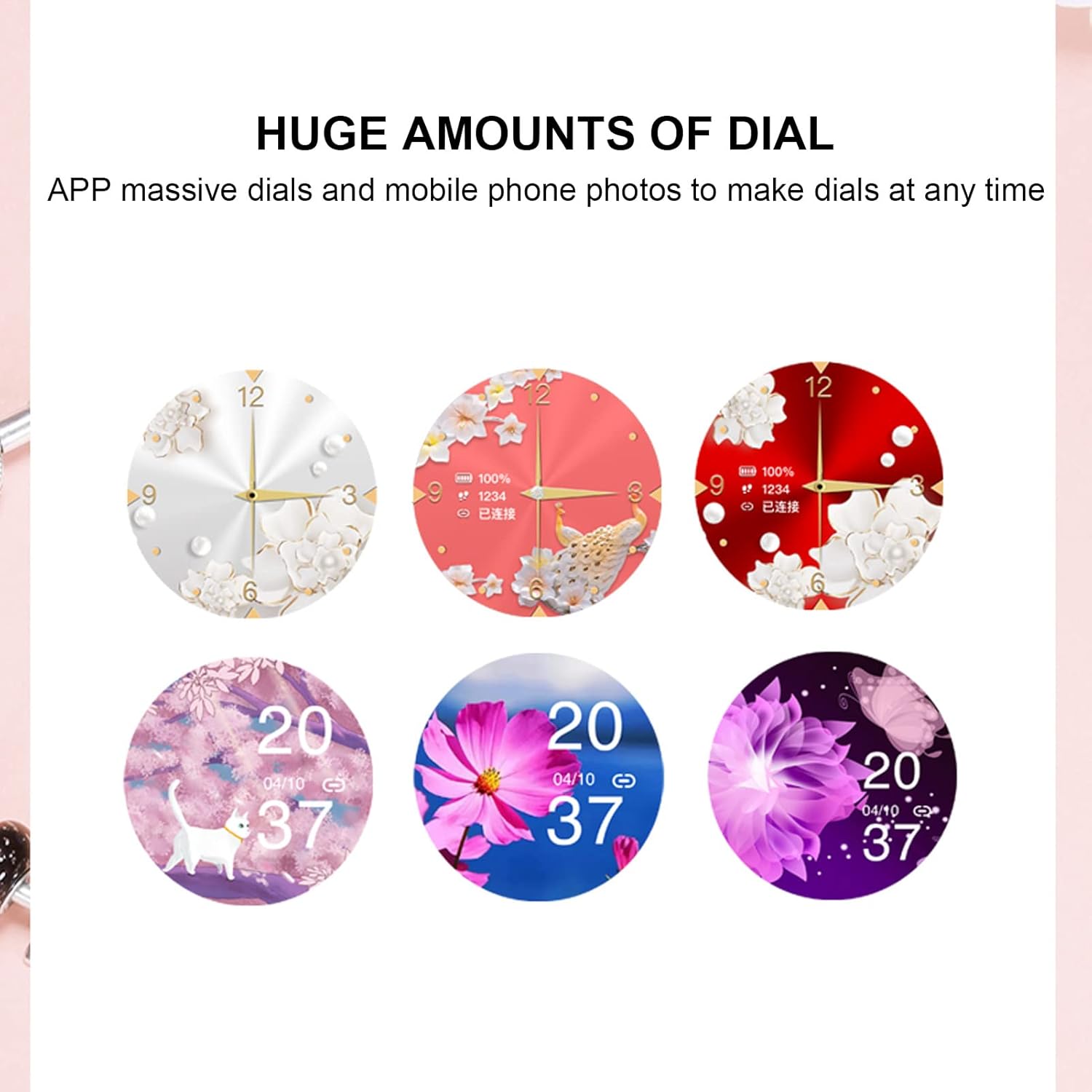
Image 5.2: A selection of diverse custom watch faces available for the Cyrank Z73 Smart Watch, allowing for personalization.
5.5. Special Purpose Functions
The Cyrank Z73 Smart Watch includes specific features for women's health:
- Feminine Functions: Prediction of menstrual period, ovulation period, ovulation day, and safe period.
6. Antretyen
To ensure the longevity and optimal performance of your smart watch, follow these maintenance guidelines:
- Netwayaj: Siye ekran mont lan ak braslè a regilyèman avèk yon twal mou epi sèk. Pou pousyè tè ki difisil pou retire, siye yon ti kras.amp Ou ka itilize twal, men evite twòp imidite.
- Evite tanperati ekstrèm: Pa ekspoze mont lan nan chalè oswa frèt ekstrèm, paske sa ka domaje batri a ak konpozan entèn yo.
- Rezistans dlo: Refer to the product specifications for water resistance ratings. Avoid submerging the watch beyond its rated depth or exposing it to hot water, steam, or chemicals.
- Chaje: Use only the provided data cable for charging. Avoid using damaged cables or chargers.
- Depo: Lè w pa itilize mont lan pou yon bon bout tan, sere l nan yon kote ki fre epi sèk.
NAN. Depanaj
If you encounter issues with your Cyrank Z73 Smart Watch, try the following steps:
- Gade a pa limen: Asire w ke mont lan chaje nèt. Konekte l nan plato a pou omwen 30 minit.
- Pa ka konekte ak telefòn nan:
- Asire w ke Bluetooth la aktive sou telefòn ou ak sou mont lan.
- Asire w ke mont lan nan zòn telefòn ou an.
- Rekòmanse telefòn ou ak mont lan.
- Efase kach Bluetooth la sou telefòn ou (si sa aplikab) epi eseye konekte ankò.
- Asire w aplikasyon konpayon an enstale epi li ap fonksyone.
- Notifikasyon yo pa resevwa:
- Check if the watch is properly paired and connected to the app.
- Verify notification permissions are granted to the app on your phone.
- Asire w ke mòd 'Pa deranje' a pa aktive sou mont lan oswa telefòn nan.
- Done Sante ki pa kòrèk: Ensure the watch is worn snugly on your wrist, but not too tight. Clean the sensor on the back of the watch.
- Kout lavi batri: Diminye klète ekran an, dezaktive fonksyon ki pa nesesè yo, epi asire w ke itilizasyon aplikasyon an background nan optimize sou telefòn ou.
- Restore Anviwònman faktori: If issues persist, you may try restoring the watch to factory settings via the watch's menu or the companion app. Note that this will erase all data on the watch.
8. Garanti ak sipò
The Cyrank Z73 Smart Watch comes with a standard manufacturer's warranty. Please refer to the warranty card included in your package or contact your retailer for specific warranty terms and conditions. For technical support or further assistance, please reach out to Cyrank customer service through the contact information provided with your purchase or on the official Cyrank websit.