
Entwodiksyon
Thank you for choosing the Masterpro by Carlo Cracco Robot 1000 Multicooker. This advanced kitchen appliance is designed to simplify your cooking process with its versatile functions and integrated Wi-Fi connectivity. This manual provides essential information for safe operation, setup, usage, maintenance, and troubleshooting to ensure you get the most out of your device.

The Masterpro Robot 1000 multicooker with its main bowl and control panel.
Enstriksyon Sekirite
Tanpri li tout enstriksyon sekirite yo ak anpil atansyon anvan ou itilize aparèy la. Si ou pa swiv enstriksyon sa yo, ou ka blese oswa domaje aparèy la.
- Toujou asire w ke aparèy la mete sou yon sifas ki estab, plat, epi ki reziste chalè.
- Pa plonje inite prensipal la nan dlo oswa nan okenn lòt likid. Netwaye ak yon zouti.amp twal sèlman.
- Keep hands and utensils away from moving blades during operation. Always use the spatula provided.
- Asire ke tout pati yo byen reyini anvan operasyon an.
- Debranche aparèy la nan priz kouran an lè w pa ap itilize l, anvan w netwaye l, epi anvan w monte oswa demonte pyès yo.
- Pa sèvi ak aparèy la si kòd la oswa ploge a domaje, oswa si li pa fonksyone byen oswa si li domaje nan nenpòt fason.
- Aparèy sa a se pou itilize nan kay la sèlman. Pa sèvi ak deyò.
- Exercise caution when handling hot liquids or steam.
Kontni pake
Verifye ke tout atik yo prezan nan pakè a:
- Masterpro Robot 1000 Main Unit
- 4.5 Liter Stainless Steel Bowl with ergonomic handle
- Preparation/Cooking Lid
- Kouvèti blenndè
- Internal Steamer Basket
- Steamer with Tray and Lid
- Shaft with Mixing Paddle
- Shaft with Butterfly Whisk
- Shaft with Stainless Steel Blades
- Extension Shaft with Slicing/Grating Disc
- Slicing/Grating Disc with Extension Shaft
- Spatul

Yon souview of the Masterpro Robot 1000 multicooker and its comprehensive set of accessories, including various blades, whisks, steaming baskets, and lids.
Pwodwi souview
The Masterpro Robot 1000 is a high-tech multicooker designed for diverse culinary tasks. Key components include:
- Inite Prensipal: Li gen motè a, eleman chofaj la, ak panèl kontwòl la.
- Bol asye pur: 4.5-liter capacity for large preparations.
- 7.7-inch Touch Screen Display: Pou kontwòl entwisyon ak resèt viewing.
- Quick Control Knob: With backlit ring for easy adjustments.
- Koneksyon Wi-Fi: Enables integrated recipe updates and online features.
- Echèl entegre: Accurate to 5 grams for precise ingredient measurement.
Enstalasyon
Swiv etap sa yo pou premye konfigirasyon:
- Dekonpoze: Ak anpil atansyon retire tout eleman nan anbalaj la.
- Netwaye: Wash the stainless steel bowl, lids, and all accessories with warm soapy water before first use. Rinse thoroughly and dry.
- Plasman: Place the main unit on a clean, dry, stable, and heat-resistant surface, away from edges and heat sources.
- Koneksyon pouvwa: Plug the appliance into a grounded electrical outlet (220V-240V, 50-60Hz).
- Premye pouvwa sou: The touch screen display will illuminate. Follow any on-screen prompts for initial language selection or Wi-Fi setup.
Enstriksyon Operasyon
Manyèl ak mòd otomatik yo
The Masterpro Robot 1000 offers both manual and automatic operation modes. In manual mode, you control each setting (time, temperature, speed). In automatic mode, you can select from integrated recipes that guide you step-by-step.
Integrated Recipes and Wi-Fi
The appliance comes with over 500 integrated recipes. Connect the device to Wi-Fi to receive updates and potentially access new recipes. Each recipe provides step-by-step instructions on the 7.7-inch touch screen display.
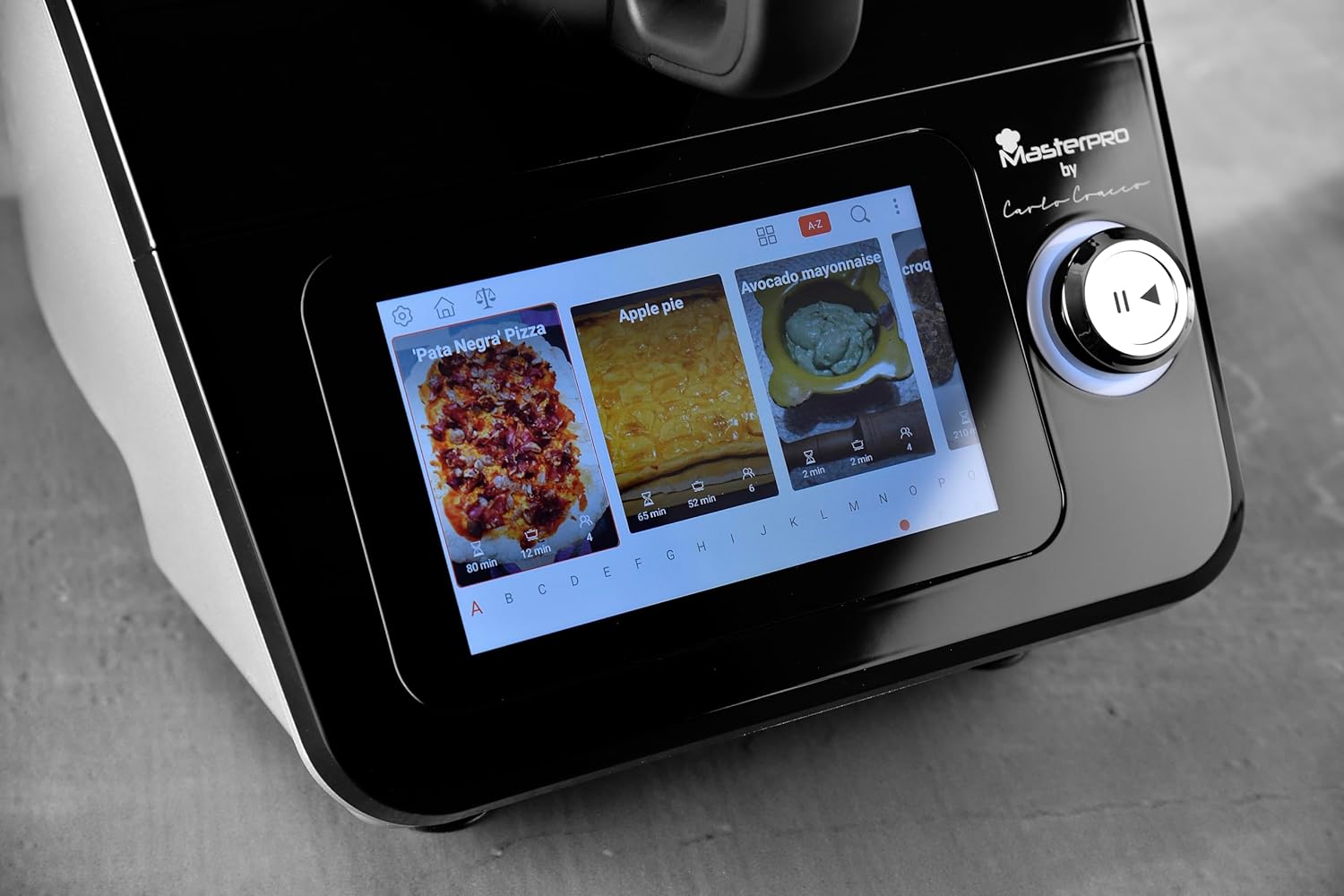
A close-up of the 7.7-inch touch screen display, illustrating the interface for selecting integrated recipes.
Fonksyon Nwayo
The multicooker performs a wide range of functions:
- Peze: Use the integrated scale for precise ingredient measurement.
- Melanj: Ideyal pou smoothie, sòs, ak pure.
- Emulsifye: Create perfect mayonnaise or dressings.
- Maladi: Prepare pat pou pen, pitza, oswa patisri.
- Koupe/griye: Utilize the dedicated disc and extension shaft for uniform slicing and grating of vegetables.
- Fwèt: Use the butterfly whisk for whipping cream or egg whites.
- Kwit manje: Various cooking methods, including simmering, sautéing, and stewing.
- Vapè: Use the internal basket or the external steamer with tray and lid for healthy steamed dishes.

The multicooker in use, demonstrating the steaming function with the steamer basket and lid in place, preparing seafood.

The multicooker demonstrating the slicing function with the dedicated accessory, processing carrots.
Temperature and Timer
Adjust the cooking temperature from 37°C to 130°C. Set the timer for up to 90 minutes. These settings are controlled via the touch screen and quick control knob.
Speed Control and Inverter Blade
The appliance features 12 speed levels. For delicate preparations like risottos, use the inverter blade function to stir gently without cutting ingredients.
Antretyen ak netwayaj
Regular cleaning ensures the longevity and optimal performance of your Masterpro Robot 1000.
- Deploge: Toujou debranche aparèy la anvan w netwaye.
- Bowl and Accessories: The stainless steel bowl, lids, and most accessories are dishwasher safe. For manual cleaning, use warm soapy water and a non-abrasive sponge.
- Inite Prensipal: Wipe the main unit and touch screen display with a soft, damp twal. Pa sèvi ak pwodui netwayaj abrazif oswa plonje aparèy la nan dlo.
- Siye: Asire w ke tout pati yo fin sèk anvan ou remonte oswa estoke.
Depanaj
If you encounter issues with your Masterpro Robot 1000, refer to the table below for common problems and solutions.
| Pwoblèm | Kòz posib | Solisyon |
|---|---|---|
| Aparèy la pa limen. | Pa branche; kouran koupetage; priz ki gen pwoblèm. | Tcheke koneksyon kòd kouran an; verifye ekipman pou kouran an; eseye yon lòt priz kouran. |
| Software update fails or gets stuck. | Unstable Wi-Fi connection; corrupted download; temporary software glitch. | Ensure stable Wi-Fi connection. Restart the appliance and attempt the update again. If the problem persists, contact customer support. |
| Touch screen unresponsive or inaccurate. | Screen is dirty; temporary software issue; hardware malfunction. | Clean the screen with a soft, dry cloth. Restart the appliance. If the issue continues, contact customer support. |
| Blade inverter function not engaging. | Incorrect setting; temporary glitch. | Ensure the correct function is selected on the display. Restart the appliance. |
| Bowl capacity appears less than stated. | Misinterpretation of usable vs. total capacity; specific recipe limits. | The stated capacity of 4.5L refers to the total volume. Usable capacity for certain preparations might be slightly less to prevent overflow. Refer to recipe guidelines. |
Espesifikasyon teknik
| Karakteristik | Spesifikasyon |
|---|---|
| Mak | MasterPRO |
| Modèl | Robo 1000 |
| Koulè | Nwa |
| Kapasite bòl | 4.5 lit |
| Kantite vitès | 12 |
| Karakteristik espesyal | Adjustable speed control, Wi-Fi connectivity, Integrated recipes, Integrated scale, Inverter blade function |
| Tanperati reglabl | 37-130 °C |
| Timer Range | 0-90 minit |
| Echèl Presizyon | 5 gram |
| Pouvwa | 1000 Watts (motor and heating) |
| Voltage / Frekans | 220V-240V ~ 50-60HZ |
| Dimansyon pwodwi | 38P x 22L x 32H cm |
Garanti ak sipò
The Masterpro by Carlo Cracco Robot 1000 Multicooker comes with a standard manufacturer's warranty. Please refer to the warranty card included in your product packaging for specific terms and conditions. For technical support, service, or spare parts, please contact your retailer or the MasterPRO customer service department. Keep your proof of purchase for warranty claims.