
1. Entwodiksyon
The Flysky FS-R4M is a compact 4-channel mini receiver designed for use with RC models, specifically mini and micro cars. It operates on the 2.4GHz ISM band using the advanced ANT protocol, offering reliable bidirectional communication. This receiver features a single external antenna and provides PWM output for control signals.
It is compatible with Flysky transmitters that support the ANT protocol, such as the FS-G7P. Its ultra-small size and lightweight design make it an ideal choice for applications where space and weight are critical considerations.
2. Karakteristik
- Sòti 4-chanèl: Provides four independent PWM channels for controlling various functions.
- ANT Protocol: Utilizes the advanced ANT 2.4GHz protocol for stable and efficient communication.
- Bidirectional Transmission: Supports two-way communication between the receiver and compatible transmitter.
- Single External Antenna: Asire yon resepsyon siyal serye.
- Konsepsyon kontra enfòmèl ant: Ultra-small dimensions (20.0 x 13.0 x 7.2mm) and lightweight (3g) for easy integration into mini/micro RC models.
- Lajè konpatibilite: Designed for use with Flysky ANT protocol transmitters, such as the FS-G7P.
- Easy Binding: Facilitates quick and straightforward pairing with compatible transmitters.
- Online Update Support: Allows for firmware updates to enhance performance and features.
3. Pwodwi souview
Familiarize yourself with the components and layout of the FS-R4M receiver.

Figure 1: FS-R4M Receiver Component Diagram
- [1] CH1: Channel 1 PWM Output
- [2] CH2: Channel 2 PWM Output
- [3] CH3: Channel 3 PWM Output
- [4] CH4: Channel 4 PWM Output
- [5] Antenna: Single external antenna for signal reception.
- [6] LED: Limyè endikatè estati.
- [7] Signal pin: Output for control signal.
- [8] Power anode: Positive power input.
- [9] Power cathode: Negative power input (Ground).
Nòt: The interface specifications for the connectors are ZH1.5mm-3P, commonly known as JST-PH2.0. Standard RC servo connectors (Futaba style) are not directly compatible and will require adapter cables or modification.
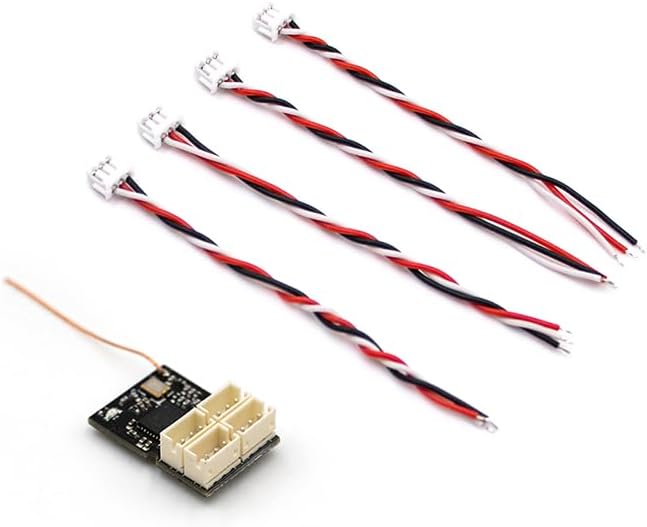
Figure 2: FS-R4M Receiver with Adapter Cables
This image illustrates the FS-R4M receiver alongside the necessary adapter cables for connecting to standard RC components. The receiver's ports are designed for ZH1.5mm-3P (JST-PH2.0) connectors.
4. Enstalasyon ak Konekte
4.1 Koneksyon fil elektrik
Connect your servos, Electronic Speed Controller (ESC), and other components to the corresponding channels on the FS-R4M receiver. Ensure correct polarity for power connections (Power anode [8] for positive, Power cathode [9] for negative/ground, Signal pin [7] for signal).
As noted in the product overview, the receiver uses ZH1.5mm-3P (JST-PH2.0) connectors. If your servos or ESC use standard Futaba-style connectors, you will need to use appropriate adapter cables or modify the connectors. Ensure all connections are secure before proceeding.
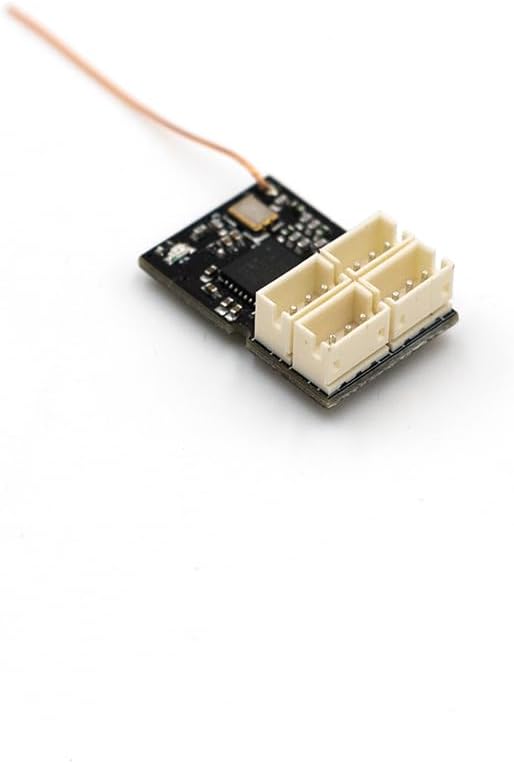
Figure 3: Receiver Channel Ports
Yon detaye view of the four channel ports on the FS-R4M receiver, highlighting their compact design.
4.2 Pwosedi obligatwa
The binding process links your FS-R4M receiver to your Flysky ANT protocol transmitter. Refer to your specific transmitter's manual for detailed binding instructions, as procedures may vary slightly. A general binding sequence is as follows:
- Ensure your transmitter is powered off.
- Connect power to the FS-R4M receiver. The LED [6] on the receiver will typically flash, indicating it is in binding mode or awaiting a signal.
- Place your transmitter into binding mode. This usually involves holding a specific button (e.g., "BIND" button) while powering on the transmitter. Consult your transmitter's manual for the exact steps.
- Once the receiver and transmitter successfully bind, the LED on the receiver will change to a solid state, indicating a successful connection.
- Release the bind button on the transmitter and power cycle both the transmitter and receiver to confirm the binding.
If binding fails, ensure the receiver is within range of the transmitter and that both devices are using the ANT protocol. Repeat the steps if necessary.
5. Operasyon Enstriksyon
After successful binding, the FS-R4M receiver will output PWM signals corresponding to the commands from your transmitter. Ensure all control surfaces and functions respond correctly before operating your RC model.
- Sekans sou pouvwa: Always power on your transmitter first, then the receiver. When powering off, disconnect power from the receiver first, then power off the transmitter.
- Tcheke Range: Perform a range check before each use, especially in new environments, to ensure reliable signal strength.
- Entèferans: Avoid operating near sources of 2.4GHz interference (e.g., Wi-Fi routers, other 2.4GHz RC systems) to prevent signal loss.
6. Antretyen
Proper care and maintenance will extend the lifespan of your FS-R4M receiver.
- Kondisyon anviwònman: Operate and store the receiver within the specified temperature range of -10°C to +60°C and humidity limit of 20% to 95%. Avoid extreme temperatures and high humidity.
- Voltage and Safety: Always pay attention to the input voltage range (3.5-9V/DC) and ensure it is not exceeded. Incorrect voltage can damage the receiver.
- Netwayaj: Keep the receiver clean and free from dust, dirt, and moisture. Use a soft, dry cloth for cleaning. Avoid using solvents or harsh chemicals.
- Swen antèn: Ensure the antenna is not cut, bent sharply, or damaged. A damaged antenna can significantly reduce range and signal reliability.
- Mizajou mikrolojisyèl: The receiver supports online updates. Periodically check the official Flysky websit la pou mizajou firmwèr ki disponib pou asire pèfòmans optimal ak aksè a nouvo fonksyonalite yo.
NAN. Depanaj
If you encounter issues with your FS-R4M receiver, consider the following troubleshooting steps:
- Receiver Not Binding:
- Ensure both the transmitter and receiver are powered on and within close proximity during the binding process.
- Verify that your transmitter supports the ANT protocol.
- Check the LED status on the receiver; it should indicate binding mode (e.g., flashing).
- Refer to your transmitter's manual for specific binding instructions.
- No Control Response:
- Confirm the receiver is successfully bound to the transmitter (solid LED).
- Check all wiring connections between the receiver, ESC, and servos for correct polarity and secure fit.
- Ensure the power supply to the receiver is within the specified voltage range (3.5-9V/DC).
- Verify that the transmitter is powered on and functioning correctly.
- Short Range or Intermittent Signal:
- Inspect the receiver antenna for any damage, kinks, or improper routing. Ensure it is positioned away from metal objects.
- Evite opere nan zòn ki gen anpil entèferans 2.4GHz.
- Ensure the transmitter's battery is adequately charged.
- Pwoblèm endikatè ki ap dirije:
- If the LED does not light up, check the power connection to the receiver.
- Refer to the transmitter manual for specific LED indications during binding and operation.
8. Espesifikasyon
| Karakteristik | Spesifikasyon |
|---|---|
| Modèl pwodwi | FS-R4M |
| Adaptive Transmitters | Transmitters with ANT protocol (e.g., Flysky FS-G7P) |
| Modèl adaptasyon | Mini/Micro RC Cars |
| Kantite Chanèl | 4 |
| RF frekans | 2.4GHz ISM |
| Maksimòm pouvwa | <10dBm (eirp) (EU) |
| Kalite antèn | Single antèn ekstèn |
| Distance (Ground) | > 50m |
| 2.4G Pwotokòl | ANT |
| Rezolisyon | 1024 |
| Sòti Done | PWM |
| Antre Voltage Range | 3.5-9V/DC |
| Mizajou sou entènèt | Wi |
| Ranje Tanperati | -10°C pou +60°C |
| Limit imidite | 20% a 95% |
| Dimansyon (L * W * H) | 20.0 x 13.0 x 7.2mm |
| Pwa | 3g |
| Sètifikasyon | CE, FCC ID: 2A2UNR4M00 |
| Kalite entèfas | ZH1.5mm-3P (JST-PH2.0) |
9. Garanti ak sipò
For warranty information, please refer to the terms and conditions provided by your retailer or the manufacturer at the time of purchase. Keep your proof of purchase for any warranty claims.
For technical support, firmware updates, and additional product information, please visit the official Flysky websit:
You may also contact your point of purchase for assistance.


