
1. Pwodwi souview
The ALLIMITY RM-D657 is a replacement remote control designed for various LG television models. It offers direct functionality without the need for complex programming, serving as a direct substitute for original LG remote models such as MKJ32022830 and MKJ32022833.
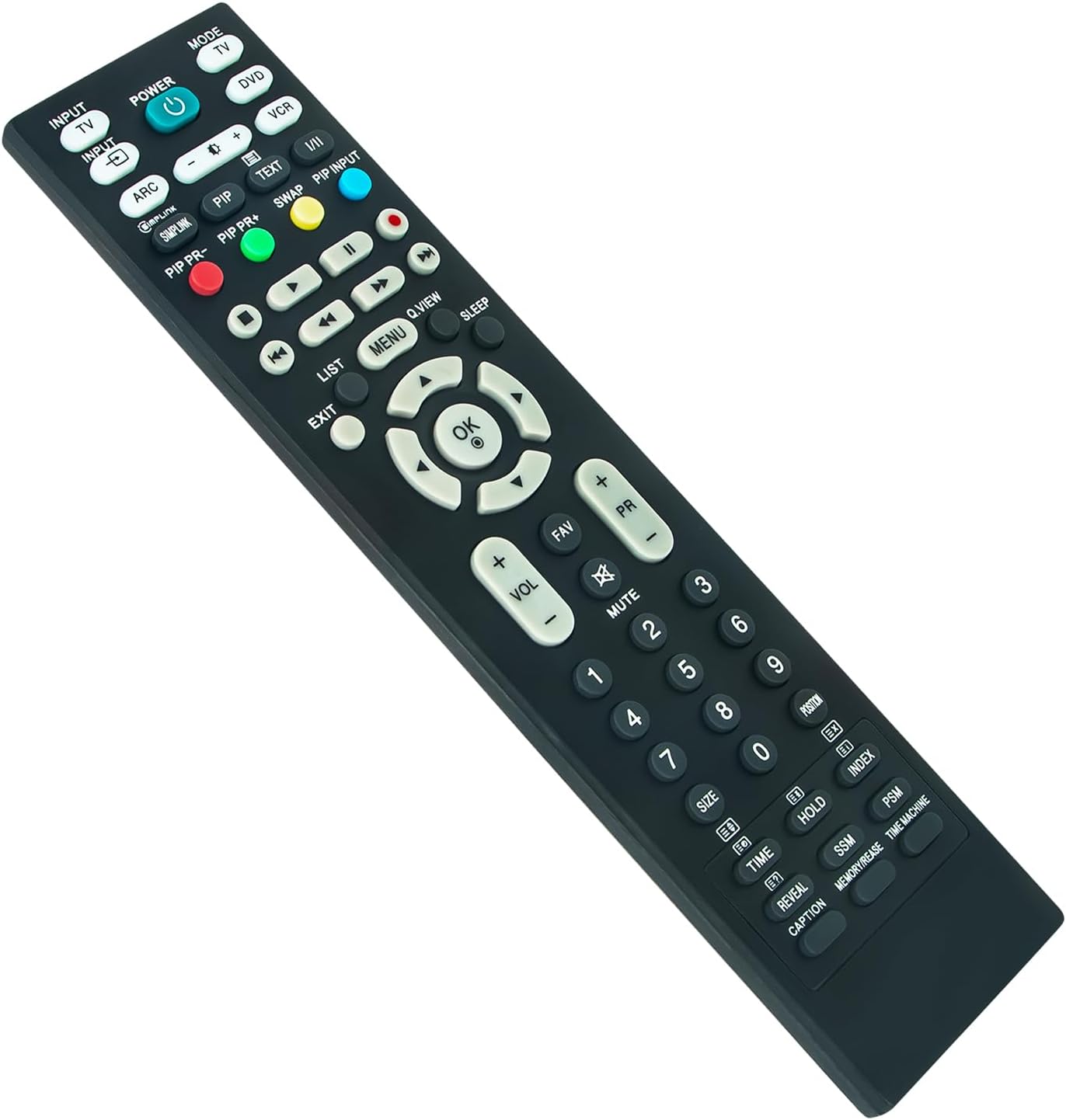
Imaj 1: Devan view of the ALLIMITY RM-D657 Remote Control.
2. Enstalasyon
2.1 Enstalasyon batri
To begin using your remote control, you must first install the batteries. No programming or setup is required beyond this step.
- Jwenn lòj batri a sou do a nan kontwòl remote la.
- Slide the battery compartment cover downwards or press the latch to open it.
- Insert two (2) AAA Alkaline batteries, ensuring the positive (+) and negative (-) terminals match the diagrams inside the compartment.
- Remèt kouvèti konpatiman batri a, epi asire w li byen klike nan plas li.
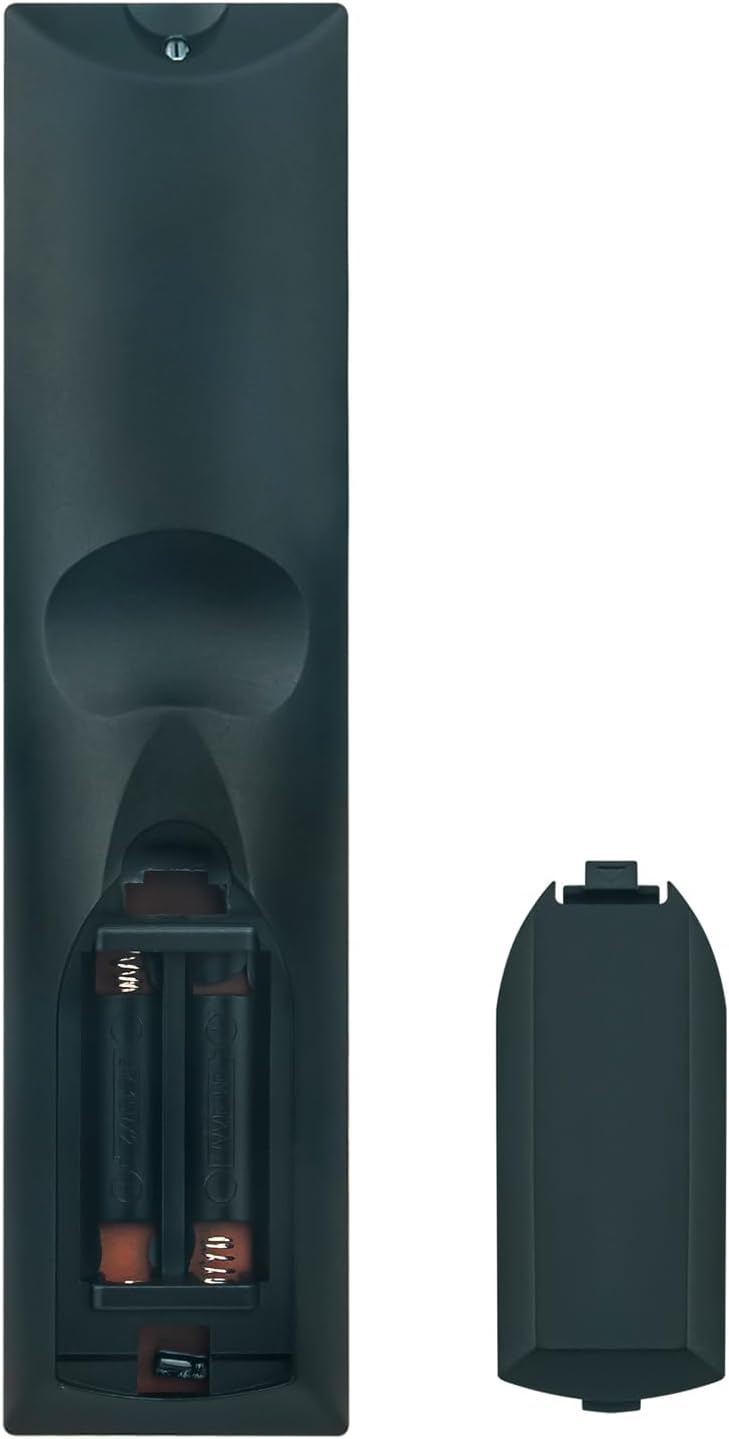
Imaj 2: Dèyè view showing the battery compartment and cover.
Note: Batteries are not included with the remote control. Use only new AAA Alkaline batteries for optimal performance.
3. Operasyon Enstriksyon
Once batteries are correctly installed, the ALLIMITY RM-D657 remote control is ready for immediate use with compatible LG TV models. Point the remote directly at your television's infrared receiver.
3.1 Fonksyon debaz
- POUVWA: Limen oswa etenn televizyon an.
- INPUT/TV/DVD/VCR: Selects the input source (e.g., HDMI, AV, TV).
- VOL +/-: Ajiste nivo volim.
- PR +/- (Channel +/-): Chanje chèn televizyon an.
- Bèbè: Sere oswa dekole odyo televizyon an.
- NIMEWO BOUTON (0-9): Chwazi chanèl dirèkteman oubyen antre valè nimerik.
- MENI: Aksè nan meni prensipal televizyon an.
- OK (Enter): Konfime seleksyon ki fèt nan meni yo.
- ARROW BUTTONS (Up/Down/Left/Right): Navige nan meni ak opsyon.
- Sòti: Sòti meni oswa fonksyon aktyèl la.
Additional buttons on the remote control correspond to specific functions available on your LG TV. Refer to your television's original user manual for detailed information on these advanced features.
4. Modèl konpatib
The ALLIMITY RM-D657 remote control is compatible with a wide range of LG TV models, including but not limited to:
- 26LH1DC5
- L26W56BA
- 50PC3D-UE
- 60PC1D-UE
- 50PQ20-UA
- 50PQ30-UA
- 37LC5DC
- 37LG3500
- 42LF66
- 42LF75
- 42LC46
- 42LC55
- 42LF65
- 37LB5DF
- 37LB4DS
- 50PB65
- MKJ32022830
- MKJ32022833
5. Antretyen
5.1 Netwayaj
To clean your remote control, gently wipe it with a soft, dry cloth. Avoid using liquid cleaners, abrasive materials, or chemical solvents, as these can damage the remote's surface or internal components.
5.2 Ranplasman batri
Replace the batteries when the remote control's responsiveness decreases, or if it stops functioning. Always replace both batteries at the same time with new AAA Alkaline batteries. Do not mix old and new batteries, or different types of batteries.
NAN. Depanaj
6.1 Telekòmand lan pa reponn
- Tcheke batri yo: Ensure batteries are inserted correctly with the correct polarity (+/-) and are not depleted. Replace with new AAA Alkaline batteries if necessary.
- Liy Vizyon: Make sure there is a clear line of sight between the remote control and the television's infrared receiver. Remove any obstructions.
- Remote sensor: Asire w ke captè telekòmand televizyon an pa bloke oswa sal.
6.2 Ranje Limite
- Nivo batri: Low battery power can reduce the remote's effective range. Replace batteries.
- Entèferans: Strong light sources (like direct sunlight or fluorescent lights) or other electronic devices can sometimes interfere with the infrared signal. Try using the remote in a different environment.
7. Espesifikasyon
- Mak: ALIMITE
- Modèl: RM-D657
- Aparèy konpatib: LG Televisions
- Koneksyon Teknoloji: Enfrawouj
- Kalite batri: 2 pil alkalin AAA (pa enkli)
- Ranje maksimòm: Approximately 33 Feet (10 meters)
- Pwa atik: 96 gram
- Karakteristik espesyal: Ergonomik konsepsyon
8. Garanti ak sipò
For specific warranty details regarding your ALLIMITY RM-D657 remote control, please refer to the retailer's terms and conditions at the time of purchase. For technical support or further assistance, please contact the seller or your point of purchase directly.