
Kidzone B0CM5PB88Y
Manyèl Itilizatè Machin Ekstrèm Entelijan Kidzone
Model: B0CM5PB88Y
Mak: Kidzone
1. Entwodiksyon
This user manual provides essential information for the safe operation, assembly, and maintenance of your Kidzone Smart Bumper Car. Designed for toddlers and kids aged 18 months to 6 years, this electric ride-on toy offers interactive features including app control, LED lights, Bluetooth connectivity, and a 360-degree spin function. Please read this manual thoroughly before use to ensure proper functionality and safety.
Ki sa ki nan bwat la
- Ride on Car
- Charger
- Kontwòl Remote
- Manyèl
- DIY Sticker Sheets
2. Gid Sekirite
Your child's safety is paramount. Always supervise children during operation and ensure all safety features are properly utilized. This product complies with ASTM/CPSIA/CPSC/CA Prop 65/FCC safety regulations.
- Limit Laj ak Pwa: Suitable for children aged 18 months to 6 years, with a maximum weight capacity of 66 lbs.
- Senti sekirite: Always ensure the adjustable 5-point seat belt is securely fastened before operation.
- Sipèvizyon: Sipèvizyon adilt obligatwa tout tan.
- Sifas: Use on smooth, flat surfaces. Avoid slopes, stairs, and uneven terrain.
- Obstak: Ensure the play area is clear of obstacles, water, and other hazards.
- Chaje: The vehicle must be OFF and cannot be operated when charging.
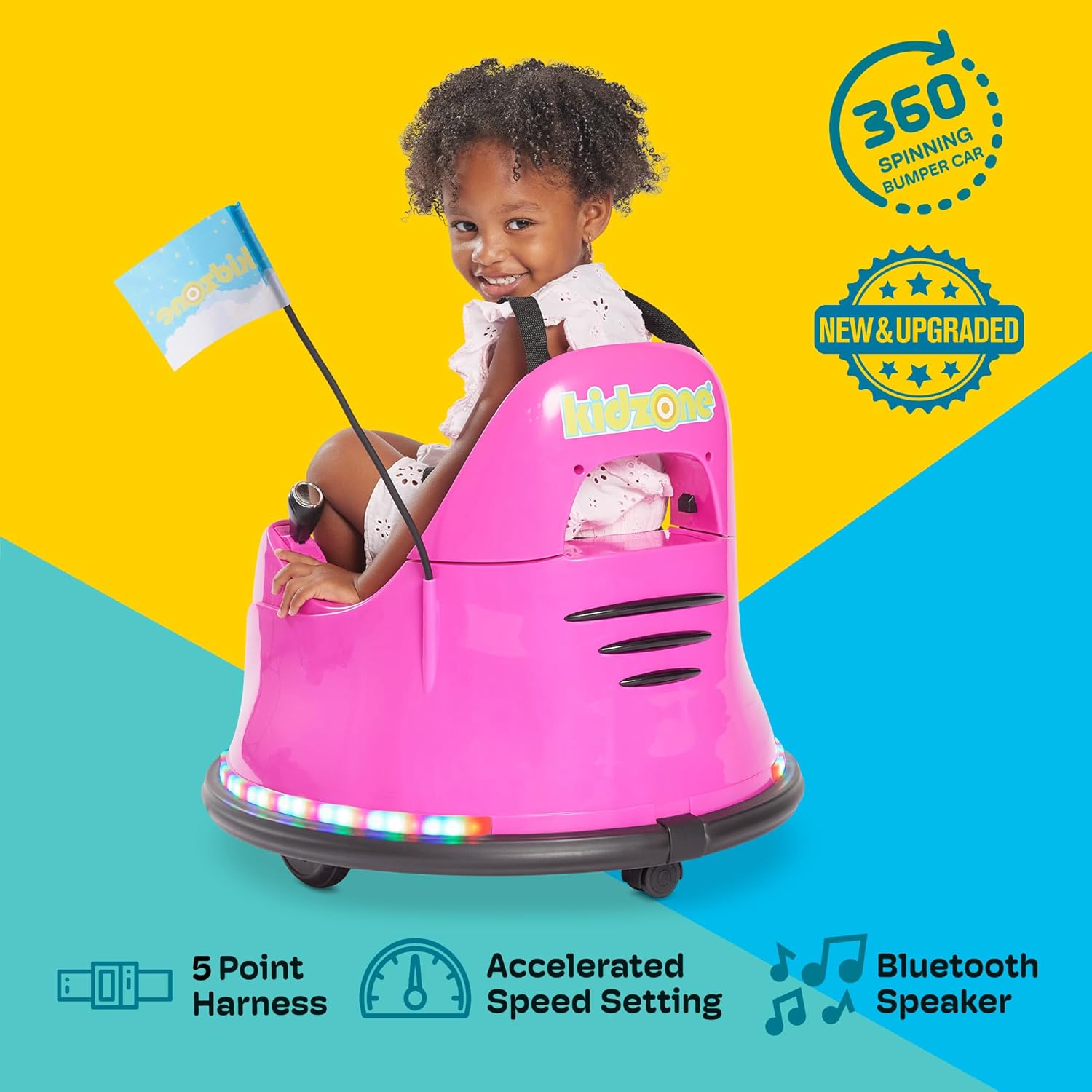
Figi 2.1: Child securely fastened in the bumper car, demonstrating the 5-point harness for safety.

Figi 2.2: The bumper car features a safety flag for increased visibility during play.
3. Enstalasyon ak Asanble
The Kidzone Smart Bumper Car comes mostly pre-assembled. Follow these steps to prepare it for first use:
- Dekonpoze: Ak anpil atansyon retire tout eleman nan anbalaj la.
- Koneksyon batri: The battery may come disconnected for shipping safety. Locate the battery compartment (usually under the seat) and connect the battery terminals as per the included quick start guide.
- Premye chaj: Fully charge the battery for 8-12 hours before initial use. Do not charge for more than 20 hours.
- Attach Flag: Insert the racing flag into its designated slot on the rear of the bumper car.
- Aplike avek stickers son: Personalize your bumper car using the provided DIY sticker sheets.

Figi 3.1: Customize your bumper car with the included DIY stickers, featuring numbers, letters, and fun designs.
4. Operasyon Enstriksyon
Kontwòl Panel Plis paseview
The main control panel is located within the seating area. It allows for power control, mode selection, speed adjustment, and light customization.

Figi 4.1: The intuitive control panel for easy operation by children or parents.
- Bouton pouvwa: Press to turn the bumper car ON/OFF.
- Endikatè batri: Montre nivo batri aktyèl la.
- Selektè mòd: Toggle between Joystick (child-driven), Remote (parental control), and APP control modes.
- Anviwònman vitès: Choose between Slow (0.75 mph) and Fast (1.3 mph) speeds.
- Kontwòl limyè: Activate and cycle through various multi-colored LED light combinations for both upper and lower light strips.
Kondwi mòd
The Kidzone Smart Bumper Car offers three distinct driving modes:
- Joystick Input Mode: Children can drive the car independently using the two joysticks located on either side of the seat. Pushing both forward moves the car forward, pulling both back moves it backward, and pushing one forward while pulling the other back enables 360-degree spins.
- 2.4G Remote Control Mode: Parents can take full control of the bumper car's direction and speed using the included 2.4G remote control. This is ideal for younger children or for guiding the car in specific areas.
- APP Control Mode: Connect the bumper car to the free Kidzone APP (available on iOS and Android) via Wi-Fi. The app allows control over direction, speed, lights, and music. It also features "Play Mode" with games and rewards for an enhanced interactive experience.

Figi 4.2: The included remote control allows parents to guide the bumper car.

Figi 4.3: Control the bumper car and access interactive features via the Kidzone mobile application.
Limyè ak son
The bumper car features multi-colored LED lights on both the upper frame and around the base, offering 25 light combinations. It also includes Bluetooth connectivity, allowing you to play music or audio files through the car's speaker for an immersive experience.
Videyo 4.1: Official product video demonstrating the Kidzone Smart Bumper Car's features, including app control and movement. This video is provided by the seller, Align Inc.
5. Antretyen
- Swen batri: The 12V rechargeable lead-acid battery provides approximately 40 minutes of playtime on a full charge. Charge the battery at least once a month, even if not operating the vehicle, to maximize battery life. Avoid completely draining the battery.
- Netwayaj: Wipe the bumper car with a damp twal. Evite itilize pwodui chimik piman bouk oswa pwodui netwayaj abrazif.
- Depo: Store the bumper car in a dry, cool place away from direct sunlight and moisture.
NAN. Depanaj
If you encounter issues with your Kidzone Smart Bumper Car, refer to the following common problems and solutions:
| Pwoblèm | Kòz posib | Solisyon |
|---|---|---|
| Machin nan pa limen. | Batri a fèb oswa li dekonekte. | Check battery connection and charge fully. |
| Machin pa deplase. | Incorrect driving mode selected or remote not paired. | Ensure correct mode (Joystick/Remote/APP) is selected. Re-pair remote if necessary. |
| Limyè yo pa mache. | Light function is turned off. | Press the light control buttons on the panel to activate. |
| App control not connecting. | Wi-Fi issue or app not properly synced. | Ensure Wi-Fi is enabled on your device. Restart app and bumper car. |
For further assistance, please refer to the full user manual or contact Kidzone customer support.
7. Spécifications pwodwi
| Karakteristik | Detay |
|---|---|
| Dimansyon pwodwi | 22.4 x 22.4 x 20.3 pous |
| Pwa atik | 12.4 liv |
| Manifakti laj rekòmande | 18 mwa - 6 an |
| Kapasite pwa | 66 liv |
| Motè | Two 15W motors |
| Batri | 12V rechargeable lead-acid |
| Tan jwèt pou chak chaj | Apeprè 40 minit |
| Tan pou chaje | 8-12 hours (max 20 hours) |
| Driving Speeds | 0.75 - 1.3 mil pa èdtan |
| Karakteristik sekirite | Adjustable 5-point seat belts, anti-flat tires, cushioned rubber bumper, slow start |
| Koneksyon | Wi-Fi (for APP control), Bluetooth |
8. Garanti ak sipò
For warranty information, product support, or to purchase replacement parts, please contact Kidzone customer service directly. Refer to the original packaging or the official Kidzone websit pou detay kontak.
Yon Manyèl Itilizatè detaye (PDF) disponib pou telechaje: Telechaje Manyèl Itilizatè a
Ask a question about this manual
Ask about setup, troubleshooting, compatibility, parts, safety, or missing instructions. Manuals+ will review the question and use this page’s manual context to help answer it.