
1. Entwodiksyon ak Gid Sekirite
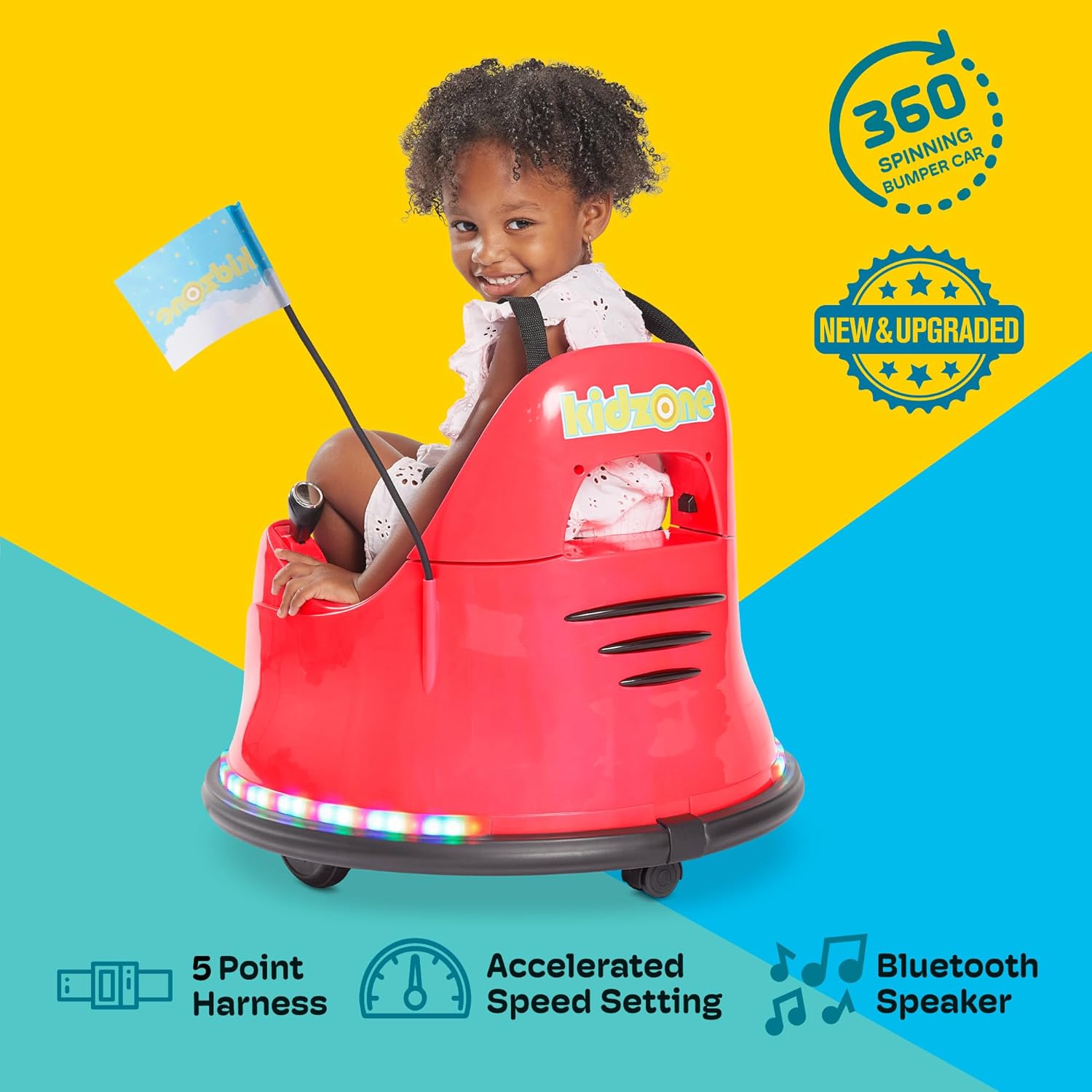
Welcome to the Kidzone Smart Bumper Car experience! This manual provides essential information for the safe assembly, operation, and maintenance of your new electric ride-on toy. Please read all instructions carefully before use and retain this manual for future reference.
Enfòmasyon enpòtan sou sekirite:
- Ranje laj: Apwopriye pou timoun ki gen laj 18 mwa a 6 ane.
- Kapasite pwa: Maximum weight capacity is 66 lbs (30 kg).
- Sipèvizyon granmoun: Always ensure an adult supervises children during operation.
- Ekipay sekirite: Always use the adjustable 5-point safety harness.
- Anviwònman Fonksyònman: Use on flat, dry surfaces. Avoid slopes, uneven terrain, water, or busy streets.
- Chaje: The vehicle must be OFF and cannot be operated when charging. Fully charge the battery for 8-12 hours, but not more than 20 hours. Charge the battery at least once a month even if not operating the vehicle to maximize battery life.
- Sekirite materyèl: Made from durable and non-toxic plastic, complying with ASTM/CPSIA/CPSC/CA Prop 65/FCC safety regulations.
2. Ki sa ki nan bwat la
Upon opening your package, please ensure all the following components are present:
- 1 x Kidzone Smart Bumper Car
- 1 x Chargeur
- 1 x kontwòl remote
- 1 x Manyèl Enstriksyon (dokiman sa a)
- DIY Sticker Sheets
- Kous Drapo
3. Enstalasyon ak Asanble
Follow these steps to assemble your Kidzone Smart Bumper Car:
- Koneksyon batri: The bumper car's battery will be detached for shipping. Locate the battery compartment (usually under the seat). Use a Phillips head screwdriver to open the compartment, connect the battery terminals, and secure the compartment cover.
- Backrest Attachment: Carefully attach the backrest to the main body of the car. Ensure any internal wiring for lights is properly connected and tucked away to prevent pinching when securing the backrest.
- Batri Remote Control: The remote control requires 2 AAA batteries (not included). Use a small Phillips head screwdriver to open the battery compartment on the back of the remote, insert the batteries, and secure the cover.
- Attach Racing Flag: Insert the racing flag into its designated slot on the rear of the bumper car.
- Inisyal chaj: Fully charge the bumper car for 8-12 hours before its first use. Refer to the 'Maintenance' section for detailed charging instructions.

Videyo konfigirasyon:
4. Operasyon Enstriksyon
Kontwòl Panel Plis paseview:
The control panel, located inside the bumper car, allows you to manage various functions:

- Bouton pouvwa: Press to turn the car ON/OFF.
- Mode Selector (Remote/Joystick): Switch between child-controlled joystick mode and parent-controlled remote mode.
- Speed Selection (Fast/Slow): Adjust the driving speed.
- Kontwòl limyè: Cycle through various multi-colored light patterns for both upper and lower LED strips.
- Endikatè batri: Displays the current battery charge level.
- Bouton Bluetooth: Activates Bluetooth for music playback.
- Pò chaje: Connect the charger here.
Mòd kondwi:
- Joystick Input Mode (Child Control):
For children capable of independent control. Push both joysticks forward to move forward, pull both back to move backward. Push one forward and one back to spin. Ensure the mode selector is set to 'Joystick'.

Figure 4: Child operating the bumper car with joysticks. - 2.4G Remote Control Mode (Parental Control):
For younger children or when parental supervision is desired. Ensure the mode selector is set to 'Remote'. Use the remote control's directional buttons to steer the bumper car. The remote also features a 'P' button for emergency braking and an 'S' button for speed adjustment.

Figure 5: Parent using the remote control. - APP Control Mode:
Download the free Kidzone APP on iOS or Android. Connect the app via Wi-Fi to control the direction, speed, lights, and music. The app also includes 'Play Mode' with games and rewards for an enhanced interactive experience.

Figure 6: Kidzone mobile application interface for smart control.
Light Settings and Customization:
- Limyè ki ap dirije plizyè koulè: Use the light control buttons on the panel to cycle through various colors and flashing patterns on the upper and lower LED strips.
- Stickers brikoleur: Personalize your bumper car with the included DIY sticker sheets (letters, numbers, and fun designs).


5. Antretyen
- Chaje: Connect the provided charger to the charging port on the control panel. A full charge takes 8-12 hours and provides approximately 40 minutes of playtime. Do not charge for more than 20 hours. Charge the battery at least once a month to prolong its lifespan.
- Netwayaj: Wipe the bumper car with a damp twal. Evite itilize pwodui chimik piman bouk oswa pwodui netwayaj abrazif.
- Depo: Store the bumper car in a dry, cool place away from direct sunlight when not in use.
NAN. Depanaj
- Machin pa Limen: Check if the battery is properly connected and fully charged. Ensure the power button is pressed.
- Car Not Moving: Verify that the correct driving mode (Remote or Joystick) is selected on the control panel. If using the remote, ensure its batteries are fresh.
- Limyè pa travay: Check the light control buttons on the panel. Ensure the battery has sufficient charge.
- Remote pa reponn: Ensure the remote control has fresh AAA batteries and is properly paired with the bumper car.
7. Espesifikasyon
| Karakteristik | Detay |
|---|---|
| Modèl | Kidzone Smart Bumper Car (B0CM5L6BD1) |
| Dimansyon pwodwi | 22.4"D x 22.4"W x 20.3"H |
| Pwa atik | 12.4 liv |
| Laj Rekòmande | 18 mwa - 6 an |
| Kapasite pwa | 66 liv (30 kg) |
| Motè | Two 15W motors |
| Batri | 12V Rechargeable Lead-acid Battery |
| Tan chaj | 8-12 èdtan |
| Tan jwèt pou chak chaj | Apeprè 40 minit |
| Mod vitès | Fast (1.3 mph) / Slow (0.75 mph) |
| Opsyon kontwòl | Joystick, 2.4G Remote Control, Kidzone APP |
| Karakteristik sekirite | Adjustable 5-point seat belt, Anti-flat tires, Cushioned rubber bumper, Slow start safety feature |
8. Garanti ak sipò
For warranty information, technical support, or any questions regarding your Kidzone Smart Bumper Car, please refer to the contact details provided on the product packaging or visit the official Kidzone websit la. Kenbe resi acha ou kòm prèv acha pou reklamasyon garanti.