
1. Entwodiksyon
Welcome to the KRUPS Sensation C10 EA910A10 Superautomatic Coffee Machine user manual. This guide provides comprehensive instructions for the safe and efficient operation, maintenance, and troubleshooting of your new coffee machine. Please read this manual thoroughly before first use and keep it for future reference.
2. Enstriksyon Sekirite Enpòtan
Pou asire yon operasyon an sekirite, toujou swiv prekosyon sekirite debaz sa yo:
- Li tout enstriksyon yo anvan ou sèvi ak aparèy la.
- Pa plonje aparèy la, kòd kouran an, oswa ploge a nan dlo oswa lòt likid.
- Aparèy sa a fèt pou itilize nan kay la sèlman.
- Asire voltagVolim ki endike sou aparèy la koresponn ak vòltaj kouran prensipal ou a.tage.
- Toujou debranche aparèy la nan priz kouran an anvan ou netwaye li oswa lè w pa ap itilize li.
- Pa opere nenpòt aparèy ki gen yon kòd oswa ploge ki domaje, oswa apre aparèy la fonksyone mal oswa li te domaje nan nenpòt fason.
- Kenbe timoun yo lwen aparèy la pandan operasyon an.
- Sèvi ak sèlman Pwodwi pou Telefòn rekòmande pa manifakti a.
- Avoid contact with hot surfaces, such as the coffee spouts or steam nozzle.
3. Pwodwi konpozan
Familiarize yourself with the main components of your KRUPS Sensation C10 EA910A10 coffee machine:
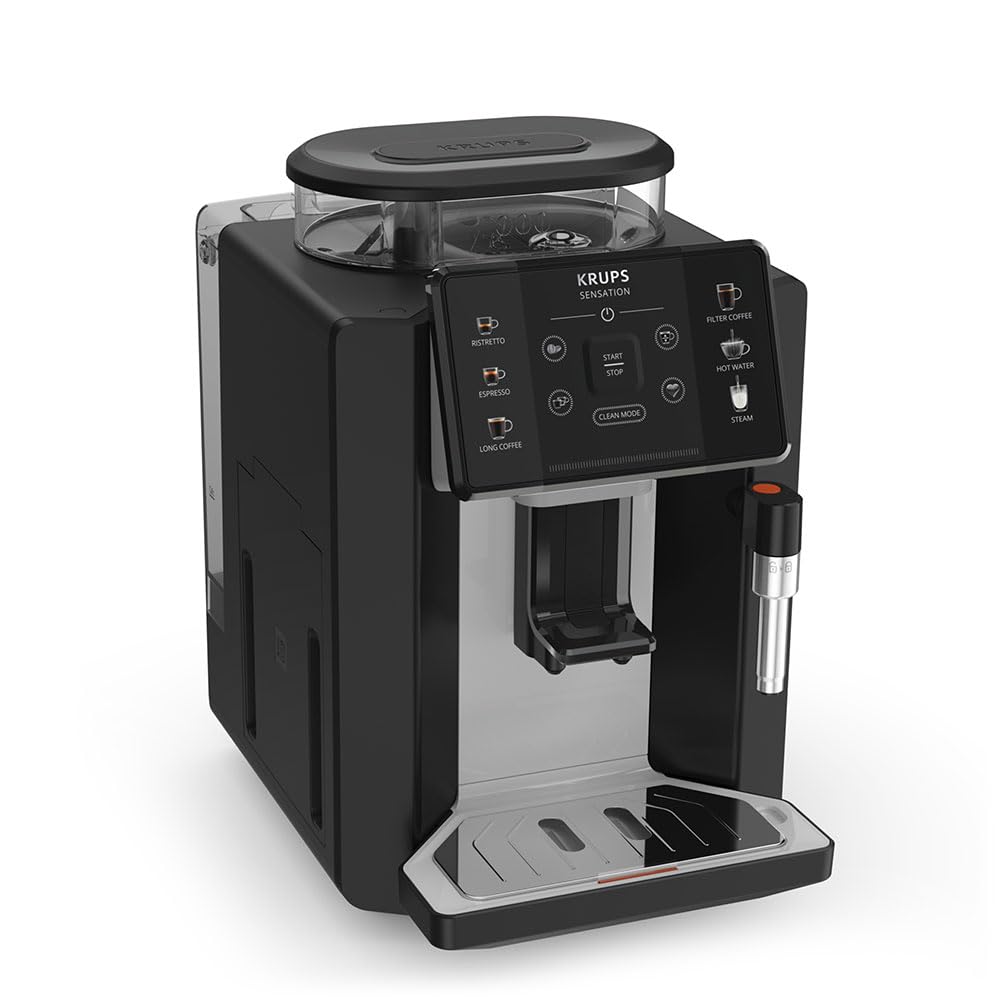
Imaj: Devan-dwat view of the KRUPS Sensation C10 EA910A10 Superautomatic Coffee Machine, showing the bean hopper, control panel, coffee spouts, and drip tray. Two cups of coffee are being dispensed.
- Trèm pwa ak kouvèti
- Tank Dlo
- Control Panel (Touchscreen)
- Coffee Spouts (Adjustable)
- Drip Tray with Grid
- Kafe Grounds Container
- Steam Nozzle / Hot Water Spout
- Koneksyon fil elektrik
4. Inisyal Enstalasyon
4.1. Debake
- Retire machin kafe a nan anbalaj li avèk prekosyon.
- Remove all packaging materials, including protective films and stickers.
- Mete machin nan sou yon sifas ki estab, plat, ki reziste chalè, lwen sous dlo ak chalè.
4.2. Preparasyon pou Premye Itilizasyon an
- Rinse the Water Tank: Remove the water tank, rinse it thoroughly with fresh water, and fill it to the MAX level. Reinsert the tank securely.
- Ranpli Hopper pwa a: Louvri kouvèti silo grenn kafe a epi ranpli l ak grenn kafe fre. Pa sèvi ak kafe moulu nan silo grenn kafe a.
- Koneksyon pouvwa: Plug the power cord into the machine and then into a grounded electrical outlet.
- Premye Sik Rensaj: The machine will prompt you to perform an initial rinse cycle. Follow the instructions on the touchscreen. This primes the system and cleans internal components.
5. Operasyon Enstriksyon
5.1. Kontwòl Panel Overview

Image: A hand interacting with the intuitive touchscreen control panel of the KRUPS Sensation C10 EA910A10, highlighting its ease of use.
The KRUPS Sensation C10 EA910A10 features an intuitive touchscreen control panel for easy operation. Key functions include:
- Ristretto: For a very short, concentrated espresso.
- Espresso: For a classic espresso shot.
- Long Coffee: For a larger volume of coffee.
- Filter Coffee: For a milder, filter-style coffee.
- Dlo cho: For tea or other hot beverages.
- Vapè: Pou mous lèt.
- Kòmanse/Stop: To begin or end a brewing cycle.
- Netwaye mòd: Initiates cleaning cycles.
- Coffee Strength/Volume Adjustment: Icons to customize your drink.
5.2. Fè Kafe
To brew a coffee beverage:
- Asire w ke tank dlo a plen epi ke trepye pwa a gen ase pwa.
- Place a cup under the coffee spouts. Adjust the spout height if necessary.
- Select your desired coffee type (e.g., Espresso, Long Coffee) from the touchscreen.
- Adjust coffee strength and volume using the on-screen options if desired.
- Press the "Start" button to begin brewing.
- The machine will grind the beans, brew the coffee, and dispense it into your cup.
- The machine will automatically stop when the brewing is complete.

Image: A selection of coffee beverages, including espresso, long coffee, and a milk-based drink, demonstrating the versatility of the KRUPS Sensation C10 EA910A10.
5.3. Fonksyon dlo cho
- Mete yon tas anba bec dlo cho a.
- Select the "Hot Water" option on the touchscreen.
- Press "Start" to dispense hot water. Press "Stop" to cease dispensing.
5.4. Steam Function (for milk frothing)
- Fill a pitcher with cold milk.
- Position the steam nozzle into the milk.
- Select the "Steam" option on the touchscreen.
- Press "Start" to activate the steam. Move the pitcher up and down to froth the milk.
- Press "Stop" when desired froth is achieved.
- Enpòtan: Clean the steam nozzle immediately after use to prevent milk residue buildup.
6. Antretyen ak netwayaj
Netwayaj ak antretyen regilye asire pèfòmans optimal ak lonjevite machin kafe ou a.
6.1. Netwayaj chak jou
- Plato pou degoute ak resipyan pou mare kafe: Vide epi rense plato degoute a ak resipyan pou kafe moulu a chak jou oubyen lè machin nan di w fè sa.
- Tiyo kafe: Siye bouch kafe yo ak piblisiteamp twal.
- Tank dlo: Rense tank dlo a avèk dlo fre chak jou.
6.2. Detartraj
The machine will indicate when descaling is required. Follow the on-screen instructions and use a KRUPS-approved descaling solution.

Image: A hand inserting a cleaning tablet into the designated slot of the KRUPS Sensation C10 EA910A10, illustrating the ease of the cleaning process.
6.3. Ranplasman Filtè Dlo
If your machine uses a water filter, replace it every 2-3 months or as indicated by the machine to ensure optimal water quality and prevent limescale buildup.
NAN. Depanaj
Gade tablo ki anba a pou pwoblèm komen ak solisyon yo.
| Pwoblèm | Kòz posib / Solisyon |
|---|---|
| Machin pa vire sou. | Check if the power cord is securely plugged into the machine and the electrical outlet. Ensure the outlet is functional. |
| Pa gen kafe ki distribye. | Water tank empty: Fill the water tank. Bean hopper empty: Fill with coffee beans. Coffee grounds container full: Empty and clean. Descaling required: Perform descaling cycle. |
| Kafe twò fèb. | Adjust coffee strength settings on the control panel. Check if the bean hopper is sufficiently filled. Ensure fresh beans are used. |
| Dlo koule nan machin lan. | Check if the water tank is correctly inserted. Ensure the drip tray is properly positioned. If leakage persists, contact customer support. |
| "Clean Mode" alert persists. | Perform the indicated cleaning cycle (e.g., descaling, rinsing). Ensure all removable parts are clean and correctly reinserted. |
| Steam nozzle not frothing milk effectively. | Clean the steam nozzle thoroughly after each use to prevent blockages. Ensure cold milk is used. |
| Grinder is unusually loud or not grinding. | Check for foreign objects in the bean hopper. Ensure the bean hopper is not empty. Contact customer support if the issue persists. |
8. Espesifikasyon teknik
| Karakteristik | Spesifikasyon |
|---|---|
| Nimewo Modèl | EA910A10 |
| Mak | Krups |
| Voltage | 145 Volts |
| Pouvwa | 1450 Watts |
| Materyèl | Steel |
| Pwa pwodwi | 7.5 kg |
| Entèfas | Touchscreen |

Image: The KRUPS Sensation C10 EA910A10 coffee machine with indicated dimensions: 24 cm width, 34.6 cm depth, and 36.4 cm height.
9. Enfòmasyon sou Garanti
Your KRUPS Sensation C10 EA910A10 Superautomatic Coffee Machine is covered by a manufacturer's warranty. Please refer to the warranty card included in your product packaging for specific terms, conditions, and duration. Keep your proof of purchase for warranty claims.
10. Sipò pou Kliyan
For further assistance, technical support, or spare parts, please contact KRUPS customer service. Contact details can typically be found on the KRUPS official websit la oubyen nan dokiman garanti a ki vini ak aparèy ou an.