
1. Entwodiksyon
Thank you for choosing the MOUNTUP MU1006-07 Dual Monitor Stand. This freestanding PC monitor stand is designed to enhance your workspace by allowing you to mount two monitors vertically, optimizing desk space and improving work efficiency. This manual provides detailed instructions for assembly, operation, and maintenance to ensure safe and effective use of your new monitor stand.
2. Pwodwi Features
2.1 Espesifikasyon kle
- Konpatibilite pou kontwole: Supports two monitors, 13 to 32 inches each.
- Kapasite chaj: 15 kg (33 lbs) per arm, total 30 kg (66 lbs).
- VESA konpatibilite: 75x75mm ak 100x100mm.
- Kalite montaj: Freestanding desktop base.
- Materyèl: High-quality reinforced steel and glass base.
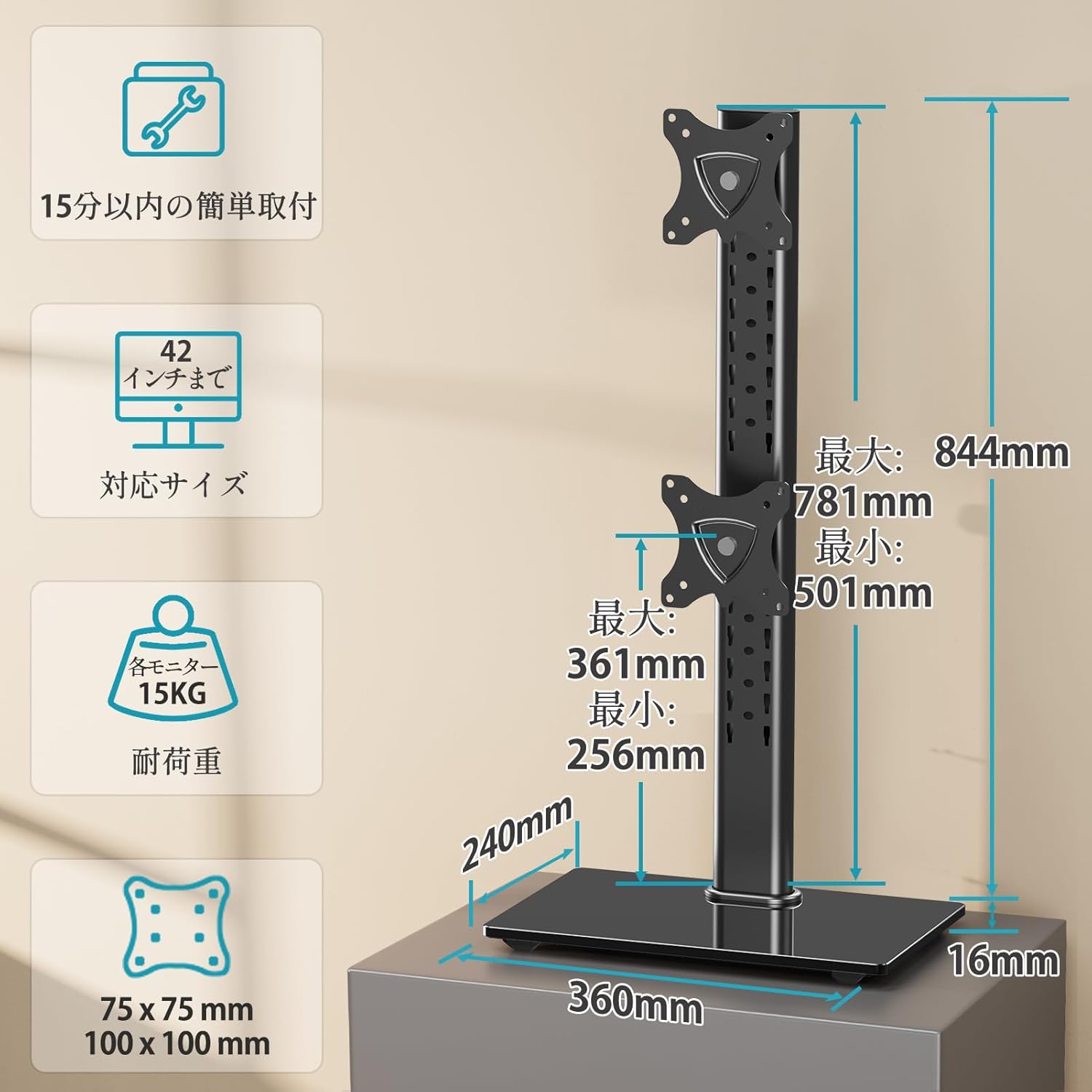
Figure 1: Product dimensions, VESA mounting patterns, and load capacity details.
2.2 Ajisteman ergonomik
- Enklinezon: Monitors can be tilted +30° (up) to -30° (down) to reduce glare and optimize viewang ing.
- Pan (Swivel): Each monitor can be swiveled ±45° (left/right) for flexible screen positioning.
- Pivot (Rotation): Full 360° rotation allows for easy switching between landscape and portrait orientations.
- Ajisteman wotè: Multi-stage height adjustment along the central pole ensures monitors can be set at eye level for ergonomic comfort.
2.3 Space Optimization
The vertical stacking design of this stand significantly saves desk space, freeing up your work surface. The elegant glass base also provides a stable platform and can accommodate small items like speakers, contributing to a tidy and organized desktop.

Figure 2: The large glass base provides stability and extra space for accessories.

Figure 3: The stand helps utilize desktop space effectively, leading to a more organized workspace.
2.4 Easy Installation
The stand comes with all necessary screws and a clear, easy-to-understand manual, making installation straightforward even for first-time users.
2.5 Durability and Warranty
Constructed from high-quality reinforced materials, this monitor stand offers excellent durability. The robust and wide base ensures stability, eliminating concerns about tipping. A 3-year quality guarantee is provided from the date of purchase.
3. Pake kontni
Tanpri verifye ke tout konpozan yo prezan epi yo pa domaje anvan ou kòmanse asanblaj la. Si gen nenpòt pyès ki manke oswa ki domaje, tanpri kontakte sèvis kliyan.
- Pòl prensipal
- Base Plate (Glass)
- Upper VESA Mounting Plate
- Lower VESA Mounting Plate
- Twous pyès ki nan konpitè pou monte (vis, rondelle, espasè)
- Klip Jesyon Kab
- Hex Keys / Tools
- Manyèl Enstriksyon
4. Enstalasyon ak Enstalasyon
Follow these steps carefully to assemble your MOUNTUP MU1006-07 Dual Monitor Stand.
4.1 Step 1: Assemble the Stand Base
- Attach the main pole to the glass base plate using the provided screws and tools. Ensure it is securely fastened.
4.2 Step 2: Attach VESA Mounting Plates to Monitors
- Mete monitè a ak anpil atansyon fas anba sou yon sifas mou epi pwòp.
- Align the VESA mounting plate with the VESA holes on the back of your monitor.
- Secure the plate to the monitor using the appropriate screws from the hardware kit. Do not overtighten.

Figure 4: Attaching the VESA mounting plate to the monitor.
4.3 Step 3: Mount Monitors to the Stand
- Slide the VESA plate with the attached monitor onto the desired slot on the main pole.
- Secure the monitor in place using the locking mechanism or screws provided.
- Repeat for the second monitor.
- Ensure both monitors are securely attached before releasing yo.
4.4 Jesyon kab
Use the included cable management clips to route and organize your monitor cables along the main pole. This helps maintain a clean and clutter-free workspace.

Figure 5: Utilizing cable management clips for an organized setup.
Nòt: The product may be delivered in an old or new version due to a transition period. Both versions are compatible and function similarly. Refer to the manual for specific details if there are minor visual differences.

Figure 6: Old version vs. New version of the monitor stand.
5. Enstriksyon Operasyon ak Ajisteman
The MOUNTUP MU1006-07 offers various adjustments to customize your vieweksperyans nan.

Figi 7: Plis paseview of all adjustment options.
5.1 Ajisteman Wotè
To adjust the height of your monitors, loosen the locking mechanism on the VESA plate, slide the monitor up or down the main pole to your desired eye level, and then re-tighten the locking mechanism securely.

Figure 8: Tilt and height adjustment capabilities.
5.2 Ajisteman enklinezon
Each monitor can be tilted +30° upwards and -30° downwards. Gently push or pull the top or bottom edge of the monitor to achieve the desired tilt angle. Ensure the tilt mechanism is firm enough to hold the monitor in place.
5.3 Swivel Adjustment (Pan)
The monitor arms allow for a ±45° swivel (pan) to the left or right. Simply rotate the monitor horizontally to adjust its angle relative to the stand. This is useful for sharing your screen or adjusting your viewpozisyon ing.
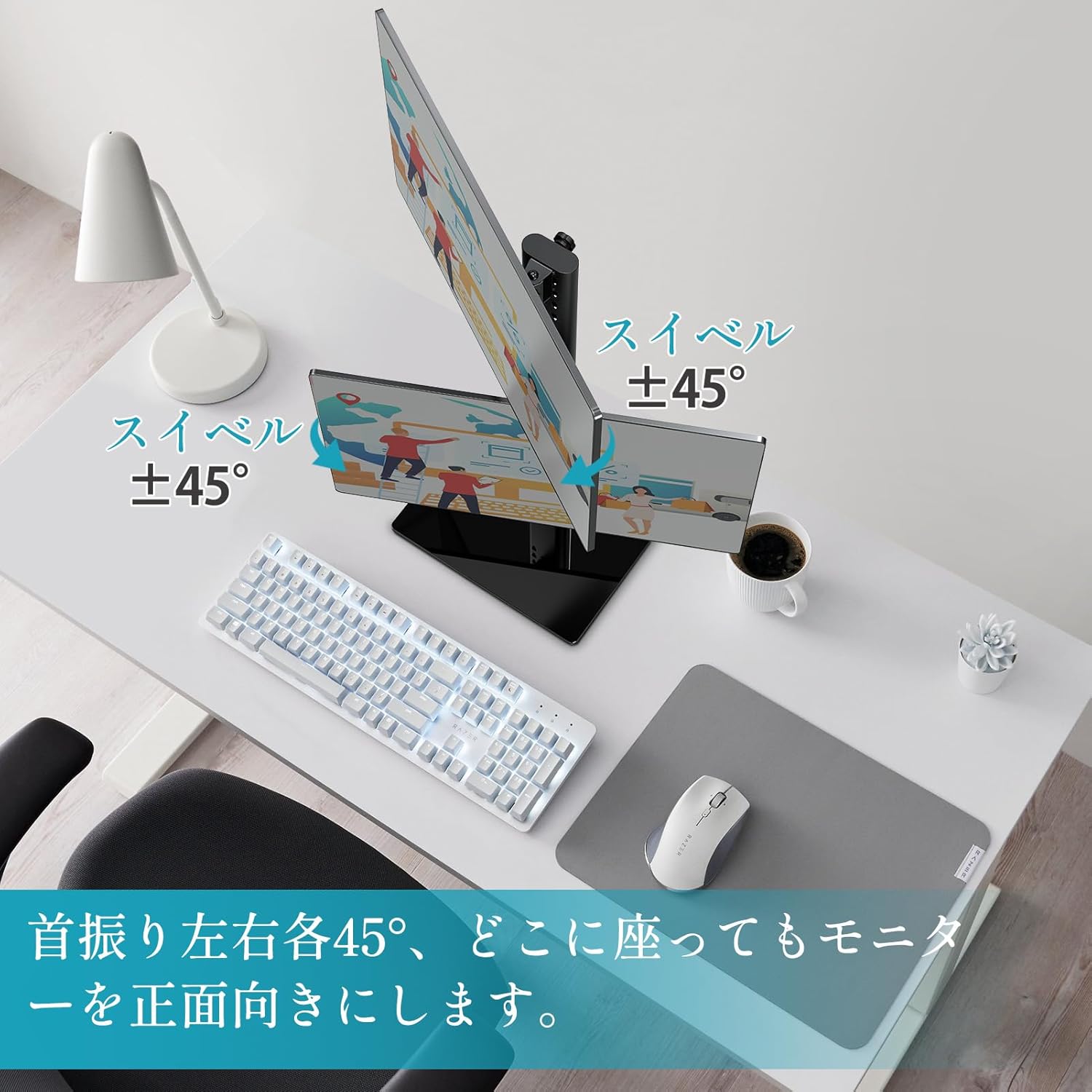
Figure 9: Swivel adjustment for optimal viewsoti nan diferan ang.
5.4 Rotation (Pivot)
Each monitor can be rotated 360° (pivot) to switch between landscape and portrait orientations. Gently rotate the monitor clockwise or counter-clockwise until it locks into the desired orientation.

Figure 10: 360° rotation for landscape or portrait viewing.
6. Antretyen
To ensure the longevity and optimal performance of your monitor stand, follow these maintenance guidelines:
- Netwayaj: Siye kanpe a ak yon twal mou,amp twal. Evite itilize pwodui netwayaj abrazif oswa solvan ki ka domaje fini an.
- Enspeksyon: Tcheke tout vis ak koneksyon yo detanzantan pou asire yo byen sere. Sere yo ankò si sa nesesè.
- Kapasite chaj: Do not exceed the maximum load capacity of 15 kg (33 lbs) per arm or 30 kg (66 lbs) total.
- Estabilite: Asire w ke kanpe a mete sou yon sifas ki estab e plat pou anpeche li chavire.
NAN. Depanaj
If you encounter any issues with your MOUNTUP MU1006-07 Dual Monitor Stand, refer to the following table for common problems and solutions:
| Pwoblèm | Kòz posib | Solisyon |
|---|---|---|
| Monitors are not stable or sag | Screws are loose; monitor weight exceeds capacity. | Tighten all mounting screws. Verify monitor weight is within 15kg per arm. |
| Difficulty adjusting height/tilt/swivel | Adjustment mechanism is too tight or too loose. | Adjust the tension screws on the VESA plate or pole as per the manual. |
| Kanpe tranble | Base not fully tightened; uneven surface. | Ensure the main pole is securely attached to the base. Place the stand on a flat, stable surface. |
| Pati ki manke pandan asanblaj la | Erè anbalaj. | Contact MOUNTUP customer support with your purchase details. |
8. Espesifikasyon teknik
- Kalite montaj: Tabletop mòn
- Kalite mouvman: Wotasyon
- Mak: MONTE
- Materyèl: Steel
- Koulè: Nwa
- Aparèy konpatib: Televizyon, Monitè
- Maksimòm ang enklinezon: 30 Degre
- Minimòm gwosè konpatib: 13 pous
- Maximum Compatible Size: 32 pous
- Manifakti: MONTE
- Peyi orijin: Lachin
9. Garanti ak sipò
The MOUNTUP MU1006-07 Dual Monitor Stand comes with a 3-ane garanti bon jan kalite apati dat acha a. Garanti sa a kouvri domaj fabrikasyon ak pwoblèm ki rive akoz itilizasyon nòmal.
If you experience any problems with your product, such as initial defects, missing parts, or issues related to age-related deterioration, please contact our customer support team. To do so, navigate to your order history on Amazon, find your purchase, and select the option to contact the seller.
Our team is dedicated to providing prompt assistance and ensuring your satisfaction.