
1. Entwodiksyon
Thank you for choosing the Devoko 120x60cm Electric Standing Desk. This desk is designed to enhance your workspace by allowing seamless transitions between sitting and standing positions, promoting better posture, reducing fatigue, and increasing productivity. This manual provides essential information for the safe assembly, operation, and maintenance of your new desk.

Image 1: The Devoko 120x60cm Electric Standing Desk in a typical setup, showcasing its spacious design and monitor support.
2. Avètisman Sekirite
- Kapasite maksimòm pwa: Pa depase kapasite chaj maksimòm lan 70 kg (154 liv). Overloading the desk can cause damage or injury.
- Asanble sekirite: Ensure all components are securely mounted and tightened according to the assembly instructions before use.
- Movement and Adjustment: Exercise caution when moving or adjusting the desk due to its metal structure and electrical components. Keep hands and objects clear of moving parts.
- Timoun ak bèt kay: Kenbe timoun ak bèt kay lwen biwo a pandan w ap opere pou evite aksidan.
- Pwovizyon pou pouvwa: Use only the provided power adapter and ensure it is connected to a grounded outlet. Do not operate the desk with a damaged power cord or plug.
- Devèsman likid: Avoid spilling liquids on the control panel or motor components. In case of a spill, immediately unplug the desk and allow it to dry completely before reconnecting power.
3. Enstalasyon ak Asanble
Detailed installation instructions are included in the product packaging. Please follow these instructions carefully for proper assembly. The desk features a robust metal frame and a multi-part wooden tabletop designed for stability.
Konsèy kle pou asanblaj:
- Espas travay: Asire w genyen ample espas pou asanble.
- Tabletop Alignment: The tabletop consists of multiple wooden parts. Take time to align them properly during assembly to ensure a smooth and even surface.
- Jesyon kab: Utilize the integrated cable pass-throughs to keep your workspace tidy.

Image 2: Integrated design features such as cable management, rounded corners, and a convenient hook for headphones or bags.
4. Operasyon Enstriksyon
Your Devoko electric standing desk is equipped with an intuitive control panel for easy height adjustment and memory functions.
4.1. Ajisteman Wotè
- Adjusting Up: Peze epi kenbe la LEVE (▲) button to raise the desk to your desired standing height.
- Adjusting Down: Peze epi kenbe la DESANN (▼) button to lower the desk to your desired sitting height.
- The desk height can be adjusted smoothly and quietly between 73 cm ak 118 cm. Release the button once the desired height is reached.
4.2. Prereglaj Memwa
The control panel allows you to save two preferred height settings for quick recall.
- Sove yon Prereglaj:
- Adjust the desk to your desired height (e.g., sitting height).
- Peze a M button (or similar memory button, if present). The LED display may flash.
- Immediately press either 1 or 2 to save the current height to that memory slot.
- Rapèl yon Predefinisyon: Senpleman peze la 1 or 2 button corresponding to your saved height. The desk will automatically move to that position.
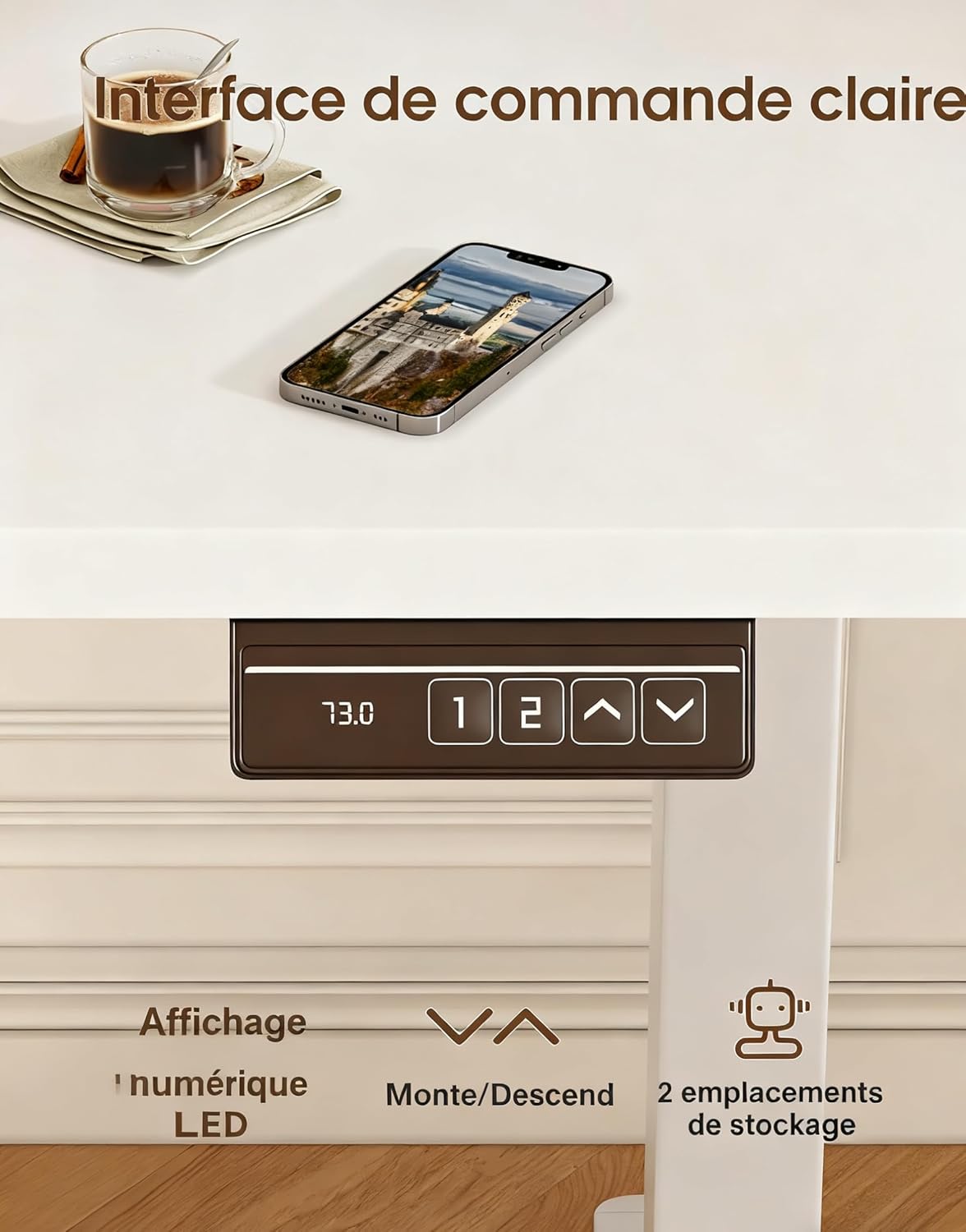
Image 3: The desk's control panel, featuring an LED display for current height, up/down adjustment buttons, and two memory preset buttons.

Image 4: Visual guide demonstrating proper ergonomic posture when using the desk in both sitting and standing positions, highlighting the benefit of the monitor support.
5. Antretyen
- Netwayaj: Siye sifas biwo yo ak yon twal mou,amp twal. Evite pwodui netwayaj abrazif oswa pwodui chimik ki ka domaje fini an.
- Tcheke Koneksyon: Tcheke tout vis ak boulon yo detanzantan pou asire yo rete sere. Sere yo ankò si sa nesesè.
- Enspeksyon kab: Inspect the power cord and motor cables for any signs of wear or damage. Replace immediately if damage is found.
- Swen motè: The desk's motors are designed for durability (tested over 20,000 cycles). Avoid continuous operation for extended periods without rest to prevent overheating.
NAN. Depanaj
| Pwoblèm | Kòz posib | Solisyon |
|---|---|---|
| Biwo a pa deplase. | Power cable disconnected; Overload; Motor error. | Check power connections. Reduce weight on desk. Unplug for 10 minutes, then reconnect. |
| Biwo a ap deplase yon fason inegal oswa li fè yon bri dwòl. | Uneven load; Loose connections; Obstruction. | Distribute weight evenly. Check all assembly screws. Ensure no objects are obstructing the legs. |
| Prereglaj memwa yo pa fonksyone. | Prereglaj yo pa sove kòrèkteman. | Re-save the memory presets following the instructions in Section 4.2. |
| Biwo a ap tranble. | Koneksyon ki lach; Planche inegal. | Ensure all screws are tightened. Adjust leveling feet if your floor is uneven. |
If you encounter issues not listed here or if the problem persists after attempting the solutions, please contact customer support.
7. Espesifikasyon

Image 5: Key specifications and dimensions of the Devoko Electric Standing Desk.
| Karakteristik | Detay |
|---|---|
| Nimewo Modèl | 0463 |
| Mak | Devoko |
| Koulè | Blan |
| Dimansyon tab la (L x W) | 120 cm x 60 cm (47.2 pous x 23.6 pous) |
| Ranje Ajisteman Wotè | 73 santimèt - 118 santimèt (28.7 pous - 46.5 pous) |
| Product Dimensions (L x W x H at lowest) | 60 x 120 x 72 cm |
| Kapasite pwa | 70 kg (154 liv) |
| Pwa pwodwi | 22 kg (48.5 liv) |
| Materyèl | Wood (Tabletop), Metal (Base) |
| Karakteristik | Adjustable, Electric, 2 Memory Presets, Monitor Support |
| Nivo bri | <60 dB |
8. Garanti ak sipò
For warranty information, please refer to the documentation included with your purchase or contact the seller directly. Devoko is committed to providing quality products and customer satisfaction.
If you have any questions, require assistance with assembly, or need troubleshooting support, please contact the Devoko customer service team or the retailer from whom you purchased the product. Please have your model number (0463) and purchase details ready when contacting support.