
Entwodiksyon
The Acoustic Research Portable Outdoor Wireless Speaker with LED Flickering Flame Light is designed to provide high-quality audio and ambient lighting for various indoor and outdoor settings. This rechargeable speaker features multiple light modes, including a realistic flickering flame, and is built with an IPX5 water-resistant rating, making it suitable for outdoor use. It also includes built-in nature sounds for relaxation and can be stereo-paired with another compatible AR speaker for an enhanced audio experience.
Kontni pake
- Acoustic Research Portable Outdoor Wireless Speaker (Model: AWSF9R)
- USB Chaje Kab
- Manyèl itilizatè
Karakteristik pwodwi
- 7 mòd limyè: Soft White, Bright White, Flicker Flame, Soft Glow, Candlelight, Aurora. Separate controls for light and speaker.
- Tan pou jwe pwolonje: Jiska 12 èdtan lekti odyo sou yon sèl chaj.
- Rezistans dlo: Klasifikasyon IPX5 pou pwoteksyon kont dlo ki ap koule.
- Son nati: Includes Forest, Waves, Running Stream, and Rain.
- Konsepsyon pòtab: Attractive lantern style with a handle for easy carrying or hanging.
- Koneksyon Bluetooth: Difizyon odyo san fil san pwoblèm soti nan aparèy konpatib.
- Peyi Estereo: Connect two AWSF9R speakers for true wireless stereo sound (second speaker sold separately).
Kontwòl ak Endikatè

Figi 1: Speaker Control Panel. This image shows a close-up of the speaker's control buttons, including power, volume, track skip, light mode, and nature sound buttons, along with the DC charging port.
| Bouton / Endikatè | Fonksyon |
|---|---|
| Bouton pouvwa (⏻) | Press and hold to power the speaker ON or OFF. Press briefly to Play/Pause music. |
| Volim desann / Previous Track (− / ⏮) | Peze yon ti tan pou diminye volim nan. Peze epi kenbe pou ale nan mizik anvan an. |
| Volim Up / Next Track (+ / ⏭) | Press briefly to increase volume. Press and hold to go to the next track. |
| Limyè Mode bouton (💡) | Press to cycle through 7 light modes: Soft White, Bright White, Flicker Flame, Soft Glow, Candlelight, Aurora, and OFF. |
| Bouton son nati (♫) | Press to cycle through 4 nature sounds: Forest, Waves, Running Stream, Rain, and OFF. |
| DC Charge Port | Connect the USB charging cable here to recharge the speaker's battery. |
| Endikatè ki ap dirije | Indicates charging status and Bluetooth pairing status. |
Enstalasyon
Chaje Oratè a
- Locate the DC charging port on the speaker's control panel.
- Connect the small end of the provided USB charging cable to the speaker's DC port.
- Konekte pi gwo bout kab USB a nan yon adaptè kouran USB (pa enkli) oubyen nan yon pò USB òdinatè.
- The LED indicator will illuminate to show charging status. Allow approximately 3-4 hours for a full charge. The indicator will change or turn off when charging is complete.
Nòt: Fully charge the speaker before first use to maximize battery life.
Enstriksyon Operasyon
Limen / Off
- To power ON, press and hold the ⏻ Power button for 2-3 seconds until you hear an audible prompt.
- To power OFF, press and hold the ⏻ Power button for 2-3 seconds until you hear an audible prompt.
Pè Bluetooth
- Ensure the speaker is powered ON and within 10 meters (33 feet) of your Bluetooth device (smartphone, tablet, etc.).
- The speaker will automatically enter Bluetooth pairing mode when powered on for the first time or if no device is connected. The LED indicator will flash, indicating it's ready to pair.
- On your Bluetooth device, go to the Bluetooth settings and enable Bluetooth.
- Chèche pou available devices and select "AR Speaker" (or similar name) from the list.
- Yon fwa li konekte, endikatè LED la ap sispann flache epi li ap rete fiks, epi w ap tande yon son konfimasyon.
- Kounye a ou kapab jwe mizik nan aparèy ou an atravè oratè a.
Nòt: Oratè a ap otomatikman eseye rekonekte ak dènye aparèy ki konekte a lè li limen.
Controlling Light Modes
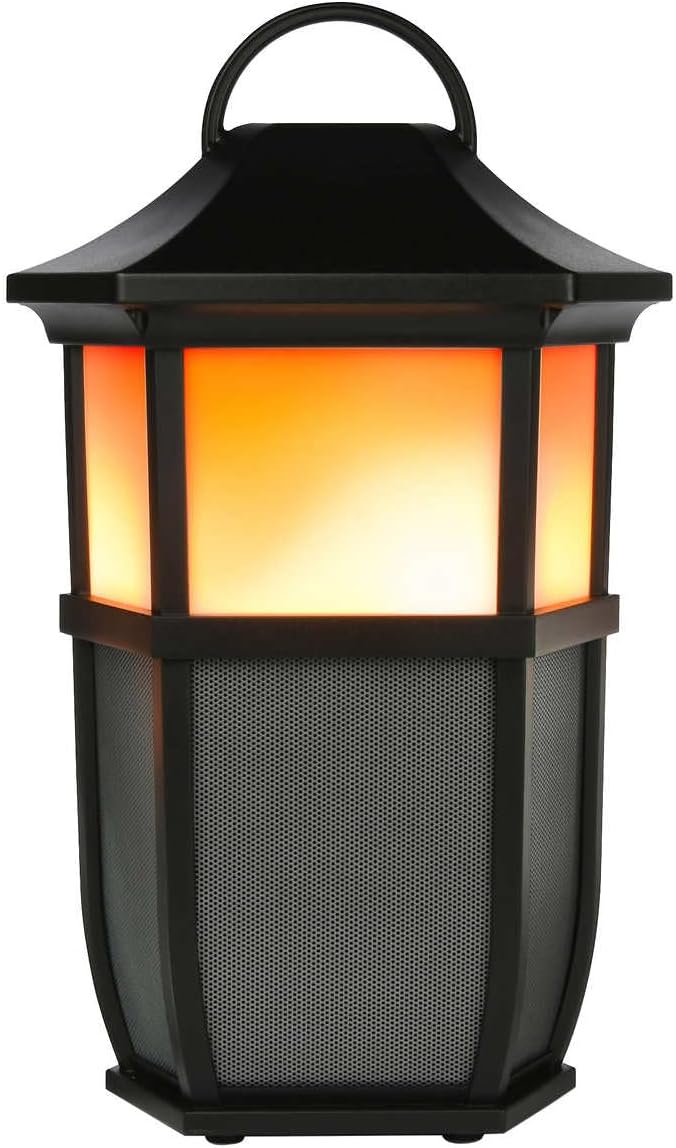

Figi 2: Speaker Light Modes. The left image shows the speaker with a warm, flickering flame light, while the right image shows it with a bright white light, demonstrating two of the available light modes.
Peze a 💡 Light Mode button repeatedly to cycle through the 7 available light modes:
- Flanm dife
- Mou blan
- Bright White
- Ekla mou
- Chandèl
- Aurora
- Limyè OFF
Playing Nature Sounds
Peze a ♫ Nature Sound button repeatedly to cycle through the 4 built-in nature sounds:
- Forest
- Vag
- Running Stream
- Lapli
- Nature Sound OFF
Koneksyon Vrè Stereo San Fil (TWS) (Si ou vle)
To achieve a true stereo sound experience, you can pair two Acoustic Research AWSF9R speakers together. (Second speaker sold separately).
- Ensure both speakers are powered ON and not connected to any Bluetooth device.
- Sou yon oratè (sa a pral oratè prensipal ou a), peze epi kenbe bouton an ⏻ Power button for 5 seconds until you hear a distinct pairing tone.
- The primary speaker will now search for the second speaker.
- Once connected, you will hear a confirmation tone, and the LED indicators on both speakers will change to indicate a successful TWS connection.
- Now, connect your Bluetooth device to the primary speaker as described in the "Bluetooth Pairing" section. Audio will play in stereo through both speakers.
Nòt: TWS pairing only works with two identical AWSF9R speakers.
Antretyen
- Netwayaj: Sèvi ak yon twal mou epi sèk pou netwaye deyò oratè a. Pa sèvi ak pwodui netwayaj abrazif oswa solvan.
- Ekspozisyon dlo: While IPX5 water-resistant, do not submerge the speaker in water. Ensure the charging port cover is securely closed when exposed to water.
- Depo: Sere oratè a nan yon kote ki fre epi sèk, lwen limyè solèy dirèk ak tanperati ekstrèm lè w pa itilize li pou yon bon bout tan.
- Swen batri: To prolong battery life, fully charge the speaker at least once every three months, even if not in regular use.
Depanaj
| Pwoblèm | Solisyon posib |
|---|---|
| Oratè a pa limen. | Ensure the battery is charged. Connect the speaker to a power source using the USB cable and allow it to charge for at least 30 minutes before attempting to power on again. |
| Pa ka asosye ak aparèy Bluetooth. |
|
| Pa gen son oswa volim nan ba. |
|
| Light modes are not working. | Press the Light Mode button repeatedly to cycle through all modes. Ensure the speaker has sufficient battery charge. |
| Nature sounds are not working. | Press the Nature Sound button repeatedly to cycle through all sounds. |
Espesifikasyon

Figi 3: Product Dimensions. This image illustrates the height (9.76 inches), width (7.2 inches), and depth (6.54 inches) of the speaker.
| Karakteristik | Detay |
|---|---|
| Non modèl | AWSF9R |
| Mak | Rechèch Acoustic |
| Kalite Oratè | Deyò, Pòtab |
| Koneksyon | Bluetooth (san fil) |
| Gamme Bluetooth | Jiska 10 mèt (33 pye) |
| Rezistans dlo | IPX5 (rezistan dlo) |
| Sorti pouvwa | 30 Watts |
| Audio Sòti Mode | Stereo (ak koneksyon TWS) |
| Lavi batri | Jiska 12 èdtan |
| Sous pouvwa | Batri Powered |
| Dimansyon pwodwi (D x W x H) | 6.54" x 7.2" x 9.76" |
| Pwa atik | 5 liv |
| UPC | 044476151811 |
Garanti ak sipò
This Acoustic Research product comes with a Garanti limite. For detailed warranty information, technical support, or service inquiries, please refer to the warranty card included with your product or visit the official Acoustic Research websit la. Tanpri konsève prèv acha ou a pou reklamasyon garanti.
For further assistance, you may contact Acoustic Research customer support through their official channels.