
1. Entwodiksyon
The HUBBLE CONNECTED Nursery Pal Dual Vision Smart Camera is designed to provide comprehensive monitoring of your baby and nursery environment. This device features both a wide-angle and a regular view camera, AI Motion Tracking, and connectivity through the HubbleClub app, allowing for remote viewing and interaction. This manual provides instructions for setting up, operating, and maintaining your smart camera.
2. Ki sa ki nan bwat la
Verifye ke tout konpozan yo prezan nan pake ou a:
- Nursery Pal Dual Vision Smart Camera
- Adaptè pouvwa
- Gid Quick Start
- Manyèl Itilizatè (dokiman sa a)
- Enfòmasyon sou Garanti
- Universal Wall Mount (optional installation)

Image: Components included with the Nursery Pal Dual Vision Smart Camera.
3. Pwodwi souview ak Karakteristik
The Nursery Pal Dual Vision Smart Camera is equipped with advanced features for comprehensive baby monitoring:
- Dual Vision Monitoring: Simultaneous wide-angle and close-up views.
- Suivi Mouvman IA: Camera automatically follows movement.
- Remote Pan & Tilt: Control the close-up view camera remotely.
- Videyo Full HD 1080p: Clear video streaming on both cameras.
- Vizyon lannwit enfrawouj: Klè viewing nan kondisyon limyè ki ba.
- Two-Way Talk (ConnectChat): Kominike avèk tibebe w la a distans.
- Preloaded Soothing Sounds: Lullabies, nature sounds, and stories.
- Capteur tanperati chanm: Monitor nursery temperature.
- HubbleClub App Integration: Access live feed, activity alerts, growth tracker, and sleep insights.
- Koneksyon Wi-Fi an sekirite: Private and secure data transmission.

Image: Key features of the Nursery Pal Dual Vision Smart Camera.
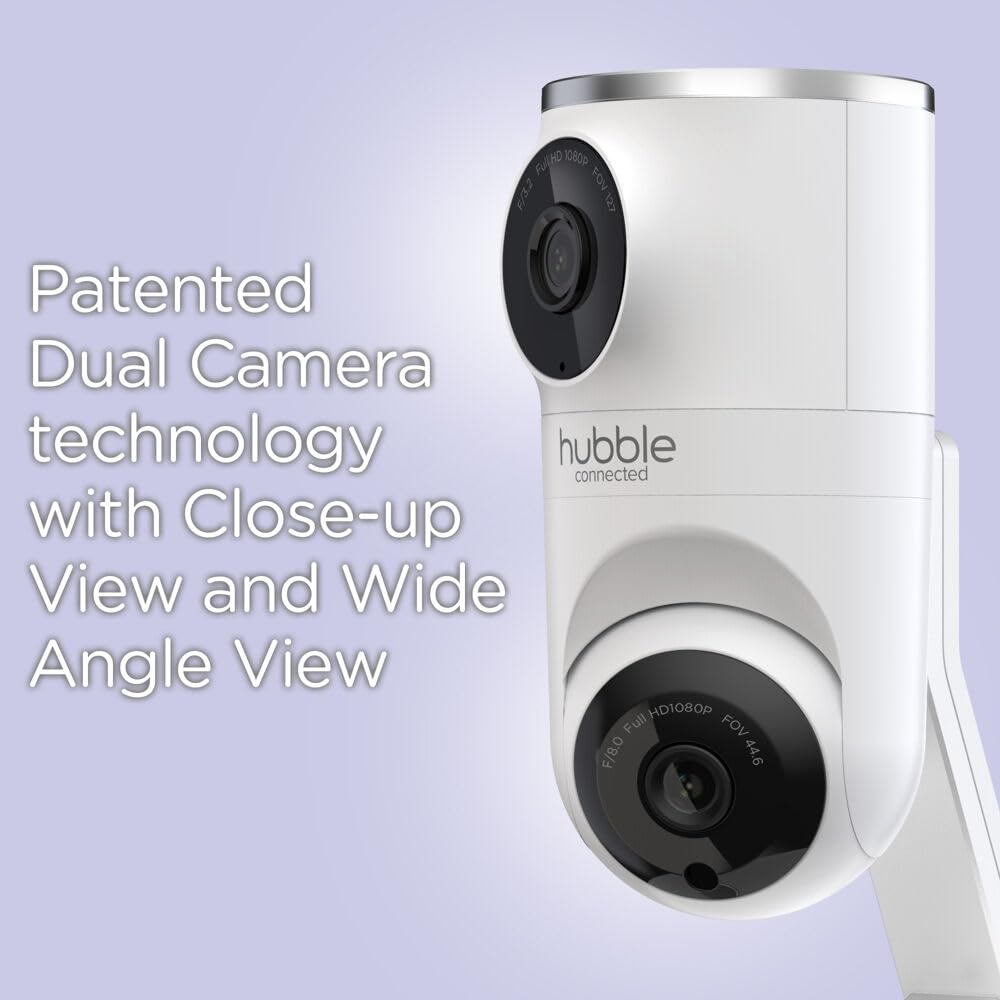
Image: Patented Dual Camera Technology for close-up and wide-angle views.
4. Enstriksyon Enstalasyon
4.1 Plasman Kamera
Mete kamera a nan yon kote ki bay yon bon vizibilite view of your baby and the nursery. The camera can be placed on a flat surface or mounted to a wall.
- Ensure the camera is out of reach of children.
- Keep the power cord away from the crib or play area to prevent entanglement hazards.
- For optimal Wi-Fi performance, place the camera within 10 feet of your Wi-Fi router during initial setup.

Image: Camera mounted above a crib for optimal viewing.

Image: Camera placed on a flat surface.
4.2 Koneksyon pouvwa
- Konekte adaptè kouran an nan pò antre kouran kamera a.
- Ploge adaptè pouvwa a nan yon priz elektrik apwopriye.
- The camera will power on automatically. Wait for the indicator light to show it is ready for pairing.
4.3 HubbleClub App Installation and Wi-Fi Pairing
- Telechaje la HubbleClub app from the App Store (iOS) or Google Play Store (Android) on your smartphone or tablet.
- Open the HubbleClub app and follow the on-screen instructions to create an account or log in.
- Select "Add Device" and choose your Nursery Pal Dual Vision Smart Camera model.
- Ensure your smartphone/tablet is connected to a 2.4GHz Wi-Fi rezo during the setup process. The camera is compatible with dual-band routers (2.4GHz and 5.0GHz), but initial setup requires 2.4GHz.
- Follow the app's prompts to connect the camera to your Wi-Fi network. This typically involves scanning a QR code generated by the app with the camera.
- Yon fwa konekte, ou kapab view the live feed and access all camera features through the app. After setup, you can switch your phone/tablet back to a 5GHz network if desired.
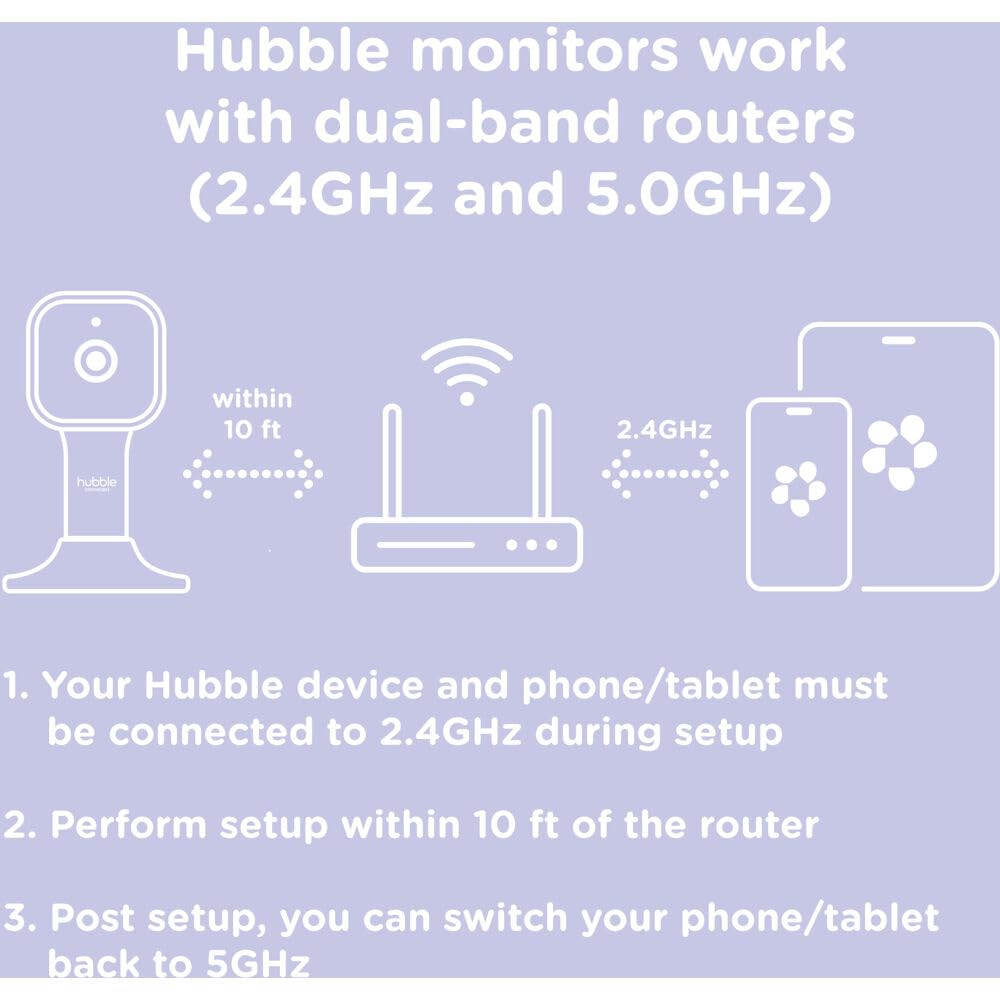
Image: Wi-Fi setup guidelines for Hubble monitors.

Image: Camera connected to the HubbleClub app on a smartphone.
5. Operasyon Enstriksyon
5.1 Live Monitoring and Dual Vision
Once connected, open the HubbleClub app to view the live feed from your camera. The app displays both the wide-angle and close-up views simultaneously, providing a comprehensive perspective of the nursery.
- Chanje ant views or use the split-screen feature within the app.
- Use the remote pan and tilt controls for the close-up camera to adjust its angle as needed.
5.2 AI Motion Tracking
Activate the AI Motion Tracking feature in the HubbleClub app. The camera will automatically pan and tilt to follow your baby's movements within its field of view, ensuring they remain in the frame.

Image: AI Motion Tracking in action, keeping the baby in view.
5.3 Two-Way Communication (ConnectChat)
Use the ConnectChat feature in the app to speak to your baby. Press and hold the microphone icon in the app to transmit your voice through the camera's speaker. This can be used to soothe your baby or communicate with them.

Image: Push-to-Talk ConnectChat button on the camera base.
5.4 Soothing Sounds and Lullabies
The camera comes with preloaded soothing sounds, lullabies, and stories. Access these features through the HubbleClub app to play them remotely and help your baby relax or fall asleep.
5.5 HubbleClub App Features
The HubbleClub app offers additional functionalities to enhance your monitoring experience:
- Alèt Aktivite: Receive notifications for motion or sound detection.
- Baby Growth Tracker: Log and monitor your baby's milestones, growth, and development.
- Apèsi sou dòmi: Track resting and waking patterns to manage sleep routines.
- Depo nwaj: Securely store precious images and videos (unlimited streaming and motion-triggered recordings stored for 24 hours in the cloud; premium service available for extended storage).
- Feeding and Diaper Log: Manage and log feeding patterns and diaper changes.

Image: Sleep routine management and tracking within the HubbleClub app.

Imaj: Plis paseview of HubbleClub app features.
6. Antretyen
- Netwayaj: Gently wipe the camera lens and body with a soft, dry cloth. Do not use abrasive cleaners or solvents.
- Anviwònman: This device is designed for indoor use only. Avoid exposing it to water or high humidity, as it is not water resistant.
- Pouvwa: Always use the provided power adapter. Disconnect power before cleaning or if the device will be unused for an extended period.
NAN. Depanaj
If you encounter issues with your Nursery Pal Dual Vision Smart Camera, refer to the following common solutions:
| Pwoblèm | Solisyon posib |
|---|---|
| Camera not connecting to Wi-Fi or app |
|
| Video feed lagging or cutting out |
|
| Camera freezing or turning off randomly |
|
| Night Vision not working |
|
| Inaccurate Room Temperature Sensor |
|
8. Espesifikasyon
| Karakteristik | Detay |
|---|---|
| Nimewo Modèl | HCTNPDVX-BU |
| Mak | HUBBLE CONNECTED |
| Itilizasyon Andedan kay la / Deyò | Andedan kay la |
| Aparèy konpatib | Smartphones, tablèt |
| Sous pouvwa | Adaptè kouran (AC) |
| Pwotokòl Koneksyon | Wi-Fi (2.4GHz for setup) |
| Kalite aliye | Tabletop Mount, Universal Wall Mount |
| Rezolisyon Capture Videyo | 1080p plen HD |
| Koulè | Blan |
| Materyèl | Plastik |
| Dimansyon atik (L x W x H) | 6.75 x 7.25 x 4.5 pous |
| Pwa atik | 11.7 ons (0.73 Liv) |
| Nivo rezistans dlo | Pa reziste dlo |
| Teknoloji limyè ki ba | Koulè lannwit (Vizyon lannwit enfrawouj) |
| Kalite Zoom | Zoom dijital |
| Kalite Alèt | Odyo ak Mouvman |
| Metòd kontwòl | App (HubbleClub) |
| Rating Pwoteksyon Entènasyonal | IP65 |
| UPC | 810074830874 |
Note on IP65 rating: While the product lists an IP65 rating, it is also specified as "Not Water Resistant." For optimal device longevity and safety, avoid exposing the camera to water or high humidity. The IP65 rating typically refers to protection against dust and low-pressure water jets, not immersion or heavy rain. This device is intended for indoor use.
9. Garanti ak sipò
Your Nursery Pal Dual Vision Smart Camera includes a warranty. Please refer to the separate warranty information document included in your package for details regarding coverage, terms, and conditions.
For technical support, troubleshooting assistance, or further inquiries, please visit the official HUBBLE CONNECTED support website or contact their customer service department. Contact information can typically be found in the Quick Start Guide or on the brand's official websit.
Resous sou entènèt:
- HubbleClub App: Available on App Store epi Google Play
- HUBBLE CONNECTED Official Websit: www.hubbleconnected.com