
1. Entwodiksyon
This manual provides essential information for the safe assembly, operation, and maintenance of your ProForm X Bike Folding Exercise Bike, Model PFEX78918R. Please read all instructions carefully before using the equipment. Retain this manual for future reference.
2. Enfòmasyon enpòtan sou sekirite
AVÈTISMAN: To reduce the risk of serious injury, read all important precautions and instructions in this manual and all warnings on your exercise bike before use. ProForm assumes no responsibility for personal injury or property damage sustained by or through the use of this product.
- Consult your physician before beginning any exercise program. This is especially important for individuals over age 35 or persons with pre-existing health problems.
- The exercise bike is intended for home use only. Do not use in any commercial, rental, or institutional setting.
- Keep children and pets away from the exercise bike at all times. The exercise bike is not a toy.
- Place the exercise bike on a level surface with at least 0.6 m (2 ft.) of clearance around it. Do not place the exercise bike on any surface that blocks air openings.
- Wear appropriate exercise clothing and athletic shoes. Do not wear loose clothing that could become caught in the exercise bike.
- The maximum user weight capacity for this exercise bike is 113.4 kg (250 lbs).
- Enspekte ak sere boulon tout pati yo regilyèman. Ranplase nenpòt pati chire imedyatman.
- Always hold the handlebars when mounting or dismounting the exercise bike.
- Ensure the seat adjustment knob is securely tightened before each use.
3. Pake kontni
Verify that all components are present before assembly. If any parts are missing or damaged, contact customer support.
- Asanble ankadreman prensipal la
- Ba estabilizatè (devan ak dèyè)
- Pedal (gòch ak dwa)
- Syèj ak Pòs Syèj
- Handlebar Assembly with Console
- Detantè altèr
- De altèr 2 liv
- Hardware Packet (bolts, washers, nuts, tools)
4. Enstriksyon Asanble
Assembly typically takes 30-60 minutes. Two people are recommended for easier assembly.
- Mete ba estabilizatè yo: Secure the front and rear stabilizer bars to the main frame using the provided bolts and washers. Ensure they are tightly fastened.
- Mete pedal yo: Identify the left (L) and right (R) pedals. The left pedal tightens counter-clockwise, and the right pedal tightens clockwise. Thread them carefully into the crank arms and tighten securely with a wrench.
- Enstale tij chèz la ak chèz la: Insert the seat post into the main frame and secure it at the desired height using the adjustment knob. Attach the seat to the seat post.
- Atache Asanblaj Gidon an: Connect the handlebar assembly to the main frame. Ensure all cables from the console are properly connected to the main frame wiring. Secure with bolts.
- Install Dumbbell Holder: Attach the dumbbell holder to the rear of the seat post. Place the two 2 lb dumbbells into the holder.

Image: The ProForm X Bike fully assembled, showing the integrated dumbbell holder at the rear of the seat.
5. Operasyon Enstriksyon
5.1 Ajisteman Syèj la
To adjust the seat height, loosen the adjustment knob located on the seat post. Raise or lower the seat to a comfortable position where your knees have a slight bend at the bottom of the pedal stroke. Tighten the knob securely before use.

Image: A person demonstrating how to adjust the seat height using the knob on the seat post.
5.2 Using the Console and Adjusting Resistance
The console displays your workout metrics. It typically requires batteries (not included) or a power adapter (if specified) to operate. Refer to the console's specific instructions for battery installation.

Imaj: Yon gwo plan view of the LCD console, displaying workout time, and the handlebars with EKG grip sensors.
- Pouvwa sou: The console typically activates when you begin pedaling or press any button.
- Metrik ekspozisyon: The LCD window shows mileage, speed, calorie burn, heart rate, and time. Use the 'DISPLAY' button to cycle through different metrics if available.
- Ajisteman rezistans: Use the '+' and '-' buttons on the console to increase or decrease the magnetic resistance. There are 10 digital resistance levels.
- EKG Grip Sensors: To measure your heart rate, firmly grasp the metal sensors on the handlebars with both hands. Your heart rate will appear on the console after a few seconds.
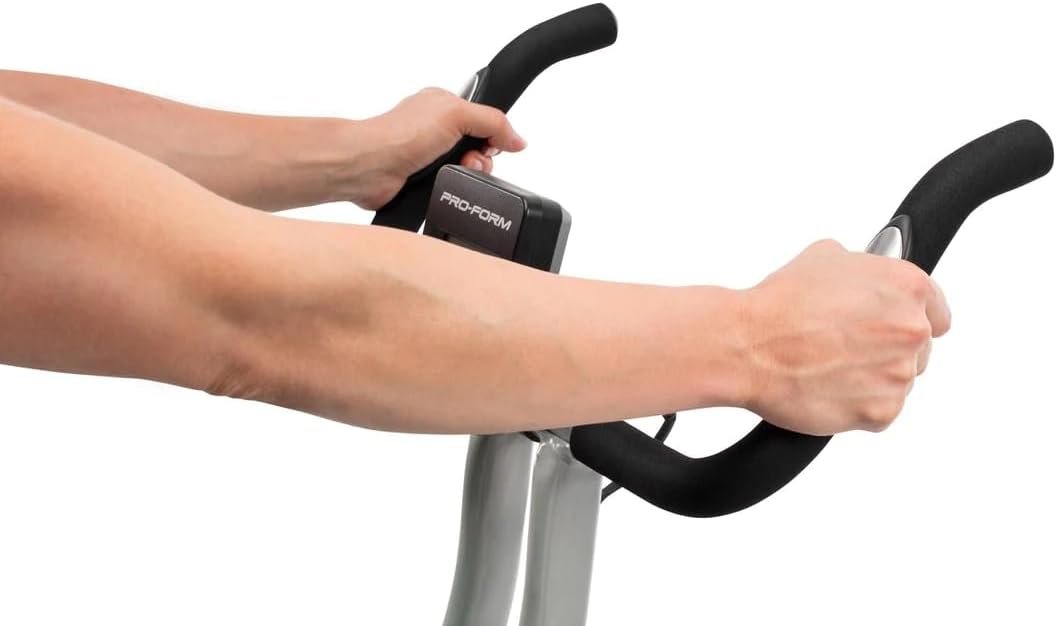
Image: A user's hands gripping the EKG pulse sensors integrated into the handlebars for heart rate monitoring.
5.3 Sèvi ak altèr ki enkli yo
The ProForm X Bike includes two 2 lb dumbbells for upper-body exercises during your workout. They are stored in a holder behind the seat.
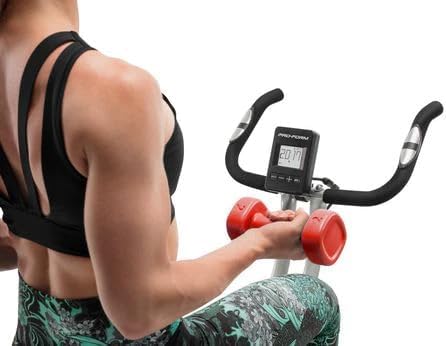
Image: A woman seated on the ProForm X Bike, performing upper body exercises with the included 2 lb dumbbells.
6. Pliye ak Depo
The ProForm X Bike features a folding design for convenient storage.
- Ensure the area around the bike is clear.
- Locate the folding pin or knob (refer to your specific model's diagram if available) on the main frame.
- Pull or loosen the pin/knob and carefully fold the bike's frame inward until it locks into the folded position.
- The bike can then be rolled using its transport wheels or stored upright against a wall.
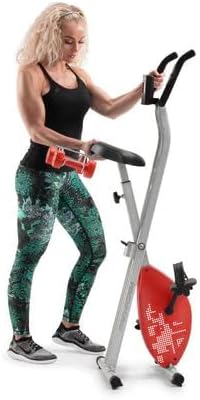
Image: A woman standing beside the ProForm X Bike in its folded, space-saving configuration, demonstrating its compact storage.
7. Antretyen
Regular maintenance ensures optimal performance and longevity of your exercise bike.
- Netwayaj: Wipe down the exercise bike after each use with a damp twal pou retire swe ak pousyè. Evite pwodui netwayaj abrazif oswa solvan.
- Enspeksyon: Periodically check all bolts, nuts, and connections to ensure they are secure. Tighten any loose fasteners.
- Pedal: Ensure pedals are securely attached and spin freely.
- Kondwi senti: The belt drive system is generally maintenance-free. Do not attempt to lubricate or adjust the belt.
- Depo: Store the exercise bike in a dry, temperate environment, away from direct sunlight and extreme temperatures.
NAN. Depanaj
| Pwoblèm | Kòz posib | Solisyon |
|---|---|---|
| Konsole a pa montre done yo | Low or dead batteries; Loose cable connection | Replace batteries; Check all console cable connections. |
| Rezistans pa chanje | Console malfunction; Internal mechanism issue | Ensure console is powered on. If problem persists, contact customer support. |
| Bisiklèt la pa estab oswa li tranble | Uneven surface; Loose stabilizer bolts | Move bike to a level surface; Tighten all bolts on stabilizer bars. |
| Pedals feel loose or make noise | Pedals not tightened correctly | Retighten pedals securely. Remember left pedal is reverse threaded. |
9. Espesifikasyon
| Karakteristik | Spesifikasyon |
|---|---|
| Nimewo Modèl | PFEX78918R |
| Dimansyon pwodwi (L x W x H) | 108 x 42 x 94 cm (42.5 x 16.5 x 37 pous) |
| Pwa atik | 18.1 kg (39.9 liv) |
| Pwa maksimòm itilizatè | 113.4 kg (250 liv) |
| Sistèm Rezistans | SMR Silent Magnetic Resistance |
| Nivo rezistans | 10 Nivo Dijital |
| Kalite ekspozisyon | LCD |
| Metrik ki parèt yo | Time, Speed, Distance, Calories, Heart Rate |
| Siveyans batman kè | EKG Grip Pulse Sensors |
| Pwodwi pou Telefòn enkli | De altèr 2 liv |
| Materyèl | Nerjaveèi asye |
| Sistèm kondwi | Belt |

Image: A diagram illustrating the key dimensions of the ProForm X Bike: 108cm height, 94cm length, and 42cm width.
10. Garanti ak sipò
ProForm products are manufactured with high-quality materials and craftsmanship. For specific warranty details, including coverage period and terms, please refer to the warranty card included with your product or visit the official ProForm website. For technical assistance, replacement parts, or customer service inquiries, please contact ProForm customer support through their official channels.
Sipò sou entènèt: www.proform.com/support
Sipò telefòn: Refer to your warranty card or the ProForm websit pou nimewo kontak rejyonal yo.