
Nextbase NBIQ1KUS
Manyèl Itilizatè NEXTBASE iQ 1K Smart HD Dash Cam Pro
Model: NBIQ1KUS
Mak: Nextbase
1. Pwodwi souview
The Nextbase iQ 1K Smart HD Dash Cam Pro is a connected in-car camera system designed to record driving footage and monitor vehicle security. It features 4G/LTE connectivity, GPS, and advanced AI-powered functions for parking surveillance and emergency response.
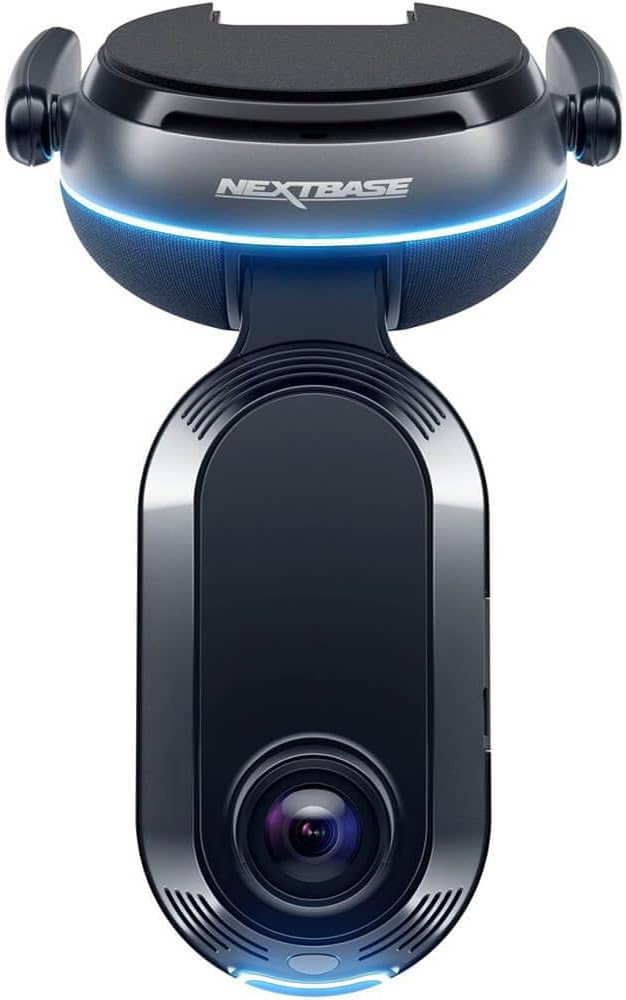
Imaj: Devan view of the Nextbase iQ 1K Smart HD Dash Cam Pro, showing the main lens and the Nextbase logo with a blue light accent.
Karakteristik kle:
- Smart Sense Parking: Monitors vehicle surroundings for threats using proximity sensing and AI.
- Guardian Mode: Allows setting speed and location limits, providing alerts if exceeded. Remote viewing of camera feeds is available via the iQ app.
- Witness Mode: Activates recording and shares live footage with a trusted contact upon voice command ("start Witness Mode").
- Emergency SOS Response: Automatically dispatches emergency services with location and medical details if an accident is detected and the driver is unresponsive.
- Roadwatch AI (Coming Soon): Analyzes recorded footage to determine the speed of surrounding vehicles.
- Dual Dashcam: Anrejistre tou de devan ak dèyè views (with optional rear camera).
- GPS entegre: For location tracking and incident mapping.
- 4G/LTE Connectivity: Enables remote access and real-time alerts.
2. Pake kontni
The Nextbase iQ 1K package typically includes the following items:
- Nextbase iQ 1K Dash Cam Unit
- Mounting Bracket (adhesive or suction cup)
- Power Cable (OBD-II or 12V car charger)
- 64GB Micro SD Kat
- Installation Tool (e.g., cable tidy tool)
- Gid Quick Start
Note: Specific contents may vary. Refer to your product packaging for a complete list.
3. Enstalasyon ak Enstalasyon
Proper installation ensures optimal performance and safety. It is recommended to have the dash cam professionally installed to conceal wiring and ensure secure mounting.
3.1 Enstale Kamera Dash la
- Chwazi yon kote: Chwazi yon pozisyon sou vit machin ou an ki pa bloke je ou. view wout la. Tipikman, sa a se dèyè dèyè aview glas.
- Netwaye vit machin nan: Ensure the chosen area is clean and dry before applying the mount.
- Tache mòn lan: Secure the adhesive mount to the windshield. Apply firm pressure for at least 60 seconds. Allow the adhesive to cure for 24 hours before attaching the dash cam.
- Tache Dash Cam la: Slide the iQ 1K dash cam onto the mounting bracket until it clicks into place.

Image: A Nextbase iQ dash cam is shown mounted on the car windshield, positioned behind the rearview mirror, from the driver's perspective. The road ahead is visible through the windshield.
3.2 Koneksyon pouvwa
The iQ 1K dash cam is powered via the OBD-II port. This allows for continuous power, enabling parking surveillance features.
- Locate OBD-II Port: The OBD-II port is typically located under the dashboard on the driver's side.
- Konekte kab pouvwa: Plug the provided power cable into the OBD-II port.
- Wout Kab: Carefully route the power cable along the vehicle's trim to conceal it and prevent obstruction. Use the included installation tool if necessary.
3.3 Mete Kat Mikwo SD
The 64GB Micro SD card must be inserted before first use.
- Jwenn plas kat SD a: The Micro SD card slot is usually on the side of the dash cam unit.
- Mete kat SD: Gently push the Micro SD card into the slot until it clicks into place. Ensure it is inserted in the correct orientation.
3.4 Initial Setup via Nextbase iQ App
The Nextbase iQ app is required for initial setup and full functionality.
- Telechaje App: Download the Nextbase iQ app from your smartphone's app store.
- Power On Dash Cam: Start your vehicle to power on the dash cam.
- Pè aparèy: Follow the in-app instructions to pair your smartphone with the iQ 1K dash cam. This typically involves scanning a QR code displayed on the dash cam or within the app.
- Konfigirasyon Anviwònman: Adjust settings such as video resolution, parking mode sensitivity, and emergency contacts within the app.
4. Operasyon Enstriksyon
4.1 Driving Mode
When your vehicle is in motion, the iQ 1K automatically records continuous footage. Important events (e.g., impacts) are detected by the G-sensor and saved as protected files.
4.2 Smart Sense Parking
This feature monitors your vehicle when parked. It uses proximity sensors and AI to detect movement around your car and can trigger alerts or recordings.

Image: A smartphone displays the Smart Sense Parking feature, illustrating detection zones around a vehicle. Next to it, a car is parked with a shopping cart in close proximity, demonstrating a potential threat scenario.
4.3 Guardian Mode
Guardian Mode allows you to set parameters for vehicle usage. If speed or location limits are exceeded, you will receive alerts. You can also access live feeds from the dash cam via the iQ app to monitor the vehicle remotely.

Image: A person is shown monitoring their smartphone, which displays the Guardian Mode interface. The screen shows multiple live camera feeds from the dash cam, including views from inside and outside the vehicle.
4.4 Witness Mode
To activate Witness Mode, verbally command "start Witness Mode." The dash cam will then lock onto the incident and share live footage with a pre-selected trusted contact.

Image: A smartphone displays a "Witness Mode Activation" notification. Adjacent to it, a scene depicts a person reaching into a car window, illustrating a situation where Witness Mode might be activated.
4.5 Emergency SOS Response
In the event of a severe accident where the driver is unresponsive, the iQ 1K can automatically alert emergency services. It transmits the vehicle's location and pre-configured medical details to aid responders.

Image: A smartphone screen displays the Emergency SOS setup interface. To the right, a car is shown in a field, indicating it has been involved in an accident, demonstrating the function of Emergency SOS.
4.6 Viv View
Utilize the Nextbase iQ app to access a live feed from your dash cam at any time, from any location. This feature allows you to monitor your vehicle and intervene if unusual activity is detected.

Image: A person is shown viewing their smartphone, which displays a live feed from the dash cam, including front and cabin views, demonstrating the Live View karakteristik.
4.7 Cloud Storage and Data Access
The iQ 1K uses its 4G connection to upload important event footage to the cloud. This ensures that recordings are accessible even if the dash cam is removed or damaged. Access your data via the Nextbase iQ app.

Image: A person is shown relaxing and reading a book while simultaneously viewing dash cam footage on their smartphone, illustrating the convenience of accessing data anytime, anywhere.
5. Antretyen
- Kat mikwo SD: Format the Micro SD card regularly (e.g., monthly) using the Nextbase iQ app or the dash cam's settings to maintain optimal recording performance and prevent data corruption. Replace the SD card if it shows signs of degradation or error messages.
- Netwayaj lantiy: Periodically clean the dash cam lenses with a soft, lint-free cloth to ensure clear video recordings. Avoid abrasive materials or harsh chemicals.
- Mizajou mikrolojisyèl: Ensure your dash cam's firmware is up to date. Updates are typically managed through the Nextbase iQ app and can improve performance, add features, and fix bugs.
- Verifikasyon mòn: Regularly check that the dash cam mount is securely attached to the windshield.
NAN. Depanaj
This section addresses common issues you might encounter with your Nextbase iQ 1K dash cam.
| Pwoblèm | Kòz posib | Solisyon |
|---|---|---|
| Kamera tablodbò a pa limen. | No power from OBD-II port; faulty cable; dash cam issue. |
|
| Video recordings are blurry or unclear. | Dirty lens; protective film still on lens; incorrect focus; low resolution setting. |
|
| Micro SD card errors or recording failures. | Corrupted SD card; incompatible SD card; full SD card. |
|
| App connectivity issues (e.g., Live View not working). | Poor 4G/LTE signal; app glitch; dash cam not connected to network. |
|
7. Espesifikasyon
| Karakteristik | Detay |
|---|---|
| Non modèl | NBIQ1KUS |
| Rezolisyon Capture Videyo | 1080p (Front and Cabin) |
| Jaden nan View | 140 Degre |
| Koneksyon Teknoloji | Wireless (4G/LTE) |
| GPS | GPS Pèmèt |
| Karakteristik espesyal | Built-in infrared Cabin Camera, Live View via Nextbase iQ app, 4G Connectivity, Smart Sense Parking, Guardian Mode, Witness Mode, Emergency SOS |
| Konpozan ki enkli | Memory Card (64GB Micro SD Card) |
| Kalite aliye | Interior Front Mount |
| Dimansyon pwodwi | 8.66 x 5.31 x 4.53 pous |
| Pwa atik | 2.14 liv |
| Koulè | Nwa |
| Manifakti | pwochen baz |
| Dat Premye Disponib | 26 septanm 2023 |
8. Garanti ak sipò
For warranty information and technical support, please refer to the official Nextbase website or contact Nextbase customer service directly. Details regarding warranty periods and claims procedures are typically provided with your product documentation or available online.
Resous sou entènèt:
- Nextbase Official Websit: www.nextbase.com
- Nextbase Support Page: (Check official website for specific support links)
It is recommended to register your product on the Nextbase website to receive updates and facilitate warranty claims.
Ask a question about this manual
Ask about setup, troubleshooting, compatibility, parts, safety, or missing instructions. Manuals+ will review the question and use this page’s manual context to help answer it.