
Pwodwi souview
The ApeStellar AS-DH01 Keyless Entry Door Lock Set provides a secure and convenient solution for your home or rental property. This electronic deadbolt with handle set offers multiple entry options, including keypad codes, and is designed for easy installation and reliable performance in various weather conditions.

Image: ApeStellar AS-DH01 Keyless Entry Door Lock Set in Satin Nickel finish.
Karakteristik kle:
- Antre san kle: Create up to 50 passcodes for family members, temporary one-time passcodes for visitors, or service personnel.
- Konstriksyon dirab: Made of heavy zinc alloy, certified ANSI Grade 3 for enhanced security and durability.
- Auto Lock & One-Touch Lock: Customizable automatic door locking (5-900 seconds) and a dedicated one-touch lock button for convenience.
- Karakteristik itilizatè-zanmitay: Includes anti-peep code protection, backlit keypad, vacation mode, mute mode, and low battery warning.
- Enstalasyon fasil: Designed for quick replacement of existing deadbolt handle sets with minimal tools.
- Rezistan nan move tan: IP54 rated for water resistance, with high and low temperature resistance for reliable operation in all weather.
Enstalasyon ak Enstalasyon
The ApeStellar AS-DH01 lock set is designed for easy installation, typically requiring only a screwdriver. It is compatible with all American standard left and right-handed doors.
Door Compatibility and Dimensions:
Asire w pòt ou a satisfè espesifikasyon sa yo pou yon enstalasyon kòrèk:
- Backset: Adjustable to fit 2-3/8" or 2-3/4" (60 or 70mm).
- Door Hole (Diameter): Only for 2-1/8" (54mm).
- Epesè Pòt: 1-3/8" to 2" (35mm to 50mm).
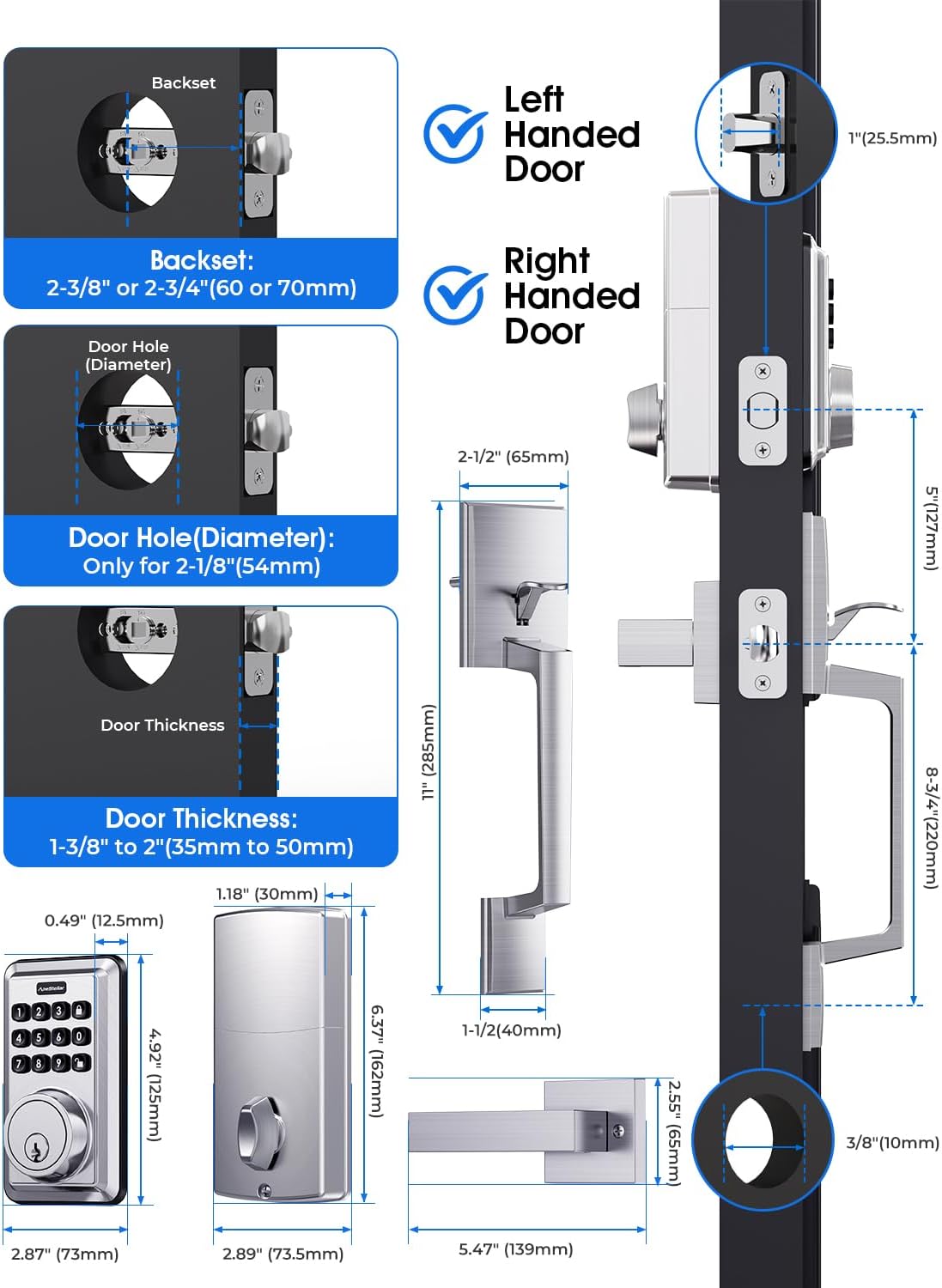
Image: Detailed diagram showing door dimensions and compatibility for the lock set.
Etap enstalasyon:
- Prepare the door and frame according to the provided template.
- Enstale latch la ak plak grèv la.
- Install the exterior assembly and interior mounting plate.
- Connect the cable and install the interior assembly.
- Enstale seri manch lan.
- Insert batteries and test the lock.

Image: A person demonstrating the ease of installation using a screwdriver.
Enstriksyon Operasyon
This section covers the basic operation and programming of your ApeStellar electronic door lock.
Operasyon Klavye:
The backlit keypad allows for easy code entry, even in low light conditions. The lock supports up to 50 user codes, including temporary one-time passcodes.

Image: Visual representation of various users (family, guests, couriers) who can be assigned PIN codes.
Enstriksyon pwogramasyon:
Watch the official programming video for a step-by-step guide on setting up your lock's codes and features.
Video: ApeStellar Electronic Door Lock Programming Guide. This video demonstrates how to create administrator codes, add and delete user codes, and configure auto-lock and mute modes.
Creating Administrator Code:
The administrator code is essential for managing all other lock settings. The default admin code is 123456. It is recommended to change this immediately after installation.
Adding a User Code:
User codes allow individuals to unlock the door. You can add multiple user codes for different family members or frequent visitors.
Deleting a User Code:
Individual user codes can be deleted as needed, for example, after a temporary visitor no longer requires access.
Deleting All User Codes:
This function allows you to clear all programmed user codes simultaneously, useful for resetting the lock or preparing it for new occupants.
Setting Auto Lock:
The auto-lock feature automatically locks the door after a set period (5-900 seconds) once it has been unlocked. This enhances security by ensuring the door is always locked behind you.

Image: Illustration of the one-touch locking button and the auto-lock function.
Cancel Auto Lock:
If you prefer to manually lock the door, you can disable the auto-lock feature.
Setting Mute Mode:
Mute mode disables the sound feedback from the keypad, providing silent operation. This is useful for quiet environments or late-night entries/exits.

Image: A family enjoying a quiet moment, illustrating the benefit of the mute mode feature.
Son On:
Re-enable sound feedback for audible confirmation of keypad presses and lock operations.
Karakteristik adisyonèl:
- Kòd PIN yon sèl fwa: Generate temporary codes for single use, ideal for deliveries or service appointments.
- Modpas Anti-Peeping: Enter random digits before or after your actual code to prevent others from guessing your passcode.
- Mòd vakans: A security feature to disable all user codes for a period, ensuring no unauthorized access while you are away.
- Wrong Code Attempt Limit: The lock will temporarily disable the keypad if too many incorrect code attempts are made, preventing brute-force attacks.

Image: A delivery person receiving a one-time PIN code for access, highlighting the convenience of this feature.

Image: Diagram illustrating how to use random digits before and after the actual password for enhanced security.

Image: A woman with luggage, symbolizing the use of vacation mode for extended absences.

Image: A hand pointing to the keypad, illustrating the code protection function that locks out after multiple wrong attempts.
Antretyen
Proper maintenance ensures the longevity and optimal performance of your ApeStellar door lock.
- Ranplasman batri: The lock operates on batteries (not included). A low battery warning will alert you when replacement is needed. Replace all batteries simultaneously with new ones of the same type. The lock is designed for up to 1 year of battery life.
- Netwayaj: Netwaye klavye a ak sifas ekstèn yo ak yon twal mou.amp twal. Evite pwodui netwayaj abrazif oswa solvan ki ka domaje fini an oswa konpozan elektwonik yo.
- Pwoteksyon move tan: The lock is IP54 weather resistant, designed to withstand various conditions including high and low temperatures (-22°F to 158°F).
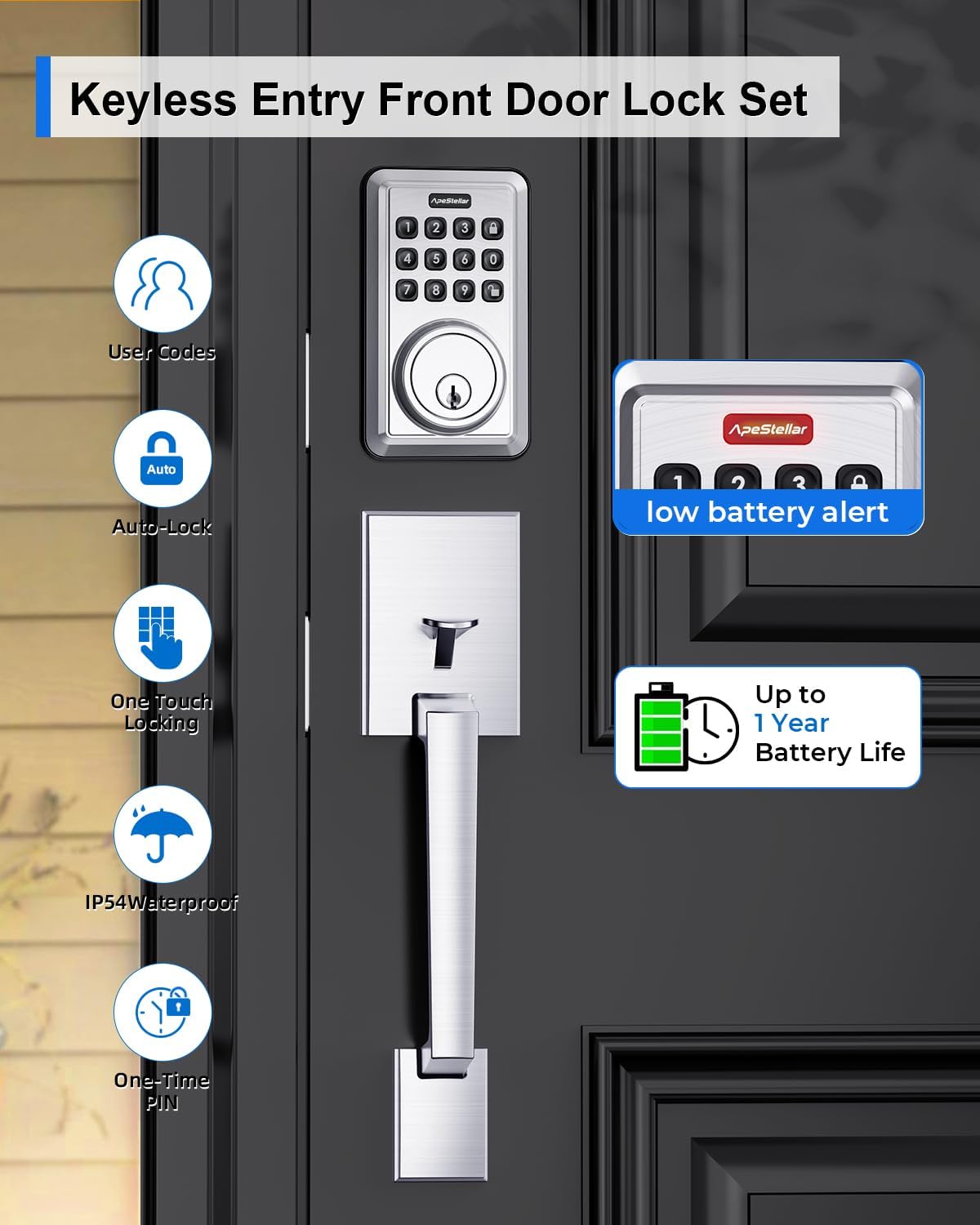
Image: Display showing a low battery alert and an icon indicating up to 1 year of battery life.

Image: The lock shown in a snowy, rainy environment, highlighting its all-weather capability and temperature resistance.
Depanaj
If you encounter issues with your ApeStellar door lock, refer to the following common troubleshooting tips:
- Kadna a pa reponn: Check battery levels. Replace batteries if low. Ensure the keypad is awake by pressing any button.
- Kòd la pa fonksyone: Verify the code is entered correctly. Ensure the lock is not in vacation mode or locked out due to too many incorrect attempts. Re-program the code if necessary.
- Deadbolt Not Extending/Retracting: Check for any obstructions in the door frame or strike plate. Ensure the lock is properly aligned and installed.
- Keypad Not Lighting Up: This may indicate low batteries or a power issue. Replace batteries.
- Son etranj: If the lock makes unusual grinding or clicking noises, check for proper alignment and ensure all components are securely fastened.
For further assistance, please contact ApeStellar customer support.
Espesifikasyon
| Karakteristik | Spesifikasyon |
|---|---|
| Mak | ApeStellar |
| Non modèl | AS-DH01 |
| Kalite fèmen | Deadbolt, Combination Lock, Keypad, Pin Tumbler |
| Materyèl | Zenk |
| Koulè | Nikèl saten |
| Pwa atik | 4.9 liv |
| Dimansyon pwodwi | 14 x 11.7 x 3.1 pous |
| Karakteristik espesyal | San kle |
| Itilizasyon Rekòmande | Front Door, Back Door, Side Door, Bedroom Door or Garage Door, Laundry Door, Airbnb short-term rental room, apartment |
| Kalite kontwolè | Hand Control, Push Button, Mechanical dial |
| Pwotokòl Koneksyon | Nonconnected |
| Batri obligatwa? | Wi |
| ANSI Grade | 3 |
| Rezistans move tan | IP54 |
Garanti ak sipò
ApeStellar is committed to providing high-quality products and customer satisfaction. For warranty information, technical support, or any inquiries regarding your AS-DH01 Keyless Entry Door Lock Set, please refer to the contact details provided in your product packaging or visit the official ApeStellar websit.
We recommend registering your product to receive updates and support.