
1. Entwodiksyon
The SMARTGEN HES9510-RM is a sophisticated hybrid energy monitoring system designed for remote management and oversight of various power generation and control units. It is compatible with single or multiple HGM9510N genset controllers, HGM9560 bus tie mains parallel controllers, and HES9510 hybrid energy controllers.
This system facilitates automatic start/stop, closing/opening operations, comprehensive data measurement, and real-time alarm display functions. Featuring an intuitive LCD display with touch screen capabilities, the HES9510-RM ensures ease of use and reliable operation. Built around a high-end ARM microprocessor, it communicates with connected controllers via network interfaces and RS485, allowing direct parameter reading and display on its screen for a clear overview of the system layout and branch parameters.
Karakteristik kle:
- Remote monitoring for single or up to six HGM9510N genset controllers.
- Remote monitoring for a single HGM9560 bus tie mains parallel controller.
- Remote monitoring for a single HES9510 hybrid energy controller.
- High-end ARM microprocessor core with LCD backlight and touch screen for visual display and operation.
- Real-time display of genset parameters and alarm information detected by connected controllers.
2. Pwodwi souview
The HES9510-RM unit features a robust design with a clear display for system monitoring and touch controls for interaction.
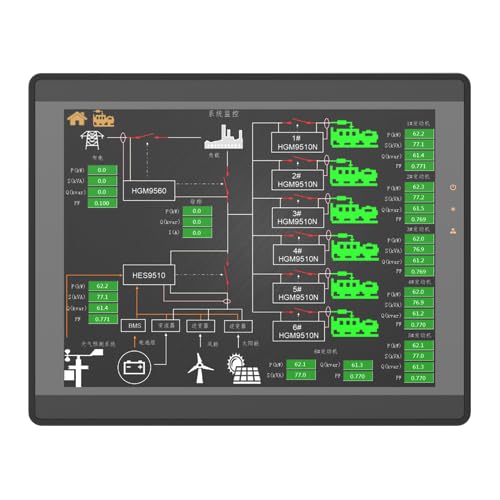
Figi 2.1: Devan view of the HES9510-RM display, illustrating the system's graphical interface for energy monitoring.

Figi 2.2: Dèyè view of the HES9510-RM, detailing the enclosure and mounting points.
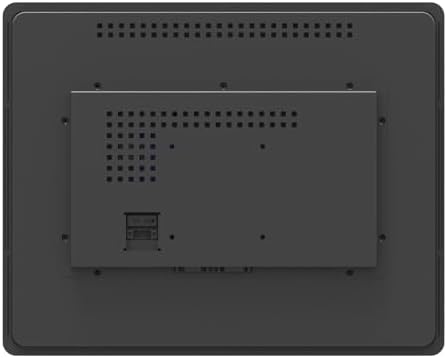
Figi 2.3: Dèyè detaye view of the HES9510-RM, showing communication interfaces and power input.
3. Enstalasyon
Proper installation and connection are crucial for the optimal performance of the HES9510-RM system. This section outlines general setup considerations.
3.1 Montaj
- Select a suitable location for mounting the HES9510-RM, ensuring it is protected from extreme temperatures, moisture, and direct sunlight.
- Ensure adequate ventilation around the unit to prevent overheating. Refer to Figure 2.2 for mounting points and rear panel layout.
- Secure the unit firmly using appropriate fasteners for the chosen mounting surface.
3.2 Koneksyon elektrik
- Pwovizyon pou pouvwa: Connect the HES9510-RM to a stable power source as specified in the technical specifications. Ensure correct voltage ak polarite.
- Entèfas rezo: For communication with HGM9510N genset controllers and HES9510 hybrid energy controllers, connect the HES9510-RM via its network interface ports. Use standard Ethernet cables.
- RS485 kominikasyon: For communication with the HGM9560 bus tie mains parallel controller, utilize the RS485 communication port. Ensure proper wiring for data transmission and reception.
Always consult the detailed wiring diagrams provided with the product packaging for specific connection instructions. Incorrect wiring can damage the unit or connected equipment.
4. Operasyon Enstriksyon
The HES9510-RM system is designed for user-friendly operation through its LCD touch screen interface.
4.1 Limen
- Once all electrical connections are secure, apply power to the HES9510-RM.
- The system will initiate a self-test and boot-up sequence. The main monitoring screen should appear after a short period.
4.2 Navige nan Entèfas la
- The LCD is a touch screen. Use your finger or a stylus to interact with on-screen elements.
- The main screen typically displays a general system layout, showing the status of connected gensets, hybrid energy systems, and bus tie controllers.
- Tap on specific components or data points to access detailed information, branch parameters, or control options.
4.3 Siveyans ak Kontwòl
- Data Measurement: Real-time parameters such as voltage, current, frequency, power, and energy consumption are displayed.
- Ekspozisyon alam: The system provides immediate visual and audible alerts for any detected alarms or abnormal conditions from connected controllers. Acknowledge alarms as required.
- Kontwòl Remote: Depending on the configuration and permissions, the HES9510-RM allows for remote auto start/stop, closing/opening of gensets, and other control functions for connected devices. Exercise caution when performing remote control actions.
4.4 Konfigirasyon Sistèm
Access the system settings menu (usually via an icon on the main screen) to configure network settings, display preferences, alarm thresholds, and communication parameters. Refer to the advanced user guide for detailed configuration procedures.
5. Antretyen
Regular maintenance ensures the longevity and reliable operation of your HES9510-RM system.
- Netwayaj: Gently clean the LCD touch screen with a soft, lint-free cloth. Do not use abrasive cleaners or solvents.
- Vantilasyon: Ensure that the ventilation openings on the unit are free from dust and obstructions to maintain proper airflow and prevent overheating.
- Mizajou mikrolojisyèl: Periodically check the SMARTGEN-America website for available firmware updates. Follow the provided instructions carefully for any update procedures.
- Tcheke Koneksyon: Routinely inspect all cable connections (power, network, RS485) for secure fit and signs of wear or damage.
NAN. Depanaj
Seksyon sa a bay etap debaz pou rezoud pwoblèm komen yo. Pou pwoblèm ki pi konplèks, kontakte sipò teknik.
6.1 Pa gen pouvwa/ekspozisyon
- Check the power supply connection and ensure it is securely plugged in.
- Verify that the power source is active and providing the correct voltage.
- Enspekte kab pouvwa a pou nenpòt domaj vizib.
6.2 Erè Kominikasyon
- Ensure all network and RS485 cables are correctly connected and not damaged.
- Verify that the connected controllers (HGM9510N, HGM9560, HES9510) are powered on and functioning correctly.
- Check the communication settings on the HES9510-RM and the connected controllers to ensure they match (e.g., IP addresses, baud rates).
6.3 Unresponsive Touch Screen
- Perform a soft reset of the unit if possible (refer to the advanced user guide for instructions).
- Ensure the screen is clean and free from debris or moisture that might interfere with touch detection.
7. Espesifikasyon
Technical specifications for the SMARTGEN HES9510-RM Hybrid Energy Monitoring System:
| Spesifikasyon | Valè |
|---|---|
| Mak | SMARTGEN |
| Modèl | HES9510-RM |
| ASIN | B0CJ586JBZ |
| Pwa atik | 2.42 liv (1.1 kilogram) |
| Materyèl | Kwiv |
| Manifakti | SMARTGEN |
| Entèfas kominikasyon | Network Interface, RS485 |
| Kalite ekspozisyon | LCD with Touch Screen |
| Nwayo Processor | High-end ARM Microprocessor |
8. Garanti ak sipò
For detailed warranty information, please refer to the warranty card included with your product or visit the official SMARTGEN-America websit. Tèm garanti yo anjeneral kouvri domaj fabrikasyon pou yon peryòd espesifik apati dat acha a.
For technical support, troubleshooting assistance beyond this manual, or inquiries regarding parts and service, please contact SMARTGEN-America customer service. Contact information can usually be found on the product packaging or the manufacturer's websit.
Resous sou entènèt:
- Check more SMARTGEN products on the smartgen-america websit.