
1. Entwodiksyon
The Zebronics Astra 30 is a portable Bluetooth speaker designed for a versatile audio experience. It features 14W output, dual 52mm drivers, dual passive radiators for enhanced bass, and multiple connectivity options including Bluetooth v5.3, FM radio, AUX, USB, and mSD card support. This manual provides instructions for setting up, operating, and maintaining your speaker.
2. Pake kontni
Tanpri tcheke pake a pou atik sa yo:
- Speaker - 1 unit
- Kab chaje - 1 inite
- User manual - 1 unit
3. Pwodwi souview
Familyarize w ak konpozan ak kontwòl oratè a.

Imaj 3.1: Devan view of the Zebronics Astra 30 speaker, showcasing konsepsyon nwa elegant li yo ak griyaj oratè a.
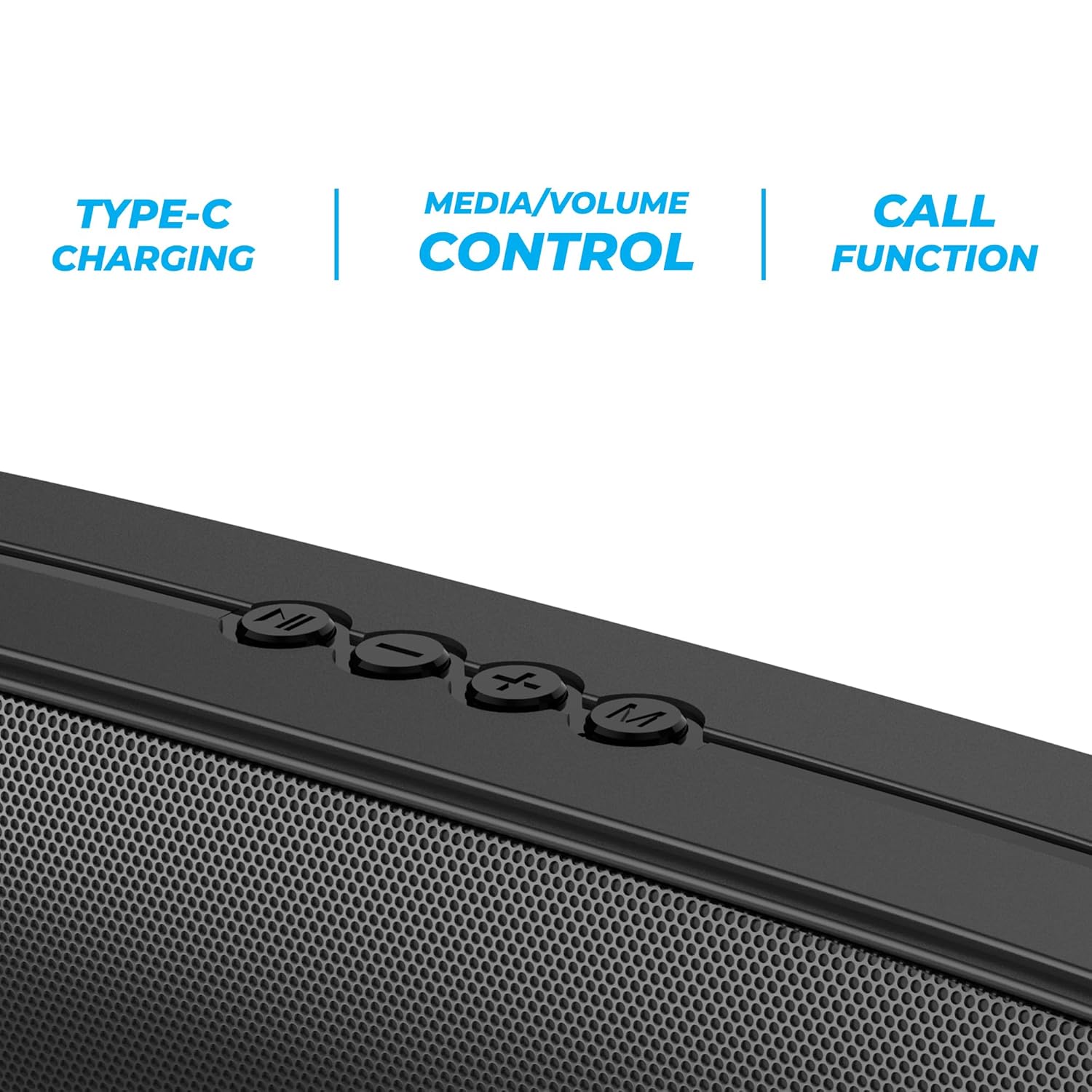
Imaj 3.2: Close-up of the control panel buttons on the top of the speaker, including power, volume, and mode controls.

Imaj 3.3: Dèyè view of the speaker showing the multi-connectivity ports: USB, Micro SD slot, AUX input, and Type-C charging port.
4. Enstalasyon
4.1 Chaje Oratè a
Before initial use, fully charge the speaker. The Zebronics Astra 30 features a built-in rechargeable battery with Type-C charging.
- Konekte kab chaje Kalite-C ki vini ak li a nan pò chaje ki sou oratè a.
- Konekte lòt bout kab la nan yon adaptè kouran USB (pa enkli) oubyen nan yon pò USB òdinatè.
- The charging indicator will illuminate during charging and turn off once fully charged.
A full charge takes approximately 4 hours and provides up to 12 hours of playback time at 50% volume.

Imaj 4.1: Illustration indicating the speaker's 12-hour playback capability on a single charge.
4.2 Limen/Etenyen
To power on or off the speaker, press and hold the power button located on the control panel until you hear an audible prompt or see the indicator light change.
5. Operasyon Enstriksyon
5.1 Bluetooth Pairing
The Zebronics Astra 30 uses Bluetooth v5.3 for wireless audio streaming.
- Limen oratè a. Li pral antre otomatikman nan mòd koneksyon Bluetooth, sa ap parèt ak yon LED k ap flache.
- Aktive Bluetooth sou telefòn entelijan ou, tablèt ou, oswa lòt aparèy ou.
- Chèche pou "ZEB-ASTRA 30" in the list of available Bluetooth devices.
- Select "ZEB-ASTRA 30" to connect. Once paired, the speaker will confirm with an audible tone, and the LED will stop flashing.
- Si yo mande w yon modpas, antre "0000".
5.2 Fonksyon Vrè Stereo San Fil (TWS)
Connect two Zebronics Astra 30 speakers for a true wireless stereo experience.
- Ensure both ZEB-ASTRA 30 speakers are powered on and not connected to any Bluetooth device.
- On one of the speakers (this will be the primary speaker), press and hold the TWS button (often combined with the Mode button) until you hear a pairing tone.
- De oratè yo ap konekte otomatikman youn ak lòt. Yon fwa konekte, ou ap tande yon son konfimasyon.
- Kounye a, konekte aparèy ou a ak oratè prensipal la atravè Bluetooth jan sa dekri nan Seksyon 5.1. Odyo a ap jwe an stereo nan tou de oratè yo.

Imaj 5.1: Visual representation of two Zebronics Astra 30 speakers connected via TWS for stereo sound.
5.3 FM Radio Mode
Pou itilize radyo FM entegre a:
- Pouvwa sou oratè a.
- Peze bouton 'M' (Mòd) la pou chanje nan mòd radyo FM.
- Pou eskane epi anrejistre estasyon FM ki disponib yo otomatikman, peze epi kenbe bouton Lekti/Pòz la. Oratè a pral eskane epi anrejistre estasyon yo otomatikman.
- Use the Previous/Next track buttons to navigate between saved stations.
- For optimal reception, ensure the charging cable is connected as an antenna.
5.4 Mòd Antre AUX
Connect external audio devices using the AUX input:
- Pouvwa sou oratè a.
- Peze bouton 'M' (Mòd) la pou chanje nan mòd AUX.
- Konekte yon bout kab odyo 3.5mm (pa enkli) nan pò AUX ki sou oratè a.
- Connect the other end to the audio output of your device (e.g., smartphone, MP3 player).
- Kounye a, odyo a pral jwe nan oratè a soti nan aparèy konekte ou an.
5.5 USB and Micro SD Card Playback
Jwe odyo files directly from a USB pen drive or Micro SD card:
- Pouvwa sou oratè a.
- Insert a USB pen drive (up to 32GB) or a Micro SD card into the respective slot.
- Oratè a pral otomatikman detekte aparèy depo a epi kòmanse jwe odyo. files. If not, press the 'M' (Mode) button to switch to USB or SD card mode.
- Sèvi ak bouton Jwe/Pòz ak bouton Tras Presedan/Swivan an pou kontwole lekti a.
5.6 Fonksyon Rele
Lè oratè a konekte via Bluetooth ak yon smartphone, ou ka itilize li pou apèl men lib.
- Reponn/Fen Apèl: Peze bouton Jwe/Paz la yon fwa.
- Rejte apèl: Peze epi kenbe bouton Jwe/Paz la.
- Recomposition Dènye Nimewo: Doub peze bouton jwe/poz la.
5.7 Volume and Media Control
The speaker features integrated controls for audio playback:
- Volim moute: Peze bouton '+' la.
- Volim desann: Peze bouton '-' la.
- Pwochen Track: Peze epi kenbe bouton '+' la.
- Track Previous: Peze epi kenbe bouton '-' la.
- Jwe/Poz: Peze bouton jwe/poz la.
6. Antretyen
- Netwaye oratè a avèk yon twal mou epi sèk. Pa sèvi ak pwodui chimik ki agresif oswa pwodui netwayaj abrazif.
- Keep the speaker away from extreme temperatures, direct sunlight, and moisture.
- Evite jete oswa soumèt oratè a nan gwo enpak.
- Sere oratè a nan yon kote ki fre epi sèk lè w pa itilize li pou yon bon bout tan.
- The speaker is rated as waterproof. However, avoid submerging it in water for prolonged periods. Ensure the port cover is securely closed to maintain water resistance.
NAN. Depanaj
| Pwoblèm | Solisyon posib |
|---|---|
| Oratè a pa limen. | Asire w batri a chaje. Konekte oratè a nan yon sous kouran avèk kab Kalite-C a. |
| Pa ka konekte atravè Bluetooth. |
|
| Pa gen son oswa volim nan ba. |
|
| Resepsyon radyo FM lan pa bon. | Ensure the Type-C charging cable is connected to act as an antenna. Try repositioning the speaker. |
| Koneksyon TWS la echwe. |
|
8. Espesifikasyon
| Karakteristik | Detay |
|---|---|
| Non modèl | ZEB-ASTRA 30 |
| Sortie pouvwa | 14 Watts |
| Gwosè Chofè | Dual 52mm |
| Bluetooth vèsyon | v5.3 |
| Opsyon Koneksyon | Bluetooth, FM, AUX, USB, Micro SD |
| USB/Micro SD Max Capacity | 32GB |
| Lavi batri | Jiska 12 èdtan (nan 50% volim) |
| Tan pou chaje | 4 èdtan |
| Chaje Kalite | Kalite-C |
| Rezistans dlo | Ki enpèmeyab |
| Dimansyon pwodwi (D x W x H) | 5.7 x 35.4 x 6.5 santimèt |
| Pwa atik | 645 gram |
| Enpedans | 3 Ohms |
| Siyal-a-bwi Pwopòsyon | 75 dB |

Imaj 8.1: Graphic highlighting the 14W RMS output and dual 52mm drivers of the Zebronics Astra 30 speaker.
9. Garanti ak sipò
The Zebronics Astra 30 speaker comes with a 1 ane garanti limite apati dat acha a. Tanpri konsève resi acha ou a pou reklamasyon garanti.
For technical support, service, or warranty inquiries, please contact Zebronics customer service. Contact details can typically be found on the official Zebronics websit la oubyen sou anbalaj pwodwi ou a.
Manifakti: Zebronics India Private Limited
Address: 13/7, Smith Road, Royapettah, Chennai-600002