
Entwodiksyon
The Havit Gamenote KB885L mechanical keyboard is engineered for precision, durability, and customization. It features a gasket structure design, providing a soft and stable typing experience while minimizing noise. The full key rollover with multi-key response ensures fast and accurate input, crucial for gaming. With customizable RGB backlighting, you can personalize your keyboard with various lighting modes and effects. The detachable USB-C cable enhances portability and simplifies cable management. This keyboard is built with mechanical switches rated for 50 million key presses, making it suitable for gamers, typists, and professionals who require long-lasting performance.
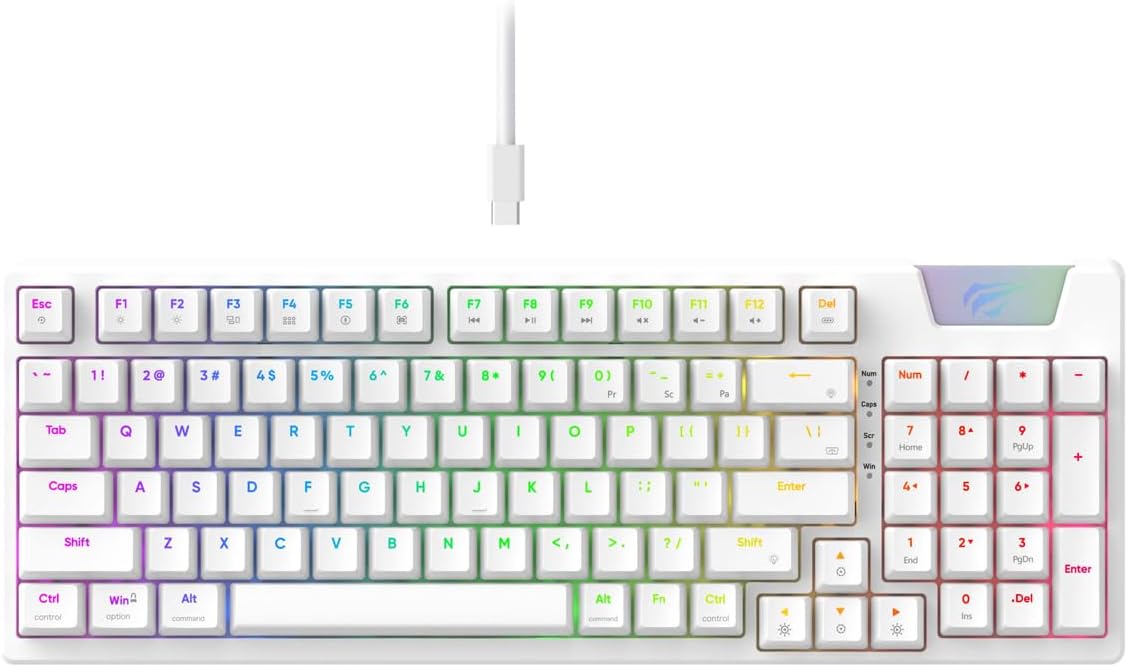
Image: The Havit Gamenote KB885L mechanical keyboard in white, showcasing its full layout and detachable USB-C cable.
Gid Enstalasyon
Follow these steps to set up your Havit Gamenote KB885L mechanical keyboard:
- Depake klavye a: Retire klavye a ak akseswa li yo nan anbalaj la avèk prekosyon.
- Konekte kab USB-C a: Insert the detachable USB Type-C cable into the port on the keyboard.
- Konekte ak òdinatè: Ploge lòt bout kab USB a nan yon pò USB ki disponib sou òdinatè w lan.
- Enstalasyon chofè: Klavye a se yon fonksyon "plug-and-play" epi anjeneral li pa bezwen lòt chofè. Sistèm operasyon ou an ta dwe otomatikman detekte epi enstale chofè ki nesesè yo.
- Fonksyonalite tès: Open a text editor or browser to test key presses and ensure all functions are working correctly.

Image: A close-up of the Havit Gamenote KB885L keyboard highlighting its portable design and detachable cable for easy setup and transport.
Enstriksyon Operasyon
The Havit Gamenote KB885L keyboard offers various features for an enhanced user experience:
Kontwòl ekleraj RGB
Klavye a gen yon ekleraj dèyè RGB personnalisable. Sèvi ak konbinezon kle sa yo pou ajiste efè ekleraj yo:
- Fn + [Kle]: Cycle through different RGB lighting modes. (Specific key combinations may vary, refer to on-keyboard legends if available).
- Fn + Flèch yo: Ajiste klète ak vitès efè ekleraj yo.

Image: The Havit Gamenote KB885L keyboard displaying its vibrant RGB backlighting, illustrating customizable lighting effects.
Ranplasman konplè kle (NKRO)
This keyboard supports Full Key Rollover, meaning every key press is registered independently, regardless of how many keys are pressed simultaneously. This feature is essential for fast-paced gaming and typing, preventing ghosting or missed inputs.
Ergonomik konsepsyon
The keyboard is designed with ergonomics in mind to provide comfort during extended use. Its layout and keycap profile aim to reduce strain on your wrists and fingers.

Imaj: A view of the Havit Gamenote KB885L keyboard highlighting its ergonomic design for comfortable use.
Antretyen
Proper maintenance ensures the longevity and optimal performance of your keyboard:
- Netwayaj: Netwaye klavye a regilyèman avèk yon twal mou epi sèk. Pou yon netwayaj pi pwofon, sèvi ak lè konprese pou retire pousyè ak debri ki ant kouvèti kle yo. Pou pousyè tè ki difisil pou retire, yon ti kras twal mouye.amp Ou ka itilize yon twal ak savon dou, pou asire pa gen likid ki antre nan klavye a.
- Evite devèsman: Keep liquids away from the keyboard to prevent damage to the internal components. In case of a spill, immediately disconnect the keyboard and allow it to dry completely before reconnecting.
- Swen kab: Handle the detachable USB-C cable with care. Avoid sharp bends or excessive pulling to prevent damage to the cable or connectors.
- Depo: Lè w pa ap itilize klavye a, sere l nan yon anviwònman pwòp epi sèk, lwen tanperati ekstrèm.
Depanaj
If you encounter issues with your Havit Gamenote KB885L keyboard, try the following solutions:
- Klavye a pa reponn:
- Asire w kab USB-C a byen konekte ak klavye a ak òdinatè a.
- Eseye branche klavye a nan yon lòt pò USB sou òdinatè w la.
- Teste klavye a sou yon lòt òdinatè pou detèmine si pwoblèm nan soti nan klavye a oswa nan sistèm ou an.
- Limyè RGB pa travay:
- Check if the lighting is turned off using the Fn key combinations.
- Asire w klavye a byen mache atravè koneksyon USB a.
- Keys Not Registering / Ghosting:
- Due to full key rollover, this is unlikely. However, ensure no debris is lodged under the keycap.
- If a specific key is consistently failing, it might indicate a switch issue. Contact support if the problem persists.
Espesifikasyon
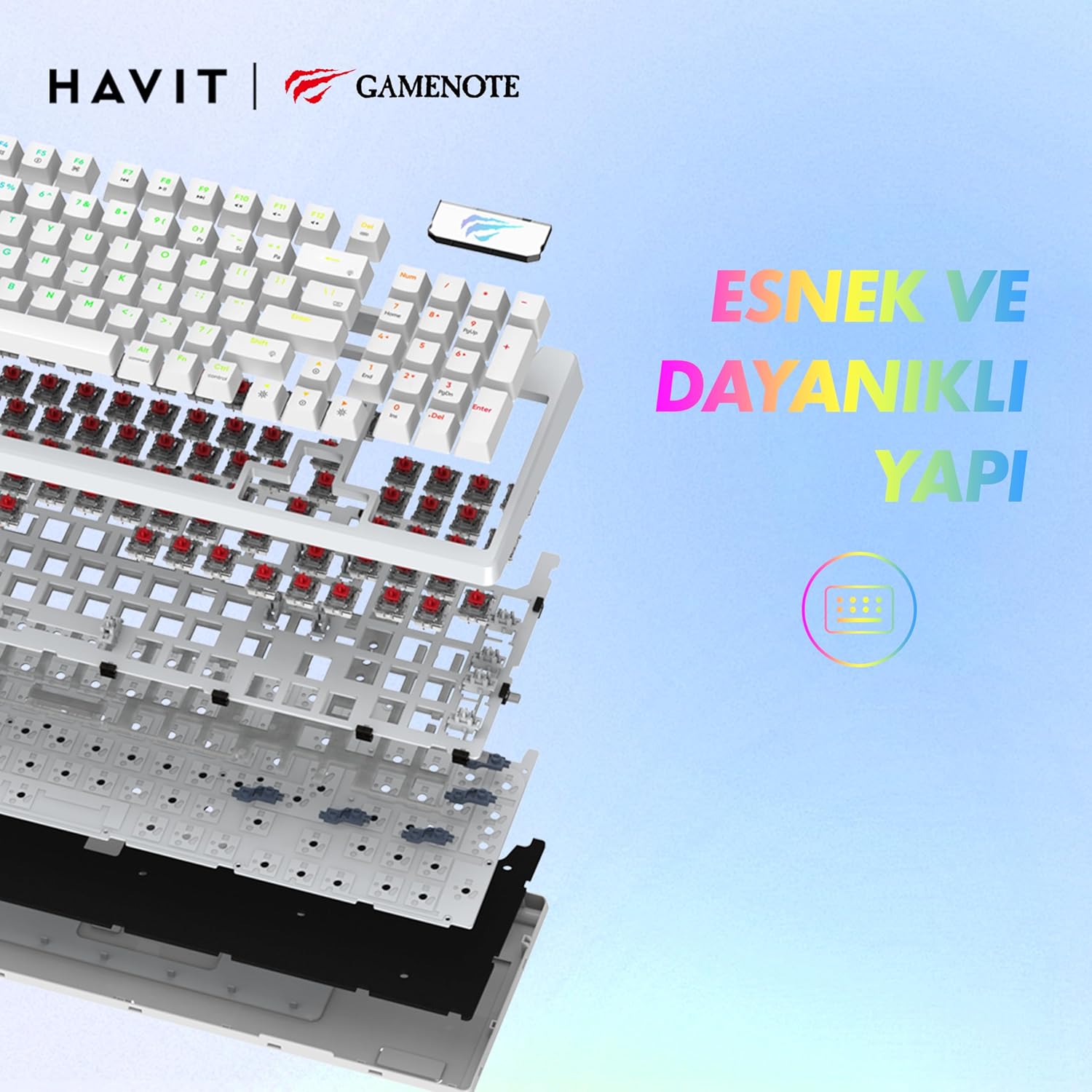
Imaj: Yon eksplozyon view of the Havit Gamenote KB885L keyboard, illustrating its internal gasket structure for enhanced stability and typing feel.
| Karakteristik | Detay |
|---|---|
| Mak | Havit |
| Nimewo Modèl | KB885L |
| Aparèy konpatib | Odinatè |
| Koneksyon Teknoloji | USB |
| Deskripsyon klavye | Gaming |
| Itilizasyon Rekòmande | Gaming |
| Karakteristik espesyal | Pòtab |
| Koulè | Blan |
| Backlight Color Support | RGB (Red, Green, Blue model) |
| Style | Modèn |
| Dimansyon pwodwi (L x W x H) | 38.7 x 14 x 4.5 cm |
| Lang | angle |
| Sous pouvwa | USB pouvwa |
| Chanje Kalite | Tactile |
| Layout klavye | QWERTY |
| Oryantasyon men | Anbidextr |
| Kantite kle | 95 |
| Kantite bouton | 104 |
| Konpozan ki enkli | USB kab |
| Materyèl | Plastik |
| Key Press Lifespan | 50 Million (from description) |

Image: An illustration highlighting the Havit Gamenote KB885L's durable mechanical switches, rated for a 50 million key press lifespan.
Enfòmasyon sou Garanti
The Havit Gamenote KB885L Mechanical Keyboard comes with a yon ane garanti from the date of purchase. This warranty covers manufacturing defects and issues arising from normal use. It does not cover damage caused by misuse, accidents, unauthorized modifications, or improper maintenance. Please retain your proof of purchase for warranty claims.
Sipò pou Kliyan
For further assistance, technical support, or warranty inquiries, please contact Havit customer service through their official website or the retailer where you purchased the product. Have your model number (KB885L) and proof of purchase ready when contacting support.


