
1. Pwodwi souview
The CATLINK W03 Wireless Cat Water Fountain is designed to provide fresh, filtered water for your cat, promoting hydration and health. Featuring a wireless design with a long-lasting battery, app control for remote monitoring, and a multi-stage filtration system, this fountain offers convenience and peace of mind.

Image 1.1: The CATLINK W03 Wireless Cat Water Fountain, showing its sleek design and a mobile app interface displaying water status and filter information.
2. Karakteristik kle
- Operasyon san fil: Equipped with a built-in 5000mAh battery, offering up to 150 days of operation on a single charge, allowing flexible placement without power cords.
- Koneksyon aplikasyon: Connect to the CATLINK app for remote control, monitoring of water intake, detailed health reports, and timely notifications.
- Gwo kapasite: A 2.3-liter water reservoir ensures up to 8 days of water supply for a single cat.
- Filtraj Avanse: A fine filter cartridge removes impurities, providing clean and healthy drinking water.
- Operasyon trankil: Engineered to operate at less than 30dB, ensuring minimal disturbance.

Image 2.1: Multiple cats drinking from CATLINK W03 fountains placed in different areas of a home, highlighting the wireless functionality.

Image 2.2: A cat drinking from the fountain, with a clear indication of the 2.3-liter water capacity on the reservoir.
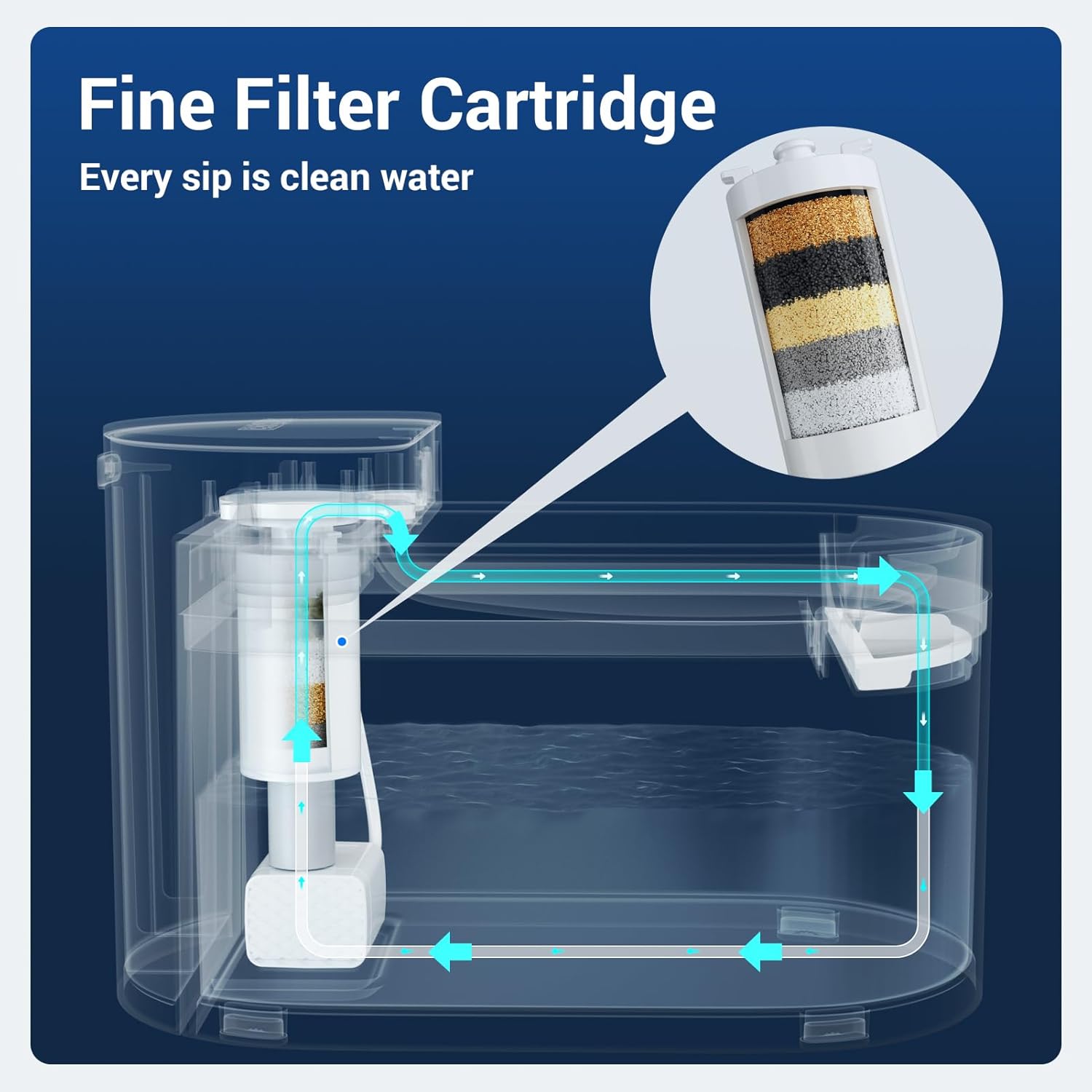
Image 2.3: A diagram illustrating the internal water flow and the multi-layer fine filter cartridge within the CATLINK W03 fountain.

Image 2.4: A cat drinking from the fountain, accompanied by a graphic indicating a sound level below 30 decibels, emphasizing quiet operation.
3. Enstriksyon Enstalasyon
- Depake konpozan: Carefully remove all parts from the packaging. Ensure you have the main unit, water reservoir, drinking tray, filter, and charging cable.
- Chaje batri a: Before first use, fully charge the built-in 5000mAh battery using the provided charging cable. The indicator light will show charging status.
- Enstale filtè: Rinse the new filter under running water for a few minutes. Insert the filter into its designated slot in the pump assembly.
- Asanble Fountain: Place the pump assembly with the filter into the water reservoir. Ensure it is securely seated.
- Ranpli rezèvwa dlo: Fill the reservoir with clean water up to the 'MAX' line. Avoid overfilling.
- Place Drinking Tray: Position the drinking tray on top of the reservoir, ensuring it aligns correctly with the water outlet.
- Pouvwa sou: Press the power button to turn on the fountain. The indicator light will illuminate.
- Koneksyon Aplikasyon (Si ou vle): Download the CATLINK app from your device's app store. Follow the in-app instructions to connect your fountain to your Wi-Fi network for remote monitoring and control.
4. Operasyon Enstriksyon
- Operasyon otomatik: The fountain is designed to operate automatically, dispensing water when your pet approaches (if motion sensor mode is enabled via the app) or on a scheduled basis.
- Manual Water Dispense: You can manually dispense water by pressing a button on the unit or through the CATLINK app.
- Kontwòl aplikasyon: Use the CATLINK app to:
- Monitor your cat's daily water intake.
- Receive notifications for low water levels or filter replacement.
- Adjust fountain modes (e.g., continuous flow, intermittent, motion-activated).
- View health reports based on drinking patterns.
- Low Water Reminder: The fountain will notify you via the app and/or an indicator light when the water level is low. Refill promptly to ensure continuous operation.

Image 4.1: The CATLINK W03 fountain alongside a smartphone displaying app notifications for low water levels and a filter replacement reminder.
5. Antretyen
Netwayaj regilye ak ranplasman filtè enpòtan anpil pou kenbe kalite dlo a ak pou dire lontan fontèn ou an.
5.1. Cleaning the Fountain
- Demonte: Turn off the fountain and unplug it if connected to power. Disassemble all removable parts: drinking tray, water reservoir, and pump assembly.
- Lave konpozan: Wash the drinking tray and water reservoir with mild soap and water. Rinse thoroughly to remove all soap residue.
- Netwaye Ponp: Carefully open the pump to clean any debris or hair that may have accumulated. Use a small brush if necessary.
- Seche epi rasanble: Asire w ke tout pati yo fin sèk anvan ou remonte sous dlo a.

Image 5.1: All components of the CATLINK W03 fountain laid out, demonstrating its easy disassembly for thorough cleaning.
5.2. Filtre Ranplasman
The filter should be replaced approximately every 1-2 months, or as indicated by the CATLINK app, depending on usage and water quality.
- Retire ansyen filtè a: Disassemble the fountain as described above and remove the used filter from the pump assembly.
- Prepare nouvo filtè a: Rinse the new filter under running water for several minutes to remove any loose carbon particles.
- Enstale nouvo filtè a: Insert the new filter into the pump assembly, ensuring a snug fit.
- Remonte: Reassemble the fountain, refill with water, and power it on. Reset the filter life counter in the CATLINK app if applicable.
NAN. Depanaj
| Pwoblèm | Kòz posib | Solisyon |
|---|---|---|
| Fontèn nan pa bay dlo | Low water level, clogged pump, dead battery, power off. | Refill water, clean pump and filter, charge battery, ensure power is on. |
| App not connecting to fountain | Incorrect Wi-Fi password, fountain too far from router, app issues. | Verify Wi-Fi credentials, move fountain closer to router, restart app/fountain, ensure 2.4GHz Wi-Fi. |
| Koule dlo a fèb | Clogged filter, dirty pump impeller. | Replace filter, clean pump thoroughly. |
| Fontèn nan fè bri | Low water level, pump not properly seated, debris in pump. | Refill water, ensure pump is correctly installed, clean pump. |
7. Espesifikasyon
| Karakteristik | Detay |
|---|---|
| Nimewo Modèl | W03 |
| Mak | CATLINK |
| Kapasite | 2.3 Lit (2300 Mililit) |
| Sous pouvwa | Battery Powered (5000mAh built-in battery) |
| Lavi batri | Jiska 150 jou |
| Nivo bri | Mwens pase 30dB |
| Materyèl | Plastik |
| Pwa atik | 3.76 liv |
| Dimansyon (L x W x H) | 12.48 x 9.72 x 7.64 pous (Pakè) |
| Konpozan ki enkli | Cat water fountain unit, filter, charging cable |
| Itilizasyon espesifik | Andedan kay la |
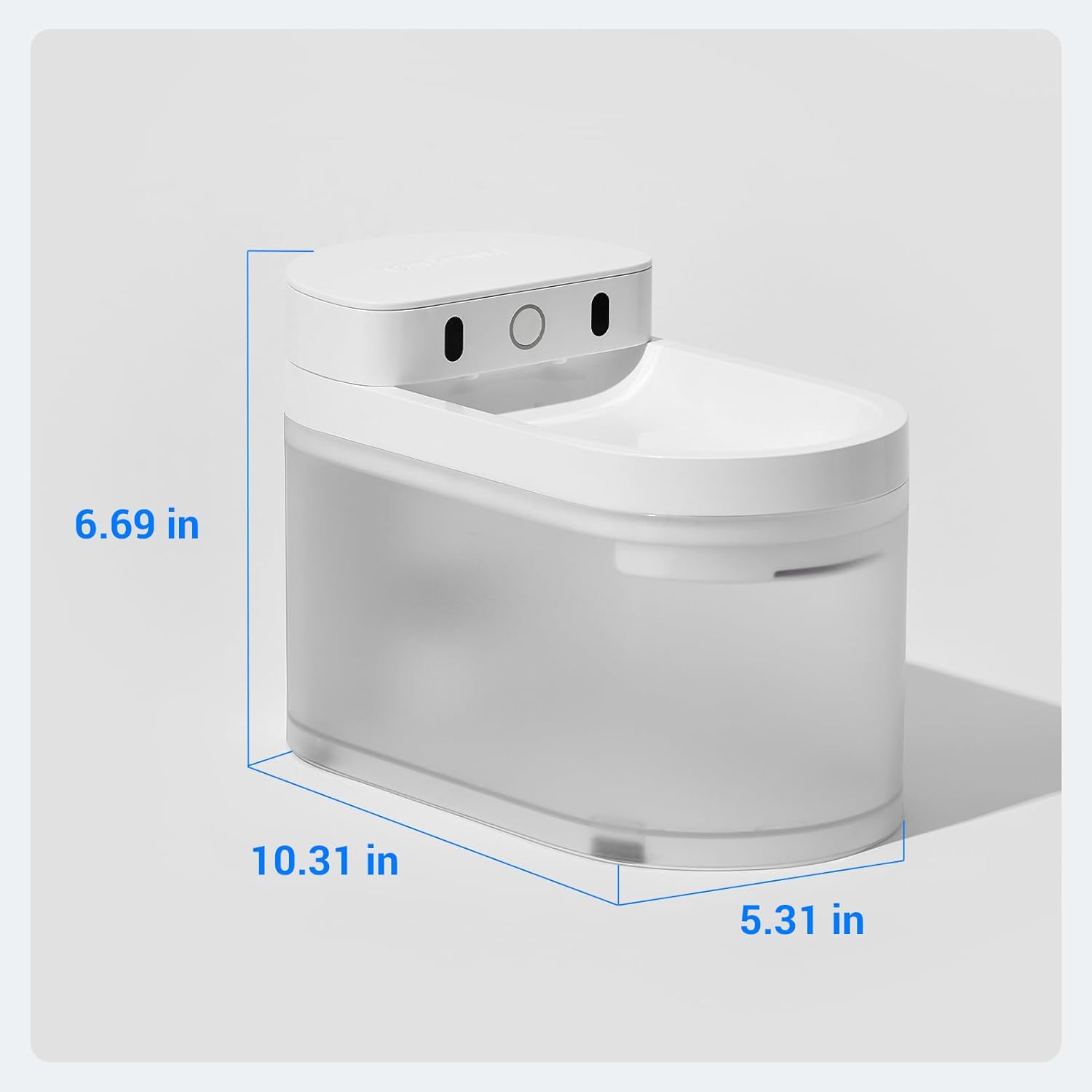
Image 7.1: A diagram illustrating the physical dimensions (length, width, height) of the CATLINK W03 Wireless Cat Water Fountain.
8. Garanti ak sipò
The CATLINK W03 Wireless Cat Water Fountain comes with a 1-ane garanti apati dat acha a. Garanti sa a kouvri domaj fabrikasyon ak fonksyònman ki pa kòrèk nan itilizasyon nòmal.
For warranty claims, technical support, or any inquiries, please contact CATLINK customer service through the following channels:
- CATLINK Official Websit: Visit the official CATLINK websit pou resous sipò, FAQ, ak enfòmasyon pou kontakte yo.
- CATLINK App: Access support directly through the help section of the CATLINK mobile application.
- Sipò Imèl: Refer to your product packaging or the CATLINK website for the dedicated customer support email address.
Tanpri konsève prèv acha ou a pou validasyon garanti a.