
1. Entwodiksyon
Thank you for choosing the EUREKA HD350 Cordless Vacuum Cleaner. This manual provides essential information for the safe and efficient use of your new appliance. Please read it thoroughly before operation and retain it for future reference.
The EUREKA HD350 is a compact and lightweight cordless vacuum cleaner designed for versatile cleaning tasks. Weighing only 500g for the main unit, it offers 10,000Pa of strong suction power, effectively cleaning dust, food spills, and fine hair from various surfaces. Its 2-in-1 design allows for use as both a stick vacuum and a handheld unit, making it ideal for quick clean-ups in your home, car, or office.
2. Enfòmasyon sou Sekirite
Toujou swiv prekosyon sekirite debaz yo lè w ap itilize aparèy elektrik pou diminye risk dife, chòk elektrik, oswa blesi.
- Pa sèvi ak aspiratè a deyò oswa sou sifas ki mouye.
- Pa kite timoun yo sèvi ak aspiratè a. Li nesesè pou siveye l byen lè w ap itilize l toupre timoun.
- Pa ranmase materyèl ki ka pran dife oswa ki ka pran dife, tankou likid brikè, gazolin, oswa kewozèn, epi pa itilize yo nan zòn kote yo ka prezan.
- Pa ranmase anyen k ap boule oswa fimen, tankou sigarèt, alimèt, oswa sann cho.
- Kenbe cheve, rad ki lach, dwèt, ak tout pati nan kò a lwen ouvèti ak pati k ap deplase.
- Sèvi ak li sèlman jan sa dekri nan manyèl sa a. Sèvi ak sèlman akseswa rekòmande pa manifakti a.
- If the suction port or metal filter becomes clogged, the motor may overheat. The built-in safety system will detect this and automatically stop operation to prevent damage. Clear any blockages before resuming use.
- Pa plonje aspiratè a nan dlo oswa lòt likid.
3. Pake kontni
Carefully unpack your EUREKA HD350 and check that all items are present and in good condition. The package should include:
- Inite prensipal vakyòm lan
- Extension Wand (for stick mode)
- Tèt Bwòs Floor
- Bwòs bouch
- Bouch fant
- USB Kalite-C Chaje Kab
- Dedicated Storage Stand
- Manyèl Itilizatè (dokiman sa a)

Image: The EUREKA HD350 package contents, including the main unit, various nozzles, charging cable, and storage stand.
4. Enstalasyon
The EUREKA HD350 can be used in two configurations: as a stick vacuum or as a handheld vacuum.
4.1. Assembling the Stick Vacuum
- Insert the extension wand into the main vacuum unit until it clicks into place.
- Attach the floor brush head to the other end of the extension wand until it clicks into place.
4.2. Assembling the Handheld Vacuum
For handheld use, simply attach the desired nozzle (brush nozzle or crevice nozzle) directly to the main vacuum unit until it clicks into place.

Image: Illustration showing the main unit, extension wand, and floor brush head for stick vacuum assembly, and the main unit with a nozzle for handheld use.
5. Chaje Aparèy la
The EUREKA HD350 features convenient USB Type-C charging.
- Locate the Type-C charging port on the main vacuum unit.
- Connect the provided USB Type-C charging cable to the vacuum cleaner and plug the other end into a compatible USB power source (e.g., wall adapter, car charger, power bank, laptop).
- The LED screen will indicate the charging status.
- A full charge typically takes 2 to 3 hours, providing up to 20 minutes of continuous use.
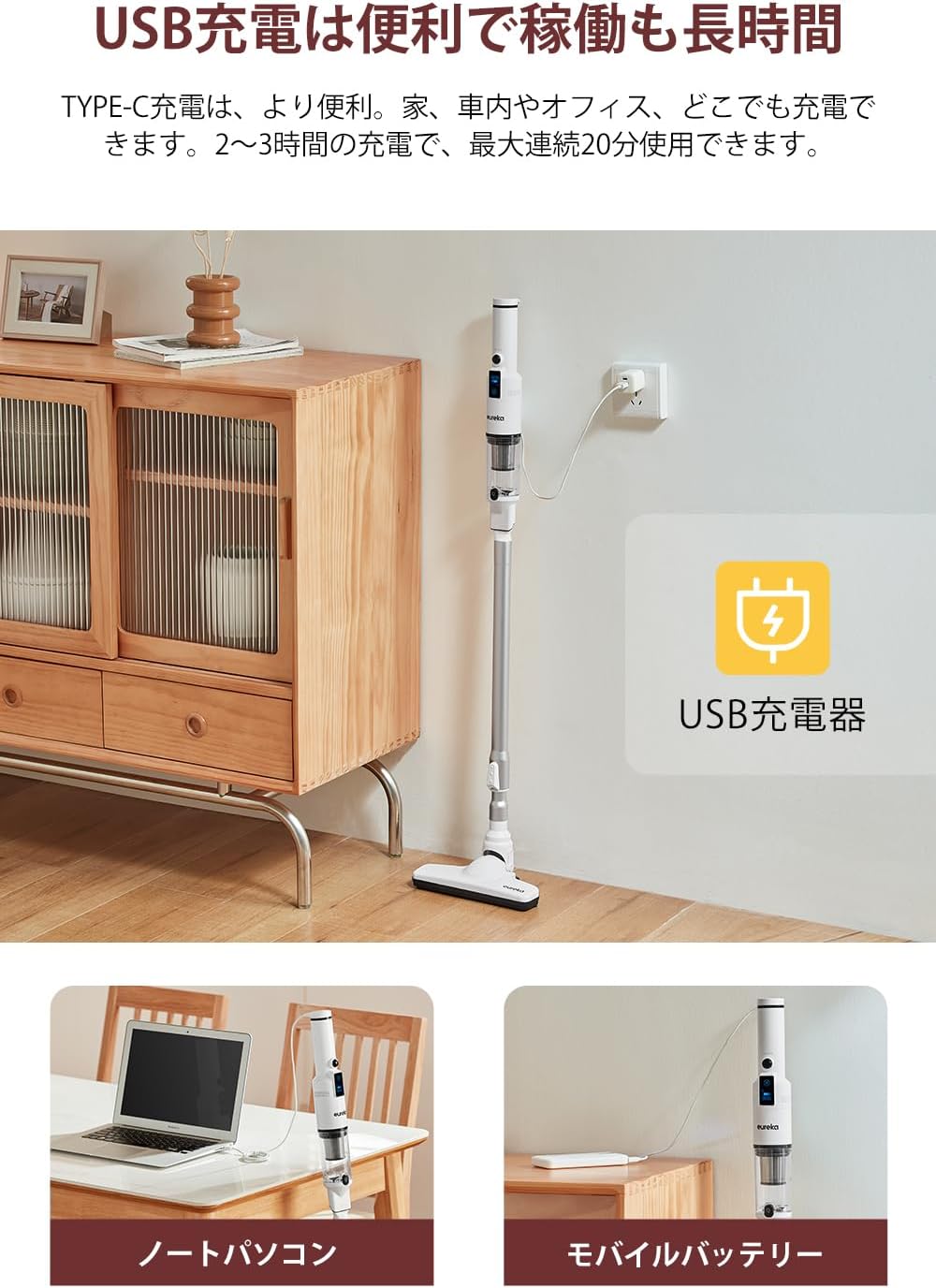
Image: The EUREKA HD350 vacuum cleaner being charged via a USB Type-C cable plugged into a wall adapter, with additional images showing charging from a laptop and a mobile battery.
6. Operasyon Enstriksyon
6.1. Power On/Off and Suction Modes
- To power on the vacuum cleaner, press the power button.
- The LED screen will display the current battery level and suction mode.
- Press the mode button to switch between standard and powerful suction modes.
- The screen also shows the estimated remaining usage time, helping you manage your cleaning tasks.
- Pou etenn, peze bouton pouvwa a ankò.

Image: Close-up of the EUREKA HD350's LED screen displaying battery level, suction mode, and remaining usage time.
6.2. Using Attachments for Various Surfaces
- Tèt bwòs pou planche: Use with the extension wand for general floor cleaning. Its design allows for effective cleaning under furniture.
- Bwòs bouch: Ideal for cleaning delicate surfaces, upholstery, and removing pet hair from sofas or car seats.
- Bouch Crevice: Perfect for reaching tight spaces, corners, car interiors, and between keyboard keys.

Image: A person using the EUREKA HD350 in stick vacuum mode to clean a floor, demonstrating its lightweight design and suction power.

Image: The EUREKA HD350's floor brush head cleaning dust and debris from under a wooden bed frame.

Image: Two separate images showing the EUREKA HD350 in handheld mode, one cleaning a sofa cushion and the other cleaning a desk surface.
6.3. Suction Demonstration Video
Video: A short demonstration of the EUREKA HD350's suction power, picking up a small screw from a concrete surface.
7. Antretyen
Antretyen regilye asire pèfòmans optimal epi pwolonje lavi aspiratè ou a.
7.1. Vide Bwat Pousyè a
- Asire w ke aspiratè a etenn.
- Hold the main unit over a trash bin.
- Press the one-push release button on the dust box to open it and empty the contents.

Image: A hand holding the EUREKA HD350 main unit over a trash bin, demonstrating the one-push dust disposal mechanism.
7.2. Washing the Dust Box and Filter
Both the dust box and the HEPA filter are washable for thorough cleaning.
- After emptying the dust box, detach it from the main unit.
- Remove the HEPA filter from the dust box.
- Rinse the dust box and filter under running water until clean.
- Allow both parts to air dry completely before reassembling and reattaching to the vacuum cleaner. Do not use the vacuum cleaner with wet components.

Image: A collage of four images showing the maintenance process: emptying the dust box, rinsing the dust box with water, rinsing the filter with water, and the vacuum cleaner stored on its dedicated stand.
8. Depo
The EUREKA HD350 comes with a dedicated storage stand for convenient and tidy storage of the cleaner and its accessories.
- After cleaning and ensuring all parts are dry, place the main vacuum unit onto the storage stand.
- The stand is designed to hold the vacuum upright and keep accessories organized.

Image: The EUREKA HD350 vacuum cleaner neatly placed on its white dedicated storage stand on a tabletop.
NAN. Depanaj
If you encounter issues with your EUREKA HD350, refer to the following common problems and solutions:
| Pwoblèm | Kòz posib | Solisyon |
|---|---|---|
| Aspiratè a pa limen. | Batri ap vide. | Chaje aspiratè a nèt. |
| Ba pouvwa pou aspirasyon. | Bwat pousyè a plen. | Vide bwat pousyè a. |
| Ba pouvwa pou aspirasyon. | Filtè a bouche. | Clean or replace the HEPA filter. Ensure it is completely dry before reinserting. |
| Ba pouvwa pou aspirasyon. | Nozzle or extension wand is blocked. | Remove any blockages from the nozzle, extension wand, or suction inlet. |
| Aspiratè a sispann sanzatann. | Motor overheating due to blockage. | Check for and clear any blockages in the suction port or metal filter. Allow the unit to cool down before restarting. |
10. Espesifikasyon
| Karakteristik | Detay |
|---|---|
| Mak | EUREKA |
| Nimewo Modèl | HD350 |
| Sous pouvwa | Batri Powered |
| San fil | Wi |
| Pouvwa pou aspirasyon | 10,000 Pa |
| Pwa inite prensipal la | 500g (apeprè 1.1 liv) |
| Wattage | 120 W |
| Voltage | 3.7 Volts |
| Tan pou chaje | 2-3 èdtan |
| Max Runtime | Jiska 20 minit |
| Kalite filtre | Filtè HEPA |
| Dimansyon pwodwi (L x W x H) | 43.1 x 11.2 x 20.2 cm (17 x 4.4 x 8 pous) |
| Itilizasyon Rekòmande | Interior (Home, Car, Office) |
| UPC | 810040947254 |
| ASIN | B0CGRFCHMW |
11. Garanti ak sipò
EUREKA is committed to providing high-quality products and excellent customer service.
- 1-ane garanti: Your EUREKA HD350 is covered by a 1-year warranty for free repair and replacement during the warranty period.
- Sipò pwofesyonèl: Access to professional staff for any product-related inquiries or assistance.
- 30-Day Returns: Enjoy a 30-day return or new product exchange policy.
- Pwodwi pou Telefòn otantik: Ensure optimal performance and longevity by using only genuine EUREKA accessories.
For further assistance, please visit the official EUREKA store or contact customer support.

Image: An illustration representing EUREKA customer service, highlighting support, warranty, and genuine accessories.