
1. Entwodiksyon
Thank you for choosing the Upperizon 15.6 inch 4K UHD OLED Touchscreen Portable Monitor. This manual provides essential information for setting up, operating, and maintaining your new monitor. Please read it thoroughly before use to ensure optimal performance and longevity of the product.
This portable monitor features a 15.6-inch OLED UHD 4K (3840 x 2160) display, offering a 100% DCI-P3 color gamut, 100,000:1 contrast ratio, 350 cd/m² brightness, and a 178° wide viewing angle with a 60 Hz refresh rate. Its ultra-slim design and integrated kickstand make it ideal for various applications, including professional color grading, extended desktop use, and portable gaming.

Image 1.1: The Upperizon portable monitor showcasing its 4K UHD OLED display with 100% DCI-P3 color accuracy.
2. Pake kontni
Tanpri tcheke kare a pou atik sa yo:
- 1 × Upperizon Portable Monitor (Model P156UHT-R)
- 2 × USB-C to USB-C Cable (full-featured)
- 1 × HDMI to Mini HDMI Cable
- 1 × USB-A pou USB-C kab
- 1 × 45W Wall Charger
- 1 × Sleeve Case
3. Pwodwi Features
- OLED 4K UHD Display: 3840 x 2160 resolution for super clear visuals.
- Segondè presizyon koulè: 100% DCI-P3 color gamut, ideal for professional color grading and graphic design.
- Segondè kontras: 100,000:1 contrast ratio for deep blacks and bright whites.
- Tan repons rapid: 1ms response time for smooth motion.
- Fonksyonalite tactile: 10-point multi-touch support for Windows devices.
- Konsepsyon pòtab: Ultra-slim (0.17 inch at slimmest point) and lightweight (1.9 lbs) with an integrated, adjustable kickstand.
- Koneksyon versatile: Two USB-C ports (for video & power), one Mini HDMI port, and one USB-C OTG port.
- Oratè entegre: Pou pwodiksyon odyo.
- Eye Comfort Features: Blue light filter and low reflection screen.

Image 3.1: Visual comparison highlighting the superior contrast and color reproduction of OLED technology compared to ordinary LED displays.
4. Koneksyon ak Pò
The monitor is equipped with multiple ports for various devices:
- USB-C (Full-featured): Two ports for video signal, power delivery, and touchscreen data (depending on device).
- Mini HDMI: For video signal input from devices with HDMI output.
- USB-C OTG: For connecting peripherals like a keyboard or mouse. Do not use this port for power input.
- 3.5mm Audio Jack: Pou konekte kas ekoutè oswa oratè ekstèn.

Imaj 4.1: Plis paseview of the monitor's rich interface options for connecting various devices.
5. Gid Enstalasyon
5.1 Alimente monitè a
Always ensure the monitor receives sufficient power. Use the included 45W wall charger and a full-featured USB-C to USB-C cable for optimal performance.
5.2 Connecting via USB-C (Full-featured)
Pou aparèy ki gen yon pò USB-C konplè (ki sipòte DisplayPort Alternate Mode ak Power Delivery):
- Connect one end of the full-featured USB-C to USB-C cable to your device's USB-C port.
- Connect the other end to one of the monitor's full-featured USB-C ports.
- If your device cannot provide enough power, connect the 45W wall charger to the other full-featured USB-C port on the monitor.
Nòt: Ensure your laptop has a Thunderbolt 3/4 or full-featured USB-C port for single-cable operation.

Image 5.1: USB-C connection setup for video, power, and touch functionality.
5.3 Connecting via HDMI
For devices with an HDMI output:
- Connect one end of the HDMI to Mini HDMI cable to your device's HDMI port.
- Connect the Mini HDMI end to the monitor's Mini HDMI port.
- Connect the 45W wall charger to one of the monitor's full-featured USB-C ports for power.
- For touchscreen functionality with Windows laptops/PCs, connect the USB-A to USB-C cable from your computer's USB-A port to the monitor's full-featured USB-C port.
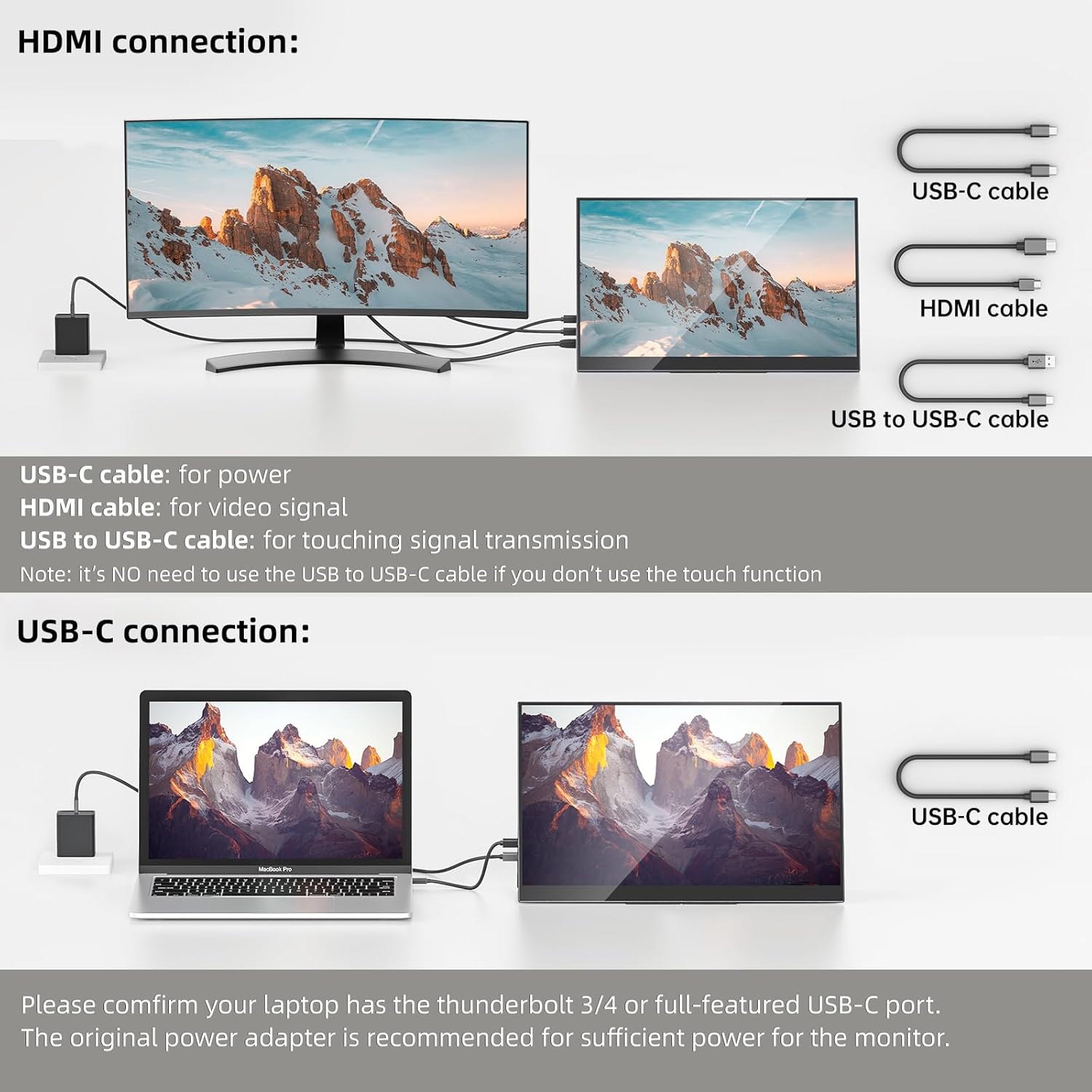
Image 5.2: HDMI connection setup, including separate power and touch signal cables.
6. Operasyon Enstriksyon
6.1 Montre mòd
The monitor supports various display modes:
- Mòd Doublon: Mirrors your primary screen, useful for presentations.
- Pwolonje mòd: Extends your desktop, increasing workspace and productivity.
- Mòd pòtrè: The integrated kickstand allows for easy setup in portrait orientation.

Imaj 6.1: Egzanpamples of duplicated, extended, and portrait display configurations.
6.2 Fonksyonalite ekran taktil
The monitor features touchscreen capabilities with specific compatibility:
- Windows Laptops/PCs: Supports 10-point multi-touch. Requires a USB-A to USB-C cable connection for touch signal when using HDMI for display.
- MacOS (MacBook, Mac mini, iMac): Supports single-point touch only. 10-point multi-touch is NOT supported.
- iPad, iPhone, Game Consoles (PS4, PS5, Xbox, etc.): Touchscreen functionality is NOT supported.

Image 6.2: Touchscreen compatibility matrix for various devices.
6.3 Meni OSD (On-Screen Display).
The OSD menu allows you to adjust various display settings. Access it using the physical buttons on the monitor. Typical settings include brightness, contrast, color temperature, input source, and audio volume.
7. Antretyen
Pou asire lonjevite ak pèfòmans optimal monitè ou a:
- Netwayaj: Sèvi ak yon twal mou ki pa gen pousyè pou siye ekran an dousman. Pou mak ki difisil pou retire, siye yon ti kras.ampSiye twal la avèk dlo oswa yon solisyon netwayaj ki an sekirite pou ekran. Evite pwodui chimik ki agresif oswa materyèl abrazif.
- Depo: When not in use, store the monitor in its sleeve case to protect it from dust and scratches.
- Manyen: Avoid applying excessive pressure to the screen or dropping the monitor.
- Vantilasyon: Ensure the monitor's vents are not obstructed to prevent overheating.
NAN. Depanaj
| Pwoblèm | Kòz posib | Solisyon |
|---|---|---|
| No display/"No Signal" | Incorrect cable connection, insufficient power, incorrect input source. | Check all cable connections (USB-C, HDMI). Ensure the monitor is receiving adequate power (use 45W adapter). Select the correct input source via the OSD menu. Verify your device's USB-C port supports video output. |
| Touchscreen pa travay | Missing USB-A to USB-C connection (for HDMI), incompatible device, driver issue. | For HDMI connections, ensure the USB-A to USB-C cable is connected for touch signal. Confirm your device (Windows) supports touchscreen functionality. Check device settings for touch input. MacOS only supports single touch. Touch is not supported for iPads, iPhones, or game consoles. |
| Ekran k ap flache | Cable issue, power fluctuation, refresh rate mismatch. | Try a different cable. Ensure stable power supply. Check display settings on your device for refresh rate. |
| Pa gen odyo soti nan monitè kè bebe | Volume too low, incorrect audio output device selected. | Increase monitor volume via OSD. Check your device's audio settings to ensure the monitor is selected as the output device. |
9. Espesifikasyon
| Karakteristik | Spesifikasyon |
|---|---|
| Mak | Upperizon |
| Nimewo Modèl | P156UHT-R |
| Gwosè ekran | 15.6 pous |
| Rezolisyon | 4K UHD (3840 x 2160p) |
| Kalite ekspozisyon | OLED |
| Rafrechisman pousantaj | 60 Hz |
| Tan repons | 1 milisgond |
| Pwopòsyon kontras | 100,000:1 |
| Klète | 350 Candela (cd/m²) |
| Gamut koulè | 100% DCI-P3 |
| Viewing Ang | 178 Degre |
| Koneksyon | 2x USB-C (Full-featured), 1x Mini HDMI, 1x USB-C OTG |
| Karakteristik adisyonèl | Touchscreen, Built-In Speakers, Blue Light Filter, Kickstand |
| Pwa atik | 1.9 liv |
| Dimansyon (D x W x H) | 0.2"D x 14"W x 8.8"H |
10. Garanti ak sipò
The Upperizon Portable Monitor P156UHT-R comes with a 2-ane garanti manifakti. For technical support, warranty claims, or any inquiries, please contact Upperizon customer service. Refer to the contact information provided with your product or visit the official Upperizon websit pou asistans.
Kouvèti garanti: This warranty covers defects in materials and workmanship under normal use. It does not cover damage caused by accident, misuse, abuse, neglect, improper installation, or unauthorized repairs.