
Beetronics 19VG7M
Beetronics 19VG7M 19-Inch Full HD IPS Monitor User Manual
Professional Industrial-Grade Display
Entwodiksyon
This manual provides comprehensive instructions for the installation, operation, and maintenance of your Beetronics 19VG7M 19-Inch Full HD IPS Monitor. Designed for professional and continuous use, this industrial-grade display offers exceptional visual clarity, versatile connectivity, and robust construction. Please read this manual thoroughly before using the monitor to ensure proper setup and optimal performance.

Figi 1: Devan view of the Beetronics 19VG7M Monitor.
Kontni pake
Anvan ou kontinye ak enstalasyon an, tanpri verifye si tout konpozan yo prezan nan pake a:
- Beetronics 19VG7M Monitor
- Pwovizyon pou pouvwa & kòd
- Kontwòl Remote
- Flush Mounting Brackets (if applicable)
- Desktop & Surface Mounting Stand
- Manyèl Itilizatè (dokiman sa a)
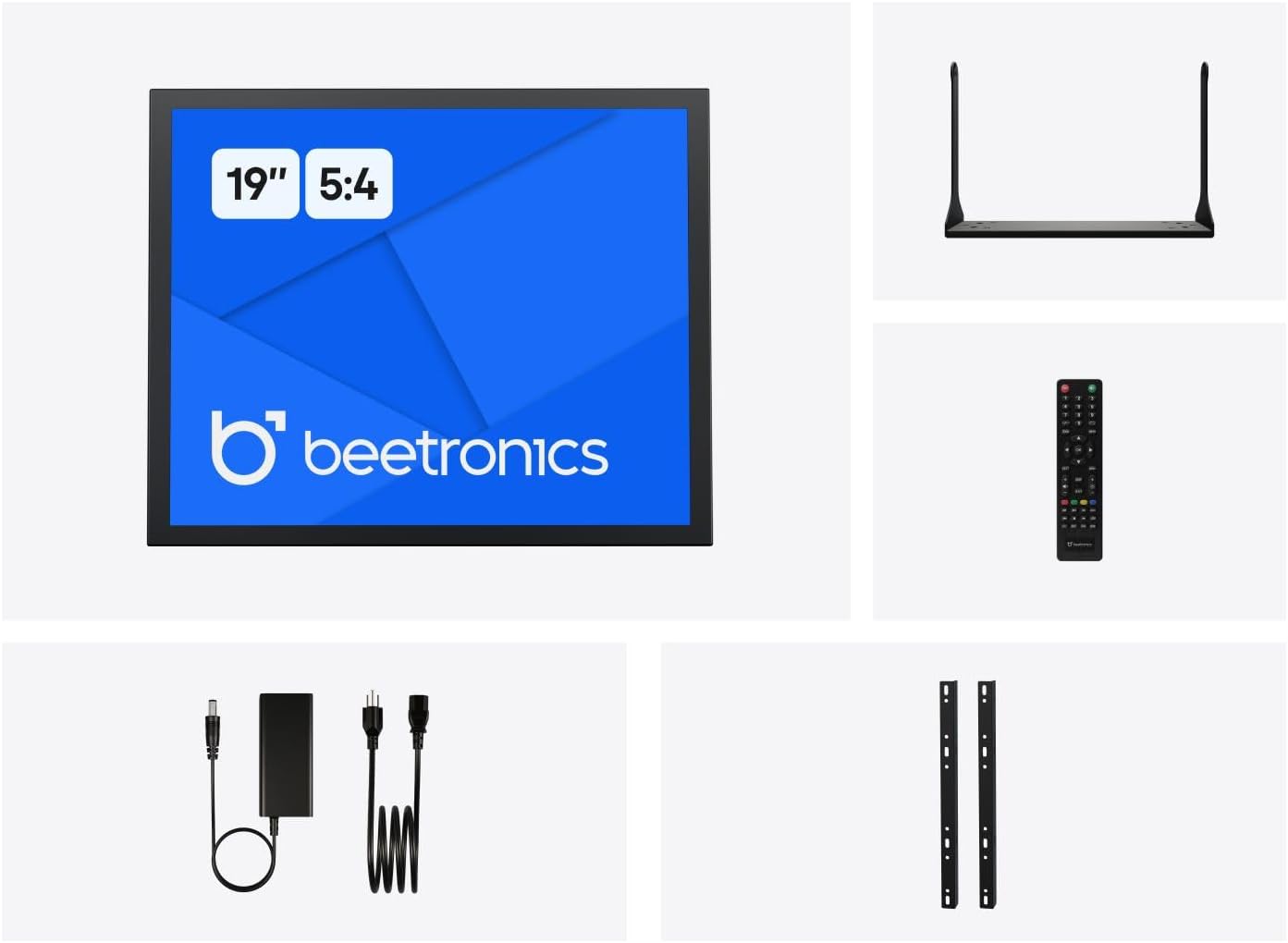
Figure 2: Included accessories with the Beetronics 19VG7M Monitor.
Enstalasyon
1. Montaj Opsyon
The 19VG7M monitor offers flexible mounting solutions, including a collapsible desktop stand and VESA 100mm compatibility for wall or arm mounting.
Enstalasyon Sipò Desktop:
- Mete monitè a ak anpil atansyon fas anba sou yon sifas mou epi pwòp pou evite li reyur.
- Attach the desktop stand to the designated mounting points on the rear of the monitor using the provided screws. Ensure it is securely fastened.
- Mete monitè a sou yon sifas ki estab, ki plat.
VESA Wall/Arm Mounting:
- If the desktop stand is attached, remove it.
- Align the VESA 100mm mounting holes on the back of the monitor with your VESA-compatible wall mount or arm.
- Secure the monitor to the mount using appropriate VESA screws (M4 x 10mm recommended, not always included with monitor).

Figure 3: Monitor dimensions with desktop stand.
2. Konekte Câbles
The 19VG7M monitor features a variety of input ports located on the rear, facing downwards for neat cable management. Ensure the monitor and all connected devices are powered off before making connections.

Figure 4: Downward-facing input ports.
- HDMI: Connect an HDMI cable from your source device (e.g., computer, media player) to the HDMI port on the monitor.
- VGA: Connect a VGA cable from your source device to the VGA port on the monitor.
- BNC: For professional video applications, connect a BNC cable to the BNC input.
- RCA (AV): Use RCA cables for composite video and stereo audio input. Connect the yellow plug for video, and red/white for audio.
- USB: (If applicable for touch functionality or specific peripherals, consult product specifications for exact USB function).
- Pouvwa: Connect the provided power supply to the DC input port on the monitor, then plug the power cord into a wall outlet. The monitor supports a wide input voltage range of 9-36 Volts.

Figi 5: Panèl dèyè souview with control buttons and ports.
Enstriksyon Operasyon
1. Powering On / Off
Peze a ON/OFF button located on the rear panel or on the remote control to power the monitor on or off. The power indicator light will illuminate when the monitor is on.
2. Seleksyon Antre
To switch between different video inputs (HDMI, VGA, BNC, RCA):
- Peze a OTO button on the rear panel or the Antre bouton sou kontwòl remote la.
- Sèvi ak la + or - buttons to navigate through the available inputs.
- Peze a MENI button or wait a few seconds to confirm your selection.
3. Meni sou ekran an (OSD).
The OSD menu allows you to adjust various display settings. To access and navigate the OSD menu:
- Peze a MENI button on the rear panel or remote control to open the OSD menu.
- Sèvi ak la + or - bouton pou navige nan opsyon meni yo.
- Peze a MENI button again to enter a sub-menu or confirm a setting.
- To exit the OSD menu, navigate to the "Exit" option or press the MENI button repeatedly until the menu disappears.
Anviwònman OSD komen yo:
- Foto: Adjust brightness, contrast, color temperature, and aspect ratio (e.g., 5:4).
- Odyo: Control volume and mute settings.
- Anviwònman OSD: Adjust OSD language, transparency, and timeout.
- Reyajiste: Renmèt anviwònman default faktori.
The monitor also supports a fully dimmable backlight, which can be adjusted via the OSD menu or dedicated dimmer controls if available.
Antretyen
Proper maintenance ensures the longevity and optimal performance of your Beetronics monitor.
Netwayaj Monitè a:
- Toujou etenn monitè a epi debranche li nan priz kouran anvan ou netwaye li.
- Ekran: Sèvi ak yon ti moso twal mou, ki san pèl dampened with water or a non-abrasive, monitor-specific cleaning solution. Do not spray liquid directly onto the screen.
- Casing: Wipe the metal housing with a soft, dry cloth. Avoid using harsh chemicals, abrasives, or solvents, as they may damage the finish.
Swen Jeneral:
- Evite mete objè lou sou monitè a oswa sou kab li yo.
- Pa bloke ouvèti vantilasyon sou monitè a.
- Keep the monitor away from direct sunlight, excessive heat, and high humidity.
- If the monitor will not be used for an extended period, it is recommended to unplug it from the power source.
Depanaj
Si ou rankontre pwoblèm ak monitè ou a, gade pwoblèm ak solisyon komen sa yo:
| Pwoblèm | Kòz posib | Solisyon |
|---|---|---|
| Pa gen imaj sou ekran an |
|
|
| Imaj la twò fonse/klere oubyen koulè yo pa kòrèk |
|
|
| Pa gen odyo |
|
|
| Monitor flickering or unstable image |
|
|
If the problem persists after trying these solutions, please contact Beetronics customer support.
Espesifikasyon
Key technical specifications for the Beetronics 19VG7M 19-Inch Full HD IPS Monitor:
| Nimewo Modèl | 19VG7M |
| Gwosè ekran | 19 pous |
| Aspè rapò | 5:4 |
| Rezolisyon | 1280 x 1024 (Full HD) |
| Kalite Panel | IPS |
| Viewing Ang | 178° (Orizontal/Vètikal) |
| Klète | 470 Candela |
| Antre Voltage | 9-36 Vòlt (DC) |
| Pò Antre | HDMI, VGA, BNC, RCA (AV), USB |
| Dimansyon pwodwi (L x W x H) | 1.6 x 16.1 x 15.2 pous (san sipò a) |
| Pwa atik | 3.3 liv |
| Manifakti | Beetronics |
| Sifas ekran | Mat |

Figure 6: Internal components and key features.
Garanti ak sipò
Enfòmasyon sou Garanti
The Beetronics 19VG7M monitor comes with a solid 2-ane garanti, ensuring reliability and peace of mind. This warranty covers defects in materials and workmanship under normal use. Please retain your proof of purchase for warranty claims.
For detailed warranty terms and conditions, please refer to the official Beetronics websit oswa kontakte sipò kliyan.
Sipò pou Kliyan
If you require technical assistance, have questions about your product, or need to initiate a warranty claim, please contact Beetronics customer support:
- Websit: Visit the official Beetronics websit pou FAQ, resous sipò, ak fòm kontak. www.beetronics.com
- Imèl: Refer to the Beetronics websit la pou jwenn adrès imel sipò ki pi resan an.
- Telefòn: Refer to the Beetronics websit pou nimewo telefòn sipò rejyonal yo.
When contacting support, please have your monitor's model number (19VG7M) and purchase information readily available.
Ask a question about this manual
Ask about setup, troubleshooting, compatibility, parts, safety, or missing instructions. Manuals+ will review the question and use this page’s manual context to help answer it.