
1. Entwodiksyon
This manual provides essential information for the proper installation, operation, and maintenance of your Beetronics 12-Inch Full HD IPS Monitor, model 12HD7M. Please read this manual thoroughly before using the product to ensure optimal performance and safety.
Karakteristik kle:
- Full HD 1920 x 1080 resolution IPS panel with 178° viewang ing.
- Multiple video inputs: HDMI, VGA, BNC, and RCA.
- Durable metal housing designed for continuous 24/7 operation.
- Wide opinyon voltage range (9-36 Volts) and dimmable backlight.
- Flexible mounting options: Collapsible stand and 75mm VESA mount.
2. Pake kontni
Verify that all items listed below are included in your product package. If any items are missing or damaged, please contact Beetronics support.
- Beetronics 12-Inch Full HD IPS Monitor (12HD7M)
- Pwovizyon pou pouvwa & kòd
- Kontwòl Remote
- Flush Mounting Brackets
- Kanpe pliable
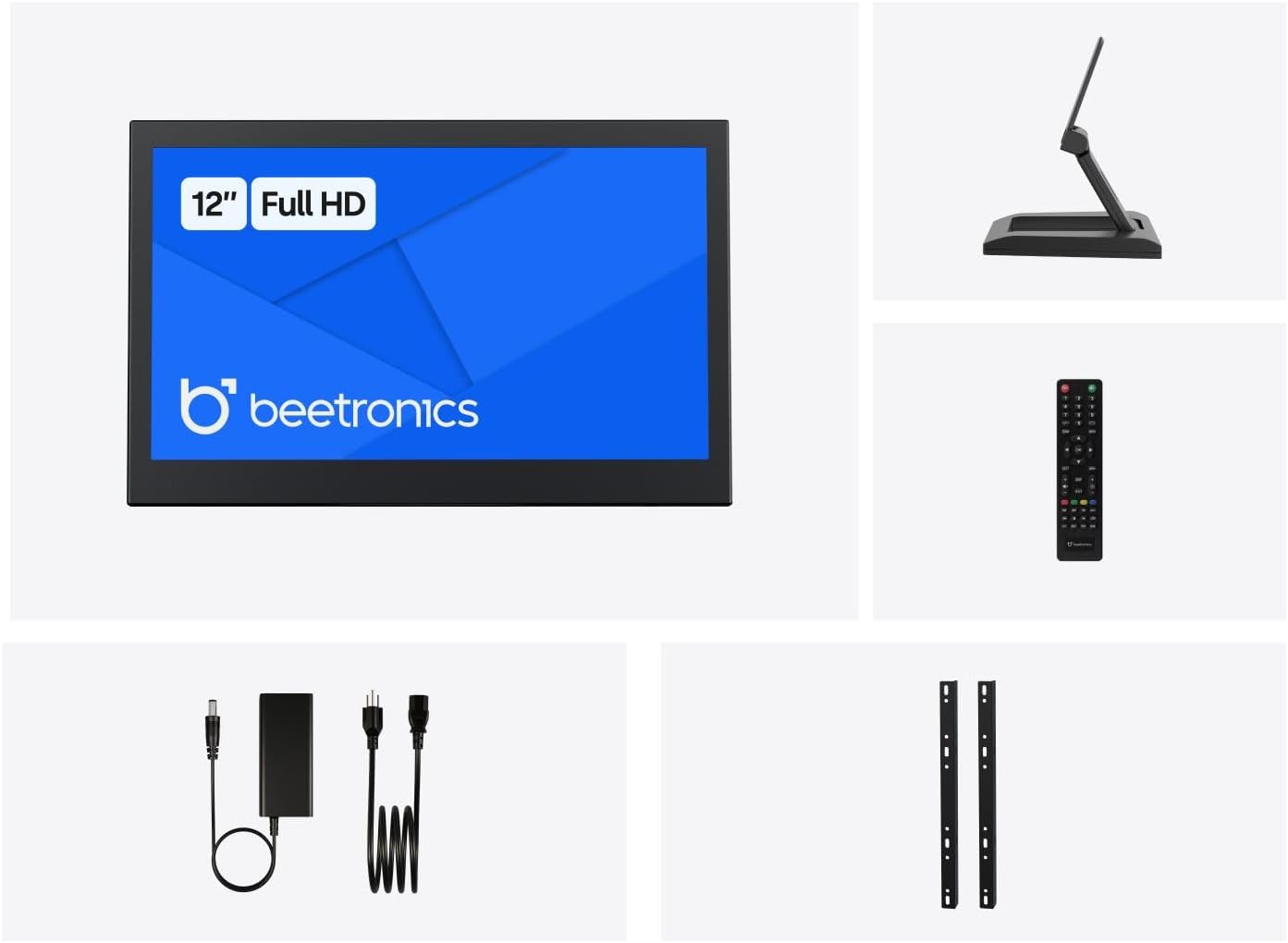
Figi 2.1: Package Contents. This image displays the Beetronics 12HD7M monitor along with its standard accessories, including the power adapter, remote, mounting brackets, and desktop stand.
3. Pwodwi souview
Monitor Dimensions and Design:
The Beetronics 12HD7M monitor features a robust metal housing, designed for industrial environments. Its compact form factor allows for versatile integration.

Figi 3.1: Monitor Dimensions. This image illustrates the physical dimensions of the 12HD7M monitor, including width (279 mm), height (179 mm), and stand height adjustment (50-64 mm).
Pò Antre / Sòti:
The monitor is equipped with a comprehensive set of rear-facing, downward-oriented input ports for easy cable management and installation.

Figi 3.2: Rear I/O Ports. This image provides a clear view of the monitor's rear panel, detailing the DC power input, HDMI, VGA, USB, AV, BNC, and audio input/output ports. Control buttons for power, menu, and volume are also visible.
- Antre pouvwa DC: For connecting the included power adapter.
- HDMI: High-Definition Multimedia Interface for digital video and audio.
- VGA: Video Graphics Array for analog video input.
- BNC: Bayonet Neill-Concelman connector, commonly used for professional video applications.
- RCA (AV): Composite video and stereo audio inputs.
- USB: For service or specific peripheral connections.
- Antre/soti odyo: 3.5mm jacks for audio connectivity.
4. Enstalasyon
4.1 Montaj Opsyon
The 12HD7M monitor offers flexible mounting solutions to suit various environments.
Enstalasyon Sipò Desktop:
The included collapsible stand allows for desktop placement and angle adjustment. Ensure the stand is securely attached to the monitor and placed on a stable, flat surface.
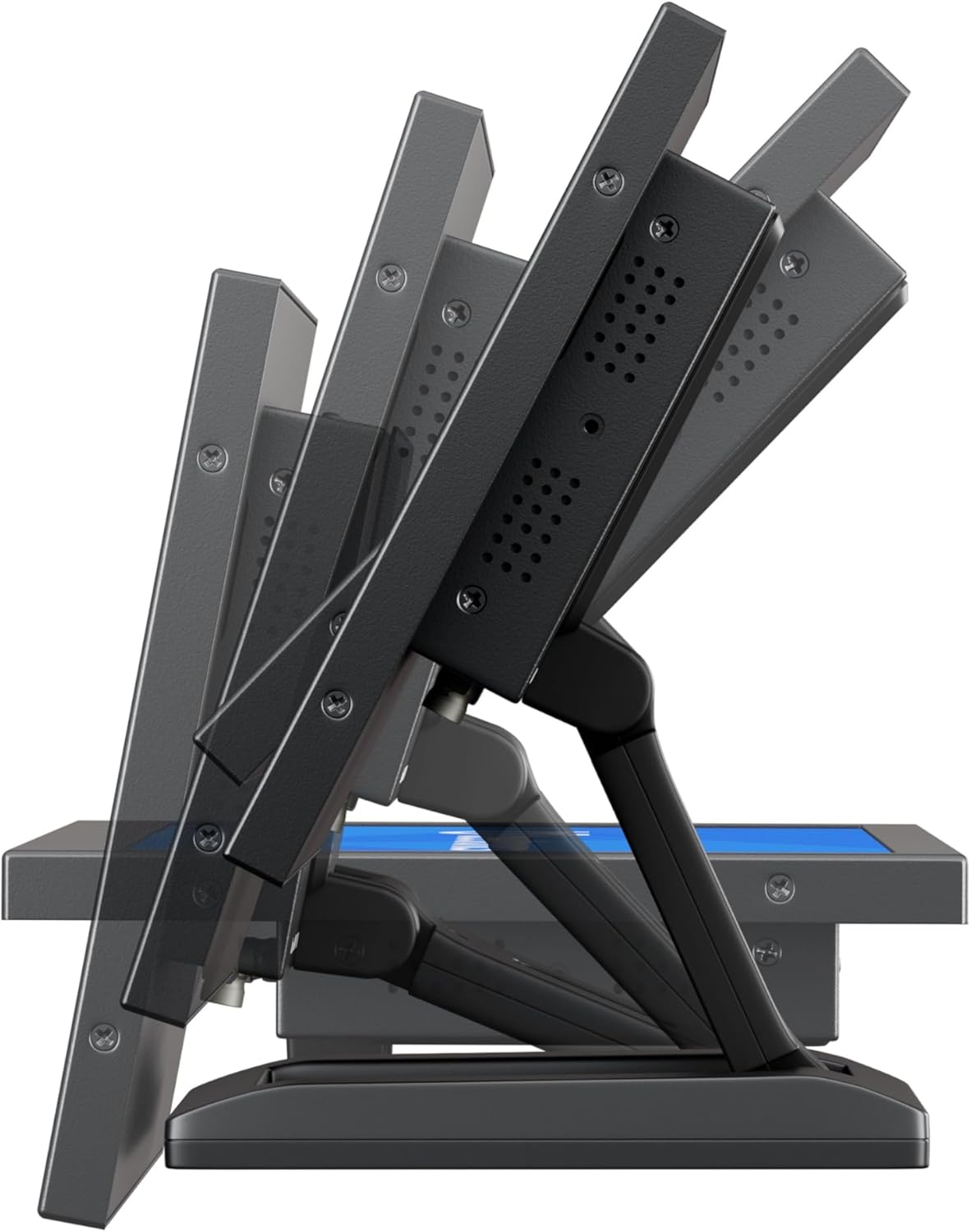
Figi 4.1: Adjustable Stand. This image shows the monitor's side profile, highlighting the flexibility of the collapsible stand to adjust the screen's tilt angle for optimal viewing.
VESA Wall/Panel Mounting:
The monitor features a 75mm VESA mount pattern on the rear, allowing it to be mounted on compatible VESA arms, wall mounts, or integrated into panels using the flush mounting brackets. Ensure appropriate screws (M4) are used and tightened securely.

Figi 4.2: VESA Mount Points. This image displays the back of the monitor, indicating the standard VESA mounting points for secure attachment to compatible brackets or arms.
4.2 Konekte pouvwa
- Connect the power adapter cable to the DC input port on the rear of the monitor.
- Plug the power adapter into a suitable electrical outlet. The monitor supports a wide input voltage seri de 9-36V DC.
4.3 Konekte Sous Videyo
Connect your video source (e.g., computer, camera, media player) to the desired input port on the monitor using appropriate cables.
- HDMI: For high-quality digital video and audio.
- VGA: Pou koneksyon videyo analòg.
- BNC: For professional video equipment.
- RCA (AV): For composite video and analog audio.
5. Operasyon Enstriksyon
5.1 Power On/Off
Press the 'ON/OFF' button located on the rear panel or on the remote control to power the monitor on or off.
5.2 Menu Navigation (OSD)
The On-Screen Display (OSD) menu allows you to adjust various monitor settings. Use the 'MENU' button to access the OSD, and the '+', '-', 'AUTO' buttons to navigate and adjust settings. The remote control can also be used for easier navigation.
5.3 Seleksyon Antre
To switch between different video input sources, press the 'AUTO' button on the rear panel or the 'Input' button on the remote control. Cycle through HDMI, VGA, BNC, and AV inputs until the desired source is displayed.
5.4 Anviwònman Foto
Access the OSD menu to adjust picture quality settings:
- Klate: Ajiste liminans jeneral ekran an.
- Kontras: Kontwole diferans ki genyen ant zòn klere ak zòn fènwa yo.
- Tanperati koulè: Selects preset color modes (e.g., Warm, Cool, User).
- Rapò aspè: Adjusts the display ratio (e.g., 16:9, 4:3).
- Netite: Enhances edge definition.
5.5 Anviwònman odyo
If an audio source is connected, adjust the volume using the '+' and '-' buttons on the rear panel or remote control. Further audio settings may be available in the OSD menu.
6. Antretyen
6.1 Netwaye monitè a
- Toujou etenn epi debranche monitè a anvan ou netwaye li.
- Sèvi ak yon ti moso twal mou, ki san pèl dampLave avèk dlo oswa yon pwodui netwayaj ekran dou ki pa abrazif.
- Pa flite likid la dirèkteman sou ekran an oswa nan okenn ouvèti.
- Evite itilize pwodui chimik ki agresif, solvang, oswa materyèl abrazif.
6.2 Swen Jeneral
- Evite mete objè lou sou monitè a.
- Pa ekspoze monitè a nan tanperati ekstrèm, imidite, oswa limyè solèy dirèk.
- Asire w ke gen ase vantilasyon toutotou monitè a pou anpeche li chofe twòp.
NAN. Depanaj
Si ou rankontre pwoblèm ak monitè ou a, gade pwoblèm ak solisyon komen sa yo.
| Pwoblèm | Kòz posib | Solisyon |
|---|---|---|
| Pa gen pouvwa | Power cable not connected; Power adapter faulty; Power outlet not working. | Check power cable connections; Test power adapter with another device; Try a different power outlet. |
| Pa gen siyal | Video cable not connected; Incorrect input source selected; Video source not active. | Ensure video cable is securely connected; Select the correct input source using the 'Input' button; Verify video source is powered on and outputting a signal. |
| Imaj la defòme oswa twoub | Rezolisyon ki pa kòrèk; Kab videyo ki lach; Paramèt monitè. | Set the video source to the monitor's native resolution (1920x1080); Reconnect video cable; Adjust 'Sharpness' or 'Auto' settings in the OSD. |
| Pa gen odyo | Audio cable not connected (for VGA/BNC/RCA); Volume too low; Audio source not active. | Ensure audio cable is connected (if not using HDMI); Increase monitor volume; Check audio output from the source device. |
8. Espesifikasyon
Detailed technical specifications for the Beetronics 12HD7M monitor.
| Karakteristik | Spesifikasyon |
|---|---|
| Nimewo Modèl | 12HD7M |
| Gwosè ekran | 11.6 pous (dyagonal) |
| Rezolisyon | 1920 x 1080 (Full HD) |
| Kalite Panel | IPS |
| Aspè rapò | 16:9 |
| Viewing Ang | 178° (Orizontal/Vètikal) |
| Imaj klète | 500 Candela |
| Sifas ekran | Mat |
| Antre Videyo | HDMI, VGA, BNC, RCA (AV) |
| Audio Antre / Sòti | 3.5mm Audio In, 3.5mm Audio Out |
| Antre pouvwa | 9-36 Vòlt (DC) |
| Dimansyon pwodwi | 1.4 x 11 x 9.6 pous (35.6 x 279.4 x 243.8 mm) |
| Pwa atik | 3.7 liv (1.68 kg) |
| Montaj | 75mm VESA, Collapsible Stand |
9. Garanti ak sipò
9.1 Enfòmasyon sou Garanti
The Beetronics 12HD7M monitor comes with a solid 2-ane garanti, reflecting our commitment to quality and reliability. This warranty covers defects in materials and workmanship under normal use. Please retain your proof of purchase for warranty claims.
9.2 Sipò teknik
For technical assistance, troubleshooting beyond this manual, or warranty inquiries, please contact Beetronics customer support. Refer to the official Beetronics websit la pou jwenn enfòmasyon kontak ak resous sipò ki pi resan yo.
Websit: www.beetronics.com