
1. Entwodiksyon
Thank you for choosing the ALLmeter Pinless Moisture Meter Model ALL019-DEFBA. This device is designed for non-invasive measurement of moisture content in various materials such as wood, walls, drywall, and masonry. Its advanced technology ensures accurate readings without causing damage to surfaces. This manual provides detailed instructions for the proper use, maintenance, and troubleshooting of your moisture meter to ensure optimal performance and longevity.
2. Enfòmasyon enpòtan sou sekirite
- Li tout enstriksyon yo ak anpil atansyon anvan ou opere aparèy la.
- Pa eseye ouvri oswa modifye aparèy la. Pa gen okenn pyès itilizatè a ka repare anndan l.
- Kenbe aparèy la lwen dlo ak imidite ki wo pou anpeche li domaje.
- Evite ekspoze aparèy la nan tanperati ekstrèm oswa limyè solèy la dirèk pou peryòd pwolonje.
- Remove batteries if the device will not be used for an extended period to prevent battery leakage.
- Jete pil yo ak aparèy la dapre règleman lokal yo.
3. Pake kontni
Verifye ke tout atik ki nan lis anba a yo enkli nan pakè ou a:
- ALLmeter Pinless Moisture Meter (Model ALL019-DEFBA)
- AAA Batteries (3 pieces)
- Manyèl itilizatè
- Pote Étui

Image 3.1: The ALLmeter Pinless Moisture Meter package contents, showing the meter, three AAA batteries, a user manual, and a gray carry pouch.
4. Pwodwi souview
4.1 Layout Aparèy

Imaj 4.1.1: Devan view of the ALLmeter Pinless Moisture Meter, highlighting its ergonomic design, large LCD display, and central control panel.
4.2 Bouton Kontwòl
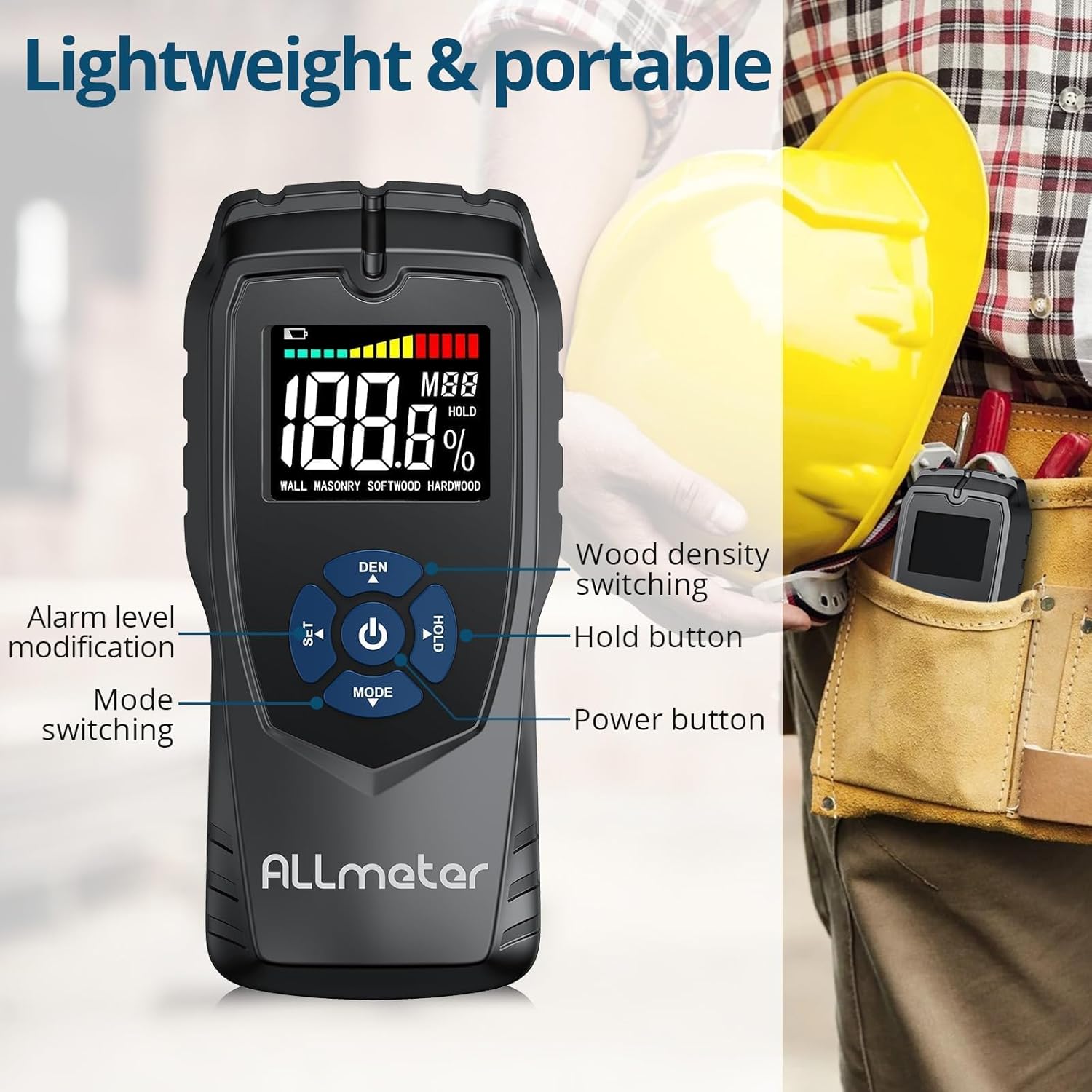
Imaj 4.2.1: Detaye view of the control buttons on the ALLmeter Pinless Moisture Meter. These include SET (for alarm level modification), DEN (for wood density switching), Power, HOLD, and MODE (for switching measurement modes).
- Bouton pouvwa (⑂): Peze pou limen oswa etenn aparèy la.
- MODE Button (▼): Press to cycle through different measurement modes (WALL, MASONRY, SOFTWOOD, HARDWOOD).
- SET Button (▲): Used to adjust alarm levels or other settings.
- DEN Button (▲): Used to switch between different wood density grades when in wood measurement modes.
- Bouton HOLD: Li bloke lekti aktyèl la sou ekran an. Peze ankò pou lage li.
4.3 Eleman ekspozisyon

Image 4.3.1: The LCD display of the ALLmeter Pinless Moisture Meter, indicating low battery, moisture bar display, moisture value, wood density grade (MBB), data hold symbol (HOLD), and current measuring mode.
- Endikasyon batri ki ba: Icon appears when battery power is low.
- Moisture Bar Display: Graphical representation of moisture level.
- Moisture Value: Digital display of the measured moisture percentage.
- Wood Density Grade (MBB): Indicates the selected wood density setting.
- Data Hold Symbol (HOLD): Appears when the HOLD function is active.
- Measuring Mode Indication: Displays the currently selected material mode (e.g., WALL, MASONRY, SOFTWOOD, HARDWOOD).
5. Enstalasyon
5.1 Enstalasyon batri
- Jwenn kouvèti konpatiman batri a sou dèyè aparèy la.
- Glise oswa deklipe kouvèti a pou ouvri konpatiman an.
- Mete twa (3) pil AAA, asire w polarite ki kòrèk la (+/-) jan yo endike anndan konpatiman an.
- Ranplase kouvèti lòj batri a byen.
6. Operasyon Enstriksyon
6.1 Power On/Off
- To turn on: Press the Power button (⑂). The display will illuminate.
- To turn off: Press and hold the Power button (⑂) for approximately 2 seconds. The device also features an auto power-off function to conserve battery life after a period of inactivity.
6.2 Chwazi Mòd Mezi a
- After powering on, press the MODE button (▼) repeatedly to cycle through the available material modes: WALL, MASONRY, SOFTWOOD, HARDWOOD.
- Select the mode that corresponds to the material you intend to measure.
6.3 Pran yon mezi
- Ensure the correct measurement mode is selected.
- Place the back of the meter (the sensing plate area) flat against the surface of the material you wish to measure. Ensure full contact.
- The moisture reading will be displayed instantly on the LCD screen.
- Move the meter across the surface to check for variations in moisture content.
6.4 Fonksyon HOLD
- While taking a measurement, press the HOLD button to freeze the current reading on the display. This is useful for reading measurements in hard-to-reach areas.
- Press the HOLD button again to release the reading and resume live measurement.
6.5 Audible Alarm Settings
- The device features an audible alarm that activates when the measured moisture level exceeds a preset threshold for the selected material.
- To adjust the alarm threshold, press the SET button (▲). Follow the on-screen prompts to increase or decrease the alarm percentage.
6.6 Wood Density Adjustment (DEN)
- When in SOFTWOOD or HARDWOOD mode, the DEN button (▲) can be used to cycle through different wood density grades (MBB) for more accurate readings based on the specific wood type. Refer to wood density charts for your material.
7. Measurement Modes and Ranges
The ALLmeter Pinless Moisture Meter provides distinct measurement ranges and visual indicators for different moisture levels across various materials.

Image 7.1: The visual moisture alarm system and a table detailing the 'Dry', 'Mid', and 'Wet' moisture percentage ranges for Wall, Masonry, Softwood, and Hardwood materials.
7.1 Moisture Level Indicators
- Vèt: Indicates a Dry moisture level.
- Papye jòn: Indicates a Mid-range moisture level.
- Wouj: Indicates a Wet moisture level, potentially requiring attention.
7.2 Measurement Ranges by Material
| Mòd Mezi | Sèk | Mid | Mouye |
|---|---|---|---|
| MI | <8% | 8-11.9% | ≥12% |
| MASONry | <17% | 17-19.9% | ≥20% |
| BWA MOUN | <13% | 13-17.9% | ≥18% |
| BWA DI | <12% | 12-15.9% | ≥16% |
7.3 Non-Invasive Measurement Principle
The ALLmeter Pinless Moisture Meter utilizes advanced inductive surveying technology. This method allows for moisture detection without penetrating the material surface, preventing damage. Unlike destructive surveying methods that require pins or probes, the pinless meter provides quick and clean readings.

Image 7.3.1: A visual comparison between inductive (pinless) surveying, which leaves no marks, and destructive (pin-type) surveying, which creates small holes in the material.
7.4 Multiple Applications
This moisture meter is versatile and suitable for a wide range of applications in home inspection, construction, and woodworking:

Imaj 7.4.1: Egzanpamples of the meter's application on various materials including walls, masonry, softwood, and hardwood.
8. Antretyen
- Netwayaj: Siye aparèy la avèk yon twal mou epi sèk. Pa sèvi ak pwodui netwayaj abrazif oswa solvan.
- Depo: Store the meter in its carry pouch in a cool, dry place when not in use. Avoid areas with extreme temperatures or high humidity.
- Ranplasman batri: Ranplase pil yo lè endikatè pil ki fèb la parèt sou ekran an.
NAN. Depanaj
| Pwoblèm | Kòz posib | Solisyon |
|---|---|---|
| Aparèy pa limen | Batri ki mouri oswa mal enstale | Tcheke polarite pil yo; ranplase yo ak nouvo pil AAA. |
| Lekti kòrèk | Incorrect measurement mode selected; poor contact with surface; device malfunction. | Ensure correct mode is selected for the material; press the meter firmly and flat against the surface; if problem persists, contact customer support. |
| Ekran an vid oswa li ap flache | Batri fèb; aparèy la pa fonksyone byen. | Replace batteries; if problem persists, contact customer support. |
| Alam ki tande pa mache | Alarm disabled or volume too low; device malfunction. | Check alarm settings using the SET button; ensure moisture level exceeds threshold; if problem persists, contact customer support. |
10. Espesifikasyon teknik
| Spesifikasyon | Valè |
|---|---|
| Nimewo Modèl | ALL019-DEFBA |
| Mak | ALLmeter |
| Prensip Mezi | Pinless, Inductive |
| Sensing Depth | 5 cm |
| Sensing Plate Size | 5 x 6 cm |
| Presizyon | ± 4% |
| Ekspozisyon | LCD Color Display with Analog Bar |
| Sous pouvwa | 3 x AAA pil |
| Auto pouvwa-Off | Wi |
| Alam ki tande | Wi |
| Pwa atik | 231 g (0.23 kilogram) |
| Dimansyon pake | 19.4 x 8.8 x 4.2 cm |
11. Garanti ak Sipò Kliyan
For warranty information, technical assistance, or customer support, please refer to the contact details provided with your purchase documentation or visit the official ALLmeter website. Please have your model number (ALL019-DEFBA) and purchase date available when contacting support.