
ELEPHAS BL128
ELEPHAS Mini Portable Projector User Manual
Modèl: BL128
1. Entwodiksyon
Thank you for choosing the ELEPHAS Mini Portable Projector. This compact and versatile device is designed to provide a high-quality viewing experience for entertainment, education, and business presentations. With its advanced features and user-friendly design, you can enjoy large-screen projection anywhere.
The ELEPHAS Mini Projector, comparable to a smartphone in size, incorporates upgraded 2023 technology. It features a built-in HIFI speaker for rich audio without the need for external speakers and an efficient heat dissipation system to minimize fan noise. Supporting 1080P HD resolution and equipped with a German Emerald Glass Lens, it delivers vibrant, detailed images up to 200 inches. Its multimedia capabilities allow easy connection to a wide range of devices.

Image: The ELEPHAS Mini Portable Projector, shown with its included mini tripod, demonstrating its compact size and portability when held in a hand.
2. Pake kontni
Tanpri verifye pake a ak anpil atansyon pou asire w ke tout bagay yo la:
- ELEPHAS Mini Portable Projector (Model BL128)
- Mini tripod
- Pote sak
- Kontwòl Remote (pil pa enkli)
- Adaptè pouvwa
- Manyèl itilizatè

Image: The ELEPHAS Mini Portable Projector displayed alongside a smartphone and its dedicated carrying case, illustrating its compact dimensions (15cm x 11cm x 6cm) for easy transport.
3. Pwodwi Features
The ELEPHAS Mini Portable Projector offers a range of features designed for optimal performance and user convenience:
- Konsepsyon ultra-konpak: Easily fits in your hand, making it highly portable for indoor and outdoor use.
- 1080P HD Support: Delivers clear and detailed images with support for Full HD resolution.
- Built-in HIFI Speaker: Provides excellent sound quality without the need for external audio devices.
- Dissipasyon chalè efikas: Advanced cooling system significantly reduces fan noise for a quieter vieweksperyans nan.
- German Emerald Glass Lens: Equipped with a high-quality lens supporting 24-bit true colors and over 16.77 million colors for vivid projection.
- Gwo pwojeksyon ekran: Capable of projecting an impressive screen size of up to 200 inches.
- Koneksyon versatile: Features multiple ports including USB, HDMI, AV, and Audio for broad device compatibility.
- Wide konpatibilite aparèy: Connects seamlessly with laptops, PCs, TV boxes, TV sticks, Chrome Books, tablets, Blu-Ray DVD players, USB drives, media players, and smartphones (iOS, Android, Windows).

Image: An internal diagram illustrating the advanced optical path and components of the projector, highlighting the German Osram LED projection technology and Emerald Glass Lens responsible for high-quality image output.
4. Gid Enstalasyon
Follow these steps to set up your ELEPHAS Mini Portable Projector:
- Plasman: Place the projector on a stable, flat surface, such as a table, at the desired distance from your projection screen or wall. Ensure there are no obstructions blocking the lens or ventilation ports.
- Koneksyon pouvwa: Konekte adaptè kouran an nan pò antre kouran pwojektè a, answit branche adaptè a nan yon priz kouran.
- Pouvwa sou: Peze bouton pouvwa a sou pwojektè a oswa sou kontwòl remote la pou limen aparèy la. Limyè endikatè a ap limen.
- Ajisteman konsantre: Once the projector is on, adjust the focus ring (usually located near the lens) until the projected image appears clear and sharp.
- Konekte Aparèy: Refer to the 'Connectivity' section to connect your desired input devices (e.g., laptop, smartphone, USB drive).

Image: Two individuals enjoying an outdoor movie night, with the ELEPHAS Mini Portable Projector projecting onto a screen inside a tent, demonstrating its suitability for portable outdoor entertainment.
5. Operasyon Enstriksyon
This section outlines the basic operation of your projector:
- Kontwòl Remote: Use the included remote control to navigate menus, select input sources, adjust volume, and control playback. Ensure batteries are inserted correctly.
- Seleksyon sous Antre: Press the 'Source' button on the remote or projector to cycle through available input options (HDMI, USB, AV). Select the input corresponding to your connected device.
- Kontwòl Volim: Use the volume up/down buttons on the remote to adjust the audio output from the built-in speaker.
- Ajisteman imaj: In addition to the manual focus ring, some settings like aspect ratio or keystone correction might be available in the projector's on-screen display (OSD) menu. Access the OSD menu using the 'Menu' button on the remote.
- Pouvwa Off: Press the power button again to turn off the projector. It is recommended to allow the projector to cool down before unplugging it.
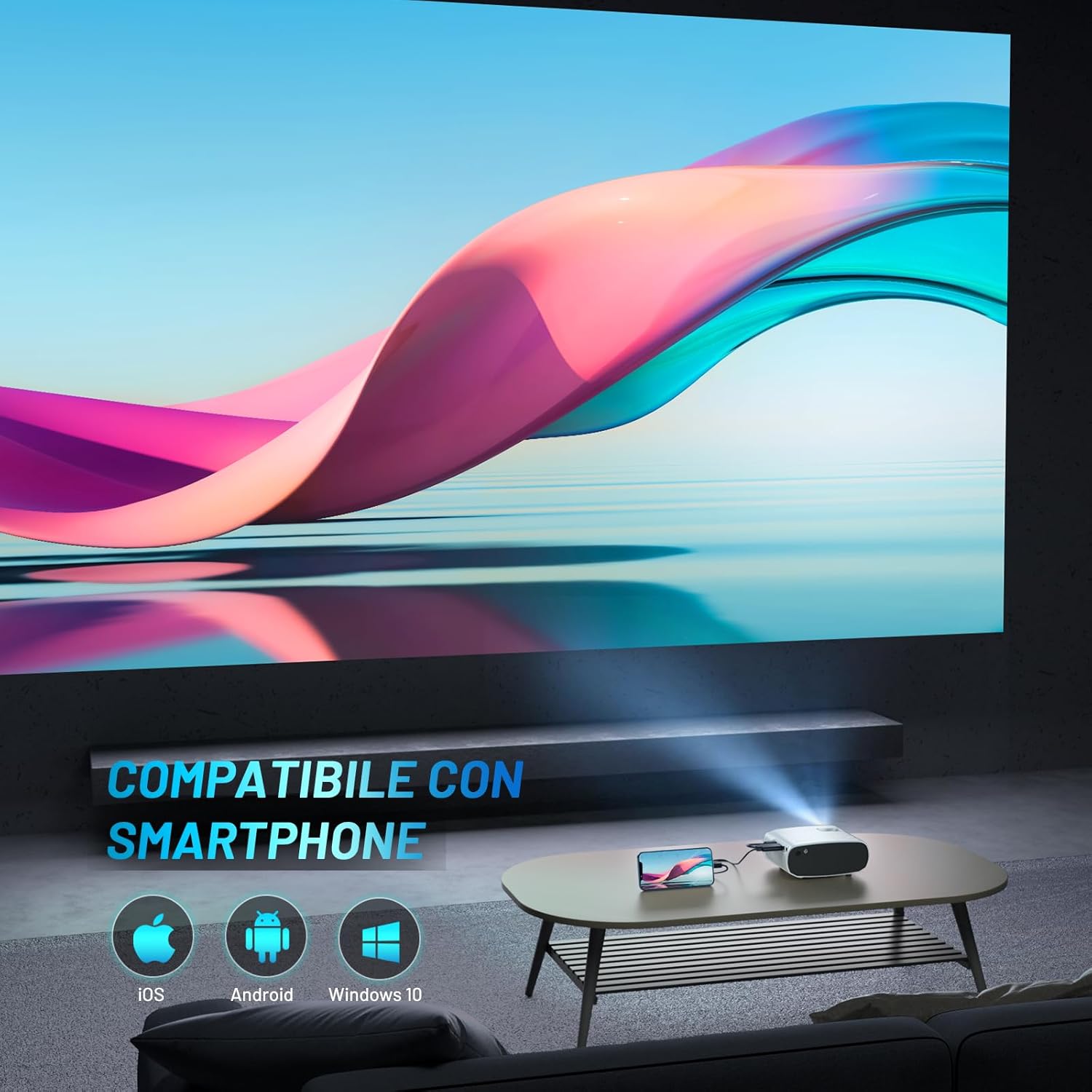
Image: The ELEPHAS Mini Portable Projector set up in a living room, projecting content onto a wall while connected to a smartphone, demonstrating its ease of use for home entertainment.
6. Koneksyon
The ELEPHAS Mini Portable Projector offers various connection options to suit your needs:
- HDMI Port: Connect devices such as laptops, PCs, TV boxes, TV sticks (e.g., Roku Stick, Fire TV, Chromecast), gaming consoles (XBOX, PS4), and Blu-Ray DVD players for high-definition video and audio transmission.
- Pò USB: Plug in USB flash drives to play multimedia content directly (videos, photos, music).
- Pò AV: Use the AV cable (not always included, check package) to connect older devices with composite video and stereo audio outputs.
- Pò soti odyo: Connect external speakers or headphones for a more immersive audio experience, though the built-in HIFI speaker is often sufficient.
- Konpatibilite Smartphone: The projector supports direct connection with iOS, Android, and Windows smartphones, often requiring a compatible adapter or cable (not included) for screen mirroring.

Image: A visual diagram illustrating the projector's extensive multimedia support, showing connections to various devices such as Roku Stick, Fire TV, Chromecast, external speakers, USB disk, phone/tablet/PC, XBOX/PS4, and DVD player.
7. Antretyen
Bon antretyen asire lonjevite ak pèfòmans optimal pwojektè ou a:
- Netwayaj lantiy: Siye lantiy pwojektè a dousman avèk yon twal mou ki pa gen pousyè, espesyalman fèt pou sifas optik. Pa sèvi ak pwodui netwayaj abrazif oswa fòs twòp.
- Pò vantilasyon: Regularly check and clean the ventilation ports to prevent dust buildup, which can hinder heat dissipation and affect performance. Use a soft brush or compressed air.
- Depo: When not in use, store the projector in its carrying bag in a cool, dry, and dust-free environment. Avoid extreme temperatures or humidity.
- Kouran koupe byen: Always power off the projector using the designated power button and allow it to complete its shutdown cycle before unplugging.
NAN. Depanaj
Si ou rankontre pwoblèm ak pwojektè ou a, gade pwoblèm ak solisyon komen sa yo:
| Pwoblèm | Kòz posib | Solisyon |
|---|---|---|
| Pa gen imaj projeté | Pa gen kouran; Sous antre ki pa kòrèk; Koneksyon kab ki lach | Ensure power adapter is securely connected and outlet is active. Select the correct input source (HDMI, USB, AV). Check all cable connections. |
| Pa gen son | Volume too low; Muted; External audio device not connected/configured | Increase volume using remote. Check if projector or source device is muted. Ensure external speakers are properly connected if used. |
| Image is blurry/unclear | Focus not adjusted; Projector too far/close; Lens dirty | Adjust the manual focus ring until the image is sharp. Ensure projector is within optimal projection distance. Clean the lens. |
| Image edges are not sharp | Inherent characteristic of some compact projectors; Keystone correction needed | While the projector offers good overall clarity, slight softness at the extreme edges can be a characteristic of compact projectors. Ensure the projector is perpendicular to the screen and adjust keystone correction if available in settings. |
| Bri fanatik la fò | Normal operation; Blocked vents | A certain level of fan noise is normal for cooling. Ensure ventilation ports are not blocked and are clean. The projector features an efficient heat dissipation system to minimize noise. |
9. Espesifikasyon
| Mak | ELEPHAS |
| Nimewo Modèl | BL128 |
| Koulè | Blan |
| Kalite pwodwi | Pwojektè pòtab |
| Koneksyon Teknoloji | USB, HDMI |
| Karakteristik espesyal | Portable, Built-in Speaker, Efficient Heat Dissipation System |
| Aparèy konpatib | Smartphone, Laptop, PC, TV Box, TV Stick, Chrome Book, Tablets, Blu-Ray DVD Players, USB Drives, Media Players |
| Rezolisyon ekspozisyon | 1920 x 1080 (1080P HD Support) |
| Kalite ekspozisyon | dirije |
| Faktè fòm | Pòtab |
| Kalite aliye | Tabletop mòn |
| Konpozan ki enkli | Mini Tripod, Carrying Bag |
| Itilizasyon Rekòmande | Biznis, Edikasyon, Jwèt Videyo, Sinema Lakay |
10. Garanti ak sipò
For specific warranty details regarding your ELEPHAS Mini Portable Projector, please refer to the warranty card included with your purchase or the product listing on the retailer's websit. Tèm garanti yo anjeneral kouvri domaj fabrikasyon pou yon peryòd espesifik apati dat acha a.
For technical support, troubleshooting assistance beyond this manual, or any other inquiries, please contact ELEPHAS customer service. Contact information can usually be found on the product packaging, the official ELEPHAS websit la, oubyen atravè pwen acha ou a.
Note: No official product videos were found for this model at the time of manual creation.
Ask a question about this manual
Ask about setup, troubleshooting, compatibility, parts, safety, or missing instructions. Manuals+ will review the question and use this page’s manual context to help answer it.