
DinoFire X17
Manyèl Itilizatè DinoFire Rechargeable Presentation Clicker X17
Modèl: X17
Entwodiksyon
Thank you for choosing the DinoFire Rechargeable Presentation Clicker, Model X17. This device is designed to enhance your presentations with its wireless control, integrated laser pointer, and user-friendly features. This manual provides detailed instructions for setup, operation, maintenance, and troubleshooting to ensure optimal performance.
Kontni pake
Tanpri verifye ke tout atik yo prezan nan pakè ou a:
- DinoFire Rechargeable Presentation Clicker (X17)
- USB Receiver (stored inside the clicker)
- Mikwo USB Chaje Kab
- Manyèl Itilizatè (dokiman sa a)
Pwodwi souview
The DinoFire X17 Presentation Clicker features an ergonomic design with intuitive controls for seamless presentation delivery. Familiarize yourself with the device's components and button functions.
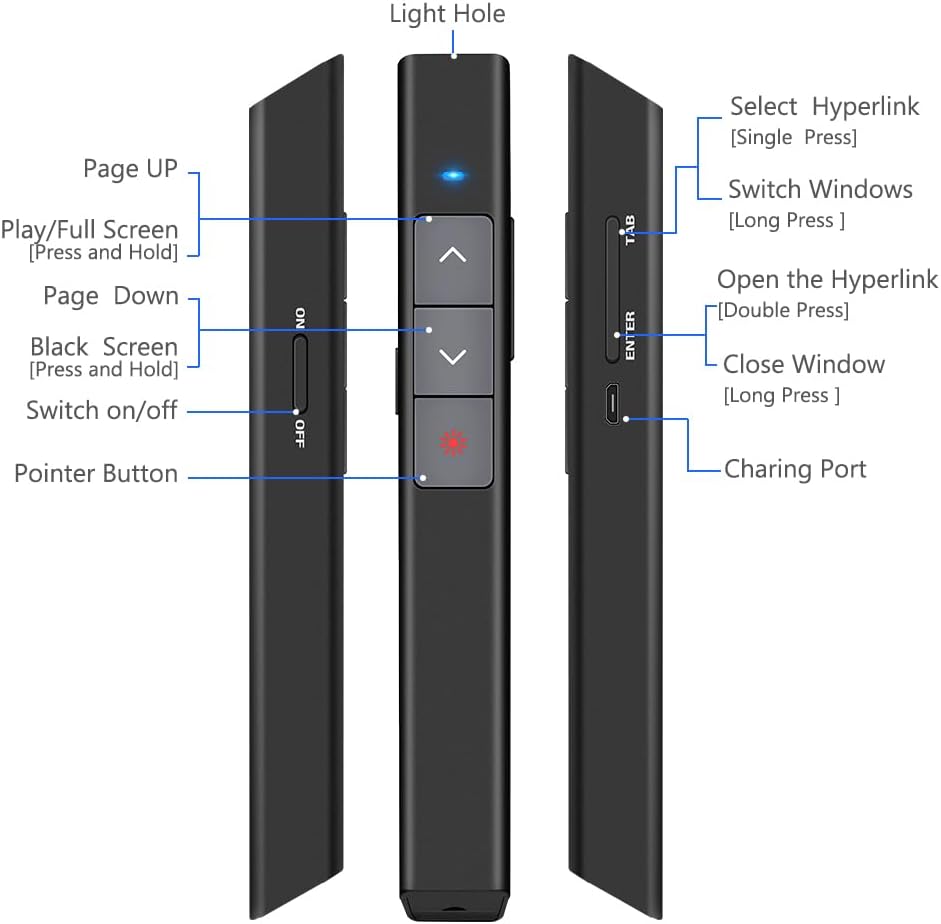
Figi 1: Detaye view of the DinoFire X17 Presentation Clicker showing button functions and port locations.
Fonksyon bouton:
- Page Up (▲): Advances to the previous slide.
- Page Down (▼): Advances to the next slide.
- Pointer Button: Activates the red laser pointer.
- Play/Full Screen (Press and Hold): Initiates or exits full-screen presentation mode.
- Black Screen (Press and Hold): Toggles a black screen during presentation.
- Chanje sou / koupe: Power switch for the device.
- Select Hyperlink (Single Press): Selects a hyperlink on the slide.
- Open the Hyperlink (Double Press): Opens the selected hyperlink.
- Switch Windows (Long Press): Cycles through open application windows.
- Close Window (Long Press): Closes the active window.
- Pò chaje: Micro USB port for recharging the device.
- Light Hole: Location of the laser emitter.
Gid Enstalasyon
1. Charging the Presenter
Before initial use, fully charge the presentation clicker. A full charge typically takes approximately one hour and provides power for over one week of use.
- Connect the provided Micro USB charging cable to the charging port on the side of the presenter.
- Konekte lòt bout kab la nan yon sous kouran USB (pa egzanp, yon pò USB òdinatè, yon adaptè USB nan miray).
- The charging indicator light will illuminate (refer to "Low Power Indicator" section for details).
- Yon fwa konplètman chaje, dekonekte kab la.

Figi 2: The presentation clicker being charged via its Micro USB port, connected to a laptop.
2. Konekte Reseptè USB a
The USB receiver is stored magnetically within the presentation clicker for convenience and to prevent loss.
- Gently pull out the USB receiver from the bottom end of the presentation clicker.
- Insert the USB receiver into an available USB port on your computer (laptop or desktop).
- The system will automatically detect and install the necessary drivers. No manual driver installation is required.

Figi 3: The magnetic storage for the USB receiver, demonstrating its removal and insertion into a computer's USB port.
3. Powering On / Off
- Locate the "Switch on/off" button on the side of the clicker.
- Slide the switch to the "ON" position to power on the device.
- Slide the switch to the "OFF" position when not in use to conserve battery life.
4. Konpatibilite Sistèm ak Lojisyèl
The DinoFire X17 is widely compatible with various operating systems and presentation software.
- Sistèm sipòte: Windows 2003, XP, Windows Vista, Windows 7, 8, 10, Linux, Android, Mac OS.
- Sipòte lojisyèl: Keynote, Prezi, MS Word, Excel, PowerPoint, ACD See, website browsers, iWork, Google Slides, etc.
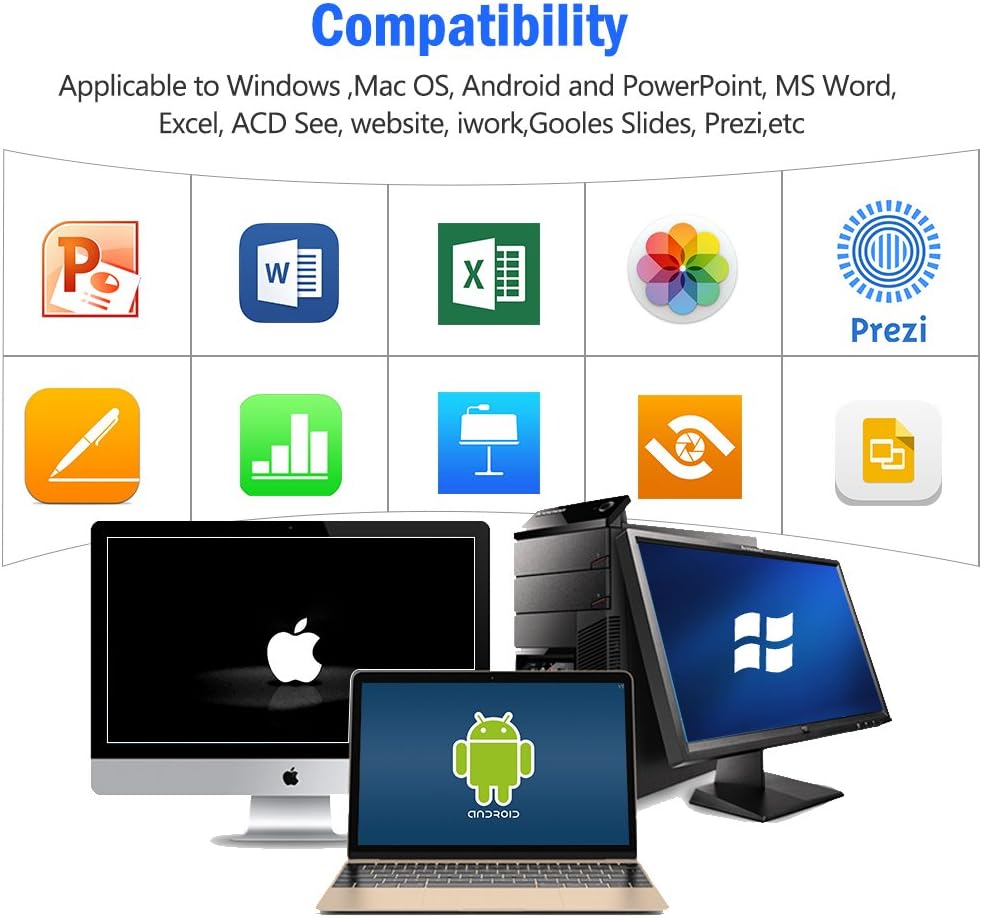
Figi 4: Visual representation of the broad compatibility of the presentation clicker with different operating systems and presentation applications.
Enstriksyon Operasyon
Basic Presentation Control
- Next Slide: Press the "Page Down" (▼) button.
- Previous Slide: Press the "Page Up" (▲) button.
- Start/Exit Full Screen: Press and hold the "Page Up" (▲) button.
- Ekran Nwa: Press and hold the "Page Down" (▼) button to toggle a black screen.
Sèvi ak Pointer lazè a
The integrated red laser pointer allows you to highlight specific content on your screen or projection.
- Press and hold the "Pointer Button" (red dot icon) to activate the laser.
- Release the button to turn off the laser.
- The laser has a range of up to 300 feet (91 meters).
- Atansyon: Do not point the laser directly at people's eyes or at highly reflective surfaces.

Figi 5: The red laser pointer in operation, highlighting its visibility and including a safety warning.
Fonksyon avanse
- Select Hyperlink: Single press the "ENTER" button.
- Open Hyperlink: Double press the "ENTER" button.
- Chanje Fenèt: Long press the "TAB" button to cycle through open applications.
- Close Window: Long press the "ENTER" button to close the active window.
Ranje Kontwòl San Fil
The DinoFire X17 offers a wireless control range of up to 100 feet (30 meters), allowing you freedom of movement during your presentation.

Figi 6: Illustration of the presentation clicker's effective long control range in a presentation setting.
Antretyen
Gid pou Chaje
- Charge the device when the low power indicator flashes continuously.
- Avoid overcharging by disconnecting the cable once fully charged.
- Use the provided Micro USB cable or a certified equivalent for charging.
Depo Reseptè USB
Always store the USB receiver inside the magnetic compartment of the clicker when not in use to prevent loss and damage.
Netwayaj
Siye aparèy la avèk yon twal mou epi sèk. Pa sèvi ak pwodui netwayaj likid oswa materyèl abrazif.
Depanaj
| Pwoblèm | Kòz posib | Solisyon |
|---|---|---|
| Aparèy la pa reponn. | Low battery; USB receiver not connected; Device is off. | Charge the device; Ensure USB receiver is securely plugged in; Turn on the device. |
| Pwent lazè a pa fonksyone. | Low battery; Laser button not pressed correctly. | Charge the device; Press and hold the laser button firmly. |
| Ti distans kontwòl. | Obstructions; Interference; Low battery. | Ensure clear line of sight to the receiver; Move away from sources of interference; Charge the device. |
| Hyperlink function not working. | Software specific issue; Hyperlink not properly selected. | Ensure the hyperlink is active and selected (single press ENTER) before attempting to open (double press ENTER). Check software settings. |
Endikatè ki ba pouvwa
The device features a low power indicator to alert you when charging is needed. When the indicator flashes continuously, please charge the device. The device will enter auto-sleep mode after approximately 5 minutes of inactivity to save energy.

Figi 7: Explanation of the indicator light states for working, charging, and fully charged conditions.
Espesifikasyon
- Modèl: X17
- Mak: DinoFire
- Teknoloji san fil: 2.4GHz RF
- Ranje kontwòl: Jiska 100 pye (30 mèt)
- Kalite lazè: Wouj lazè
- Ranje lazè: Jiska 300 pye (91 mèt)
- Kalite batri: 1 batri ityòm Polymère (enkli)
- Tan pou chaje: Apeprè 1 èdtan
- Tan Itilizasyon: Over one week (on a single charge)
- Dimansyon: 6.42 x 1.61 x 1.14 pous (16.3 x 4.1 x 2.9 cm)
- Pwa atik: 1.6 ons (45 gram)
- Sistèm konpatib: Windows 2003/XP/Vista/7/8/10, Linux, Android, Mac OS
- Lojisyèl konpatib: Keynote, Prezi, MS Word, Excel, PowerPoint, ACD See, web browsers, iWork, Google Slides
Garanti ak sipò
Enfòmasyon sou Garanti
The DinoFire Rechargeable Presentation Clicker X17 typically comes with a 3-year warranty. Please refer to your purchase documentation or the manufacturer's official websit la pou wè tèm ak kondisyon garanti espesifik yo.
Sipò pou Kliyan
For technical assistance, troubleshooting beyond this manual, or warranty claims, please contact DinoFire customer support through their official website or the retailer where the product was purchased. Keep your purchase receipt or order number handy for faster service.
Ask a question about this manual
Ask about setup, troubleshooting, compatibility, parts, safety, or missing instructions. Manuals+ will review the question and use this page’s manual context to help answer it.