
Amazon Echo Show 21
Amazon Echo Show 21 Manyèl itilizatè
Model: Echo Show 21
1. Entwodiksyon
Welcome to your new Amazon Echo Show 21. This smart display is designed to be the central hub for your home, offering a large Full HD screen for entertainment, organization, and communication. With built-in Fire TV and Alexa, you can stream content, manage your smart home, make video calls, and keep your family organized with customizable widgets.

Figure 1.1: Amazon Echo Show 21 Overview
The Echo Show 21 integrates seamlessly into your daily life, providing a visual and interactive experience for all your Alexa commands.
2. Pou kòmanse: Enstalasyon
2.1 Sa ki nan bwat la
- Aparèy Echo Show 21 la
- Alexa Voice Remote with batteries (2 AAA included)
- Power adapter (30W) and 5 ft. cord (white)
- Wall mount, anchors, screws, mounting template
- Gid pou kòmanse rapid
2.2 Inisyal Enstalasyon
The Echo Show 21 is designed for simple setup. You will need a Wi-Fi connection.
- Pouvwa sou: Konekte adaptè kouran an nan Echo Show 21 ou a epi branche l nan yon priz miray. Aparèy la ap limen otomatikman.
- Koneksyon Wi-Fi: Follow the on-screen instructions to connect your device to your Wi-Fi network. Amazon Wi-Fi simple setup can automatically connect your device if you are a Prime member and have previously saved your Wi-Fi credentials.
- Koneksyon kont Amazon: Konekte avèk kalifikasyon kont Amazon ou.
- Pèsonalizasyon: Customize your home screen, set up profiles, and configure your preferred settings.
- Pairing Remote: The included Alexa Voice Remote should pair automatically. If not, follow the on-screen instructions or refer to the quick start guide for manual pairing.
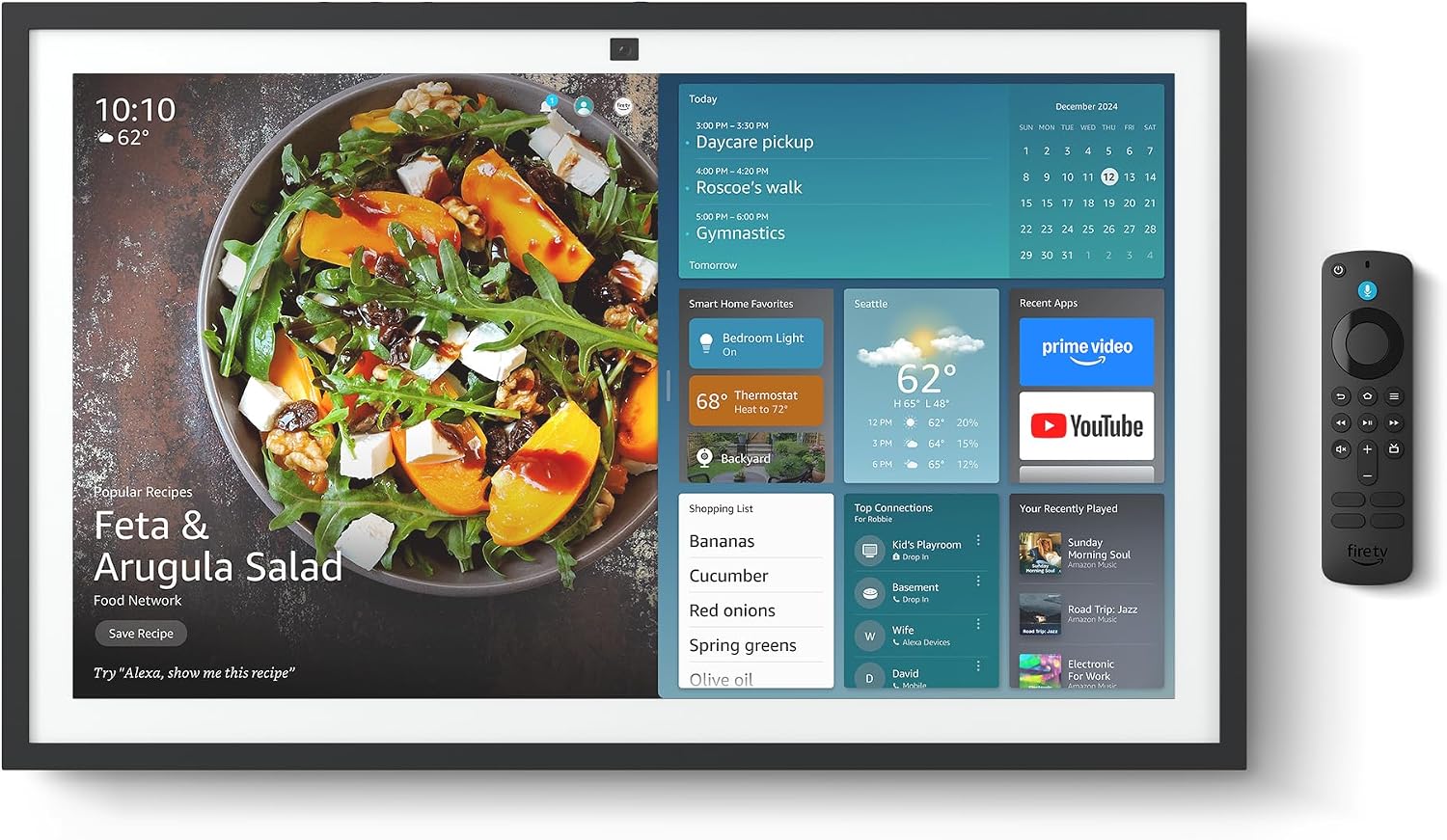
Figure 2.1: Echo Show 21 with Alexa Voice Remote
2.3 Montaj Opsyon
The Echo Show 21 can be wall-mounted using the included hardware or placed on a stand (sold separately). Wall mounting requires an electric drill.
3. Kijan pou w itilize Echo Show 21 ou a
3.1 Kontwòl Vwa ak Alexa
Your Echo Show 21 is primarily controlled by voice using Alexa. Simply say the wake word "Alexa" followed by your command or question.
- Kòmandman Jeneral: "Alexa, what's the weather?", "Alexa, set a timer for 10 minutes."
- Mizik ak odyo: "Alexa, play pop music," "Alexa, play my morning playlist."
- Video & Entertainment: "Alexa, open Prime Video," "Alexa, play The Boys on Netflix."
3.2 Entegrasyon Fire TV
Enjoy endless entertainment with built-in Fire TV. Use the included Alexa Voice Remote or voice commands to navigate.

Figure 3.1: Fire TV Interface
- Access thousands of apps like Prime Video, Netflix, YouTube, Apple TV.
- Stream movies, TV shows, and live content.
- The Fire TV remote allows for traditional navigation and playback control.
3.3 Home Screen & Widgets
The 21-inch display is ideal for organizing your day with customizable widgets.

Figure 3.2: Customizable Home Screen Widgets
- Keep important information like calendars, shopping lists, and weather in view.
- Personalize your home screen with family photos.
3.4 Kontwòl Kay Entelijan
Control compatible smart devices using your voice or the smart home dashboard.

Figure 3.3: Smart Home Dashboard
- Turn lights on/off, adjust thermostats, or view emisyon kamera an dirèk.
- Supports Zigbee, Matter, and Thread Border Router for broad compatibility.
3.5 Video Calling
Connect with family and friends using the 13 MP camera with auto-framing, wide field of vision, 3.3x zoom, and noise reduction.

Figure 3.4: Echo Show 21 as a Digital Photo Frame
The camera can also be used to display your favorite memories as a digital photo frame.
4. Antretyen
Pou asire lonjevite ak pèfòmans optimal Echo Show 21 ou a, swiv gid antretyen sa yo:
- Netwaye ekran an: Sèvi ak yon twal mou ki pa gen pousyè pou siye ekran an dousman. Pou tach ki difisil pou retire, siye l yon ti kras.ampRense twal la avèk dlo. Evite pwodui netwayaj abrazif oswa espre dirèkteman sou ekran an.
- Netwaye kò aparèy la: Wipe the exterior surfaces with a dry, soft cloth. Do not use harsh chemicals or solvents.
- Vantilasyon: Ensure the device's ventilation openings are not blocked to prevent overheating.
- Mizajou lojisyèl: Your Echo Show 21 receives automatic software security updates. Ensure your device is connected to Wi-Fi to receive these updates.
NAN. Depanaj
If you encounter issues with your Echo Show 21, try the following common solutions:
- Aparèy pa reponn: Try saying "Alexa" again clearly. If unresponsive, unplug the power adapter for a few seconds and then plug it back in to restart the device.
- Pa gen koneksyon Wi-Fi: Check your router and modem to ensure they are working correctly. Restart your router. On the Echo Show 21, go to Settings > Network to re-select your Wi-Fi network and re-enter the password.
- Pwoblèm odyo: Ensure the volume is not muted or too low. Say "Alexa, turn up the volume." Check audio settings in the device menu.
- Kamera a pa fonksyone: Ensure the physical camera shutter is open and the mic/camera-off button is not activated (red light indicates off).
- Remote pa reponn: Check the batteries in the Alexa Voice Remote. If necessary, replace them. Re-pair the remote if it becomes disconnected.
6. Espesifikasyon teknik
| Karakteristik | Spesifikasyon |
|---|---|
| Gwosè | 21.4" lajè x 13.2" wotè x 1.5" pwofondè |
| Pwa | 10.7 liv |
| Ekspozisyon | 21” with 1920 x 1080 resolution (landscape or portrait) |
| Kamera | 13 MP + Shutter |
| Odyo | Two 2” woofers + two 0.6” tweeters |
| Koneksyon Wi-Fi | Wi-Fi 6E (802.1ax), Tri-band, dual-antenna (MIMO). Supports 802.11a/b/g/n/ac. |
| Smart Kay Hub | Zigbee + Matter + Thread Border Router |
| Processeur | Octa-core SoC with Amazon AZ2 neural network engine |
| Detèktè | ALS RGB + Accelerometer |
| Lang | Angle ak Panyòl |

Figure 6.1: Echo Show 15 vs. Echo Show 21 Dimensions
7. Fonksyonalite Konfidansyalite
The Echo Show 21 is designed with multiple layers of privacy controls:
- Mic/Camera-Off Button: A physical button to electronically disconnect the microphones and camera.
- Panno kamera: A built-in physical shutter to cover the camera lens.
- Teknoloji Pawòl Wake: Alexa devices only begin recording and sending audio to the cloud after detecting the wake word.
- Endikatè difizyon: Visual indicators show when audio or video is being streamed to the cloud.
- Voice Recording Control: Kapasite pou view and delete your voice recordings.

Figure 7.1: Mic/Camera-Off Button and Camera Shutter
For more details, visit the Alexa Privacy Hub.
8. Aksesiblite Karakteristik
Echo Show 21 la gen plizyè fonksyon aksesibilite pou pèsonalize Alexa selon kapasite ou:
- Tape pou Alexa: Jwenn aksè a Alexa atravè manyen ekran an oswa yon klavye.
- Koute Adaptatif: Bay plis tan pou Alexa fini pale anvan li reponn.
- To Preferansyèl pou Pale: Kontwole vitès oswa ralanti Alexa ap pale.
- Captioning: Alexa Captioning, Call Captioning, and Closed Captioning provide text for supported content.
- Montre epi Rakonte: Helps users who are blind or visually impaired identify products.
- VwaView Lektè ekran: Pèmèt aksè pou kliyan ki avèg oswa ki gen pwoblèm vizyon.
- Agrandisè ekran: Zoom in/out and pan around the screen.
- Lekti Kindle awotvwa: Kite Alexa li liv Kindle ou yo awotvwa.
- Tèks an tan reyèl: Type live text in a video call.
These features can be enabled via Settings > Accessibility on your device.
9. Garanti ak sipò
9.1 Pwodwi Garanti
Your Echo Show 21 comes with a 1-ane garanti limite ak sèvis. Optional 1-year, 2-year, and 3-year extended warranties are available for U.S. customers, sold separately.
Use of Echo Show 21 and Fire TV on Echo Show 21 is subject to their respective terms of service.
9.2 Sipò pou Kliyan
For further assistance, troubleshooting, or to learn more about your device, please visit the Amazon support websit la oubyen kontakte sèvis kliyan Amazon an.
Ask a question about this manual
Ask about setup, troubleshooting, compatibility, parts, safety, or missing instructions. Manuals+ will review the question and use this page’s manual context to help answer it.