
1. Entwodiksyon
Thank you for choosing the Diffuserlove Cloud Humidifier Rain Water Drip Diffuser. This device combines the functions of a humidifier, a rain sound generator, and a multi-color mood lamp to create a relaxing and comfortable environment. Please read this manual thoroughly before use to ensure proper operation and maintenance.
Enfòmasyon enpòtan sou sekirite
- Do not use with essential oils. This device is designed for water-based humidification and rain effects only.
- Kenbe lwen timoun ak bèt kay.
- Place the humidifier on a stable, flat surface away from direct sunlight or heat sources.
- Asire w ke kòd kouran an pa domaje epi li byen konekte.
- Pa plonje inite baz la nan dlo oswa lòt likid.
- Unplug the device before cleaning or refilling.
2. Pake kontni
Verifye ke tout atik yo prezan nan pakè a:
- Diffuserlove Cloud Rain Humidifier Unit
- Remote Control (requires two AAA batteries, not included)
- Type-C Power Cord (plug not included)

Image: The Diffuserlove Cloud Humidifier unit with its remote control.
3. Pwodwi souview
The Diffuserlove Cloud Humidifier features a unique mushroom-shaped design with integrated rain and mist functions, along with customizable lighting.

Image: The humidifier showing its approximate dimensions: 16cm (6.3 inches) wide and 25cm (9.95 inches) tall.
Eleman:
- Mushroom Top: Houses the light and rain drip mechanism.
- Tank dlo: Transparent section for water, capacity 300ml.
- Inite debaz: Contains controls, power input, and ultrasonic mist generator.
- Bouton kontwòl: Located on the front of the base unit for light, power, and mist/rain functions.
- Kontwòl Remote: For convenient adjustment of settings.
4. Enstalasyon
- Plasman: Place the humidifier on a flat, stable surface. Ensure it is not near electronic devices sensitive to moisture.
- Remove Top: Gently lift the transparent water tank section from the base.
- Ranpli tank dlo: Fill the water tank with clean tap water up to the MAX line. Do not overfill. Do not add essential oils.

Image: A hand pouring water into the humidifier's base reservoir.
- Remonte: Carefully place the transparent water tank back onto the base unit, ensuring it is securely seated.
- Konekte pouvwa: Insert the Type-C power cord into the port on the back of the base unit, then connect the other end to a suitable USB power adapter (not included).

Image: A hand connecting the Type-C power cable to the humidifier's power port.
5. Operasyon
The humidifier can be operated using the touch buttons on the base unit or the included remote control.
5.1 Power On/Off
- Bouton aparèy: Peze bouton pouvwa a (U) on the base unit to turn the device on or off.
- Kontwòl Remote: Press the 'ON' or 'OFF' button on the remote control.
5.2 Rain & Mist Modes
The humidifier offers three combined rain and mist modes:
- Heavy Rain & Mist: Provides a strong rain sound and mist output.
- Light Rain & Mist: Offers a softer rain sound and mist output.
- Mist Only (No Rain): Produces mist without the rain sound effect.
Use the 'Rain' and 'Mist' buttons on the remote control to adjust these settings. The touch button on the device cycles through mist modes.

Image: Visual representation of the three rain and mist modes: Heavy, Light, and No Rain.
5.3 Fonksyon ekleraj
The mushroom top features a 7-color LED mood light with various display options:
- Mòd Koulè Fiks: Select a specific color from the remote control (R, G, B, or other color buttons).
- Cycling Color Mode: The light transitions through all 7 colors automatically.
- Mòd limyè pou respire: The selected or cycling color gently fades in and out.
- Ajisteman klète: Use the sun icon buttons on the remote to increase or decrease light brightness.
The light button on the device cycles through light modes. The remote offers more precise control.
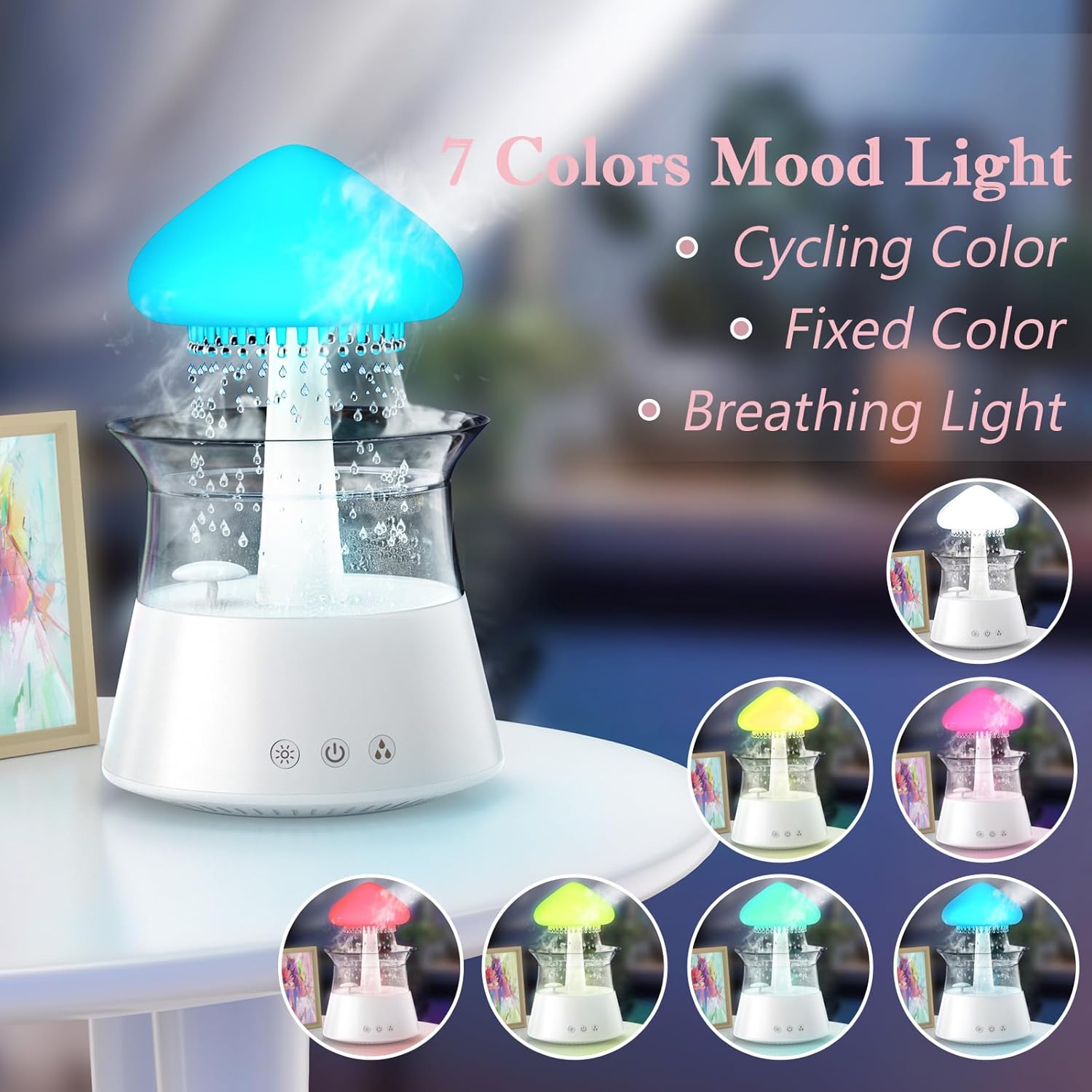
Image: The humidifier showcasing its 7-color mood light feature, including cycling, fixed, and breathing light modes.
5.4 Anviwònman revèy
Set an automatic shut-off timer using the remote control:
- Press the '4H', '6H', or '8H' buttons on the remote to set the timer for 4, 6, or 8 hours respectively.
- The device will automatically turn off after the selected duration.

Image: A diagram illustrating the remote control with buttons for timer settings (4H, 6H, 8H), light colors, breathing light, rain volume, mist volume, and light brightness.
6. Antretyen
Regular cleaning ensures optimal performance and extends the lifespan of your humidifier.
6.1 Antretyen chak jou
- Chanjman dlo: Change the water in the tank daily to prevent bacterial growth.
- Siye desann: Wipe the inside of the water tank and the mushroom top with a clean, damp twal.
6.2 Netwayaj chak semèn
- Deploge: Toujou debranche imidifikatè a anvan ou netwaye li.
- Demonte: Carefully remove the mushroom top and the transparent water tank.
- Tank dlo pwòp: Wash the water tank with mild soap and water. Rinse thoroughly to remove all soap residue.
- Netwaye Inite Baz la: Use a soft brush or cotton swab to gently clean the ultrasonic mist generator and any small openings in the base unit. Do not use abrasive cleaners.
- Detartraj: If mineral deposits accumulate, fill the tank with a mixture of equal parts white vinegar and water. Let it sit for 30 minutes, then rinse thoroughly.
- Sèk: Pèmèt tout pati yo sèk nèt anvan yo remonte.

Image: Hands gently lifting the transparent water tank from the humidifier's base, indicating how to access for cleaning or refilling.
NAN. Depanaj
If you encounter issues with your Diffuserlove Cloud Humidifier, refer to the following common problems and solutions:
| Pwoblèm | Kòz posib | Solisyon |
|---|---|---|
| Pa gen bwouya oswa pwodiksyon bwouya fèb | Nivo dlo ki ba Mineral buildup on mist generator Vant lè bloke | Ranpli tank dlo Clean the mist generator as per maintenance instructions Ensure air vents are clear |
| No rain sound or weak rain sound | Nivo dlo ki ba Rain drip holes blocked Rain function not activated | Ranpli tank dlo Clean rain drip holes (a small wire may be needed, not included) Activate rain function via remote or device button |
| Limyè pa travay | Fonksyon limyè a etenn Aparèy pa mache | Turn on light function via remote or device button Ensure device is plugged in and powered on |
| Remote kontwòl pa reponn | Pil ki mouri Obstruction between remote and device | Ranplase pil AAA nan aleka Ensure clear line of sight to the device's sensor |
| Dlo flit | Tank dlo pa byen chita Tank dlo twòp Damage to unit | Re-seat the water tank correctly Pa ranpli pi lwen pase liy MAX la Contact customer support if unit is damaged |
8. Espesifikasyon
Technical details for the Diffuserlove Cloud Humidifier (Model CH06):
- Non modèl: CH06
- Mak: Diffuserlove
- Dimansyon pwodwi: 6.3"P x 6.3"L x 9.95"H (160 x 160 x 251 mm)
- Kapasite dlo: 300ml
- Pwovizyon pou pouvwa: Type-C electric, 5V 2A
- Wattage: 10 wat
- Voltage: 2.3E+2 Volts (Note: This value seems unusually high for a 5V USB device. Please refer to the product label for accurate voltagegzijans e yo.)
- Mòd operasyon: Manual (via device buttons) / Remote Control
- Karakteristik espesyal: Auto Shut Off, Night Light, Rain Sounds, Remote Control
- Limyè: 7 colors LED night light
- Frekans ultrasons: 2.4MHz
- Rain Sounds: White noise 30-50dB
- Materyèl: Plastik ABS + PP
- Pwa atik: 1.87 liv
- UPC: 663992505702

Image: The back of the product packaging displaying detailed product parameters and specifications.
9. Garanti ak sipò
The Diffuserlove Cloud Humidifier (Model CH06) comes with a 12-mwa garanti apati dat acha a. Garanti sa a kouvri domaj fabrikasyon anba itilizasyon nòmal.
For warranty claims, technical support, or any questions regarding your product, please contact Diffuserlove customer service through the retailer where the product was purchased or refer to the contact information provided on the product packaging.