
1. Entwodiksyon
This manual provides detailed instructions for the installation, operation, and maintenance of your Tiandy TC-C32XN 2MP Fixed IP Dome Turret Camera. Please read this manual thoroughly before using the product to ensure correct usage and optimal performance. Keep this manual for future reference.
2. Enfòmasyon sou Sekirite
- Asire w ke ekipman pou pouvwa a koresponn ak egzijans kamera a pou anpeche domaj.
- Pa ekspoze kamera a nan tanperati ekstrèm, imidite, oswa anviwònman koroziv.
- Avoid pointing the camera directly at strong light sources for extended periods, as this may damage the image sensor.
- Manyen kamera a avèk prekosyon. Pa lage l oswa pa mete l anba gwo vibrasyon.
- All installation and service should be performed by qualified personnel.
- Dekonekte kouran an anvan ou netwaye oswa fè antretyen.
3. Pake kontni
Verifye ke tout atik yo prezan nan pakè ou a:
- Tiandy TC-C32XN 2MP Fixed IP Dome Turret Camera
- Adaptè
- Vis ak ploge miray pou monte
- Gid pou kòmanse rapidman (si li enkli)
4. Pwodwi souview
The Tiandy TC-C32XN is a 2MP Fixed IP Dome Turret Camera designed for reliable surveillance. It features Smart IR for clear night vision up to 30 meters, a built-in microphone, and an SD card slot for local storage.

Figi 4.1: Devan view of the Tiandy TC-C32XN camera, showing the lens and IR illuminators.
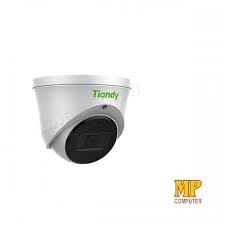
Figi 4.2: Side view of the Tiandy TC-C32XN camera, highlighting its dome turret form factor.
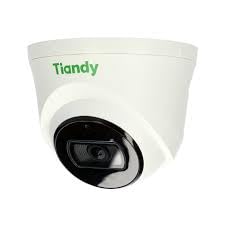
Figi 4.3: Angle view of the Tiandy TC-C32XN camera, showcasing konsepsyon kontra enfòmèl ant li an.
5. Enstalasyon ak Enstalasyon
5.1 Montaj
- Chwazi yon kote: Choose a suitable outdoor or indoor location (IP67 rated for outdoor use) that provides the desired viewing angle and is within reach of power and network connections. The camera is designed for protruding mounting.
- Fè twou: Use the provided mounting template (if applicable) to mark and drill holes for the mounting screws.
- Sekirize kamera a: Attach the camera base securely to the mounting surface using the provided screws and wall plugs.
5.2 fil elektrik
- Koneksyon pouvwa: Connect the provided adapter to the camera's power input and then to a power outlet. The camera operates on corded electric power.
- Rezo Koneksyon: Connect an Ethernet cable from your network router or PoE switch to the camera's Ethernet port. This camera supports Ethernet connectivity for data transmission.
5.3 Inisyal Konfigirasyon
- Pouvwa sou: Once wired, power on the camera.
- Dekouvèt Rezo: Use the Tiandy client software or a network scanner tool to discover the camera's IP address on your local network.
- Aksè Kamera: Louvri a web navigatè a epi antre adrès IP kamera a pou jwenn aksè a li web interface. Log in using the default credentials (refer to the quick start guide for default username/password).
- Chanje Modpas Defo: Pou sekirite, chanje modpas defo a imedyatman lè w konekte pou premye fwa.
- NVR Integration: If using with an NVR, add the camera to your NVR system following the NVR's instructions. This camera is compatible with all brand NVRs.
- Enstalasyon aplikasyon mobil: Download the official Tiandy mobile application (available for Android and iOS) and follow the in-app instructions to add your camera for remote viewing ak kontwòl.
6. Operasyon Enstriksyon
6.1 Viv View ak Anrejistreman
Jwenn aksè a an dirèk kamera a view atravè la web interface, NVR, or mobile app. Configure recording schedules and methods (continuous, motion-triggered) via the camera's settings.
6.2 Smart IR and Night Vision
The camera features Smart IR technology, which automatically adjusts the intensity of its infrared LEDs to prevent overexposure of objects close to the camera, ensuring clear images in low-light conditions up to 30 meters. It also supports 'Night Color' low light technology for enhanced visibility.
6.3 Deteksyon Mouvman ak Alèt
Configure motion detection zones and sensitivity in the camera settings. The camera supports 'Motion Only' alert types. When motion is detected, the camera can trigger recordings, send notifications to your mobile device, or activate other configured actions. It also supports advanced features like tripwire and perimeter intrusion detection.
6.4 Fonksyonalite Odyo
The built-in microphone allows for audio monitoring of the surveillance area. Audio settings can be adjusted in the camera's web koòdone oswa NVR.
6.5 SD Card Storage
Insert a compatible SD card into the camera's SD card slot for local storage of recordings. Ensure the card is formatted correctly via the camera's settings. The camera supports SD flash memory type.
6.6 Bouton Reyajiste
A reset button is included for restoring the camera to its factory default settings. Consult the quick start guide for the exact location and procedure for your model.
7. Antretyen
- Netwayaj: Siye lantiy kamera a ak kò a dousman avèk yon twal mou epi sèk. Pa sèvi ak pwodui chimik ki agresif oswa pwodui netwayaj abrazif.
- Mizajou mikrolojisyèl: Regularly check the Tiandy official website for firmware updates. Keeping your camera's firmware up-to-date ensures optimal performance and security.
- Enspeksyon kab: Periodically inspect all cables for signs of wear or damage, especially for outdoor installations.
NAN. Depanaj
- Pa gen pouvwa: Ensure the power adapter is securely connected and the power outlet is functional.
- Pa gen Videyo: Check network cable connections. Verify the camera's IP address and network settings. Ensure the camera is properly added to your NVR or viewing lojisyèl.
- Kalite imaj pòv: Clean the camera lens. Adjust focus if applicable. Check lighting conditions and camera placement.
- Pwoblèm Koneksyon Rezo: Verify router and network cable functionality. Restart the camera and network devices.
- Pa Ka Aksè Web Entèfas: Ensure your computer is on the same network segment as the camera. Verify the camera's IP address. Try resetting the camera to factory defaults if necessary (this will erase all settings).
9. Espesifikasyon
| Karakteristik | Spesifikasyon |
|---|---|
| Modèl | TC-C32XN |
| Rezolisyon toujou efikas | 2 MP (1920x1080) |
| To Frame | 30 ankadreman pou chak segonn |
| Teknoloji Capteur Foto | CMOS (1/2.8") |
| Vizyon lannwit Range | 30 Metres (Smart IR) |
| Teknoloji limyè ki ba | Koulè lannwit |
| Zoom optik | 3 x |
| Mikwofòn entegre | Wi |
| Kat SD plas | Yes (Flash Memory Type: SD) |
| Kalite Alèt | Motion Only (supports tripwire and perimeter) |
| Koneksyon Teknoloji | Wireless (IR), Ethernet |
| Sous pouvwa | Fil elektrik |
| Rating Pwoteksyon Entènasyonal | IP67 |
| Faktè fòm | Dome Turret |
| Kalite aliye | Ki vle pèse anvlòp la |
| Sistèm operasyon konpatibilite | Android, iOS |
| Dimansyon pwodwi (L x W x H) | 50 x 50 x 70 Milimèt |
| Pwa atik | 20 gram |
| Konpozan ki enkli | Adaptè |
| Koulè | Blan |
10. Garanti ak sipò
For warranty information and technical support, please refer to the warranty card included with your product or visit the official Tiandy website. Contact the seller or manufacturer directly for assistance with product issues or inquiries.