Entwodiksyon
Thank you for choosing the Apt Decor Cool Mist Humidifier Bulb Air Purifier. This device is designed to enhance your indoor environment by humidifying the air, providing a comfortable atmosphere, and featuring an integrated LED night light. This manual provides essential information for the safe and efficient operation of your humidifier.
Key features include ultrasonic atomization technology for fine mist, whisper-quiet operation, a 400ml water tank capacity, automatic shut-off for safety, and colorful LED light functions.
Enfòmasyon sou Sekirite
- Li tout enstriksyon yo anvan ou sèvi ak aparèy la.
- Pa plonje imidite a nan dlo oswa lòt likid.
- Always unplug the device before cleaning, refilling, or when not in use.
- Kenbe lwen timoun ak bèt kay.
- Use only clean tap water or distilled water. Do not add essential oils directly into the water tank as this may damage the unit.
- Ensure the humidifier is placed on a stable, flat surface.
- Pa bloke priz vapè dlo a.
- Use only the provided USB cable for power. Ensure the power source is 5V 1A.
- If the device is damaged, do not operate it. Contact customer support.
Kontni pake
Tanpri tcheke pake a pou atik sa yo:
- Humidifier Unit (Bulb Design)
- USB pouvwa kab
- Cotton Filter Stick (pre-installed or separate)
- Kouvèti
Pwodwi souview
Familiarize yourself with the components of your humidifier:
- Mist Outlet: Where the cool mist is released.
- Tank dlo: Holds up to 400ml of water.
- bouton kontwòl: For power and light functions.
- Port pouvwa USB: Pou konekte kab pouvwa a.
- Cotton Filter Stick: Absorbs water for mist generation.
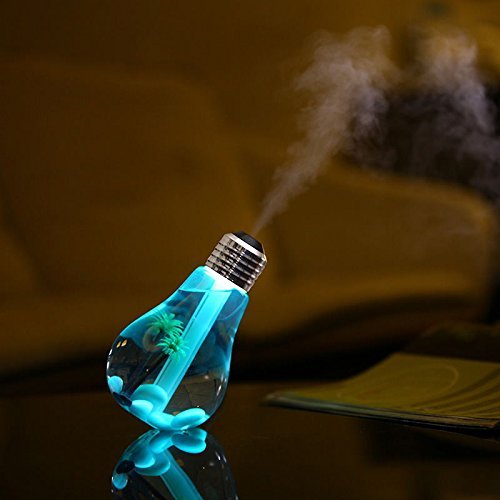
Image: The Apt Decor Bulb Humidifier in operation, showing mist being released from the top.
Enstalasyon
Swiv etap sa yo pou premye konfigirasyon:
- Open the Humidifier: Gently twist and lift the top section (bulb base) to access the water tank.
- Prepare the Cotton Filter: If the cotton filter stick is not already installed, insert it into the central tube in the top section. Ensure it is fully soaked in water for 5-10 minutes before first use. This is crucial for mist production.
- Ranpli tank dlo a: Fill the transparent bulb reservoir with clean tap water or distilled water up to the maximum fill line (400ml). Do not overfill.
- Close the Humidifier: Carefully place the top section back onto the bulb reservoir and twist to secure it.
- Konekte pouvwa: Plug the small end of the USB cable into the humidifier's USB port and the larger end into a 5V 1A USB power source (e.g., power bank, computer USB port, or USB wall adapter).
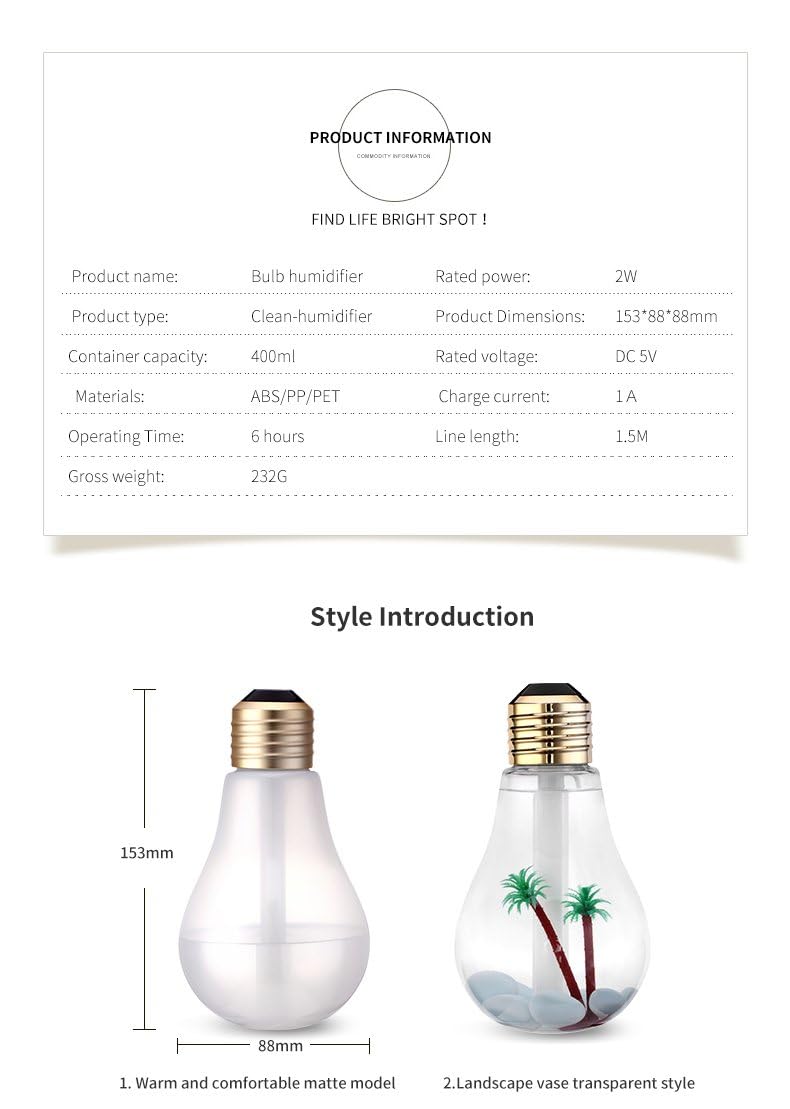
Image: A four-step visual guide demonstrating how to replace or install the cotton filter stick in the humidifier.
Enstriksyon Operasyon
Once set up, operate your humidifier as follows:
- Power On/Mist Function: Press the control button once to turn on the humidifier and start continuous misting. The LED light will also illuminate.
- Ki ap dirije limyè kontwòl: While the humidifier is on, press and hold the control button for 2-3 seconds to cycle through the colorful LED light modes. Release to select a color or mode.
- Pouvwa Off: Press the control button again to turn off both the mist and the LED light.
The humidifier operates at a mist output of approximately 30-45ml per hour and can work for 6-8 hours on a full 400ml tank. It features an automatic shut-off function that activates after 4-6 hours of continuous operation or when the water level is too low, ensuring safety and preventing dry burning.

Image: The bulb humidifier displaying a colorful gradient LED light while emitting mist.
Antretyen
Antretyen regilye asire pèfòmans optimal ak lonjevite imidifikatè ou a.
- Netwaye tank dlo a: Unplug the humidifier. Open the top section and empty any remaining water. Wipe the inside of the tank with a soft, damp cloth. Do not use harsh chemicals or abrasive cleaners. Rinse thoroughly.
- Replacing the Cotton Filter Stick: The cotton filter stick should be replaced every 1-3 months, or sooner if you notice reduced mist output or a strange odor. Refer to the 'Setup' section for instructions on how to replace it.
- Cleaning the Mist Outlet: Gently wipe the mist outlet with a cotton swab dampened with water to remove any mineral buildup.
- Depo: If storing the humidifier for an extended period, ensure it is clean and completely dry. Store in a cool, dry place.
Depanaj
Si ou rankontre pwoblèm, gade pwoblèm ak solisyon komen sa yo:
| Pwoblèm | Kòz posib | Solisyon |
|---|---|---|
| Pa gen bwouya oswa pwodiksyon bwouya ki ba |
|
|
| Dirije limyè pa travay |
|
|
| Dlo flit |
|
|
| Aparèy pa limen |
|
|
Espesifikasyon
Technical details for the Apt Decor Cool Mist Humidifier Bulb Air Purifier:
- Modèl: Imidifikateur
- Mak: Jenerik
- Mòd operasyon: À
- Kapasite tank dlo: 400 mililit
- Dimansyon pwodwi: 15.3P x 8.8W x 8.8H santimèt
- Rated Voltage: 5 Vòlt (DC)
- Chaje aktyèl: 1A
- Pouvwa nominal: 2W
- Tan operasyon: 6-8 hours (continuous mist)
- Karakteristik espesyal: Auto Shut Off, Night Light, Portable
- Materyèl: ABS+PET+PP

Image: A detailed product information table showing specifications and dimensions of the bulb humidifier.
Garanti ak sipò
This product is covered by a standard manufacturer's warranty against defects in materials and workmanship. Please retain your proof of purchase for warranty claims.
For technical support, troubleshooting assistance, or warranty inquiries, please contact your retailer or the point of purchase. Provide your model number and a detailed description of the issue when seeking support.


