
ATOMSTACK ATOMSTACK A5 PRO BK US
AtomSTACK A5 Pro Lazè Graveur Enstriksyon Manyèl
Model: ATOMSTACK A5 PRO BK US
1. Pwodwi souview
The ATOMSTACK A5 Pro is a versatile commercial-grade laser engraver and cutter designed for precision work on a wide range of materials. Featuring a 5W output power laser module and a 32-bit MCU motherboard, it offers efficient and stable performance for both engraving and cutting tasks. Its robust aluminum alloy construction ensures durability and a longer service life, making it suitable for continuous 7x24H operation in commercial and DIY environments.

Figure 1.1: The ATOMSTACK A5 Pro Laser Engraver, a robust machine designed for commercial and DIY engraving and cutting.
Karakteristik kle:
- Pèfòmans nan klas komèsyal: Supports 7x24H continuous engraving, ideal for mass production and commercial DIY needs.
- Konstriksyon dirab: Made of aluminum alloy with a black anti-oxidation and anti-rust coating for enhanced stability and longevity.
- Upgraded Laser Technology: Equipped with a 5-5.5W powerful laser module and a 0.08mm x 0.08mm compressed spot for precise engraving and clear patterns.
- Konpatibilite materyèl laj: Capable of engraving and cutting metal, wood, stainless steel, cylinder, rubber, leather, glass (requires blackening), PCB boards, acrylic, and more.
- Kat manman avanse: 32-bit MCU motherboard ensures faster data processing and smoother operation.
- Lojisyèl konpatibilite: Compatible with LaserGRBL (Windows XP/7/8/10) and LightBurn (Windows/Mac OS).
- Eye Protection Design: Features an eye protection cover to reduce laser exposure.
- Fanatik refwadisman entegre: Ensures optimal performance during extended use.
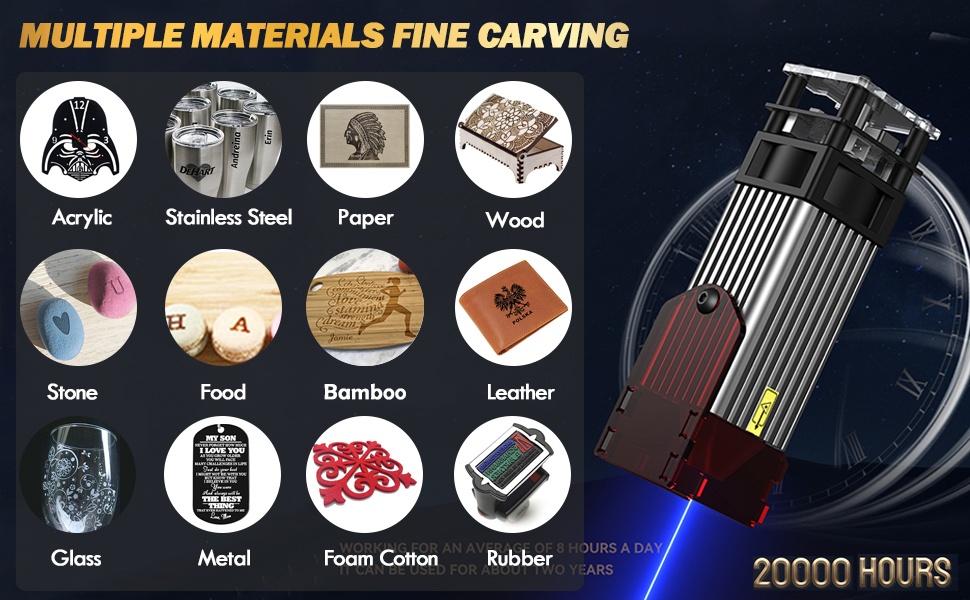
Figi 1.2: Plis paseview of the ATOMSTACK A5 Pro's key features, including its durable aluminum alloy body, 32-bit MCU, eye protection, and continuous engraving capability.
2. Enfòmasyon sou Sekirite
Operating a laser engraver involves inherent risks. It is crucial to read and understand all safety warnings and instructions before using the ATOMSTACK A5 Pro. Failure to follow these guidelines may result in serious injury, fire, or damage to the equipment.
Prekosyon Sekirite Jeneral:
- Pwoteksyon je: Always wear the provided protective glasses or equivalent laser safety goggles (OD4+) when the laser is active. Never look directly at the laser beam.
- Vantilasyon: Operate the engraver in a well-ventilated area to dissipate fumes and smoke produced during engraving and cutting. Consider using an exhaust fan or air purifier.
- Danje dife: Laser engraving and cutting can ignite flammable materials. Keep a fire extinguisher nearby and never leave the machine unattended during operation.
- Sekirite materyèl: Only engrave or cut materials that are safe for laser processing. Avoid materials that produce toxic fumes (e.g., PVC, vinyl) or are highly reflective.
- Timoun ak bèt kay: Keep children and pets away from the laser engraver at all times.
- Sifas ki estab: Place the engraver on a stable, level, and non-flammable surface.
- Ijans Stop: Familiarize yourself with the location of the power switch and be prepared to turn off the machine immediately in case of an emergency.
- Sekirite elektrik: Ensure the power supply is correctly rated for your region and the machine. Do not operate with damaged cables or plugs.
- Klas lazè: This product is a Class 4 laser device. Exercise extreme caution.
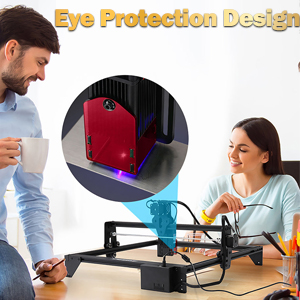
Figure 2.1: The ATOMSTACK A5 Pro features an eye protection cover, but users must still wear protective glasses during operation.
3. Pake kontni
Before beginning assembly, please verify that all components listed below are present in your package. If any parts are missing or damaged, contact ATOMSTACK customer service immediately.

Figure 3.1: Visual representation of the ATOMSTACK A5 Pro package contents.
Lis konpozan:
- Support Beam (Top)
- Bwat kontwòl
- Foot Bracket (x3)
- Tèt lazè
- Twous zouti
- Y-axis Left Slide Rail
- Support Beam (Bottom)
- Y-axis Right Slide Rail
- X-axis Rail
- Fèy Acrylic
- Focusing Sheet
- Fil Mare
- Bwòs
- Belt Synchrone
- Test Wooden Board
- Linèt pwoteksyon
- Pouvwa kab
- Adaptè
- Data Line (USB Cable)
- Montaj Vis
- Manyèl pwodwi
4. Enstalasyon ak Asanble
The ATOMSTACK A5 Pro is designed for easy assembly. Follow these steps to set up your laser engraver.
4.1 Mechanical Assembly:
Refer to the included product manual for detailed step-by-step assembly instructions and diagrams. The machine features an all-metal structure for stability.
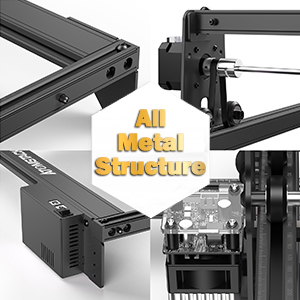
Figure 4.1: The ATOMSTACK A5 Pro boasts an all-metal structure for enhanced durability and precision.
4.2 Software Installation and Connection:
The ATOMSTACK A5 Pro is compatible with popular laser control software. It is recommended to use the latest versions of the software for optimal performance.
- LaserGRBL: A free, open-source software suitable for new laser users. Supports Windows XP/7/8/10. Download from the official LaserGRBL websit.
- LightBurn: A paid, professional laser control software offering advanced features. Supports Windows/Mac OS/Linux. Download from the official LightBurn websit.
Connect the engraver to your computer using the provided Data Line (USB Cable). Ensure the power adapter is connected and the machine is powered on before launching the software.
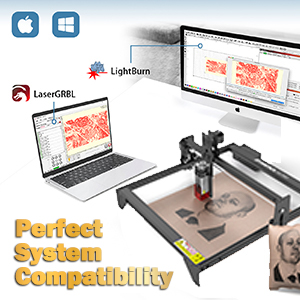
Figure 4.2: The ATOMSTACK A5 Pro offers perfect system compatibility with LaserGRBL and LightBurn software.
4.3 Focusing the Laser:
Proper focusing is critical for achieving precise engraving and cutting results. Use the provided focusing sheet to set the correct focal length for the laser module. The laser module features a quick-release design for easy height adjustment.
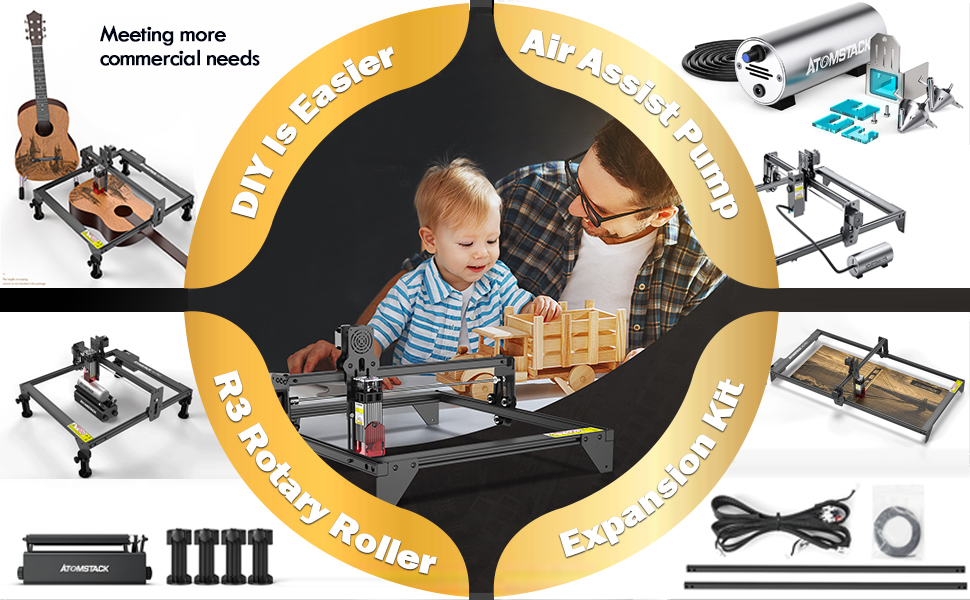
Figure 4.3: The laser module utilizes quadruple lens compression technology for a fine, compressed spot, requiring accurate focusing for optimal performance.
5. Gid operasyon
This section provides guidance on operating your ATOMSTACK A5 Pro for various engraving and cutting tasks.
5.1 Preparing Your Design:
Use your chosen software (LaserGRBL or LightBurn) to import or create your design. The engraver supports various file formats including NC, DXF, BMP, JPG, PNG, etc.
5.2 Material Selection and Parameter Settings:
The ATOMSTACK A5 Pro is capable of working with a wide array of materials. Optimal results depend on selecting the correct laser power, speed, and number of passes for each material. Refer to the material parameter settings table for recommended values. For materials like glass and ceramics, blackening the surface may be required for effective engraving.

Figi 5.1: Egzample of material parameter settings for various materials, crucial for achieving desired engraving and cutting quality.

Figure 5.2: The ATOMSTACK A5 Pro supports fine carving on multiple materials including acrylic, stainless steel, paper, wood, leather, glass, and more.
5.3 Starting an Engraving/Cutting Job:
- Place your material securely on the working area.
- Adjust the laser focus according to the material thickness.
- Chaje konsepsyon ou a file nan lojisyèl an.
- Set the appropriate laser parameters (power, speed, passes) based on your material and desired outcome.
- Perform a frame test to ensure the design fits within your material.
- Initiate the engraving/cutting process from the software.
- Monitor the process closely and ensure proper ventilation.
5.4 Commercial Use and Accessories:
The ATOMSTACK A5 Pro is built for commercial use, supporting continuous operation. For enhanced capabilities, consider compatible accessories:
- Air Assist Pump: Improves cutting performance by blowing away smoke and debris, resulting in cleaner cuts and reduced charring.
- R3 Rotary Roller: Enables engraving on cylindrical objects like tumblers and bottles.
- Twous ekspansyon: Extends the working area for larger projects.
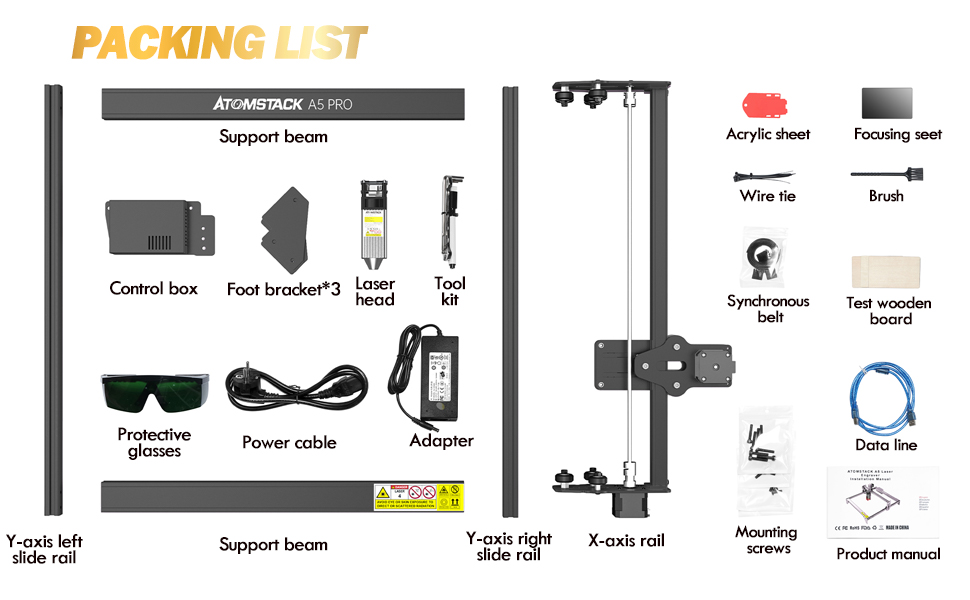
Figure 5.3: Various accessories like the Air Assist Pump, R3 Rotary Roller, and Expansion Kit can enhance the functionality of your ATOMSTACK A5 Pro.
5.5 Videyo Demonstrasyon Pwodwi:
Video 5.1: A demonstration of the ATOMSTACK laser engraver's capabilities, showcasing the engraving of a motorcycle model. This video highlights the precision and detail achievable with the machine.
6. Antretyen
Regular maintenance ensures the longevity and optimal performance of your ATOMSTACK A5 Pro.
6.1 Netwayaj:
- Lantiy lazè: Gently clean the laser lens with a lint-free cloth and lens cleaning solution specifically designed for optics. A dirty lens can significantly reduce laser power and engraving quality.
- Rails and Belts: Periodically inspect and clean the guide rails and synchronous belts to remove dust and debris. This ensures smooth movement of the laser head.
- Netwayaj jeneral: Wipe down the machine's frame and components with a soft, dry cloth. Avoid using abrasive cleaners or solvents.
6.2 Lubrifikasyon:
Apply a small amount of machine lubricant to the guide rails and lead screws (if applicable) every few months, or as needed, to ensure smooth operation.
6.3 Firmware Updates:
Check the official ATOMSTACK website periodically for firmware updates. Keeping your firmware up-to-date can improve performance, add new features, and resolve potential issues. Follow the instructions provided with the firmware update carefully.
NAN. Depanaj
Seksyon sa a adrese pwoblèm komen ou ka rankontre epi li bay solisyon potansyèl.
| Pwoblèm | Kòz posib | Solisyon |
|---|---|---|
| Lazè a pa tire oswa pwodiksyon an fèb. |
|
|
| Machine not connecting to software. |
|
|
| Engraving quality is poor (blurry, inconsistent). |
|
|
| Air assist not working (if applicable). |
|
|
8. Espesifikasyon teknik
| Karakteristik | Detay |
|---|---|
| Nimewo Modèl | ATOMSTACK A5 PRO BK US |
| Lazè Sòti pouvwa | 5W - 5.5W |
| Laser Engraving Power | 40W (Machine Power) |
| Size Spot | 0.08mm x 0.08mm (Compressed Spot) |
| Mèr | 32-ti jan MCU |
| Dimansyon pwodwi | 23.23 x 13.39 x 4.8 pous |
| Pwa atik | 11.77 liv |
| Sipòte lojisyèl | LaserGRBL, LightBurn |
| Sipòte File Fòma | NC, DXF, BMP, JPG, PNG, etc. |
| Klas Lazè | Klas 4 |
| Operasyon kontinyèl | 7x24H |
9. Garanti ak Sipò Kliyan
ATOMSTACK is committed to providing excellent customer service and support for your A5 Pro laser engraver.
9.1 Enfòmasyon sou garanti a:
Nou bay 12 MWA of free parts replacement from the date of purchase. This warranty covers manufacturing defects and malfunctions under normal use conditions.
9.2 Sipò Teknik:
ATOMSTACK offers PÈMANAN professional technical customer service. If you encounter any issues, have questions about operation, or require assistance with your engraver, please do not hesitate to contact our support team.
Enfòmasyon pou kontakte:
- Refer to the contact details provided in your product manual or on the official ATOMSTACK websit.
- For Amazon purchases, you can also contact the seller "FKX-ATOMSTACK" through the Amazon platform.
Dokiman ki gen rapò - ATOMSTACK A5 PRO BK US
 |
Manyèl machin gravur lazè ATOMSTACK A5 Pro a Manyèl itilizatè konplè pou machin gravur lazè ATOMSTACK A5 Pro a, ki kouvri sekirite, enstalasyon lojisyèl (LaserGRBL ak LightBurn), operasyon, ak depanaj. |
 |
Paramèt Gravure ak Koupe Lazè Atomstack A5 Pro Tablo paramèt detaye pou graveur ak kouto lazè Atomstack A5 Pro a, ki kouvri paramèt grave ak koupe pou divès materyèl tankou bwa bas, bwa di, banbou, akrilik, papye kraft, miwa, kwi, ak asye pur. Gen ladan paramèt vitès, S-Max, ak pas rekòmande yo. |
 |
Manyèl Itilizatè ak Gid Enstalasyon Mandrin Rotary ATOMSTACK MAKER R1 la Gid konplè sa a detaye enstalasyon, koneksyon, ak operasyon mandrin rotary ATOMSTACK MAKER R1 pou machin gravur lazè. Li kouvri sa ki nan anbalaj la, pwosedi enstalasyon, konfigirasyon lojisyèl ak LightBurn, ak nòt esansyèl pou grave objè silendrik, esferik, ak lòt fòm. |
 |
Paramèt Gravure ak Koupe Lazè P7 M30 Tablo paramèt konplè pou graveur ak kouto lazè AtomStack P7 M30, ki detaye paramèt pou divès materyèl tankou bwa bas, bwa di, banbou, akrilik, papye kraft, miwa, ak kwi pou operasyon gravur ak koupe. |
 |
Gid Paramèt Gravure ak Koupe Lazè ATOMSTACK K40 MAX-20W Yon gid konplè ki detaye paramèt gravur ak koupe pou modil lazè ATOMSTACK K40 MAX-20W la atravè yon varyete materyèl komen. Gen ladan l paramèt pou vitès, puisans, entèval liy, ak mòd imaj. |
 |
ATOMSTACK C4 Pro Control Software and Offline Controller Operation Guide Comprehensive operation guide for the ATOMSTACK C4 Pro CNC engraving machine, covering software installation, hardware setup, operation, maintenance, and firmware updates. |
Ask a question about this manual
Ask about setup, troubleshooting, compatibility, parts, safety, or missing instructions. Manuals+ will review the question and use this page’s manual context to help answer it.