
1. Entwodiksyon
This manual provides essential information for setting up, operating, and maintaining your Lenovo ThinkCentre M720S Small Form Factor (SFF) Desktop. Please read these instructions carefully before using your device to ensure proper function and safety.
The Lenovo ThinkCentre M720S is a powerful and compact desktop computer designed for business and general computing tasks. It features an Intel i7-9700 processor, 32GB RAM, 2TB SSD storage, and runs on Windows 11 Pro.
2. Enfòmasyon sou Sekirite
- Pwovizyon pou pouvwa: Use only the power adapter supplied with your desktop. Ensure the power outlet is properly grounded.
- Vantilasyon: Do not block ventilation openings. Ensure adequate airflow around the desktop to prevent overheating.
- Ekspozisyon likid: Keep the desktop away from liquids. Do not operate with wet hands.
- Plasman: Place the desktop on a stable, flat surface. Avoid placing it in direct sunlight or near heat sources.
- Netwayaj: Disconnect power before cleaning. Use a soft, dry cloth. Avoid liquid cleaners.
- Sèvis: Do not attempt to service the desktop yourself. Refer all servicing to qualified personnel.
3. Pake kontni
Verifye ke tout atik yo prezan nan pakè ou a:
- Lenovo ThinkCentre M720S SFF Desktop Unit
- Pouvwa kab
- DisplayPort to HDMI Adapter (if included)
- Dokimantasyon (manyèl sa a)
- Keyboard (if included)
- Mouse (if included)
Note: Some accessories like keyboard, mouse, or specific adapters may vary based on your purchase configuration.
4. Pwodwi souview

Figi 4.1: Devan angilè view of the Lenovo ThinkCentre M720S SFF Desktop, showcasing konsepsyon kontra enfòmèl ant li an.
4.1 Karakteristik Front Panel

Figi 4.2: Devan detaye view highlighting the power button, optical drive, USB ports, and audio jacks.
- Bouton pouvwa: Located at the top right, used to power the system on or off.
- Optical Drive (DVD-RW): Slot-loading drive for reading and writing CDs and DVDs.
- Pò USB 3.0 (x2): High-speed ports for connecting compatible devices.
- Pò odyo: Separate headphone and microphone jacks for audio input and output.
- Lektè kat: Slot for inserting various memory card formats (e.g., SD cards).
Note: The availability of an internal DVD-RW drive and card reader may vary in renewed units. Please verify with your seller if these features are essential for your use.
4.2 Pò Panèl Dèyè
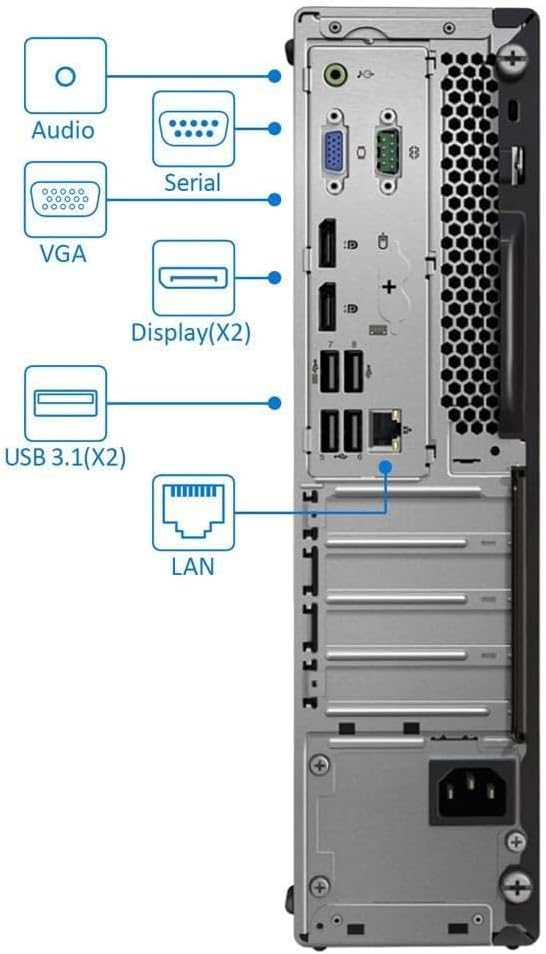
Figure 4.3: Rear panel connections, including video outputs, USB ports, and network interface.
- Pò odyo: Line-in, Line-out, and Microphone jacks for external audio devices.
- Seri Port: For connecting legacy serial devices.
- Pò VGA: Analog video output for older monitors.
- DisplayPort (x2): Digital video outputs supporting high resolutions, including 4K.
- Pò USB 3.1 (x2): Pò USB gwo vitès.
- Pò USB 2.0 (x4): Pò USB estanda pou periferik.
- Pò LAN (Etènèt): Konektè RJ45 pou koneksyon rezo filaire.
- HDMI Port: Digital video and audio output.
- Pouvwa Connector: Pou konekte kab kouran AC a.
5. Enstriksyon Enstalasyon
- Konekte periferik:
- Connect your monitor(s) to the available DisplayPort, HDMI, or VGA ports on the rear panel.
- Connect your keyboard and mouse to any available USB ports (front or rear).
- If using a wired network, connect an Ethernet cable to the LAN port. For wireless, ensure the Wi-Fi adapter is connected (if external USB) or built-in Wi-Fi is enabled.
- Konekte pouvwa:
- Connect the power cable to the power connector on the rear of the desktop.
- Branche lòt bout kab kouran an nan yon priz elektrik ki gen tè.
- Pouvwa sou:
- Press the power button on the front panel of the desktop.
- The system will boot up, and you should see the Lenovo logo followed by the Windows 11 Pro setup screen or desktop.
- Premye enstalasyon Windows 11 Pro:
- Follow the on-screen prompts to complete the Windows 11 Pro initial setup, including language, region, network connection, and user account creation.
6. Operasyon Enstriksyon
- Fenèt 11 Pwofesyonèl: Your desktop comes pre-installed with Windows 11 Pro. Familiarize yourself with the operating system's interface and features.
- Processor Performance: The Intel i7-9700 processor with up to 4.7 GHz Turbo Boost provides ample power for multitasking and demanding applications.
- Graphics Output: The integrated Intel UHD Graphics 630 supports 4K resolution. Connect to your display using DisplayPort, HDMI, or VGA.
- Depo: The 2TB SSD provides fast boot times and ample depo pou ou files ak aplikasyon yo.
- Koneksyon:
- Wi-Fi: Connect to wireless networks using the built-in AC Wi-Fi.
- Bluetooth: Konekte aparèy ki gen Bluetooth tankou kas ekoutè oswa oratè.
- Pò USB: Utilize the various USB 3.0 and USB 2.0 ports for connecting external drives, printers, and other peripherals.
- Optical Drive: Insert CDs or DVDs into the DVD-RW drive for media playback or data burning.
- Lektè kat: Insert compatible memory cards to access data.
7. Antretyen
- Netwayaj:
- Regularly clean the exterior of the desktop with a soft, dry, lint-free cloth.
- Use compressed air to gently clear dust from ventilation grilles and ports. Ensure the desktop is powered off and unplugged before cleaning.
- Mizajou lojisyèl:
- Keep your Windows 11 Pro operating system updated by regularly checking for updates through Anviwònman > Mizajou Windows.
- Ensure device drivers are up-to-date. You can typically find driver updates on the Lenovo support websit.
- Vantilasyon: Ensure the desktop is placed in an area with good air circulation to prevent overheating. Do not obstruct the air vents.
NAN. Depanaj
- Pa gen pouvwa:
- Tcheke si kab kouran an byen konekte ak tou de biwo a ak priz elektrik la.
- Verifye si priz kouran an ap fonksyone byen lè w branche yon lòt aparèy.
- Pa gen ekspozisyon sou monitè kè bebe:
- Ensure the monitor is powered on and its video cable is securely connected to the desktop's video output port (DisplayPort, HDMI, or VGA).
- Check the monitor's input source settings to ensure it matches the connected port.
- Pèfòmans Ralanti:
- Fèmen aplikasyon ki pa nesesè k ap fonksyone nan background nan.
- Tcheke epi enstale nenpòt mizajou Windows ki annatant.
- Asire w ke gen ase vantilasyon pou anpeche pwoblèm tèmik.
- Missing Features (e.g., DVD-RW, Card Reader):
- If your renewed unit appears to be missing a feature advertised, such as the DVD-RW drive or card reader, please contact your seller for clarification or resolution.
- Pwoblèm koneksyon rezo:
- For wired connections, ensure the Ethernet cable is properly connected to both the desktop and the router/modem.
- For Wi-Fi, check if the Wi-Fi adapter is enabled and connected to the correct network. Restart your router/modem if necessary.
9. Espesifikasyon
| Karakteristik | Deskripsyon |
|---|---|
| Mak | Lenovo |
| Modèl | ThinkCentre M720S SFF |
| Sistèm operasyon | Windows 11 Pro |
| Modèl CPU | Intel Nwayo i7-9700 |
| CPU vitès | Up to 4.7 GHz (Turbo Boost) |
| Memwa RAM | 32 GB DDR4 |
| Depo | SSD 2 TB |
| Grafik | Intel UHD Graphics 630 (Entegre) |
| Kondwi optik | DVD-RW |
| Lektè kat | Wi |
| Sòti videyo | DisplayPort (x2), HDMI, VGA |
| Pò USB | USB 3.1 (x2), USB 3.0 (x2), USB 2.0 (x4) - Total 8 |
| Koneksyon rezo | Gigabit Ethernet (RJ45), AC Wi-Fi (2.4G/5.8GHz) |
| Koneksyon san fil | Bluetooth 4.2 |
| Dimansyon (H x W x P) | 13.5 x 3.6 x 11.4 pous (apeprè) |
| Pwa | 2 Kilogram (apeprè) |
10. Garanti ak sipò
Your Lenovo ThinkCentre M720S SFF Desktop comes with a 90-jou garanti limite. Garanti sa a kouvri domaj nan materyèl ak atizan konn fè nan itilizasyon nòmal.
For technical support, warranty claims, or inquiries regarding your renewed product, please contact your seller directly. Refer to your purchase documentation for seller contact information.
Additional resources and driver updates may be available on the official Lenovo support websit.