
Entwodiksyon
This user manual provides detailed instructions for the safe and effective operation of your IROO Mini Karaoke Machine. Please read this manual thoroughly before use and retain it for future reference. This portable karaoke machine is designed to provide an engaging and fun musical experience for children and families, featuring wireless microphones, various voice effects, and colorful lighting.
Enfòmasyon sou Sekirite
- Sipèvizyon granmoun: Always ensure adult supervision when children are using the karaoke machine.
- Sous pouvwa: Use only the provided charging cables. Do not use damaged cables or chargers.
- Ekspozisyon dlo: Keep the device away from water or any liquids to prevent electric shock or damage.
- Netwayaj: Netwaye aparèy la avèk yon twal mou epi sèk. Pa sèvi ak pwodui netwayaj abrazif oswa solvan.
- Vantilasyon: Ensure proper ventilation around the device during use and charging.
- Kontwòl Volim: The device features scientifically controlled volume to protect sensitive ears. Avoid prolonged listening at maximum volume.
Kontni pake
Upon opening your IROO Mini Karaoke Machine package, you should find the following items:
- 1 x IROO Mini Karaoke Machine (Main Speaker Unit)
- 2 x Microphones Wireless
- 2 x Kab Chaje (Kalite-C)
- 1 x Manyèl Itilizatè (dokiman sa a)
- 1 x Karafun Premium 1-Month Access Card (or similar promotional material)
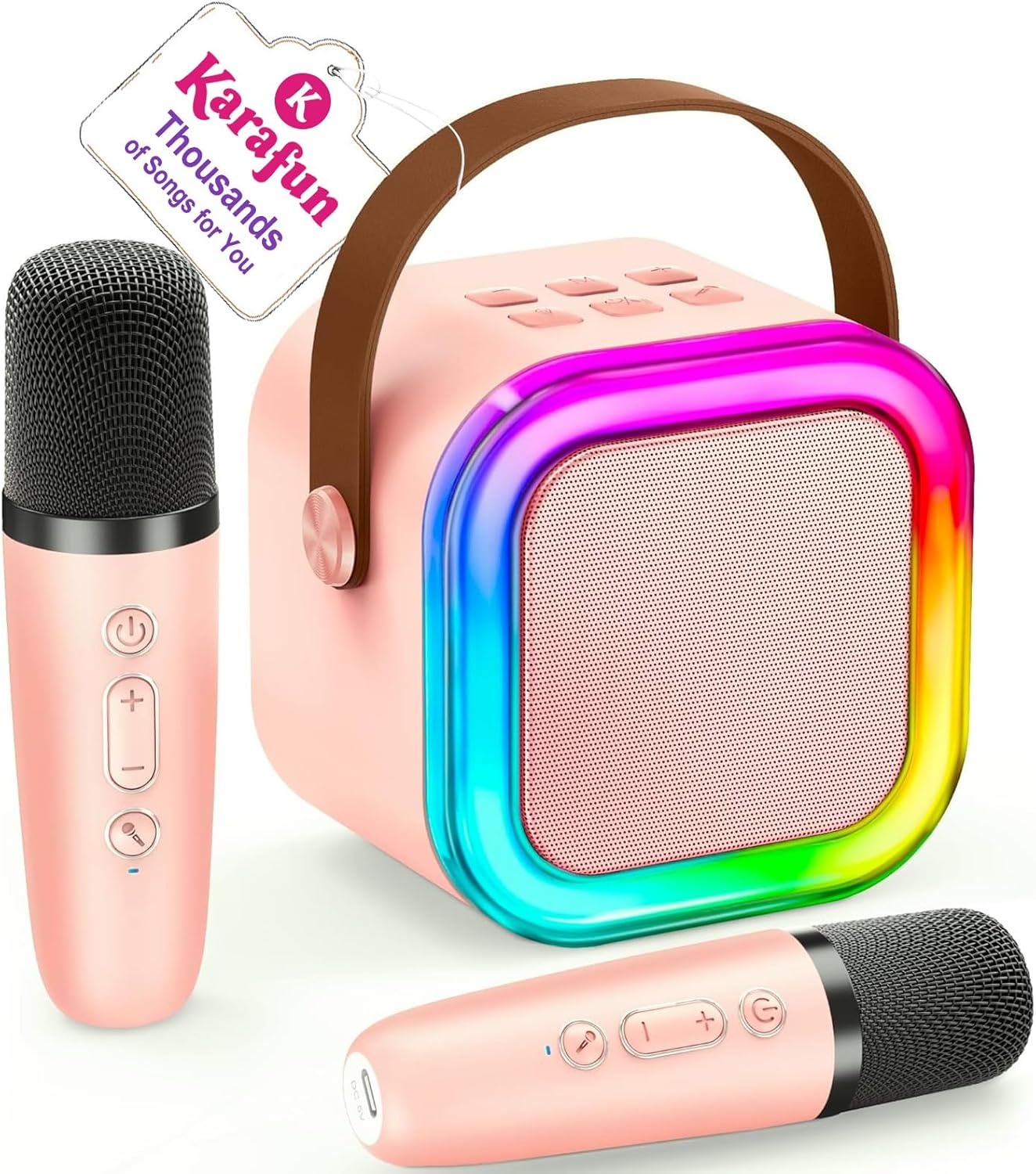
Image: The IROO Mini Karaoke Machine in pink, accompanied by two matching wireless microphones. A tag indicating "Karafun Thousands of Songs for You" is attached to the machine's handle.
Pwodwi souview
The IROO Mini Karaoke Machine is a compact and portable audio system designed for entertainment. It features a main speaker unit with integrated controls and colorful LED lights, along with two wireless microphones for duet singing.

Imaj: Yon eksplozyon view diagram illustrating the internal audio components of the karaoke machine, emphasizing its DSP chip, HiFi sound quality, and 3D surround sound capabilities.

Image: The IROO Mini Karaoke Machine illuminated with vibrant, dancing LED lights, creating a colorful atmosphere in a room.
Enstalasyon
- Chaje: Before first use, fully charge the karaoke machine and both microphones using the provided Type-C charging cables. The charging port for the main unit is typically located on the side or back, and for the microphones, it's usually at the bottom.
- Pouvwa sou: Press and hold the power button on the main speaker unit until the indicator lights illuminate and you hear a power-on prompt. Do the same for each wireless microphone.
- Koup Mikwofòn: The wireless microphones are designed to automatically pair with the main speaker unit upon powering on. If pairing does not occur automatically, refer to the troubleshooting section.
Enstriksyon Operasyon
Koneksyon Bluetooth
- Aktive Bluetooth: Ensure the karaoke machine is powered on and in Bluetooth pairing mode (indicated by a voice prompt "Bluetooth" or a flashing blue light).
- Enable Device Bluetooth: On your smartphone, tablet, or other Bluetooth-enabled device, go to Bluetooth settings and turn on Bluetooth.
- Chwazi Aparèy: Look for "IROO K-51" or a similar name in the list of available devices and select it to pair. A successful connection will be confirmed by a voice prompt.
- Jwe Mizik: Once connected, you can stream music from your device (e.g., Spotify, YouTube, Karafun) through the karaoke machine.

Image: A visual representation of the IROO Mini Karaoke Machine wirelessly connecting to a mobile device via Bluetooth, highlighting its ultra-portable design.
Other Playback Modes
- TF Kat Mode: Insert a TF (Micro SD) card loaded with MP3 music files into the designated slot on the main unit. The machine will automatically switch to TF Card mode and begin playback.
- USB mòd: Connect a USB drive with MP3 music files to the USB port on the main unit. The machine will automatically switch to USB mode and begin playback.
- Sòti ekoutè: Pou koute mizik an prive, konekte kas ekoutè yo nan priz kas ekoutè 3.5mm lan.

Image: A group of children enjoying the karaoke machine, illustrating its versatility with multiple connection options such as Bluetooth, TF Card, USB, and compatibility with phones, computers, pads, and laptops.
Voice Effects and Lighting
- Efè vwa: The microphones feature buttons to cycle through 5 fun voice effects: Original Voice, Female Voice, Male Voice, Baby Voice, and Monster Voice. Experiment with these to enhance your singing experience.
- Limyè ki ap dirije: The main speaker unit has colorful disco lights. Use the independent light button to turn them on/off or change modes, adding a dynamic visual element to your performance.

Image: Two children actively singing into the microphones, with graphic overlays indicating the five available vocal effects: Original Voice, Female Voice, Male Voice, Baby Voice, and Monster Voice.
Video: A demonstration of the IROO Mini Karaoke Machine, showcasing its unboxing, features, microphone voice effects, and colorful lighting in action. This video provides a comprehensive overview of the product's functionality.
Antretyen
- Netwayaj: Use a soft, dry, lint-free cloth to wipe down the exterior of the karaoke machine and microphones. Do not use liquid cleaners or sprays directly on the device.
- Depo: When not in use, store the karaoke machine and microphones in a cool, dry place, away from direct sunlight and extreme temperatures.
- Swen batri: Pou pwolonje lavi batri a, evite dechaje aparèy la nèt souvan. Chaje l regilyèman, menm si w pa itilize l tout tan.
Depanaj
| Pwoblèm | Kòz posib | Solisyon |
|---|---|---|
| Aparèy la pa vle limen. | Batri ki ba. | Chaje aparèy la konplètman. |
| Mikwofòn yo pa konekte. | Microphones are off or too far from the main unit. | Ensure microphones are powered on and within range (50 ft). Restart both the main unit and microphones. |
| Pa gen son ki soti nan oratè a. | Volume too low; device not connected; incorrect mode. | Increase volume on both the machine and connected device. Ensure proper Bluetooth connection or correct mode (TF/USB). |
| Sound distortion or howling. | Microphone too close to speaker; high volume. | Move microphone further from the speaker. Reduce volume. |
| Koneksyon Bluetooth la pa estab. | Interference; device too far. | Move closer to the main unit. Avoid obstacles. Disconnect and reconnect Bluetooth. |
Espesifikasyon
- Nimewo Modèl: K-51
- Mak: IROO
- Dimansyon pwodwi: 3.78 x 4.53 x 5.51 pous
- Pwa atik: 1.17 liv
- Materyèl: Aliminyòm, Plastik
- Koneksyon Teknoloji: Bluetooth 5.3
- Antre odyo: Micro SD/Bluetooth MP3 Music Player
- Kalite konektè: 3.5mm headphone, Type-C Charging
- Kantite chanèl: 1
- Laj rekòmande: 3 ane ak plis
Garanti ak sipò
IROO stands behind the quality of its products. Your IROO Mini Karaoke Machine comes with a:
- 365-jou garanti: Enjoy peace of mind with a full year of warranty coverage from the date of purchase.
- Ranplasman gratis: In case of manufacturing defects or issues covered under warranty, a free replacement will be provided.
- Sipò teknik: For any questions, technical assistance, or troubleshooting not covered in this manual, please contact IROO customer support.
For further assistance, please visit the official IROO store or contact their customer service team.