
1. Entwodiksyon
Thank you for choosing the KOO Kinchika Remote Control Car. This versatile vehicle is designed for dynamic play, featuring a unique shapeshifting capability that allows for over 100 different configurations. Equipped with four powerful motors, LED lights, and programmable functions, the Kinchika offers an engaging experience. This manual provides essential information for safe operation, setup, maintenance, and troubleshooting.
2. Avètisman Sekirite
Please read all safety warnings carefully before use to prevent injury or damage.
- Danje toufe: Pa apwopriye pou timoun ki poko gen 36 mwa akòz ti pati.
- Danje toufe: Kenbe materyèl anbalaj lwen timoun yo.
- Avètisman sou epilepsi: Jwèt sa a pwodui flash ki ka deklanche epilepsi nan moun ki sansibilize yo.
- Sekirite batri: Do not mix old and new batteries. Do not mix alkaline, standard (carbon-zinc), or rechargeable (nickel-cadmium) batteries. Dispose of batteries properly.
- Sipèvizyon granmoun: Toujou sipèvize timoun yo pandan operasyon an.
- Itilizasyon Anviwònman: Avoid operating in wet conditions or on public roads.
3. Pake kontni
Asire w tout atik yo prezan nan pakè a:
- KOO Kinchika Remote Control Car
- Inite kontwòl Remote
- Rechargeable Battery for Car
- USB Chaje Kab
- Manyèl Enstriksyon (dokiman sa a)
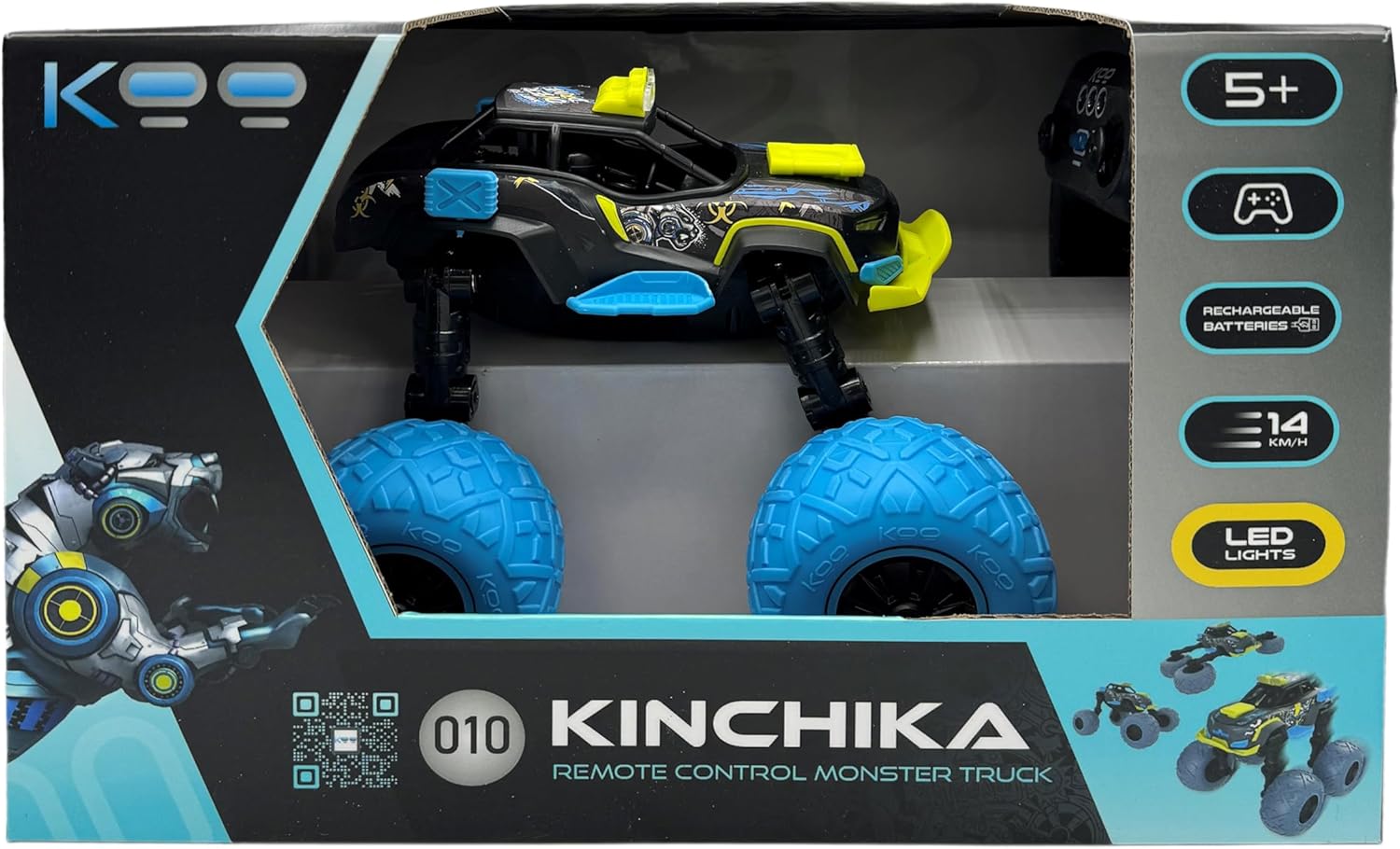
Image: KOO Kinchika product packaging. The box displays the car in its monster truck configuration, the remote control, and key features like "5+", "Rechargeable Batteries", "14 KM/H", and "LED Lights".
4. Enstalasyon
4.1 Enstalasyon ak Chaje Batri Machin
- Locate the battery compartment on the underside of the KOO Kinchika car.
- Louvri kouvèti lòj batri a.
- Connect the rechargeable battery to the car's battery connector.
- Place the battery inside the compartment and close the cover securely.
- To charge the car battery, connect the USB charging cable to the car's charging port and to a standard USB power adapter (not included). The charging indicator will show the charging status.
- Allow several hours for a full charge. A full charge typically provides approximately 20 minutes of play time.
Nòt: All KOO cars are equipped with rechargeable batteries as part of the "E-KOO Friendly" initiative.
4.2 Enstalasyon pil kontwòl remote la
Kontwòl remote la mande pou 3 pil AAA (ki pa enkli).
- Jwenn lòj batri a sou do a nan kontwòl remote la.
- Louvri kouvèti lòj batri a.
- Mete 3 pil AAA, asire w polarite ki kòrèk la (+/-).
- Fèmen kouvèti lòj batri a byen.
5. Operasyon Enstriksyon
5.1 Remote Control Overview

Image: The KOO Kinchika remote control. Labels indicate: "Forward/Backward" (left joystick), "On/Off" (center button), "Left/Right" (right joystick), and "LED Light" (top buttons).
- Joystick gòch: Controls Forward and Backward movement.
- Joystick dwat: Controls Left and Right steering.
- Bouton Sant: Power On/Off for the remote control.
- Bouton anlè yo: Activates/deactivates the LED lights on the car.
5.2 Limen epi konekte
- Ensure both the car and remote control have fresh or fully charged batteries.
- Turn on the car using its power switch (usually located near the battery compartment).
- Press the On/Off button on the remote control to power it on.
- The car and remote control should automatically pair. If not, turn both off and on again.
5.3 Driving and Transformation
Use the joysticks on the remote control to maneuver the Kinchika car. The Kinchika features fully articulated arms that allow it to transform into various shapes. Experiment with the car's movement and the remote control to discover different configurations and driving styles.

Image: The KOO Kinchika remote control car in its elevated monster truck configuration, showcasing its large blue wheels and yellow accents.

Imaj: Yon lòt view of the KOO Kinchika car, highlighting its adjustable chassis and wheel design.
5.4 Fonksyon pwogramasyon
The Kinchika car allows you to record sequences of movements and play them back. Refer to the remote control's specific programming buttons (if available, not explicitly detailed in provided data) or experiment with holding certain buttons during movement to initiate recording. Once recorded, a dedicated playback button will execute the sequence.
5.5 dirije limyè
Activate the car's LED lights using the designated button(s) on the remote control for enhanced visibility and visual effect, especially in low-light conditions.
6. Antretyen
6.1 Netwayaj
To clean the KOO Kinchika car, gently wipe it with a dry or slightly damp cloth. Do not use harsh chemicals or immerse the car in water.
6.2 Swen Batri
- Always fully charge the car's rechargeable battery before first use and after each play session.
- Remove batteries from the remote control if it will not be used for an extended period.
- Sere pil yo nan yon kote ki fre, sèk.
NAN. Depanaj
| Pwoblèm | Kòz posib | Solisyon |
|---|---|---|
| Machin nan pa reponn a kontwòl remote la. |
|
|
| Short play time (approx. 20 minutes). |
|
|
| One wheel or motor not functioning. |
|
|
8. Espesifikasyon
| Karakteristik | Detay |
|---|---|
| Non modèl | Kinchika |
| Nimewo Modèl Atik | KAB_KOO_0010 |
| Mak | KOO |
| Dimansyon pwodwi | 21.3 x 21.4 x 19.2 cm |
| Pwa atik | 1.27 Kilogram |
| Manifakti laj rekòmande | 5 ane ak plis |
| Batri machin | Rechargeable Lithium-Ion (Included) |
| Batri Remote Kontwòl | 3 AAA batteries (Not Included) |
| Kalite Materyèl | Plastik |
| Kalite kontwòl Remote | Enfrawouj |
| Objektif Edikasyonèl(yo) | Develop creativity, problem-solving, hand-eye coordination and social interaction |
| Karakteristik espesyal | Flashing Light (LED) |
9. Garanti ak sipò
For warranty information, technical support, or assistance with your KOO Kinchika Remote Control Car, please contact the retailer or manufacturer directly. Keep your proof of purchase for any warranty claims.
For general inquiries or further assistance, please visit the official KOO websit oswa kontakte depatman sèvis kliyan yo.