
DBPOWER W32
DBPOWER W32 Projector User Manual
Modèl: W32
1. Entwodiksyon
Mèsi pou acha aasing the DBPOWER W32 Projector. This manual provides essential information for the safe and efficient operation of your device. Please read it thoroughly before use and keep it for future reference.
Kontni pake
Verifye ke tout atik yo enkli nan pakè ou a:
- DBPOWER W32 Projector
- Kontwòl Remote
- Kòd pouvwa
- HDMI kab
- AV Kab
- Manyèl Itilizatè (dokiman sa a)
- Wotè Ajisteman Vis

2. Enstalasyon
2.1 Plasman
Place the projector on a stable, flat surface. Ensure adequate ventilation around the device. For optimal viewing, project onto a smooth, light-colored wall or a projector screen.

2.2 Koneksyon pouvwa
- Konekte kòd kouran an nan pò antre kouran pwojektè a.
- Ploge lòt bout kòd kouran an nan yon priz kouran.
- Peze bouton pouvwa a sou pwojektè a oswa sou kontwòl remote la pou limen li.
2.3 Koreksyon Fokus ak Keystone
Adjust the focus ring on the projector lens until the image is clear. Use the keystone correction dial to correct any trapezoidal distortion, ensuring a rectangular image.

3. Operasyon Enstriksyon
3.1 Konekte Aparèy
The DBPOWER W32 Projector supports various input sources:
- HDMI: Connect to laptops, game consoles (PS3/PS4, X-Box, Switch), TV sticks (Fire TV, Roku Stick), and other HDMI-enabled devices.
- USB: Konekte kle USB yo pou li medya yo.
- DE: Connect to DVD players or older devices using the included AV cable.
- Kat TF: Insert a TF card for direct media playback.

3.2 Koneksyon san fil (WiFi ak Bluetooth)
The projector features built-in WiFi and Bluetooth for seamless wireless connections.
WiFi Screen Mirroring (iOS/Android)
- Select "Screen" from the input source menu to enter the mirroring interface.
- Ensure your iOS/Android device and the projector are connected to the same WiFi network.
- On your iOS device, enable Screen Mirroring and select "DBPOWER-XXXXXX" from the detected devices.
- On your Android device, enable Cast/Wireless Display and select "DBPOWER-XXXX" from the detected devices.

Bluetooth Audio Koneksyon
Konekte oratè Bluetooth ekstèn oswa kas ekoutè pou yon eksperyans odyo amelyore.
- Go to the projector's Bluetooth settings.
- Pèmèt Bluetooth sou pwojektè a.
- Mete aparèy odyo Bluetooth ou a nan mòd appariement.
- Chwazi aparèy ou an nan lis la sou pwojektè a pou konekte.
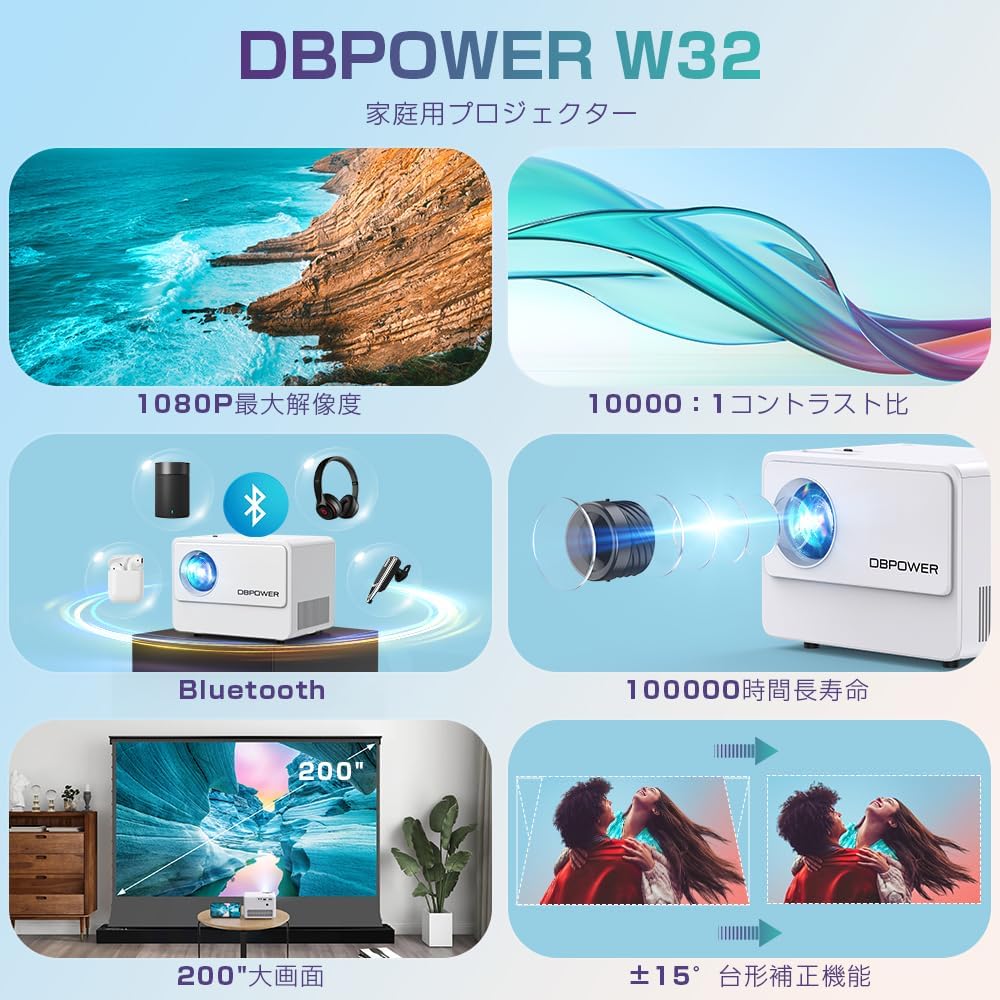
3.3 Sòti odyo
The projector has two built-in speakers for basic audio. For a more immersive experience, connect external audio devices via Bluetooth or the 3.5mm audio jack.

4. Antretyen
4.1 Netwaye Lantiy la
Use a soft, lint-free cloth specifically designed for optical lenses to clean the projector lens. Do not use abrasive cleaners or solvents.
4.2 Netwayaj Filtè Lè a
Regularly check and clean the air filter to ensure proper ventilation and prevent overheating. Refer to the diagram below for the location of the air vents.

4.3 Depo
When not in use for extended periods, store the projector in a cool, dry place, away from direct sunlight and excessive dust. Use the original packaging or a protective case.
NAN. Depanaj
| Pwoblèm | Kòz posib | Solisyon |
|---|---|---|
| Pa gen imaj ki parèt | Power cable not connected; Incorrect input source selected; Device not connected properly. | Check power connection; Select correct input source (HDMI, USB, AV); Ensure cables are securely connected. |
| Imaj twoub | Focus not adjusted; Keystone not adjusted. | Adjust the focus ring; Adjust the keystone correction dial. |
| Pa gen son | Volume too low; External audio device not connected or selected; Muted. | Increase volume; Check external audio connections/Bluetooth pairing; Unmute the projector. |
| Remote kontwòl pa travay | Batteries dead; Obstruction between remote and projector; Remote sensor blocked. | Replace batteries; Remove obstructions; Ensure remote is pointed at the projector's IR sensor. |
| Surchof | Vantilasyon bloke; Itilizasyon pwolonje nan yon anviwònman cho. | Ensure vents are clear; Operate in a well-ventilated area; Allow projector to cool down. |
6. Espesifikasyon
| Karakteristik | Detay |
|---|---|
| Mak | DBPOWER |
| Nimewo Modèl | W32 |
| Dimansyon pwodwi | 14.9 x 11 x 10.4 cm |
| Pwa atik | 970 g |
| Klète | 10000 Lumens (equivalent to 300 ANSI Lumens) |
| Rezolisyon natif natal | 1920 x 1080 pixels (1080P) |
| Rezolisyon sipòte | Jiska 4K |
| Pwopòsyon kontras | 10,000:1 |
| Lamp Lavi | ≥100,000 èdtan |
| Koneksyon Teknoloji | Bluetooth, WiFi, HDMI, USB, AV, TF Card |
| Itilizasyon Rekòmande | Teyat lakay |
| Karakteristik espesyal | 4K compatible, Bluetooth, Built-in Speaker, Keystone Correction, WiFi |


7. Garanti ak sipò
DBPOWER provides a 12-month warranty from the date of purchase. This warranty covers initial defects and natural failures under normal use. For any issues, including exchanges or returns, please contact our customer support.
Sipò pou Kliyan
- 24-hour quick response service
- 12 mwa garanti bon jan kalite
- 30-day return validity period
- Dedicated customer support always available
For direct support, you can scan the QR code below to add us on LINE or visit our official store page.

Please note: Customer support is closed on Saturdays, Sundays, and public holidays, as well as during year-end/New Year, Golden Week, and Obon holidays.
Ask a question about this manual
Ask about setup, troubleshooting, compatibility, parts, safety, or missing instructions. Manuals+ will review the question and use this page’s manual context to help answer it.