
1. Entwodiksyon
Thank you for choosing the ACEBEAM E75 4500 High Lumens Flashlight. This powerful and versatile flashlight is designed for various applications, including outdoor activities, searching, camping, hiking, and everyday carry (EDC). It features a magnetic base, USB Type-C rechargeable battery, and multiple lighting modes. Please read this manual thoroughly before use to ensure proper operation and maintenance.
2. Enfòmasyon sou Sekirite
- Pa klere flach la dirèkteman nan je yo. Gwo limyè ki soti a ka lakòz pwoblèm vizyon tanporè.
- Kenbe soti nan atenn timoun yo.
- Do not disassemble the sealed head of the flashlight, as this may cause damage to the flashlight and void the warranty.
- Use only the recommended battery type. Improper battery use can lead to damage or explosion.
- The flashlight may become hot during prolonged use, especially in high output modes. Handle with care.
- Asire w kouvèti pò USB a byen fèmen pou kenbe l reziste dlo.
3. Pake kontni
- ACEBEAM E75 Flashlight
- Batri ityòm-ion rechargeable (pre-enstale oswa separe)
- USB Kalite-C Chaje Kab
- Lanyard
- rezèv O-bag
- Manyèl itilizatè
4. Pwodwi souview
The ACEBEAM E75 is a high-performance flashlight featuring four LEDs, a magnetic tail cap, and a side switch for intuitive control. Its robust aluminum construction ensures durability and IPX8 water resistance.

Figi 1: Prensipal view of the ACEBEAM E75 Flashlight, showcasing its robust design and textured body.
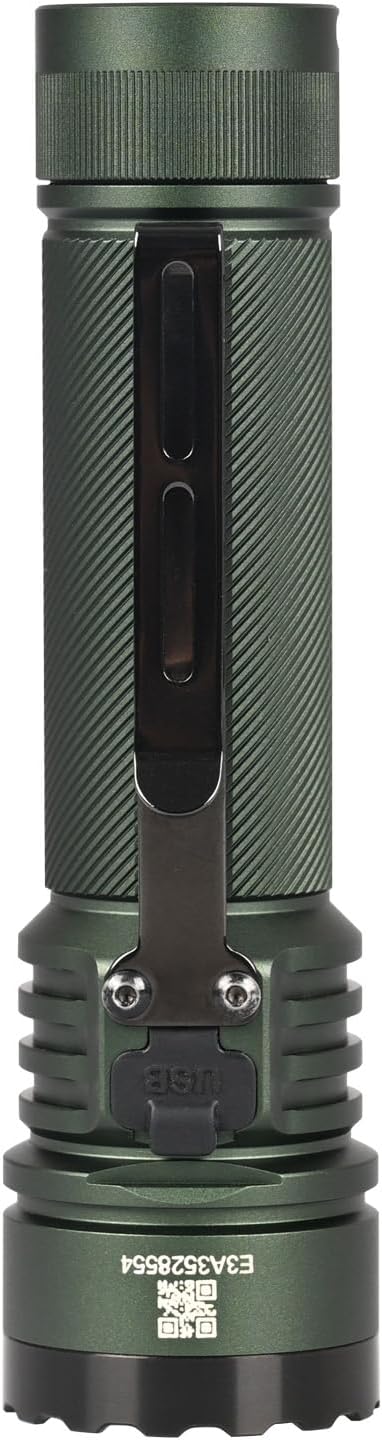
Figi 2: Side view of the ACEBEAM E75 Flashlight, highlighting the integrated pocket clip for secure carrying.

Figure 3: The ACEBEAM E75 Flashlight shown with its included lanyard attached, providing an additional carrying option.

Figure 4: Diagram illustrating the key features of the E75: quad-core high-performance LEDs, 4500 lumens maximum output, Type-C rechargeable battery, and magnetic tail cap.

Figure 5: The magnetic base of the E75 Flashlight demonstrated, allowing it to attach to metallic surfaces for hands-free operation.
5. Enstalasyon
5.1 Enstalasyon batri
- Unscrew the tail cap of the flashlight counter-clockwise.
- Insert the included 21700 Lithium-Ion battery with the positive (+) terminal facing towards the head of the flashlight.
- Screw the tail cap back on clockwise until it is fully tightened. Ensure the O-rings are properly seated to maintain water resistance.
5.2 Premye chaj
Anvan premye itilizasyon an, li rekòmande pou chaje batri a nèt.
- Locate the USB Type-C charging port on the flashlight body, usually covered by a rubber flap.
- Open the rubber flap and connect the USB Type-C cable to the port.
- Konekte lòt bout kab la nan yon sous pouvwa USB (pa egzanp, òdinatè, adaptè miray la).
- The battery indicator around the side switch will show charging status.
6. Operasyon Enstriksyon
The ACEBEAM E75 features an all-in-one side switch for convenient operation of all lighting modes.

Figure 6: Diagram detailing the functions of the all-in-one control switch on the ACEBEAM E75 Flashlight.
- On/Off: Single click the side switch to turn the flashlight on or off.
- Seleksyon Sòti: With the light on, press and hold the switch to cycle through Low, Med1, Med2, and High modes. Release the switch at your desired mode. The flashlight will memorize the last selected mode for future use.
- Turbo: When the light is unlocked, quickly double-click the switch at any time to activate Turbo mode. Double-click again to switch between Turbo and the previously memorized mode.
- Strobe: When the light is unlocked, quickly triple-click the switch at any time to activate Strobe mode.
- Limyè lalin: When the light is unlocked and off, press and hold the switch for 0.5 seconds to access Moonlight mode.
- Fèmen/Debloke: When the light is off, press and hold the switch for 3 seconds to lock the flashlight. The indicator light will flash to confirm. To unlock, press and hold the switch for 3 seconds until the light turns on in Moonlight mode.
7. Charging and Battery Indicator
The E75 features a built-in USB Type-C charging port and a battery level indicator for convenient power management.

Figure 7: Close-up of the Type-C charging port and the battery level indicator on the E75 Flashlight.

Figure 8: Visual representation of the power indicator levels on the E75 Flashlight.
- Chaje Estati:
- Red Flash: Charging
- Green On: Fully Charged
- Battery Level Indicator (when light is on):
- Green Light: >20% remaining power
- Red Light: 20% - 10% remaining power (low battery warning)
- Red Flash Light: <10% remaining power (critical battery level)
8. Antretyen
- Netwayaj: Netwaye kò flach la avèk yon twal mou,amp twal. Pa sèvi ak pwodui netwayaj abrazif.
- Threads and O-rings: Lubricate the threads and O-rings regularly with silicone grease to maintain water resistance and smooth operation. Replace O-rings if they appear damaged.
- Swen batri: If the flashlight will not be used for an extended period, remove the battery to prevent potential leakage. Store batteries in a cool, dry place.
NAN. Depanaj
| Pwoblèm | Kòz posib | Solisyon |
|---|---|---|
| Flach pa limen. | Battery is depleted or incorrectly inserted. Flashlight is locked. | Charge the battery or ensure it is inserted with the positive (+) terminal facing the head. Unlock the flashlight by pressing and holding the switch for 3 seconds. |
| Limyè ki soti a fèb oswa li ap tranble. | Low battery. Loose connections. | Recharge the battery. Ensure the tail cap is fully tightened. |
| Flashlight gets excessively hot. | Prolonged use in high output modes. | This is normal for high-lumen flashlights. Reduce output mode or allow to cool down. |
| Dlo antre. | USB port cover not sealed. Damaged O-rings. | Ensure the USB port cover is fully closed. Inspect and replace O-rings if damaged. |
10. Espesifikasyon
| Karakteristik | Detay |
|---|---|
| Modèl | E75 |
| Sous limyè | 4 High Performance LEDs (Cool White 6500K) |
| Maksimòm Sòti | 4500 Lumen |
| Distans gwo bout bwa | 260 mèt |
| Sous pouvwa | 1 x 21700 Lithium-Ion Battery (included) |
| Chaje | USB Kalite-C Rechargeable |
| Materyèl | Hard Anodizing Aircraft Grade Aluminum Alloy |
| Rezistans dlo | IPX8 (Submersible to 2 meters) |
| Rezistans enpak | 1.5 mèt |
| Dimansyon | 5.09" (Length) x 1.37" (Head Diameter) x 1.1" (Body Diameter) |
| Pwa | 7.65 Ounces (excluding battery) |
| Karakteristik espesyal | Magnetic Base, Battery Level Indicator, Mode Memory |
11. Garanti ak sipò
ACEBEAM products are manufactured with high-quality materials and craftsmanship. For warranty information, technical support, or service inquiries, please contact ACEBEAM customer service directly or visit the official ACEBEAM websit la. Tanpri konsève prèv acha ou a pou reklamasyon garanti.
12. Pwoteksyon anviwònman
Please dispose of batteries and electronic components responsibly. Do not dispose of batteries in household waste. Consult your local regulations for proper battery recycling and disposal procedures.