
KRUX KRX0137
ENDORFY Krux Qara 60% Mechanical Keyboard User Manual
Modèl: KRX0137
Entwodiksyon
This manual provides comprehensive instructions for the setup, operation, maintenance, and troubleshooting of your ENDORFY Krux Qara 60% Mechanical Keyboard. Please read this manual thoroughly before using the product to ensure proper functionality and longevity.
Pwodwi souview
The ENDORFY Krux Qara 60% is a compact mechanical gaming keyboard designed for performance and portability. It features Outemu Red Mechanical Switches, zone RGB backlighting, and a durable construction.
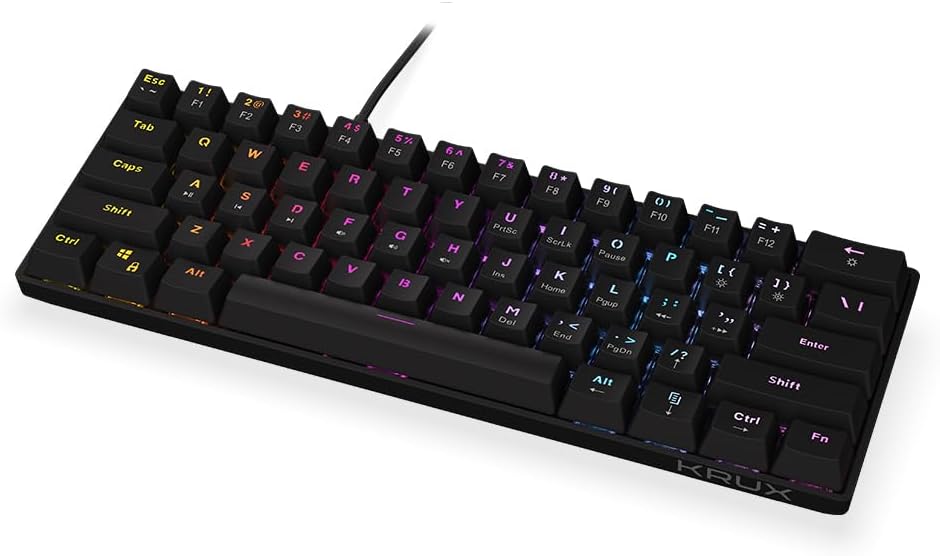
Figi 1: Devan view of the ENDORFY Krux Qara 60% Mechanical Keyboard, showcasing its compact 60% layout and vibrant RGB zone backlighting. The keyboard features black keycaps with white legends.

Figi 2: Top-down perspective of the keyboard, highlighting the keycap layout and the integrated USB-A cable connection point at the top center.

Figi 3: Dèyè view of the keyboard, showing the product label with model information (KRX0137) and certification marks. The two adjustable feet are visible in their folded position.
Kontni pake
Asire w tout atik yo la anvan ou kontinye ak konfigirasyon an:
- ENDORFY Krux Qara 60% Mechanical Keyboard
- USB cable (integrated)
- Manyèl Itilizatè (dokiman sa a)
Enstalasyon
- Debake: Retire klavye a ak akseswa li yo nan anbalaj la avèk prekosyon.
- Koneksyon: Connect the integrated USB-A cable from the keyboard to an available USB port on your computer (PC, Linux, Mac).
- Enstalasyon chofè: The keyboard is plug-and-play and typically does not require additional drivers for basic functionality. Your operating system should automatically recognize the device.
- Plasman: Place the keyboard on a stable, flat surface. You may adjust the keyboard height using the foldable feet located on the underside for ergonomic comfort.

Figi 4: Side view illustrating the keyboard's profile and the adjustable feet in their extended position, providing an elevated typing angle.
Enstriksyon Operasyon
Fonksyonalite debaz
The keyboard functions as a standard QWERTY input device. All alphanumeric keys, symbols, and basic modifiers (Shift, Ctrl, Alt) operate as expected.
Function Key Combinations (Fn Layer)
Due to its 60% compact layout, many standard keyboard functions are accessed via the Fn key in combination with other keys. The secondary functions are typically printed on the front or side of the keycaps.
- Fn + Number Row (F1-F12): Accesses F1 through F12 functions. For example, Fn + 1 for F1.
- Fn + P, [, ]: Multimedia controls (Play/Pause, Previous Track, Next Track).
- Fn + ;, ', /: Kontwòl volim (Silans, Diminye volim, Monte volim).
- Fn + Maj dwat: Arrow keys (Up, Down, Left, Right).
- Fn + M, <, >: Home, End, PgUp, PgDn.
- Fn + I, K, L: Insert, Home, Page Up.
- Fn + U, J, H: Print Screen, Scroll Lock, Pause Break.
Kontwòl ekleraj
The keyboard features zone RGB backlighting. Use the following combinations to control the lighting:
- Fn + \| Chanje mòd ekleraj yo youn apre lòt.
- Fn + Enter: Ajiste klète ekleraj.
- Fn + Right Ctrl: Chanje koulè ekleraj.
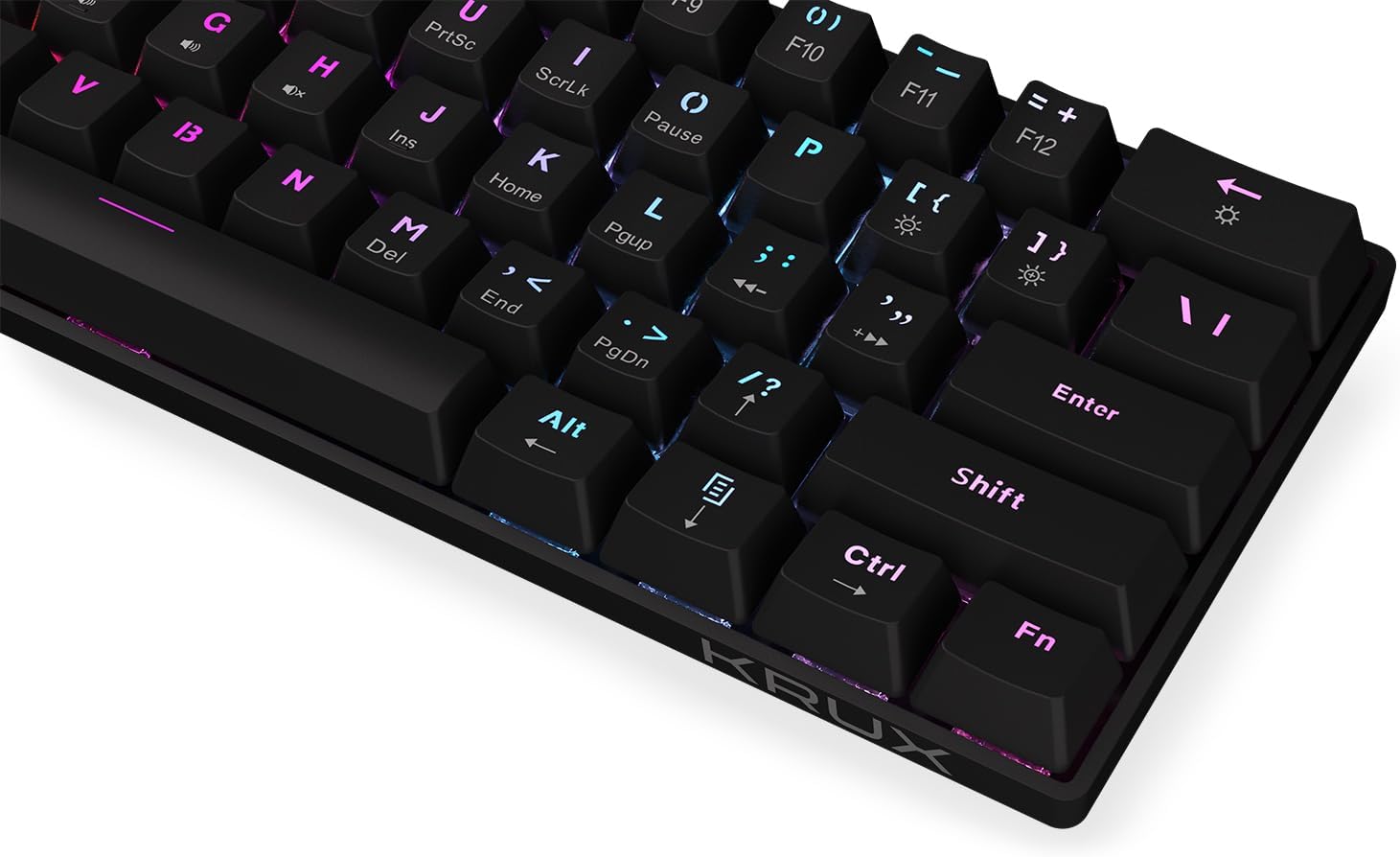
Figi 5: Yon fèmen view of the keycaps, demonstrating the RGB backlighting effect and the secondary functions printed on the front of some keys.
Antretyen
Regular maintenance helps prolong the life of your keyboard:
- Netwayaj: Use a soft, dry cloth to wipe the surface of the keyboard. For dust and debris between keycaps, use compressed air. Avoid liquid cleaners directly on the keyboard.
- Devèsman: In case of liquid spills, immediately disconnect the keyboard from your computer. Turn it upside down to drain liquid and allow it to dry completely before reconnecting. Do not use a hairdryer as excessive heat can damage components.
- Depo: Sere klavye a nan yon kote ki fre epi sèk, lwen limyè solèy dirèk ak tanperati ekstrèm.
Depanaj
| Pwoblèm | Kòz posib | Solisyon |
|---|---|---|
| Klavye pa reponn | Koneksyon USB ki lach, pò USB ki gen pwoblèm, erè sistèm. | Ensure USB cable is securely connected. Try a different USB port. Restart your computer. |
| Kle yo pa anrejistre oswa yo tape de fwa | Dust/debris under keycap, switch malfunction. | Use compressed air to clean around the affected key. If problem persists, contact support. |
| Backlight not working or inconsistent | Backlight setting, software glitch. | Peze Fn + Antre to adjust brightness. Cycle through modes with Fn + \|. Restart computer. |
| Fn key combinations not working | Konbinezon kle ki pa kòrèk, konfli lojisyèl. | Refer to the "Operating Instructions" section for correct combinations. Ensure no conflicting software is running. |
Espesifikasyon
- Modèl: KRX0137
- Kalite klavye: Klavye jwèt mekanik 60%
- Chanjman: Outemu wouj switch mekanik
- Ekleraj: Zone RGB
- Koneksyon: Fil USB-A
- Dimansyon: 29.1 x 10.1 x 3.9 cm (11.46 x 3.98 x 1.54 pous)
- Pwa: 506 g (1.11 lbs)
- Sistèm operasyon konpatib: Windows 10, Mac OS X 10.12 Sierra, Linux
- Eleman ki enkli: USB cable (integrated)
Garanti ak sipò
For warranty information and technical support, please refer to the official KRUX websit la oubyen kontakte détayan lokal ou a. Kenbe prèv acha ou pou reklamasyon garanti.
Manifakti: Krux
Websit: www.krux.tech (Note: This is a placeholder link, please refer to the official manufacturer's website for accurate support information.)
Ask a question about this manual
Ask about setup, troubleshooting, compatibility, parts, safety, or missing instructions. Manuals+ will review the question and use this page’s manual context to help answer it.