
Entwodiksyon
Thank you for choosing the AVMTON Wireless Gaming Mouse. This manual provides detailed instructions on how to set up, operate, and maintain your new mouse, ensuring optimal performance and an enhanced gaming and work experience. Designed for comfort and precision, this ergonomic wireless mouse features adjustable DPI, customizable buttons, and vibrant RGB lighting.
Pwodwi souview
The AVMTON Wireless Gaming Mouse is engineered for both gaming and office use, offering a comfortable ergonomic design and responsive control. It features a honeycomb hollow design with RGB backlighting, providing both aesthetic appeal and lightweight performance.
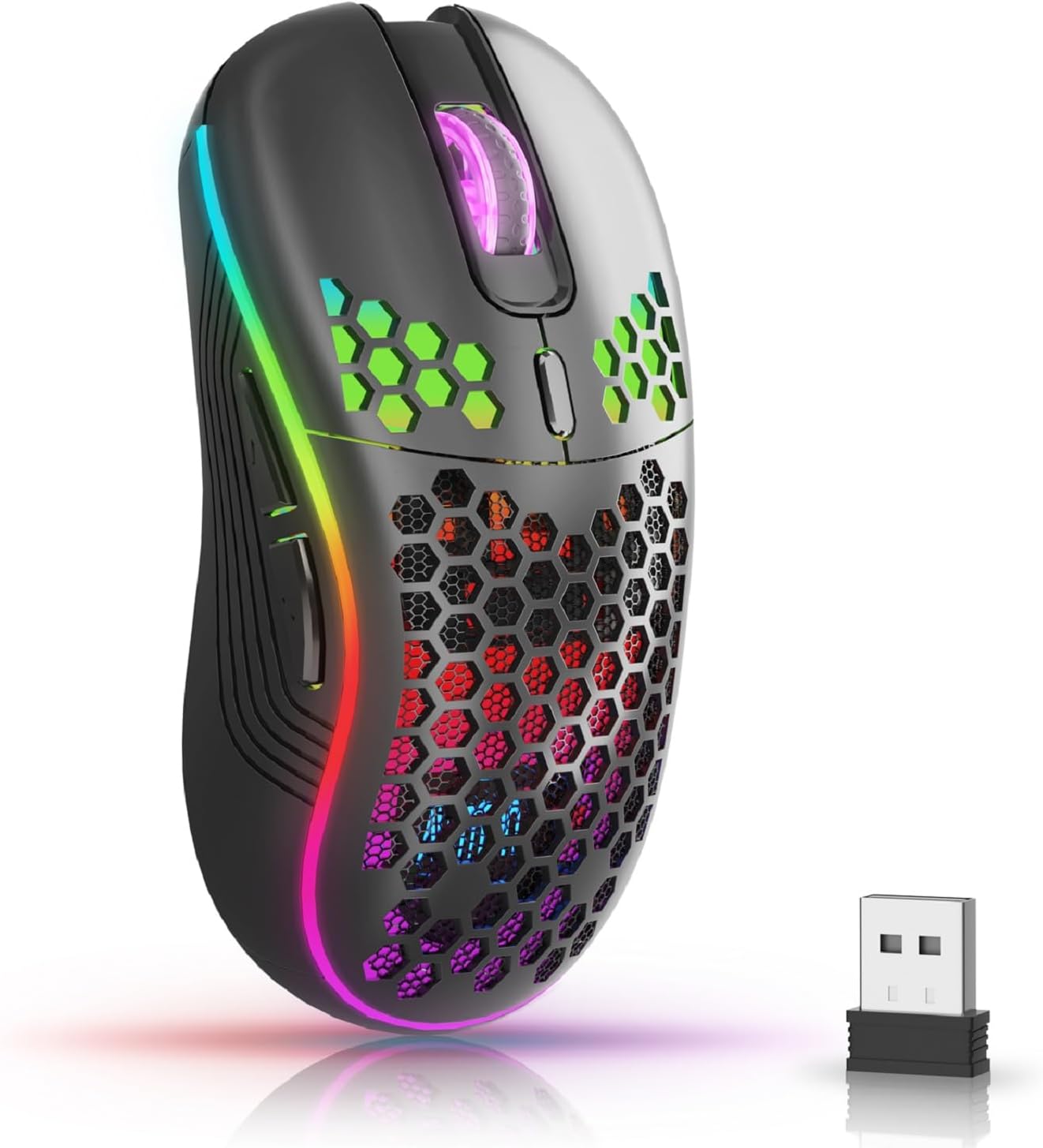
The AVMTON Wireless Gaming Mouse in black, featuring RGB lighting and a honeycomb design, shown alongside its compact USB receiver.

Illustration of the mouse's connectivity modes, including Type-C charging, 2.4G wireless receiver, and a 10m sensing range, suitable for home, gaming, and office environments.
Karakteristik kle:
- Konsepsyon ergonomique: Shaped to fit the hand comfortably, reducing strain during extended use.
- DPI reglabl: Easily switch between 800/1200/1600/2400/4800 DPI settings for precise control.
- 6 bouton pwogramasyon: Includes forward/backward, left/right click, scroll wheel, and DPI adjustment button.
- Batri rechargeable: Built-in lithium battery with USB-C charging, offering 15-20 days of use on a single charge.
- Konsepsyon Klike Silansyeuz: Ideal for quiet environments like libraries or offices.
- Lajè konpatibilite: Supports Windows 2000/ME/XP/7/8/10/Vista/98, Mac OS, Linux, and compatible with laptops, PCs, desktops, and Macbooks.
- Konstriksyon dirab: Tested for over 5 million clicks, ensuring long-lasting performance.
Gid Enstalasyon
Follow these steps to set up your AVMTON Wireless Gaming Mouse:
- Chaje sourit la: Before first use, fully charge the mouse using the provided USB-C charging cable. Connect the cable to the mouse's Type-C port and a USB power source (e.g., computer USB port, USB wall adapter). The charging indicator will show the charging status.
- Jwenn reseptè USB a: The compact USB 2.4G wireless receiver is typically stored in a compartment on the underside of the mouse for safe keeping during transport.
- Konekte reseptè a: Insert the USB receiver into an available USB port on your computer (laptop, PC, desktop, Macbook).
- Pouvwa sou: Limen sourit la avèk bouton pouvwa ki sitiye anba sourit la.
- Koneksyon otomatik: The mouse should automatically connect to your computer. No additional drivers are usually required for basic functionality.
Enstriksyon Operasyon
Understanding the functions of your mouse buttons and settings will enhance your experience.
Fonksyon bouton:
- Bouton Klike Goch: Fonksyon klike prensipal estanda.
- Bouton Klike Dwat: Fonksyon klike segondè estanda.
- wou woulo liv: Defile anlè oswa anba nan dokiman yo epi web paj yo. Ou kapab peze l tou pou fonksyonalite klike sou bouton mitan an.
- Bouton Ajisteman DPI: Located near the scroll wheel. Press this button to cycle through available DPI settings (800/1200/1600/2400/4800). Each press changes the cursor speed and sensitivity.
- Bouton Avant: Typically located on the side of the mouse. Used for navigating forward in web navigatè oswa file eksploratè.
- Bouton dèyè: Typically located on the side of the mouse. Used for navigating backward in web navigatè oswa file eksploratè.
Kontwòl ekleraj RGB:
The mouse features dynamic RGB backlighting. If you prefer to turn off the backlight, refer to the specific instructions provided with your mouse or check the manufacturer's website for software utilities, if available. Some models allow toggling RGB with a combination of buttons (e.g., DPI button + another button).
Antretyen
Proper maintenance ensures the longevity and performance of your mouse.
- Chaje: Recharge the mouse when the battery indicator shows low power. A full charge provides approximately 15-20 days of use. It is recommended to fully charge the mouse before extensive use.
- Netwayaj: Use a soft, dry cloth to clean the surface of the mouse. For stubborn dirt, a slightly damp Ou ka itilize twal, men asire w pa gen imidite ki antre nan konpozan entèn yo. Evite pwodui chimik ki agresif oswa materyèl abrazif.
- Depo: When not in use for extended periods, turn off the mouse to conserve battery life. Store it in a cool, dry place.
Depanaj
If you encounter issues with your AVMTON Wireless Gaming Mouse, try the following solutions:
- Sourit la pa reponn:
- Asire w sourit la mache.
- Tcheke si reseptè USB a byen branche nan yon pò USB ki fonksyone sou òdinatè w la.
- Recharge the mouse. A low battery can cause unresponsiveness.
- Eseye konekte reseptè USB a nan yon pò USB diferan.
- Rekòmanse òdinatè w lan.
- Koneksyon ki ralanti oswa ki pa konekte:
- Ensure the mouse is within the 10-meter sensing range of the USB receiver.
- Remove any large metallic objects or other wireless devices that might be causing interference between the mouse and the receiver.
- Try moving the USB receiver to a port closer to the mouse.
- Ajisteman DPI a pa fonksyone:
- Ensure you are pressing the dedicated DPI adjustment button.
- If the issue persists, try restarting the mouse and your computer.
- Limyè RGB pa travay:
- Check if the RGB backlight has been intentionally turned off (refer to "RGB Backlight Control" in Operating Instructions).
- Asire w ke sourit la gen ase chaj batri.
If these steps do not resolve the issue, please contact AVMTON customer support for further assistance.
Espesifikasyon
| Karakteristik | Detay |
|---|---|
| Mak | AVMTON |
| Nimewo Modèl | AV-DDMB-1 |
| Koulè | Nwa |
| Koneksyon Teknoloji | 2.4G san fil (Reseptè USB) |
| Anviwònman DPI | 800/1200/1600/2400/4800 |
| Kantite bouton | 6 |
| Oryantasyon men | Dwa |
| Lavi batri | Approx. 15-20 days (on a single charge) |
| Port chaje | USB Kalite-C |
| Sistèm operasyon konpatib | Windows 2000/ME/XP/7/8/10/Vista/98, Mac OS, Linux |
| Aparèy konpatib | Odinatè pèsonèl, Laptop |
| Karakteristik espesyal | Portable, Ergonomic, Rechargeable, RGB Backlight, Silent Click |
Garanti ak sipò
AVMTON offers a 12-month worry-free after-sales service for this product. If you encounter any problems with your wireless mouse, please do not hesitate to contact us. Our customer support team is ready to assist you.
For support, please visit the official AVMTON websit oswa kontakte revandè ou a.