
Entwodiksyon
Thank you for choosing the Diyeeni Portable Vintage Radio Speaker. This device combines a classic retro design with modern functionality, offering AM/FM/SW radio reception, Bluetooth connectivity, and multiple playback modes. Its portable and lightweight design makes it ideal for both indoor and outdoor use. Please read this manual carefully to ensure proper operation and to maximize your enjoyment of this product.
Enfòmasyon sou Sekirite
- Pa ekspoze aparèy la anba lapli, imidite, oswa tanperati ekstrèm.
- Evite jete oswa sibi aparèy la nan gwo enpak.
- Pa demonte oswa eseye repare aparèy la tèt ou. Konfye tout antretyen bay pèsonèl kalifye.
- Kenbe aparèy la lwen gwo chan mayetik.
- Use only the provided charging cable and battery, or compatible replacements.
- Asire w ke gen bon vantilasyon lè w ap itilize aparèy la.
Kontni pake
Tanpri tcheke pake a pou atik sa yo:
- 1 x Portable Vintage Radio Speaker (Model RXBT628)
- 1 x Matching Rechargeable Battery
- 1 x USB Chaje Kab
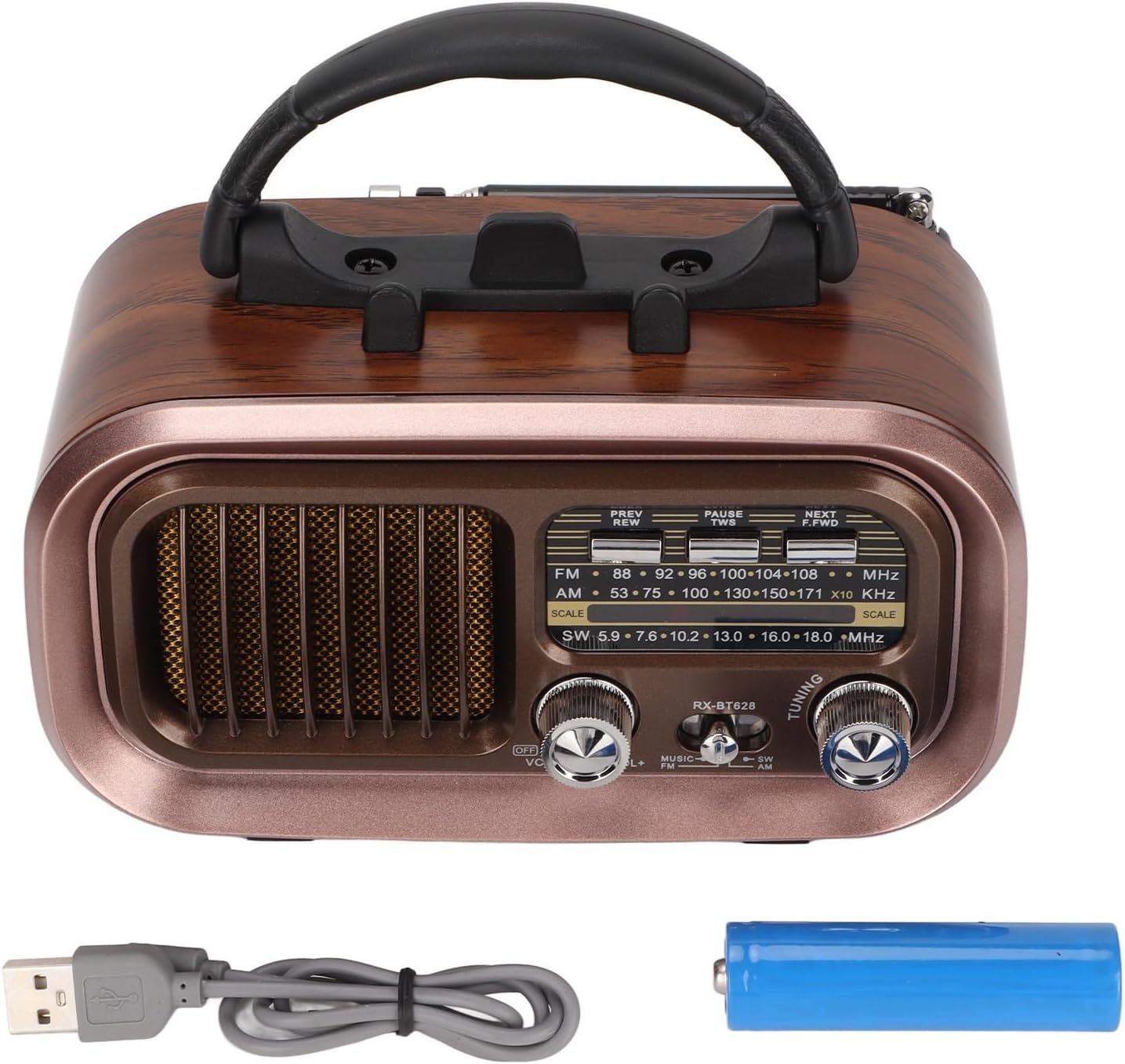
Image: The Diyeeni Portable Vintage Radio Speaker shown with its included rechargeable battery and USB charging cable.
Layout pwodwi ak kontwòl

Imaj: Devan view of the radio speaker, highlighting the main controls and display area.
- Antèn: Antèn teleskopik ki ka pwolonje pou pi bon resepsyon radyo.
- Manch: Manch entegre pou fasilite transpò.
- Bouton PREV/REW: Short press for previous track (Bluetooth/USB/TF), long press for rewind.
- PAUSE/TWS Button: Play/Pause (Bluetooth/USB/TF). Long press for TWS pairing (Bluetooth mode).
- NEXT/F.FWD Button: Short press for next track (Bluetooth/USB/TF), long press for fast forward.
- Ekspozisyon frekans: Analog display for radio frequencies.
- OFF/VOL Knob: Power On/Off and Volume control. Rotate to adjust volume.
- MUSIC/SW/AM/FM Switch: Selects between Bluetooth/USB/TF (MUSIC) mode and radio bands (SW, AM, FM).
- Bouton Akò: Rotate to tune into radio stations.

Image: Side panel of the radio speaker, showing the USB port, TF card slot, power indicator, charge indicator, and DC 5V input port.
- Pò USB: Pou lekti sou yon kle USB.
- TF Kat plas: Pou lekti kat TF (Micro SD).
- Endikatè POWER: Limen lè aparèy la limen.
- CHARGE Indicator: Li limen pandan y ap chaje.
- Pò DC 5V ANTRE: Pò mikwo USB pou chaje batri entèn lan.
Enstalasyon
1. Enstalasyon batri
The radio speaker uses a rechargeable battery. Before first use, ensure the battery is correctly installed.
- Jwenn lòj batri a sou do inite a.
- Glise kouvèti lòj batri a louvri.
- Insert the provided rechargeable battery, ensuring the polarity (+/-) matches the diagram inside the compartment.
- Fèmen kouvèti lòj batri a byen.

Imaj: Dèyè view of the radio speaker, showing the battery compartment cover and specifications label.
2. Chaje batri a
Before initial use, fully charge the battery for optimal performance.
- Connect the small end of the USB charging cable to the DC 5V IN port on the side of the radio.
- Connect the larger end of the USB charging cable to a standard USB power adapter (not included) or a computer USB port.
- The CHARGE indicator light will illuminate, indicating that the battery is charging.
- Once fully charged, the CHARGE indicator light may change color or turn off (refer to specific model behavior). Disconnect the charging cable.
Enstriksyon Operasyon
1. Pouvwa pou limen/etenn ak kontwòl volim
- To power on the device, rotate the OFF/VOL knob clockwise until you hear a click and the POWER indicator lights up.
- Kontinye vire a OFF/VOL knob clockwise to increase the volume, and counter-clockwise to decrease it.
- Pou etenn, vire OFF/VOL knob counter-clockwise until you hear a click and the POWER indicator turns off.
2. Seleksyon mòd
Sèvi ak la MUSIC/SW/AM/FM switch to select the desired operating mode:
- FM: Pou resepsyon radyo FM.
- AM: Pou resepsyon radyo AM.
- SW: For Shortwave radio reception.
- MIZIK: For Bluetooth, USB, or TF card playback. The device will automatically detect and switch to the available source (Bluetooth, then USB, then TF).
3. Operasyon Radyo (AM/FM/SW)
- Extend the telescopic antenna for better reception, especially for FM and SW bands.
- Mete la MUSIC/SW/AM/FM switch to the desired radio band (FM, AM, or SW).
- Dousman vire a REGLAGE knob to scan for radio stations. The frequency display will indicate the approximate frequency.
- Ajiste pozisyon antèn lan pou yon siyal ki pi klè.
4. Pè Bluetooth
- Mete la MUSIC/SW/AM/FM chanje a MIZIK mode. The device will enter Bluetooth pairing mode, indicated by an audible prompt.
- Sou aparèy mobil ou a (telefòn entelijan, tablèt, elatriye), aktive Bluetooth epi chèche aparèy ki disponib yo.
- Select "RXBT628" (or similar name) from the list of found devices to pair.
- Once paired, you will hear a confirmation sound, and you can now play audio from your device through the speaker.
- Sèvi ak la PREV/REW, PAZE/TWS, ak PWOCHÈ/F.FWD bouton pou kontwole lèktur.
5. Lekti Kat USB/TF
- Ensure your USB flash drive or TF (Micro SD) card contains audio files nan fòma MP3, WMA, oswa WAV.
- Mete la MUSIC/SW/AM/FM chanje a MIZIK mòd.
- Insert the USB flash drive into the USB port or the TF card into the TF card slot. The device will automatically detect and begin playing audio.
- Sèvi ak la PREV/REW, PAZE/TWS, ak PWOCHÈ/F.FWD bouton pou kontwole lèktur.
Antretyen
- Netwayaj: Siye deyò aparèy la avèk yon twal mou epi sèk. Pa sèvi ak pwodui netwayaj abrazif oswa solvan.
- Depo: Lè w pa itilize aparèy la pou yon bon bout tan, sere l nan yon kote ki fre epi sèk, lwen limyè solèy dirèk ak tanperati ekstrèm.
- Swen batri: If the device will not be used for a long time, it is recommended to charge the battery periodically to maintain its lifespan.
Depanaj
| Pwoblèm | Kòz posib | Solisyon |
|---|---|---|
| Pa gen pouvwa | Batri a fin itilize oswa li pa byen enstale. | Chaje batri a. Asire w ke batri a byen mete nan plas li epi li byen polarite. |
| Resepsyon radyo pòv | Antèn nan pa lonje, siyal la fèb, oswa entèferans. | Fully extend the telescopic antenna. Adjust the antenna position. Try moving to a different location. |
| Bluetooth pa asosye | Device not in pairing mode, or too far from the speaker. | Ensure the speaker is in MUSIC mode. Make sure Bluetooth is enabled on your mobile device. Keep devices within 10 meters (33 feet). |
| Kat USB/TF la pa ap jwe | Pa kòrèk file format, card not inserted properly, or damaged card. | Asire odyo files are MP3, WMA, or WAV. Reinsert the USB drive/TF card. Try a different USB drive/TF card. |
| Pa gen son | Volume too low, or device muted. | Increase the volume using the OFF/VOL knob. Check if the connected Bluetooth device's volume is also up. |
Espesifikasyon
| Karakteristik | Spesifikasyon |
|---|---|
| Nimewo Modèl | RXBT628 |
| Mak | Diyeeni |
| Koulè | Black (Retro Style) |
| Koneksyon Teknoloji | Bluetooth |
| Tuner Teknoloji | AM, FM, SW (3-Band) |
| Sous pouvwa | Batri Powered (Rechargeable) |
| Materyèl | Plastik |
| Entèfas Materyèl | USB |
| Aparèy konpatib | Telefòn entelijan, Tablèt, Laptop |
| Lektur mòd | Bluetooth, USB, TF Card (MP3, WMA, WAV formats) |
| Karakteristik espesyal | Lightweight, Portable, External Antenna |
Garanti ak sipò
This product comes with a standard manufacturer's warranty. For specific warranty details, please refer to the documentation provided with your purchase or contact Diyeeni customer support. If you encounter any issues not covered in this manual, please reach out to the retailer or manufacturer for assistance.
For further support, please visit the official Diyeeni store or contact their customer service channels.