
ApeStellar Keyless Entry Door Lock
Manyèl Itilizatè Kadna Pòt Antre San Kle ApeStellar
Model: Keyless Entry Door Lock
Mak: ApeStellar
1. Entwodiksyon
Thank you for choosing the ApeStellar Keyless Entry Door Lock. This product is designed to provide convenient and secure access to your property without the need for traditional keys. It features a robust keypad for code entry, auto-locking capabilities, and is built with durable materials for long-lasting performance. This manual will guide you through the installation, programming, and daily operation of your new lock.
2. Karakteristik kle
- Plizyè Kòd Aksè: Supports one administrator code and up to 49 user codes, including one-time codes.
- Konstriksyon dirab: Made from heavy zinc alloy for enhanced stability and durability, meeting ANSI Grade 3 requirements.
- Rezistans move tan: IP54 rated for protection against dust and water, suitable for various weather conditions.
- Bloke otomatik: Customizable auto-lock feature with adjustable delay from 5 to 900 seconds.
- Bloke yon sèl-Touch: Dedicated button for quick and easy locking.
- Anti-Peep Code Protection: Allows entry of random digits before or after the actual code to prevent code exposure.
- Klavye ki eklere: Illuminated keypad for visibility in low-light conditions.
- Avètisman batri ki ba: Alerts when battery power is low, ensuring timely replacement.
- Mòd vakans: Disables all user codes for extended security when away.
- Mòd bèbè: Silences keypad tones for quiet operation.
3. Pwodwi souview
The ApeStellar Keyless Entry Door Lock consists of an exterior keypad assembly and an interior knob assembly, designed for easy integration with standard door preparations.
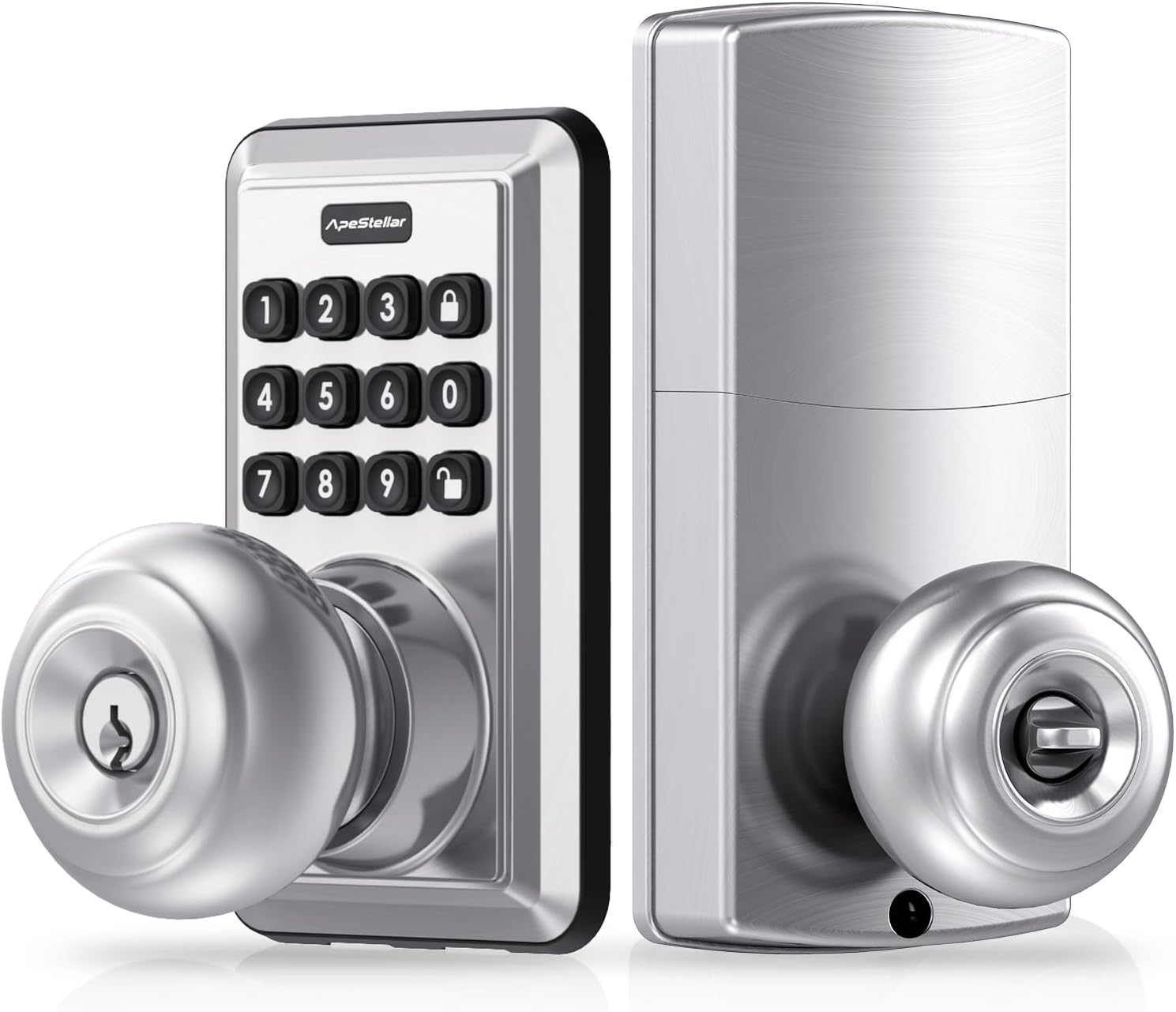
Figi 3.1: Devan ak dèyè view of the ApeStellar Keyless Entry Door Lock components.

Figure 3.2: The lock supports up to 50 user codes, suitable for various access needs.

Figure 3.3: The lock is constructed from heavy zinc alloy, offering superior durability and meeting ANSI Grade 3 standards.
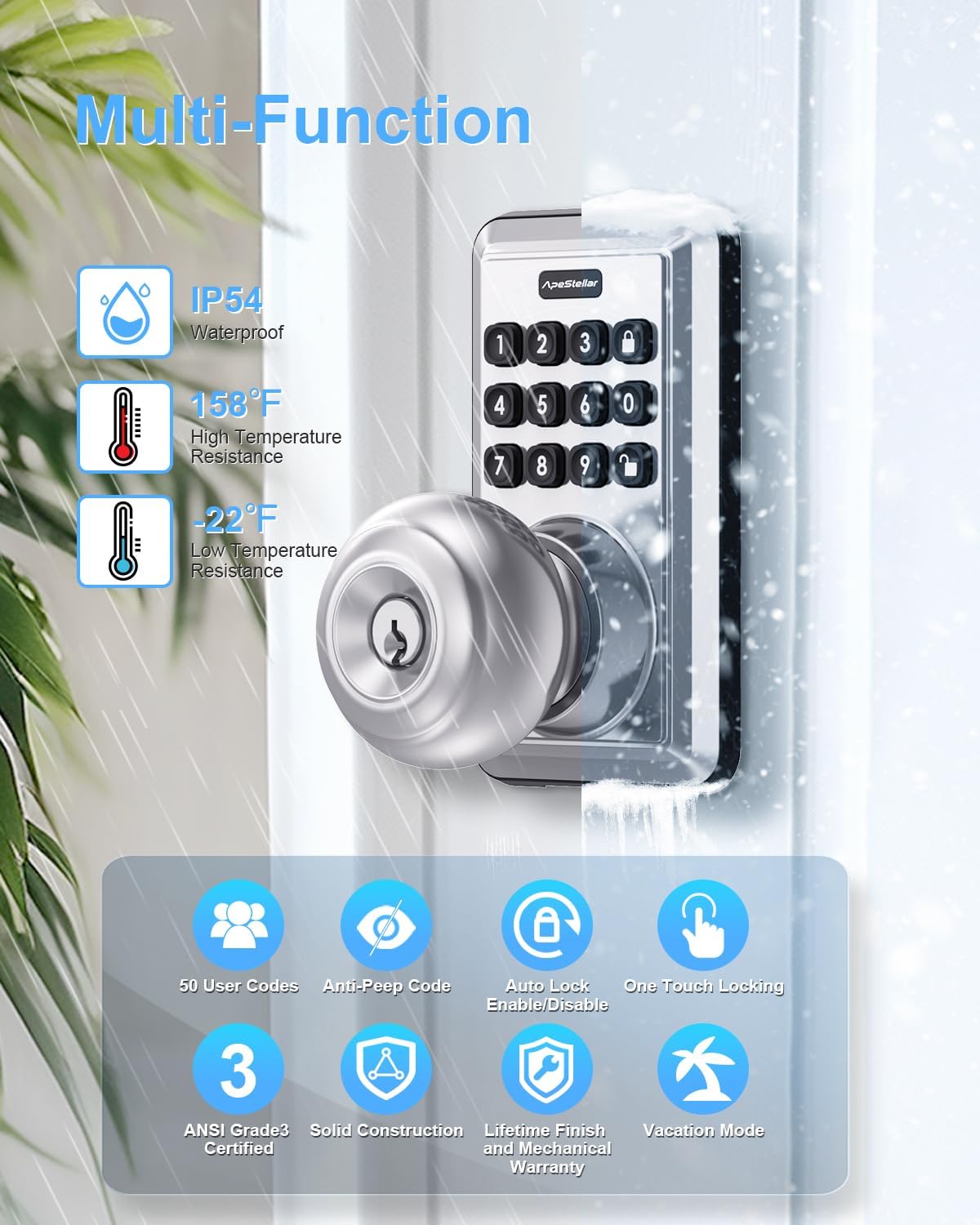
Figi 3.4: Plis paseview of the lock's multi-functional capabilities, including weather resistance and various security features.
4. Gid Enstalasyon
4.1 Konpatibilite Pòt
Asire w pòt ou a satisfè espesifikasyon sa yo pou yon enstalasyon kòrèk:
- Door Holes: Only suitable for 2-1/8" (54mm) door holes.
- Epesè Pòt: 1-3/8" to 1-3/4" (35mm to 45mm).
- Backset: Adjustable latch fits 2-3/8" or 2-3/4" (60mm or 70mm) backset.

Figure 4.1: Door compatibility and lock dimensions.
4.2 Zouti obligatwa
- Phillips tèt tournevis
4.3 Etap enstalasyon yo
The installation process typically takes about 15 minutes. Follow the instructions provided in the packaging for detailed steps. A screwdriver is the only tool required.
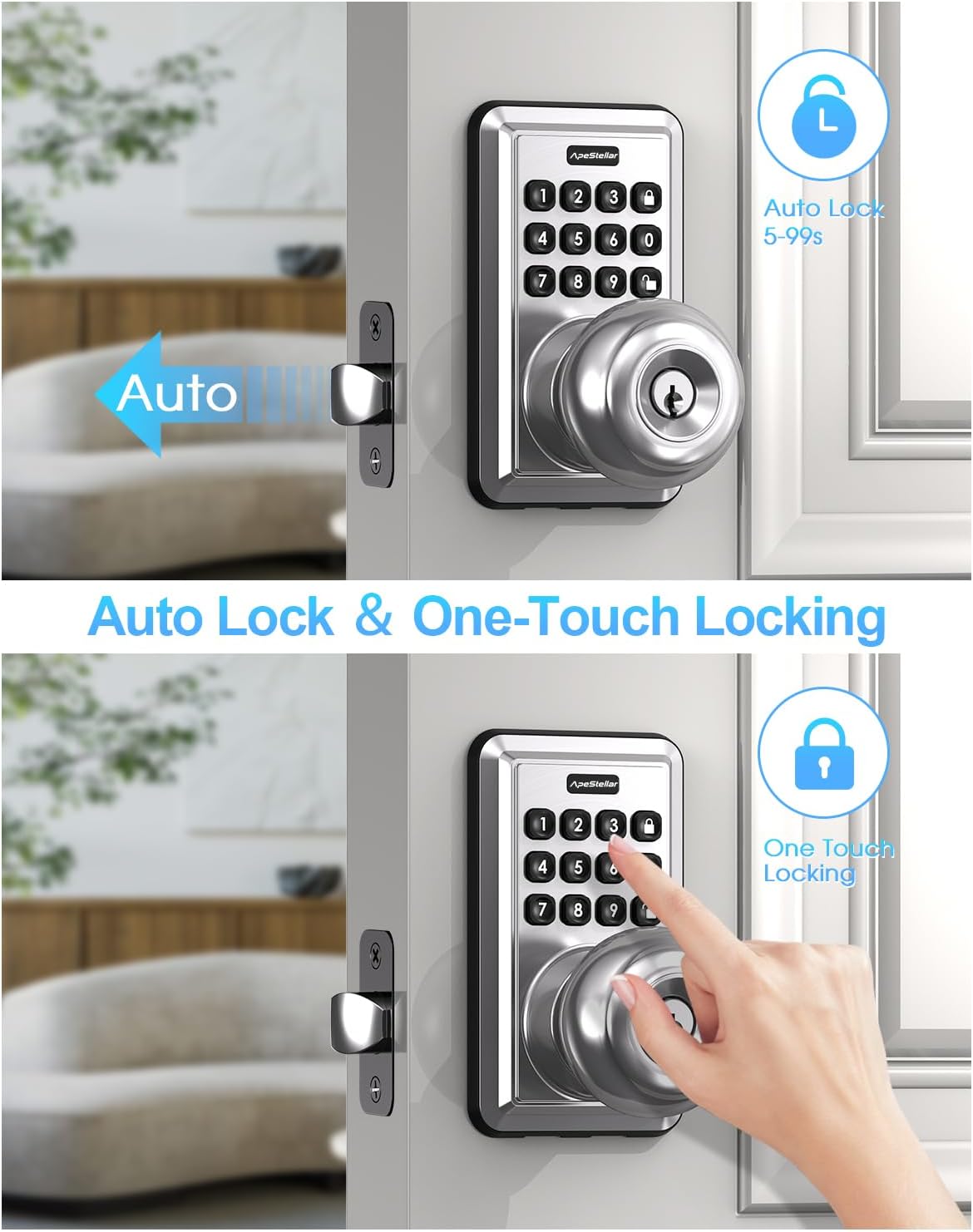
Figure 4.2: The lock is designed for easy, 15-minute installation.
5. Pwogramasyon ak Enstalasyon
After installation, you will need to program your lock. Refer to the detailed programming instructions included in your product packaging for specific steps on setting up administrator codes, user codes, and other features.
5.1 Setting Up Codes
- Administrator Code: This is the primary code used to manage all lock functions. It is recommended to change the default admin code immediately after installation.
- Kòd itilizatè: Create up to 49 unique user codes for family members, guests, or service providers.
- Kòd yon sèl itilizasyon: Generate temporary codes that expire after a single use, ideal for deliveries or short-term access.
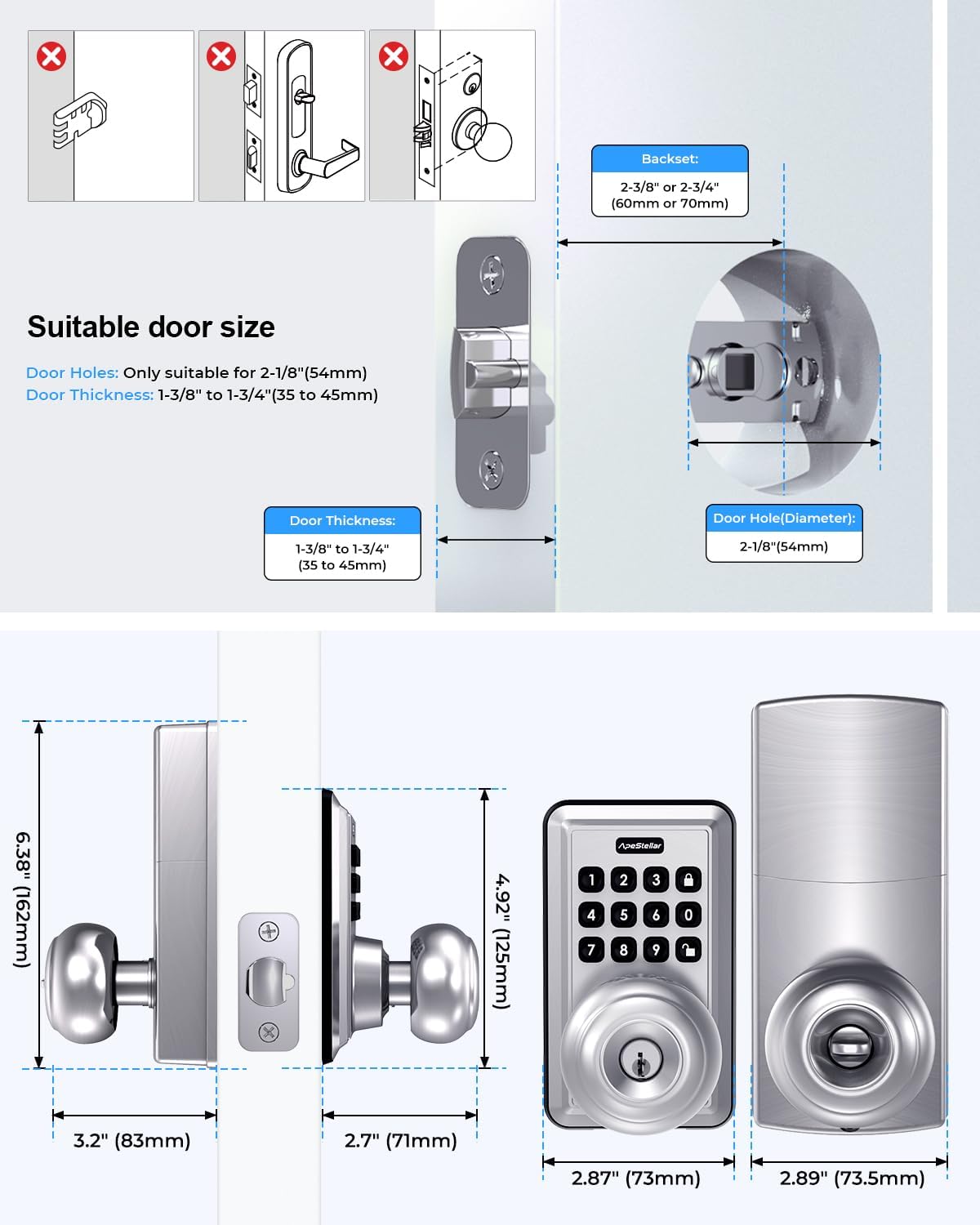
Figure 5.1: One-time user codes provide temporary access.
5.2 Fonksyon Oto-Bloke
The lock can be configured to automatically lock after a set period (5-900 seconds) once unlocked. This feature enhances security by ensuring the door is always locked after entry or exit.

Figure 5.2: Auto-lock and one-touch locking features.
5.3 Anti-Peep Code Protection
Pou anpeche lòt moun devine kòd ou a, ou ka antre chif o aza anvan oswa apre kòd reyèl ou a. Kadna a ap toujou rekonèt sekans ki kòrèk la nan seri nimewo ki pi long lan.

Figure 5.3: Anti-peep code entry for enhanced security.
6. Operasyon Enstriksyon
6.1 Debloke Pòt la
- Sèvi ak yon Kòd: Enter your valid user code or administrator code on the keypad, then turn the knob to open the door.
- Sèvi ak yon kle: Mete kle fizik la nan twou kle a epi vire l pou debloke l.
6.2 Fèmen pòt la
- Bloke yon sèl-Touch: Press the dedicated lock button on the keypad.
- Bloke otomatik: If enabled, the lock will automatically engage after the set delay period.
- Manyèl bloke: Soti anndan an, vire bouton an nan pozisyon bloke a.
7. Antretyen
7.1 Ranplasman batri
The lock is powered by batteries, offering up to 1 year of battery life under normal usage. When the battery level is low, the lock will provide a warning. Replace batteries promptly to ensure continuous operation.
- Refer to the product packaging for specific battery type and replacement instructions.
7.2 Netwayaj
Netwaye deyò kadna a avèk yon twal mou.amp twal. Evite itilize pwodui netwayaj abrazif oswa solvan ki ka domaje fini an oswa konpozan elektwonik yo.
NAN. Depanaj
If you encounter issues with your ApeStellar Keyless Entry Door Lock, refer to the following common problems and solutions:
- Lock not responding to code:
- Check if batteries are low and replace them.
- Ensure the correct code is being entered.
- Verify the lock is not in vacation mode.
- Kadna a ap bipe kontinyèlman:
- Sa ka vle di pil yo fèb. Ranplase pil yo.
- Door does not lock/unlock smoothly:
- Tcheke pou nenpòt obstak nan ankadreman pòt la oswa nan plak grèv la.
- Ensure the lock is properly aligned and installed.
- Klavye a pa limen:
- Tcheke nivo batri a.
For further assistance, please contact ApeStellar customer support.
9. Espesifikasyon
| Karakteristik | Spesifikasyon |
|---|---|
| Mak | ApeStellar |
| Karakteristik espesyal | Anti-Peeping Password, Auto-Lock, Back-Lit Keypad |
| Kalite fèmen | Combination Lock, Keypad, Pin Tumbler, Door Knob with Keypad, Keyless Door Knob |
| Dimansyon atik (L x W x H) | 6.3 x 3.2 x 3.2 pous |
| Materyèl | Zenk |
| Konpatibilite twou pòt | 2-1/8 pous (54mm) |
| Epesè Pòt | 1-3/8" pou rive 1-3/4" (35mm pou rive 45mm) |
| Backset | Reglabl 2-3/8" oswa 2-3/4" (60mm oswa 70mm) |
| Rezistans move tan | IP54 |
| Lavi batri | Up to 1 year (approximate) |
10. Garanti ak sipò
ApeStellar products are manufactured to high-quality standards. For information regarding warranty coverage, technical support, or replacement parts, please refer to the contact information provided with your product packaging or visit the official ApeStellar websit.
Sipò sou entènèt: Visit the ApeStellar Store on Amazon
Ask a question about this manual
Ask about setup, troubleshooting, compatibility, parts, safety, or missing instructions. Manuals+ will review the question and use this page’s manual context to help answer it.