
1. Entwodiksyon
The SENCKIT Solar Motion Sensor Alarm Outdoor is a security device designed to detect movement and deter potential intruders using a combination of loud sounds and flashing lights. This device is suitable for various outdoor applications, including homes, villas, farms, barns, and yards, providing an additional layer of security.

Imaj 1.1: Devan view of the SENCKIT Solar Motion Sensor Alarm Outdoor, showcasing wouj li casing, solar panel, speaker grille, and motion sensor.
2. Pake kontni
Tanpri verifye ke tout atik yo prezan nan pakè a:
- 1 x SENCKIT Solar Motion Sensor Alarm Outdoor
- 1 x USB Chaje Kab
- 1 x Twous Enstalasyon (vis ak lank miray)
3. Espesifikasyon
| Karakteristik | Detay |
|---|---|
| Panèl solè | 5*80mA Mono-silicon panel |
| Dirije Limyè | 6 pcs dirije |
| Batri | 3.7V 400mAH battery |
| Mòd chaje | Solar energy / DC charge (USB) |
| Tan chaj solè | >8 hours (direct sunlight) |
| DC Charge Time | ≤1 hour (DC5V ≤1A) |
| Volim Alam | 129db (Dog barking & gunshot sound) |
| Evalyasyon ki enpèmeyab | IP55 |
| Metòd kontwòl | Touch (via switch key) |
| Maksimòm Range | 8 mèt |
| Sensor Teknoloji | Mouvman Capteur |
| Pwa atik | 4.5 ons |
| Dimansyon pwodwi | 3.55 x 3.15 x 1.95 pous |
| Sous pouvwa | Mache ak pil, Mache ak enèji solè |
| Aparèy konpatib | Mouvman Detektè |
| Voltage | 5 Volts |
4. Enstalasyon ak Enstalasyon
4.1 Premye chaj
Before first use, it is recommended to fully charge the device using the provided USB cable. Connect the USB cable to the DC charging port on the back of the alarm and plug it into a 5V USB power adapter (not included). A full charge via USB typically takes about 1 hour.
4.2 Seleksyon Kote
Choose an installation location that receives ample direct sunlight throughout the day to ensure efficient solar charging. The location should also provide an unobstructed view for the motion sensor to cover the desired area.

Image 4.1: Illustration of the two charging methods: solar charging via the top panel and DC charging via the USB port on the back.
4.3 Monte Aparèy la
The alarm can be mounted using the screw holes on the back for wall installation or secured with an iron wire. Ensure the device is mounted securely at a height that allows for optimal motion detection, typically less than 4 meters, with a sensing distance of 5-8 meters.
- Montaj mi: Use the provided installation kit (screws and wall anchors) to securely attach the alarm to a wall or sturdy surface.
- Wire Binding: For temporary or alternative installations, the device can be bound with an iron wire through the designated slots.
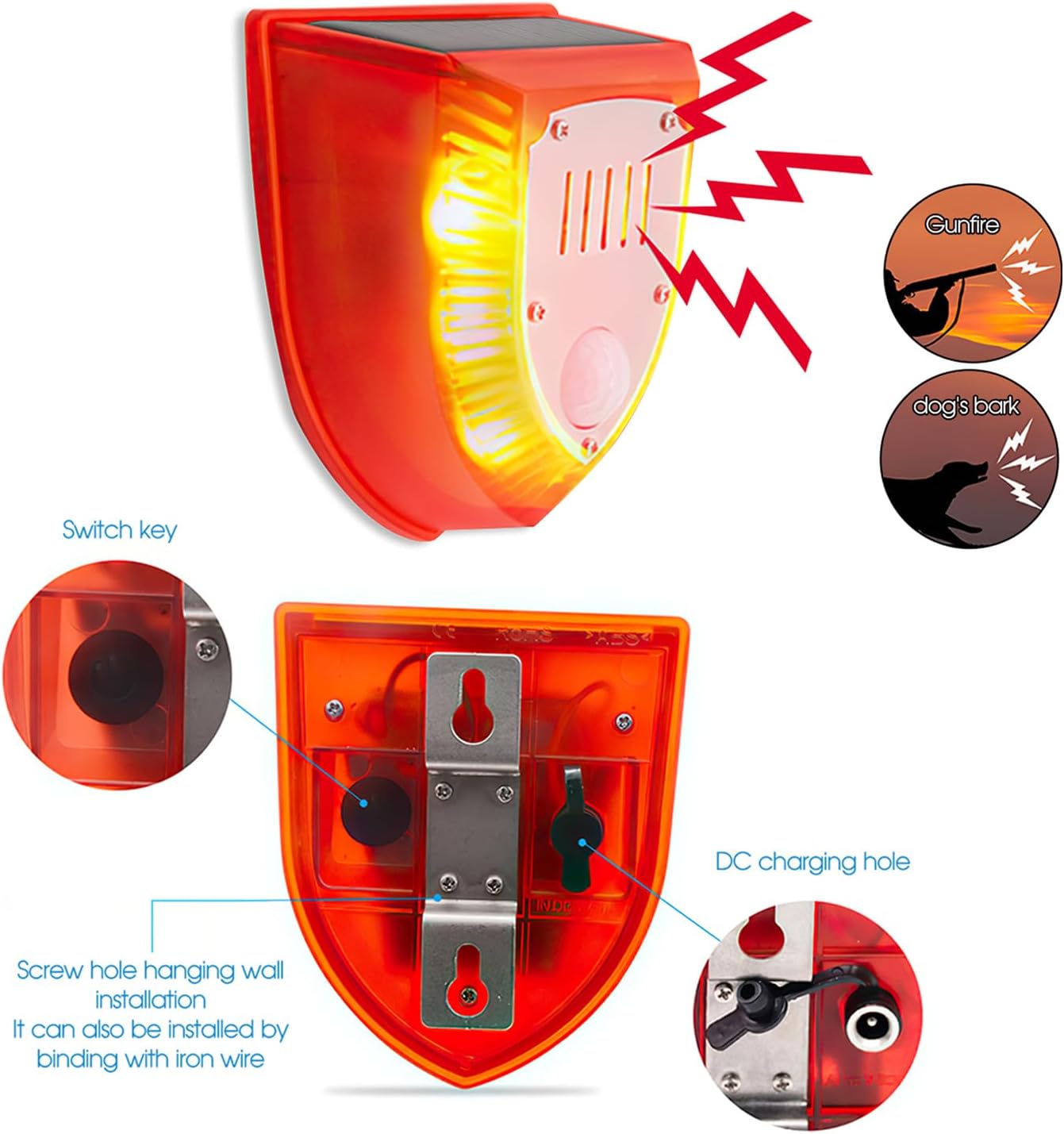
Imaj 4.2: Dèyè view of the alarm, highlighting the switch key, DC charging port, and mounting screw holes for installation.
5. Operasyon Modes
The SENCKIT Solar Motion Sensor Alarm features three distinct operating modes, selectable via the switch key located on the back of the device. Press the switch key to cycle through the modes.
- Mode 1: 24-Hour Detection (Dog Barking & Gunshot & Flashing)
In this mode, the alarm will activate with dog barking sounds, gunshot sounds, and flashing lights whenever motion is detected, regardless of the time of day. - Mode 2: Night-Time Detection (Dog Barking & Gunshot & Flashing)
This mode enables the alarm to activate with dog barking sounds, gunshot sounds, and flashing lights only when motion is detected during nighttime hours. - Mode 3: Night-Time Cyclic Flash & Alarm Sound (Automatic)
In this mode, the device will automatically flash and emit an alarm sound every 5 minutes during nighttime, even without motion detection, providing a continuous deterrent.

Image 5.1: The alarm in action, illustrating its ability to detect movement and activate its deterrent features, including flashing lights and sound.

Image 5.2: A visual representation of the alarm's wide sensing range, featuring a 125-degree induction angle and a detection distance of 5-8 meters.
6. Chaje
The SENCKIT Solar Motion Sensor Alarm supports two charging methods to ensure continuous operation:
- Solè chaje: The integrated solar panel charges the internal battery when exposed to direct sunlight. For optimal performance, ensure the solar panel is clean and free from obstructions.
- Chaje USB: In periods of low sunlight or for faster charging, the device can be charged via the USB cable. Connect the cable to the DC charging port and a 5V USB power source.
7. Antretyen
To ensure the longevity and optimal performance of your SENCKIT Solar Motion Sensor Alarm, follow these maintenance guidelines:
- Netwaye Panèl Solè: Siye panèl solè a regilyèman avèk yon twal mou.amp twal pou retire pousyè, salte, oswa debri ki ka anpeche efikasite chaj la.
- Tcheke pou obstak: Periodically inspect the motion sensor and surrounding area for any new obstructions (e.g., overgrown plants) that might block the sensor's field of view.
- Montaj sekirite: Ensure the device remains securely mounted to prevent accidental falls or damage.
- Entegrite ki enpèmeyab: While the device is IP55 waterproof, avoid submerging it in water or exposing it to high-pressure water jets.

Image 7.1: The alarm operating outdoors during rainfall, illustrating its IP55 dustproof and rainproof capabilities.
NAN. Depanaj
If you encounter issues with your SENCKIT Solar Motion Sensor Alarm, refer to the following troubleshooting tips:
| Pwoblèm | Kòz posib | Solisyon |
|---|---|---|
| Alam pa aktive | Ba chaj batri Anviwònman mòd ki pa kòrèk Capteur mouvman bloke | Charge the device via USB or ensure sufficient solar exposure. Press the switch key to select the desired operating mode. Clear any obstructions from the motion sensor's view. |
| Device not charging via solar | Ensifizan limyè solèy la Panèl solè sal | Relocate the device to an area with more direct sunlight. Netwaye sifas panèl solè a. |
| Fo alam | Movement from trees/bushes Small animals Gwo van | Adjust the device's angle or relocate it to minimize detection of non-threats. Consider using Mode 2 (Night-Time Detection) if false alarms occur during the day due to environmental factors. |
| Alarm sound is too low | Environmental factors (e.g., distance, background noise) | Ensure the device is placed in a strategic location where the 129db sound can be most effective. The volume is fixed and not adjustable. |
9. Garanti ak sipò
The SENCKIT Solar Motion Sensor Alarm Outdoor comes with a 24 mwa apre-lavant sèvis. For any inquiries or support needs, please contact customer service. We aim to respond to messages within 12 hours.

Imaj 9.1: Egzanpamples of the alarm's application in different outdoor environments, including agricultural settings and residential properties.