
1. Enfòmasyon sou Sekirite
Please read these safety instructions carefully before using your Ledwood XTREM140 speaker. Keep this manual for future reference.
- Pa ekspoze oratè a nan tanperati ekstrèm, limyè solèy dirèk, oswa flanm dife.
- Evite jete oswa soumèt oratè a nan gwo enpak.
- The speaker is IPX5 waterproof, meaning it is protected against low-pressure water jets from any direction. Do not immerse it in water.
- Pa eseye demonte, repare, oswa modifye oratè a tèt ou. Kontakte pèsonèl sèvis kalifye.
- Use only the provided USB-C charging cable or a certified equivalent.
- Kenbe soti nan atenn timoun yo.
2. Pwodwi souview
Familyarize w ak konpozan ak kontwòl oratè Ledwood XTREM140 ou a.
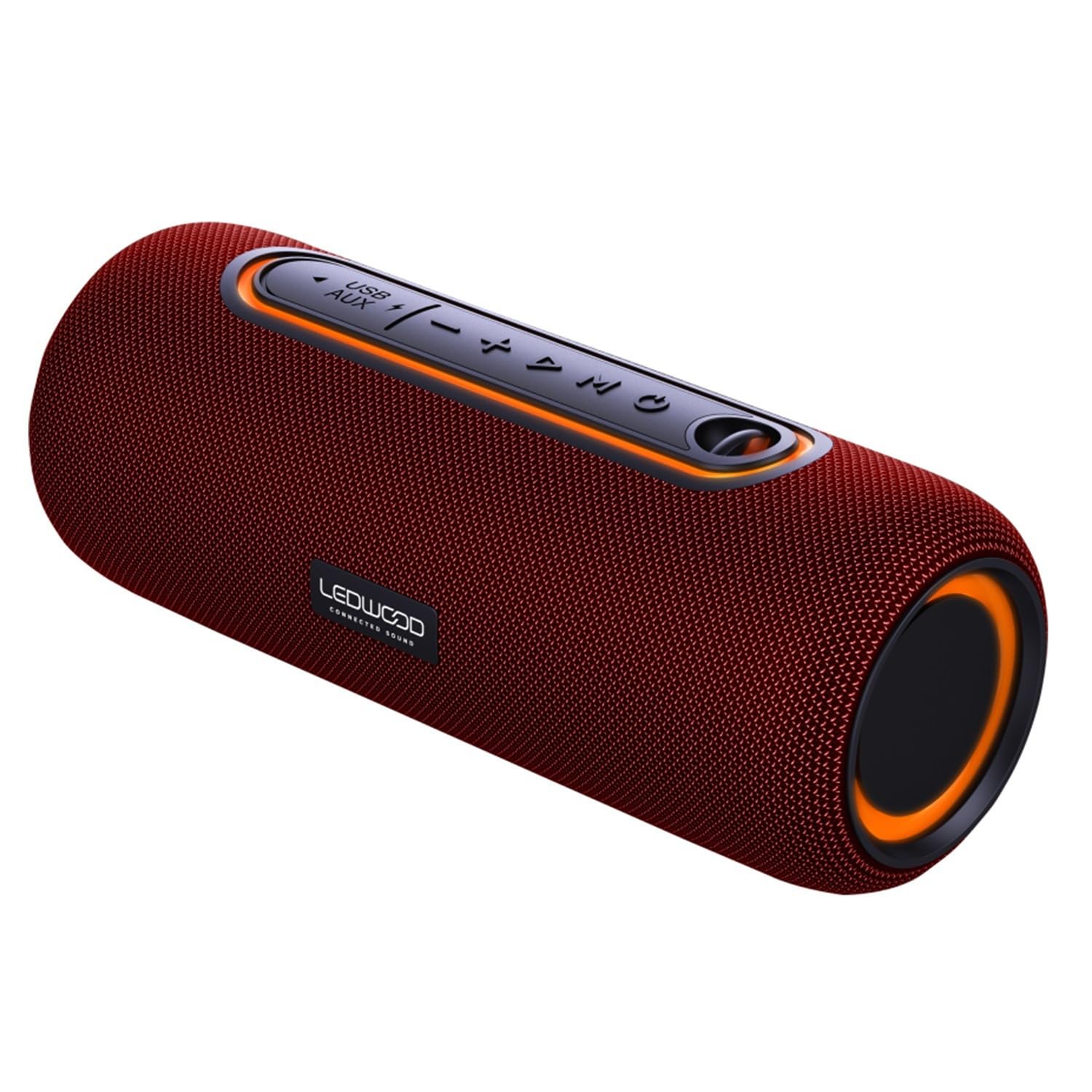
Image 1: Ledwood XTREM140 speaker, angled view showing the control panel and carrying strap.
Kontwòl Panel Layout

Imaj 2: Detaye view of the speaker's control buttons, including power, volume, play/pause, and mode selection.
- Bouton pouvwa: Peze epi kenbe pou limen/ete.
- Bouton jwe/poz: Peze pou jwe oswa pran yon poz odyo.
- Volim desann / Previous Track: Peze pou diminye volim nan. Peze epi kenbe pou ale nan mizik anvan an.
- Volim moute / Next Track: Peze pou ogmante volim nan. Peze epi kenbe pou ale nan pwochen mizik la.
- Bouton mòd (M): Peze pou chanje ant mòd Bluetooth, AUX, ak USB.
- Bouton TWS: Press to activate True Wireless Stereo pairing.
- Pò USB: For USB playback or charging.
- Antre AUX: Pou koneksyon odyo ak fil.
- USB-C chaje pò: Pou chaje oratè a.
3. Ki sa ki nan bwat la
Verifye ke tout atik yo prezan nan anbalaj la:
- Oratè Bluetooth pòtab Ledwood XTREM140
- USB-C Chaje Kab
- 3.5mm AUX Audio Kab
- Manyèl Itilizatè (dokiman sa a)
4. Enstalasyon
4.1 Chaje Oratè a
- Connect the provided USB-C cable to the speaker's USB-C charging port.
- Konekte lòt bout kab USB-C a nan yon adaptè kouran USB (pa enkli) oubyen nan yon pò USB òdinatè.
- Limyè endikatè chaj la ap limen. Li pral etenn oswa chanje koulè yon fwa li fin chaje nèt.
- A full charge takes approximately 3-4 hours and provides up to 6 hours of playback.
4.2 Limen/Etenyen
- Pou limen: Peze epi kenbe bouton Power la pandan 2-3 segonn. Ou pral tande yon mesaj sonab.
- Pou etenn: Peze epi kenbe bouton Power la pandan 2-3 segonn. Ou pral tande yon mesaj sonab.
4.3 Bluetooth Pairing
- Asire w ke oratè a limen epi li nan mòd Bluetooth (yon LED ble k ap flache endike sa). Si se pa sa, peze bouton 'M' (Mòd) la pou chanje an mòd Bluetooth.
- Aktive Bluetooth sou telefòn entelijan ou, tablèt ou, oswa lòt aparèy ki gen Bluetooth.
- Chèche pou "XTREM140" in your device's Bluetooth list.
- Select "XTREM140" to connect. Once paired, the LED indicator will stop flashing and remain solid blue, and you will hear a confirmation sound.
- Oratè a ap rekonekte otomatikman ak dènye aparèy ki konekte a lè li limen, si Bluetooth aparèy la aktif epi li nan zòn li.
4.4 Vrèman san fil stereo (TWS) koneksyon
TWS allows you to connect two XTREM140 speakers for a stereo sound experience.
- Ensure both XTREM140 speakers are powered on and in Bluetooth mode, but pa konekte ak nenpòt aparèy.
- On one of the speakers (this will be the primary speaker), press the 'TWS' button. You will hear a prompt indicating TWS pairing mode.
- The two speakers will automatically search for and connect to each other. Once connected, you will hear a confirmation sound, and the TWS indicator light will be solid on both speakers.
- Now, connect your Bluetooth device to the primary speaker (the one you pressed the TWS button on) as described in section 4.3.
- To disconnect TWS, press the TWS button on either speaker.
4.5 AUX Koneksyon
- Connect one end of the 3.5mm AUX audio cable to the AUX input port on the speaker.
- Connect the other end of the cable to the audio output jack of your device (e.g., MP3 player, computer).
- Press the 'M' (Mode) button on the speaker to switch to AUX mode.
- Kounye a, odyo a pral jwe nan oratè a soti nan aparèy konekte ou an.
4.6 Lekti USB
- Mete yon kle USB (fòmate an FAT32) ki gen odyo MP3 ladan l. files nan pò USB ki sou oratè a.
- Press the 'M' (Mode) button to switch to USB mode.
- Oratè a ap kòmanse jwe odyo otomatikman files soti nan kondwi a USB.
5. Operasyon Enstriksyon
5.1 Kontwòl debaz pou lèktur
- Jwe/Poz: Peze a Jwe/Poz bouton.
- Volim moute: Peze a Volim monte (+) bouton.
- Volim desann: Peze a Volim Dawonn (-) bouton.
- Pwochen Track: Peze epi kenbe la Volim monte (+) bouton.
- Track Previous: Peze epi kenbe la Volim Dawonn (-) bouton.
5.2 Asistan Vwa
The speaker supports voice assistant functionality when connected via Bluetooth to a compatible smartphone.
- To activate your device's voice assistant (e.g., Siri, Google Assistant), press the Jwe/Poz bouton de fwa byen vit.
5.3 Call Handling (via Bluetooth)
Lè oratè a konekte ak yon smartphone atravè Bluetooth, li ka itilize pou apèl men lib.
- Reponn apèl: Peze a Jwe/Poz bouton yon fwa.
- Fini apèl: Peze a Jwe/Poz bouton an yon fwa pandan yon apèl.
- Rejte apèl: Peze epi kenbe la Jwe/Poz bouton pou 2 segonn.
6. Antretyen
6.1 Netwayaj
- Siye oratè a ak yon mou, damp twal. Pa sèvi ak pwodui netwayaj abrazif oswa solvang.
- Asire w tout pò yo sèch anvan ou chaje oswa konekte kab yo.
6.2 Depo
- Sere oratè a nan yon kote ki fre epi sèk, lwen limyè solèy dirèk ak tanperati ekstrèm.
- If storing for an extended period, charge the battery every 3-6 months to maintain battery health.
NAN. Depanaj
| Pwoblèm | Kòz posib | Solisyon |
|---|---|---|
| Oratè pa limen | Batri ki ba | Chaje oratè a pou omwen 30 minit. |
| Pa ka konekte via Bluetooth | Speaker not in pairing mode; Device Bluetooth off; Speaker already connected to another device; Device too far. | Ensure speaker is in Bluetooth pairing mode (flashing blue LED). Turn on device Bluetooth. Disconnect from other devices. Move device closer to speaker. |
| Pa gen son | Volume too low; Incorrect mode selected; AUX/USB cable not fully inserted. | Increase speaker and device volume. Press 'M' to select correct mode (Bluetooth, AUX, USB). Ensure cables are securely connected. |
| TWS appariement echwe | Speakers already connected to a device; Speakers too far apart. | Ensure both speakers are disconnected from any Bluetooth device before TWS pairing. Place speakers within 5 meters of each other. |
8. Espesifikasyon
| Karakteristik | Spesifikasyon |
|---|---|
| Non modèl | XTREM140 |
| Nimewo Modèl | LD-XT140BT |
| Bluetooth vèsyon | 5.0 |
| Evalyasyon ki enpèmeyab | IPX5 |
| Sorti pouvwa RMS | 10W |
| Pouvwa Total Admisib | 100W |
| Chofè Oratè | 2 x 3.5 pous (9cm) |
| Repons Frekans | 80Hz - 16KHz |
| Kapasite batri | 5V, 2000mAh |
| Lektur Tan | Jiska 6 èdtan |
| Tan pou chaje | Apeprè. 3-4 èdtan |
| Koneksyon | Bluetooth, USB, 3.5mm AUX |
| Dimansyon (L x W x H) | 24.2cm x 9.2cm x 9.2cm |
| Materyèl | High-quality fabric |
| Karakteristik espesyal | TWS Function, Voice Assistance |
9. Garanti ak sipò
Ledwood products are designed and manufactured to the highest quality standards. For detailed warranty information and customer support, please refer to the warranty card included with your purchase or visit the official Ledwood websit.
If you encounter any issues not covered in this manual, please contact Ledwood customer service for assistance.