
DOVIICO H13
DOVIICO H13 Smart Watch User Manual
Modèl: H13
Entwodiksyon
This manual provides detailed instructions for the setup, operation, and maintenance of your DOVIICO H13 Smart Watch. Please read this manual thoroughly to ensure proper use and to maximize the benefits of your device. The DOVIICO H13 Smart Watch features a 1.69-inch full touch screen, comprehensive fitness tracking, and health monitoring capabilities, compatible with both iOS and Android smartphones.

Image: The DOVIICO H13 Smart Watch, showcasing its vibrant display and user interface with various application icons.
Ki sa ki enkli
The DOVIICO H13 Smart Watch package contains the following items:
- 1 x DOVIICO H13 Smart Watch
- 1 x ponyèt braslè
- 1 x kab chaje
- 1 x Manyèl Itilizatè (dokiman sa a)
Gid Enstalasyon
1. Chaje Aparèy la
Before first use, fully charge your DOVIICO H13 Smart Watch. Connect the provided charging cable to the charging port on the back of the watch and to a standard USB power adapter (not included). A full charge typically takes approximately 2.5 hours.
2. Enstalasyon aplikasyon an
To unlock the full functionality of your smart watch, download and install the companion mobile application on your smartphone. The app is compatible with iOS 9.0 and above, and Android 5.0 and above devices. Chèche pou the app name (usually mentioned in the quick start guide or on the watch screen during initial setup) in your phone's app store (Apple App Store for iOS, Google Play Store for Android).
3. Aparèy Pè
- Asire w ke mont entelijan ou an chaje epi li limen.
- Pèmèt Bluetooth sou smartphone ou.
- Louvri aplikasyon konpayon ki enstale a sou telefòn entelijan ou an.
- Follow the in-app instructions to search for and connect to your DOVIICO H13 Smart Watch. The watch will typically appear as "H13" or "DOVIICO H13" in the list of available devices.
- Konfime demann koneksyon an sou mont ou ak sou telefòn entelijan ou si yo mande w la.
Yon fwa li konekte, mont lan ap senkronize done yo ak telefòn ou, epi ou ka pèsonalize paramèt yo atravè aplikasyon an.
Enstriksyon Operasyon
Navigasyon debaz
- Glise anlè/desann: Defile nan meni yo ak notifikasyon yo.
- Glise agoch/dwat: Jwenn aksè a fonksyon rapid oswa diferan ekran done.
- Tape: Chwazi yon atik oubyen konfime yon aksyon.
- Bouton bò: Typically used to return to the home screen or power on/off the device (long press).
Kadran Mont Pèsonalize
The DOVIICO H13 Smart Watch allows for extensive customization of its watch face. Through the companion mobile application, you can browse and download a variety of pre-designed dials. Additionally, you can upload your own photos to personalize the watch background.

Imaj: Egzamples of customizable watch faces available for the DOVIICO H13 Smart Watch, including digital and analog styles.
Siveyans Sante
The DOVIICO H13 Smart Watch provides comprehensive health data tracking to help you monitor your well-being.
Siveyans batman kè
The watch continuously monitors your heart rate throughout the day. You can view real-time heart rate data directly on the watch or access historical data and trends in the companion app.
Blood Pressure and Blood Oxygen (SpO2) Tracking
The device is equipped to measure your blood pressure and blood oxygen saturation levels. For accurate readings, ensure the watch is worn snugly on your wrist. Consult the app for detailed insights and historical data.
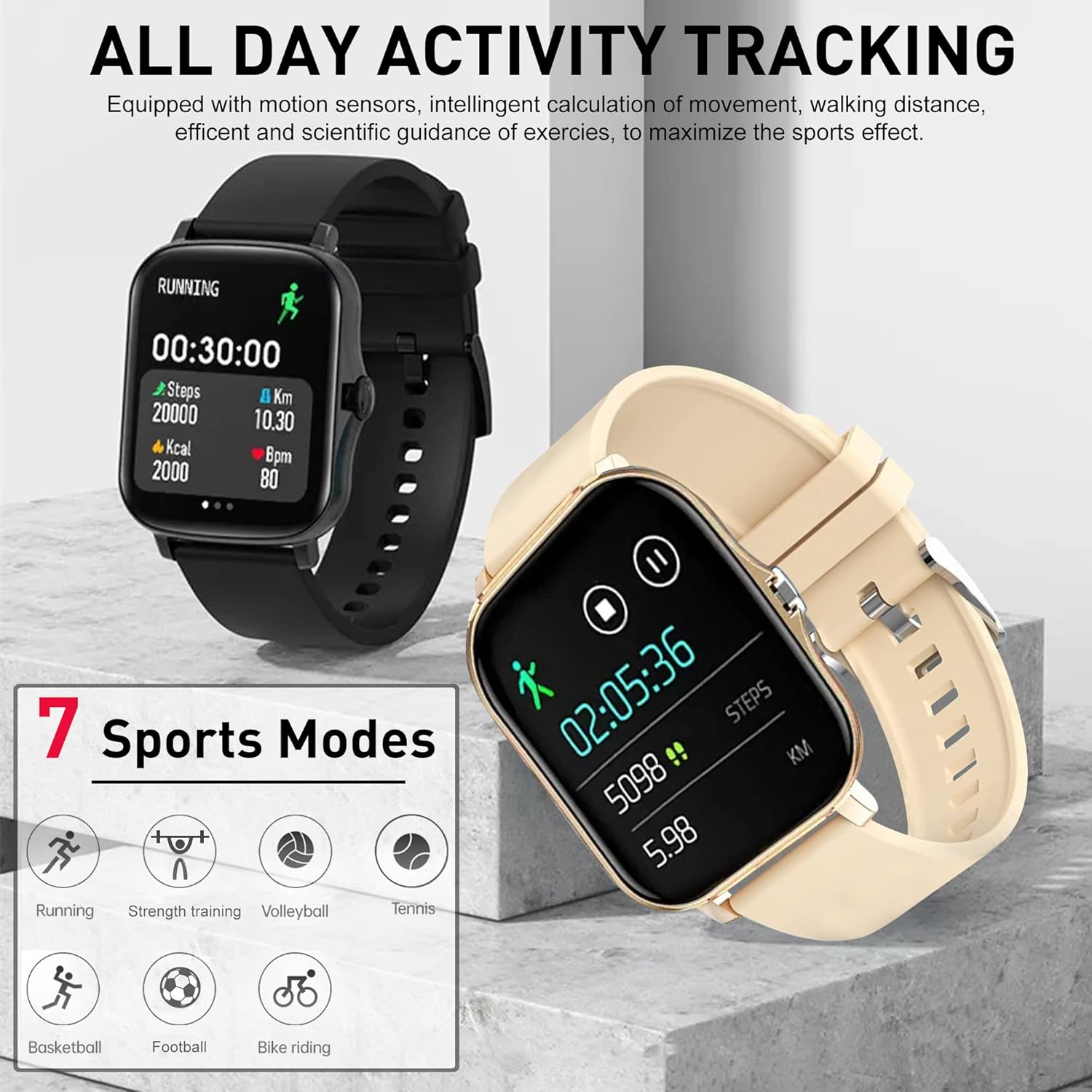
Image: The DOVIICO H13 Smart Watch showing real-time blood pressure (128/90 mmHg) and blood oxygen (98% SpO2) measurements.
Siveyans dòmi
Wear your smart watch to bed to track your sleep patterns. It records deep sleep, light sleep, and awake times, providing a comprehensive analysis of your sleep quality in the mobile application.

Image: The DOVIICO H13 Smart Watch displaying sleep duration and a breakdown of sleep stages (deep, light, awake).
Aktivite Tracking
The DOVIICO H13 Smart Watch is designed to track your daily activities and workouts, helping you stay motivated and achieve your fitness goals.
All-Day Activity Monitoring
The watch automatically tracks your steps, distance traveled, and calories burned throughout the day. This data is synchronized with the mobile app for detailed analysis and progress tracking.
Espò mòd
The DOVIICO H13 supports 7 different sports modes to provide more accurate tracking for specific activities. These include:
- Kouri
- Monte bisiklèt
- Tenis
- Fòmasyon fòs
- Basketball
- Volleyball
- Foutbòl
Select the appropriate mode before starting your workout for optimized data collection.

Image: The DOVIICO H13 Smart Watch showing a running activity screen with duration, steps, distance, calories, and heart rate, alongside icons representing the 7 supported sports modes.
Karakteristik entelijan
Beyond health and fitness, the DOVIICO H13 Smart Watch offers a range of smart features to keep you connected and organized.
Notifikasyon entelijan
Receive alerts for incoming calls, SMS messages, and notifications from social media applications (e.g., WeChat, QQ, Facebook, Twitter, Line, WhatsApp, Instagram) directly on your wrist. The watch will vibrate to notify you, ensuring you don't miss important updates.

Image: Two DOVIICO H13 Smart Watches showing real-time message notifications from social media platforms.
Lòt zouti
The watch includes several convenient tools for daily use:
- Revèy ak kronomèt: Pou aktivite ki gen rapò ak tan.
- Revèy Alam: Mete alam ki vibre an silans.
- Kontwolè Mizik: Kontwole lèktur mizik sou smartphone ou.
- Tan: View kondisyon metewolojik aktyèl yo.
- Rapèl sedantèr: Li ankouraje w pou w deplase apre peryòd inaktivite.
- Jwenn telefòn ou: Ede lokalize smartphone ou ki konekte a.
- Fotografi adistans: Kontwole kamera telefòn ou a adistans.
- Rele Bluetooth: Fè epi resevwa apèl dirèkteman nan mont lan.
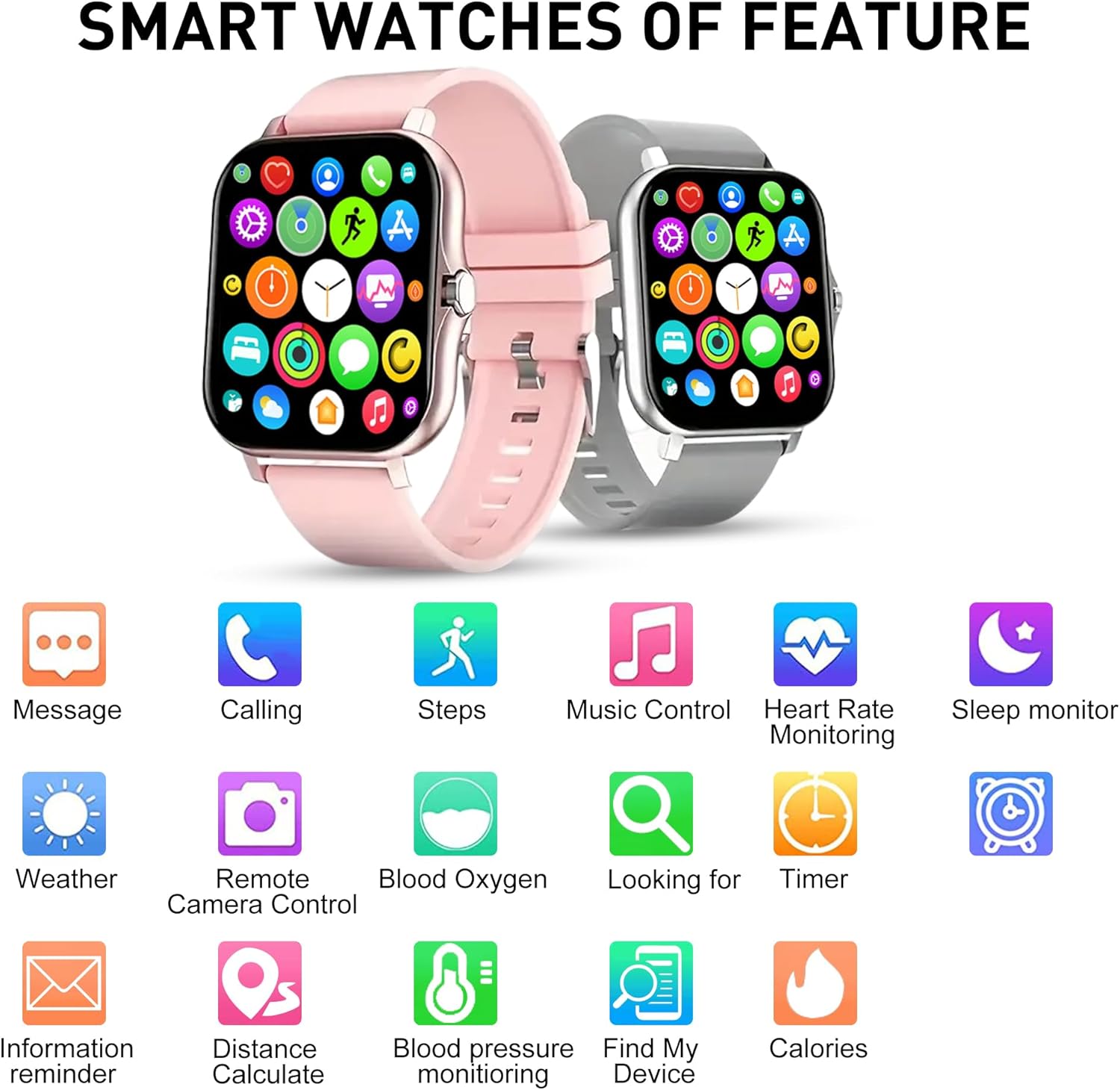
Imaj: Yon plis paseview of the DOVIICO H13 Smart Watch's key features, represented by various icons for functions such as messaging, calling, step tracking, music control, and health monitoring.
Antretyen
Netwaye mont entelijan ou an
- Siye ekran mont lan ak braslè a regilyèman avèk yon twal mou,amp, twal ki pa gen pèl.
- Evite itilize pwodui chimik ki fò, pwodui netwayaj abrazif, oswa solvan, paske sa yo ka domaje fini ak konpozan mont lan.
- Asire w ke kontak chaj yo pwòp epi sèk anvan ou chaje yo pou anpeche yo koroze.
Swen batri
- Pou pwolonje lavi batri a, evite dechaje mont lan nèt souvan.
- Sere mont lan nan yon kote ki fre epi sèk lè w pa itilize li pou yon bon bout tan.
- The watch has a battery capacity of 160 mAh and typically lasts for 7 days with normal use, with a standby time exceeding 30 days.
Swen Jeneral
- Evite ekspoze mont lan nan tanperati ekstrèm, limyè solèy dirèk pou peryòd pwolonje, oswa nan imidite ki wo.
- While the watch may have some water resistance, avoid submerging it in water or exposing it to high-pressure water jets unless explicitly stated in product specifications.
Depanaj
Gade a pa limen
- Asire w ke mont lan chaje nèt. Konekte l nan plato a pou omwen 30 minit.
- Press and hold the side button for several seconds to power it on.
Unable to Pair with Smartphone
- Asire w ke Bluetooth aktive sou smartphone ou.
- Ensure the watch is within Bluetooth range of your phone (typically 10 meters).
- Rekòmanse tou de smartphone ou ak mont entelijan an.
- Tcheke si aplikasyon konpayon an mete ajou nan dènye vèsyon an.
- Si ou te deja konekte aparèy la, eseye dekonekte l nan paramèt Bluetooth telefòn ou an epi konekte l ankò atravè aplikasyon an.
Lekti Sante ki pa egzak
- Asire w ke mont lan byen sere sou ponyèt ou, men pa twò sere.
- Keep your wrist still during measurements.
- Netwaye detèktè ki dèyè mont lan regilyèman.
- Note that smart watch readings are for reference only and should not be used for medical diagnosis.
Notifikasyon ki pa parèt
- Verifye ke mont lan byen konekte ak telefòn ou an.
- Check notification permissions for the companion app in your phone's settings.
- Ensure that notification alerts are enabled within the companion app settings for the specific applications you wish to receive alerts from.
- Disable "Do Not Disturb" mode on both your watch and phone.
Espesifikasyon
| Karakteristik | Detay |
|---|---|
| Mak | DOVIICO |
| Modèl | H13 |
| Gwosè ekran | 1.69 pous |
| Kalite ekspozisyon | LCD |
| Rezolisyon | 240 x 240 |
| Sistèm operasyon konpatibilite | Android 5.0+, iOS 9.0+ |
| Koneksyon | Bluetooth |
| Kapasite batri | 160 Miliamp Orè (mAh) |
| Tan pou chaje | Apeprè 2.5 èdtan |
| Lavi batri (itilizasyon tipik) | Jiska 7 jou |
| Tan sibstiti | Over 30 Days |
| Dimansyon pwodwi | 14.99 x 7.49 x 3 cm |
| Pwa atik | 80 g |
| Karakteristik espesyal | Heart Rate, Blood Pressure, Blood Oxygen, Sleep Monitoring, Step/Distance/Calorie Tracking, 7 Sports Modes, Call/SMS/Social App Alerts, Alarm, Sedentary Reminder, Music Control, Weather, Remote Camera, Find Phone, Bluetooth Calling. |
Garanti ak sipò
For information regarding warranty coverage and customer support for your DOVIICO H13 Smart Watch, please refer to the warranty card included in your product packaging or visit the official DOVIICO website. If you encounter any issues not covered in this manual, please contact DOVIICO customer service for assistance.
Ask a question about this manual
Ask about setup, troubleshooting, compatibility, parts, safety, or missing instructions. Manuals+ will review the question and use this page’s manual context to help answer it.