
1. Entwodiksyon
Thank you for choosing the CAMKORY DC403 Digital Camera. This compact and easy-to-use camera is designed for capturing high-quality photos and videos, making it suitable for beginners and children. This manual provides essential information on setting up, operating, and maintaining your camera to ensure optimal performance and longevity.

Image 1.1: The CAMKORY DC403 camera is designed to be pocket-sized and easy to use, making it ideal for children and beginners. It has passed drop tests for durability.
2. Pwodwi souview
2.1 Karakteristik kle
- Segondè rezolisyon: 44 Megapixel photos and 1080p Full HD video recording.
- Zoom dijital: 16x digital zoom for capturing distant subjects.
- Estabilizasyon imaj: Optical image stabilization to reduce blur.
- Ekspozisyon: 2.5-inch LCD screen for clear viewing.
- Mòd versatile: Includes self-timer, fill light, fun filters, smile capture, burst shooting, and webfonksyonalite Cam.
- Pòtabilite: Compact and lightweight design (9.5 x 5.5 x 2 cm, 120g) for easy carrying.
- Pouvwa: Comes with two 3.7V 700mAh rechargeable lithium-polymer batteries.
- Koneksyon: USB Type-C for charging and data transfer to PC.
2.2 Konpozan Kamera
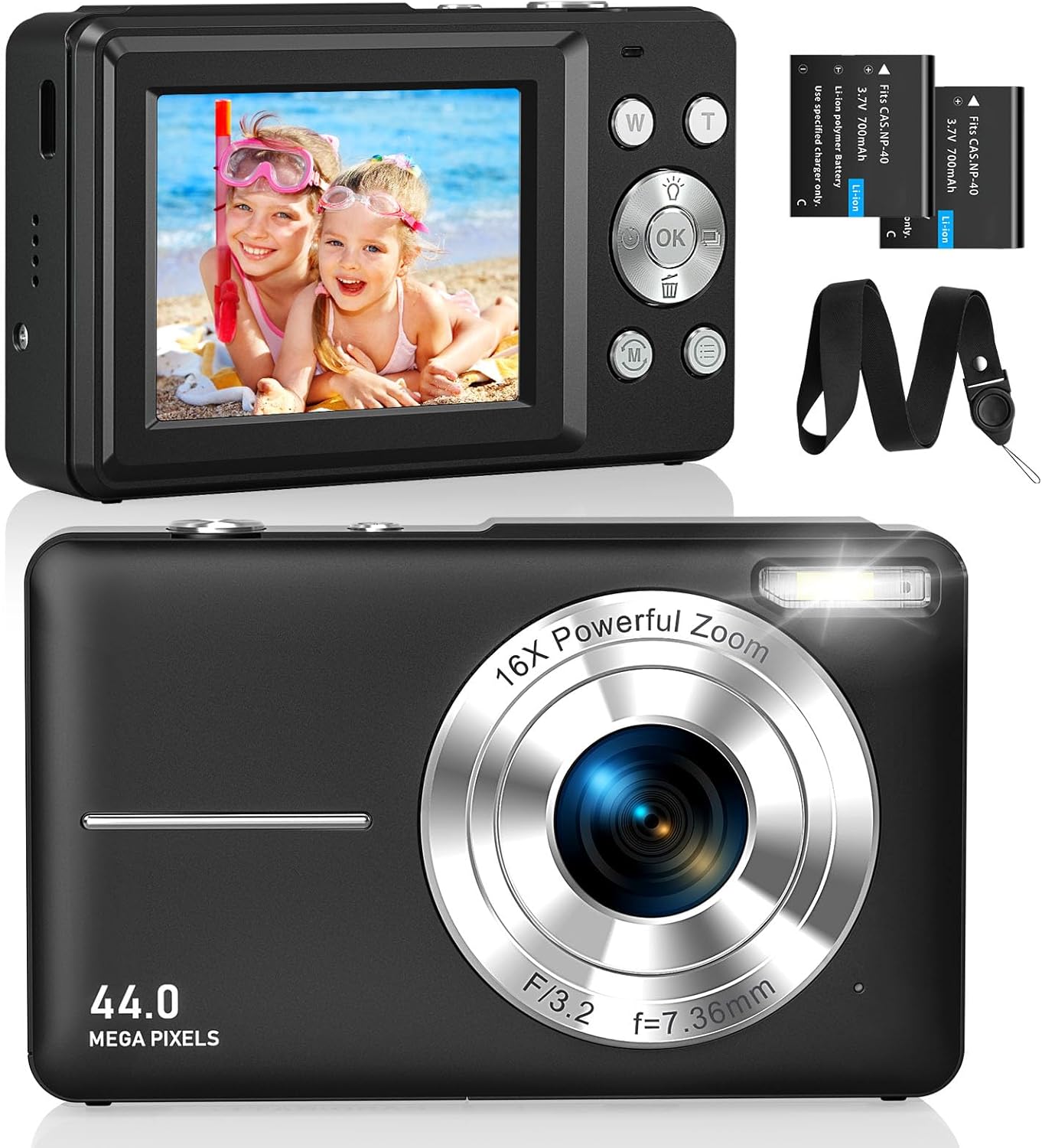
Imaj 2.1: Devan ak dèyè views of the CAMKORY DC403 Digital Camera, illustrating the lens, flash, LCD display, and various control buttons. Two rechargeable batteries are also shown.
The camera features an intuitive layout with ergonomically placed buttons suitable for small hands. Key controls include the power button, shutter button, zoom (W/T) buttons, mode button, and an OK button for menu navigation.

Imaj 2.2: Detaye view of the camera's side controls, including the ON/OFF button, Shutter, W/T (Zoom), Fill Light, and Mode button.
3. Enstalasyon
3.1 Enstalasyon ak Chaje Batri
- Louvri kouvèti konpatiman batri a ki anba kamera a.
- Insert the two provided 3.7V 700mAh rechargeable lithium-polymer batteries, ensuring correct polarity.
- Fèmen kouvèti lòj batri a byen.
- Connect the camera to a power source using the supplied USB Type-C cable for charging. The charging indicator will show the charging status.
3.2 Enstalasyon kat memwa
The camera supports Micro SD memory cards from 4GB to 32GB. A memory card is required to save photos and videos.
- Locate the Micro SD card slot, usually near the battery compartment.
- Insert the Micro SD card with the metal contacts facing the front of the camera until it clicks into place.
- Before first use, it is recommended to format the memory card directly within the camera's settings menu. This ensures compatibility and optimal performance.
3.3 Premye pouvwa sou
Press and hold the power button (usually located on the top or side of the camera) to turn on the device. The LCD screen will illuminate, and the camera will be ready for use.
4. Operasyon Enstriksyon
4.1 Pran Foto
- Limen kamera a.
- Ankadre foto ou a avèk ekran LCD 2.5 pous la.
- Use the W/T buttons to adjust the 16x digital zoom.
- Press the shutter button halfway down to focus, then press it fully to capture the 44MP image.

Image 4.1: The camera captures 44MP images, allowing for detailed and clear photographs.
4.2 Anrejistreman Videyo
- Switch to video mode using the Mode button.
- Press the shutter button to start recording 1080p FHD video.
- Press the shutter button again to pause or stop recording.

Image 4.2: The camera supports 1080p Full HD video recording, allowing users to capture moments with clarity.
4.3 Karakteristik espesyal
- Zoom dijital: Use the W/T buttons to zoom in and out. The camera features 16x digital zoom.
- Estabilizasyon imaj: The optical image stabilization feature helps reduce blur from camera shake.
- Ranpli limyè: Activate the fill light for better illumination in low-light conditions.
- Oto-revèy: Set a delay (e.g., 2s, 5s, 10s) before taking a photo, useful for group shots or selfies.
- Fiziyad kontinyèl: Capture a rapid sequence of photos by holding down the shutter button.
- Filtè: Experiment with 20 different built-in filters to add creative effects to your photos.
- Deteksyon Souri: The camera can automatically detect and capture a photo when a smile is detected.
- WebCam mòd: Konekte kamera a ak yon òdinatè atravè USB pou itilize li kòm yon webcam for live streaming or video calls.

Image 4.3: Demonstrations of 16x digital zoom and image stabilization. The zoom feature allows for closer shots, while stabilization helps maintain clarity during movement.

Imaj 4.4: Egzanpamples of self-timer, continuous shooting, and fill light functions. These features enhance photographic flexibility and quality in various scenarios.

Image 4.5: The camera can be used as a webcam when connected to a computer, suitable for streaming or video calls.
5. Antretyen
5.1 Netwayaj Kamera a
- Sèvi ak yon twal mou ki pa gen pousyè pou netwaye kò kamera a.
- Pou lantiy la ak ekran LCD a, sèvi ak yon twal espesyal ak yon solisyon pou netwaye lantiy. Evite pwodui chimik ki agresif.
- Asire w kamera a etenn anvan ou netwaye li.
5.2 Depo
- Sere kamera a nan yon kote ki fre epi sèk, lwen limyè solèy dirèk ak tanperati ekstrèm.
- Si w ap sere l pou yon bon bout tan, retire pil yo pou anpeche yo koule.
- Use the provided long strap and pouch to protect the camera from drops and scratches during transport.
NAN. Depanaj
If you encounter issues with your CAMKORY DC403 camera, please refer to the following common solutions:
| Pwoblèm | Solisyon posib |
|---|---|
| Kamera a pa limen | Ensure batteries are correctly inserted and fully charged. Try using the second battery if available. |
| Cannot take photos/videos | Check if a Micro SD card is inserted and has sufficient free space. Ensure the card is formatted in the camera. |
| Imaj yo flou | Ensure the lens is clean. Hold the camera steady or use the image stabilization feature. Check lighting conditions. |
| Camera not recognized by PC | Ensure the USB Type-C cable is securely connected to both the camera and the PC. Try a different USB port or cable. |
| Batri vide byen vit | Reduce screen brightness. Turn off features like flash or continuous shooting when not needed. Ensure batteries are fully charged before use. |
7. Espesifikasyon
| Karakteristik | Detay |
|---|---|
| Mak | CAMKORY |
| Non modèl | DC403 |
| Koulè | Nwa |
| Kalite pwodwi | Compact Kamera Digital |
| Rezolisyon toujou efikas | 44 megapiksèl |
| Rezolisyon videyo | 1080p plen HD |
| Zoom dijital | 16x |
| Zoom optik | 16x (Note: This appears to be a mislabeling in the source data, likely referring to digital zoom) |
| Estabilizasyon Imaj | Optik |
| Gwosè ekran | 2.5 pous LCD |
| Koneksyon Teknoloji | USB (Tip-C) |
| Sipòte kat memwa | Micro SD (4-32GB) |
| Kalite batri | Lithium-polymer (2 x 3.7V 700mAh included) |
| Dimansyon (L x W x H) | 9.5 x 2 x 5.5 cm |
| Pwa atik | 120 gram |
| Burst Mode Speed | 30 ankadreman pou chak segonn |
| ISO Range | ISO 100 to ISO 1600 |
| Ouverture | F3.5-F5.6 |
| Kalite Konsantre | Konsantre oto |
| Nivo rezistans dlo | Pa enpèmeyab |
8. Garanti ak sipò
For any questions, technical support, or warranty inquiries regarding your CAMKORY DC403 Digital Camera, please contact CAMKORY customer service through the retailer's platform or the official CAMKORY websit la. Tanpri konsève prèv acha ou a pou reklamasyon garanti.