
1. Entwodiksyon
Welcome to the user manual for your new ZZB ZB10 10.1-inch Android 14 Tablet PC. This guide provides essential information for setting up, operating, maintaining, and troubleshooting your device. Please read this manual thoroughly to ensure optimal performance and longevity of your tablet.

Figi 1: Devan view of the ZZB ZB10 Tablet.
2. Ki sa ki nan bwat la
Upon opening your ZZB ZB10 Tablet PC package, please verify that all the following items are included:
- ZZB ZB10 10.1-inch Android 14 Tablet PC
- Kalite-C Kab
- Manyèl Itilizatè (dokiman sa a)

Figure 2: The ZZB ZB10 Tablet and its packaging.
3. Pwodwi souview
Familiarize yourself with the physical components of your ZZB ZB10 Tablet.
3.1 Konpozan fizik yo
- Ekspozisyon: 10.1-inch IPS screen.
- Kamera devan: Located above the screen.
- Kamera dèyè: Located on the back panel.
- Bouton pouvwa: Typically on the side or top edge.
- Bouton Volim: Ajiste nivo odyo yo.
- USB Kalite-C Port: Pou chaje ak transfè done.
- MicroSD Kat plas: Pou depo ki ka elaji.

Figi 3: Dèyè view of the ZZB ZB10 Tablet, highlighting the camera and model information.
4. Enstalasyon
4.1 Chaje tablèt la
Before first use, fully charge your tablet. Connect the provided Type-C cable to the tablet's charging port and the other end to a compatible USB power adapter (not included) or a computer's USB port. The battery indicator on the screen will show charging status.
4.2 Power On/Off
- Pou limen: Peze epi kenbe bouton pouvwa a jiskaske ekran an limen.
- Pou etenn: Press and hold the Power button until a menu appears, then select 'Power off'.
- Pou rekòmanse: Press and hold the Power button until a menu appears, then select 'Restart'.
4.3 Inisyal Enstalasyon
Lè w limen tablèt la pou premye fwa, li pral gide w nan pwosesis konfigirasyon inisyal la. Sa anjeneral gen ladan l:
- Chwazi lang ou.
- Konekte nan yon rezo Wi-Fi.
- Setting up your Google account (or skipping for later).
- Reviewantre epi aksepte tèm ak kondisyon yo.
5. Operasyon Enstriksyon
5.1 Navigasyon debaz
The ZZB ZB10 Tablet runs on Android 14, offering an intuitive touch interface.
- Tape: Chwazi yon atik oubyen louvri yon aplikasyon.
- Glise: Navigate through screens or scroll content.
- Zoom-pou-Zoom: Agrandi oswa diminye kontni ki sou ekran an.
- Long Press: Jwenn aksè nan meni kontèks yo oubyen deplase ikòn yo.
5.2 Konekte ak Wi-Fi
- Ale nan Anviwònman > Rezo ak entènèt > Wi-Fi.
- Aktive Wi-Fi a On.
- Chwazi rezo ou vle a nan lis la.
- Antre modpas la si yo mande w, epi tape Konekte.
5.3 Bluetooth Pairing
- Ale nan Anviwònman > Aparèy ki konekte > Bluetooth.
- Aktive Bluetooth On.
- Ensure the device you wish to pair is in pairing mode.
- Select the device from the 'Available devices' list and follow on-screen prompts.
5.4 Itilizasyon Kamera
Tablèt la gen yon kamera devan 2MP ak yon kamera dèyè 8MP.
- Louvri a Kamera app.
- Tape bouton deklanchè a pou pran yon foto.
- Chanje ant kamera devan ak dèyè a avèk ikòn kamera a.
- Chwazi mòd videyo pou anrejistre videyo.

Figure 4: Using the tablet's camera for photos or video calls.
5.5 Jesyon Depo
The tablet comes with 32GB of internal storage and supports up to 1TB expandable storage via a MicroSD card.
- To insert a MicroSD card, locate the card slot on the side of the tablet.
- Mete kat MicroSD a dousman jiskaske li fè yon klik pou l antre nan plas li.
- You can manage storage in Anviwònman > Depo.

Figure 5: The tablet supports extended storage up to 1TB.
5.6 Reading Mode
The tablet features a reading mode designed to reduce eye strain by adjusting screen colors and brightness. This mode can typically be activated from the quick settings panel (swipe down from the top of the screen) or within the display settings.
6. Antretyen
6.1 Netwayaj
Use a soft, lint-free cloth to clean the screen and body of the tablet. Avoid using harsh chemicals or abrasive materials, which can damage the device.
6.2 Swen Batri
- Evite ekspoze tablèt la nan tanperati ekstrèm.
- Pa kite batri a dechaje nèt souvan.
- Sèvi sèlman ak kab Kalite-C ki vini ak aparèy la pou chaje.
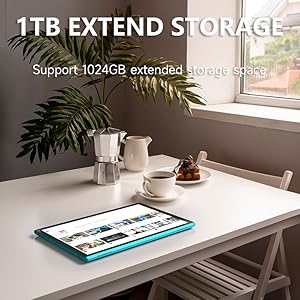
Figure 6: The tablet features a 6000mAh battery for extended use.
6.3 Mizajou lojisyèl
Tcheke regilyèman pou wè si gen mizajou sistèm pou asire tablèt ou a gen dènye fonksyonalite ak patch sekirite yo. Ale nan Anviwònman > Sistèm > Aktyalizasyon sistèm lan.
NAN. Depanaj
Si w rankontre pwoblèm ak tablèt ou a, gade solisyon komen sa yo:
| Pwoblèm | Solisyon posib |
|---|---|
| Tablèt la pa limen | Ensure the battery is charged. Connect to a power source for at least 30 minutes. |
| Ekran an pa reponn | Restart the tablet by holding the power button for 10-15 seconds. |
| Pwoblèm koneksyon Wi-Fi | Restart your Wi-Fi router. Forget the network in tablet settings and reconnect. |
| Aplikasyon yo ap plante oswa yo bloke | Clear the app's cache (Settings > Apps > [App Name] > Storage > Clear cache). If the problem persists, uninstall and reinstall the app. |
| Pèfòmans dousman | Fèmen aplikasyon ki pa nesesè nan background nan. Vide kach la ak aplikasyon tanporè yo files. Consider a factory reset if issues persist (backup data first). |
8. Espesifikasyon
Key technical specifications for the ZZB ZB10 Tablet PC:
- Modèl: ZB10
- Sistèm operasyon: Android 14
- Ekspozisyon: IPS 10.1 pous, 1280 x 800 piksèl
- RAM: 6GB (including 4GB virtual memory)
- Depo Entèn: 32GB ROM
- Depo dilatabl: Jiska 1TB atravè kat MicroSD
- Kamera dèyè: 8 MP
- Kamera devan: 2 MP
- Koneksyon Wireless: Wi-Fi 802.11ac, Bluetooth
- Batri: 6000mAh, up to 12 hours average life
- Dimansyon: 12 x 7 x 0.3 pous
- Pwa: 1 liv
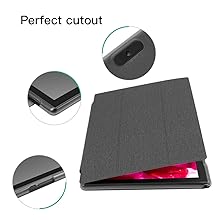
Figure 7: The tablet's 10.1-inch IPS display.
9. Garanti ak sipò
For warranty information and customer support, please refer to the documentation provided with your purchase or visit the official ZZB websit la. Kenbe prèv acha ou pou reklamasyon garanti.