
Entwodiksyon
The Cherub WMT-565C is a versatile 5-in-1 device designed for musicians. It integrates a metronome, tuner, tone generator, hygrometer, and thermometer into a single, compact, and rechargeable unit. This manual provides detailed instructions for operating and maintaining your WMT-565C to ensure optimal performance and longevity.

Figure 1: Cherub WMT-565C Multi-Function Device
Karakteristik pwodwi
- Fonksyonalite 5-an-1: Metronome, Tuner, Tone Generator, Hygrometer, and Thermometer.
- Siveyans anviwònman an: Equipped with a hygrometer and thermometer to monitor ambient humidity and temperature, crucial for instrument care.
- Large Full-Color LCD: High-definition, colorful display for easy readability of tuning, metronome settings, and environmental data.
- Adjustable Metronome Forte: Allows adjustment of metronome volume for practice. Includes electronic sound and vocal count options.
- Batri rechargeable Li-ion: Provides up to 600 minutes of battery life on a single charge.

Figure 2: WMT-565C Displaying Environmental Data and Tuning
Enstalasyon
Chaje Aparèy la
The WMT-565C comes with a built-in rechargeable Li-ion battery. Before first use, fully charge the device using the provided USB cable. Connect the small end of the USB cable to the charging port on the device and the other end to a standard USB power adapter (not included) or a computer's USB port. The charging indicator will show the charging status.
Limen / Off
Pou limen aparèy la, peze epi kenbe bouton an Pouvwa/jwe button. To power off, press and hold the same button until the screen turns off.
Sèvi ak Kickstand la
The device features a retractable kickstand on its back for convenient tabletop use. Gently pull out the kickstand to prop up the device for better viewang ing.
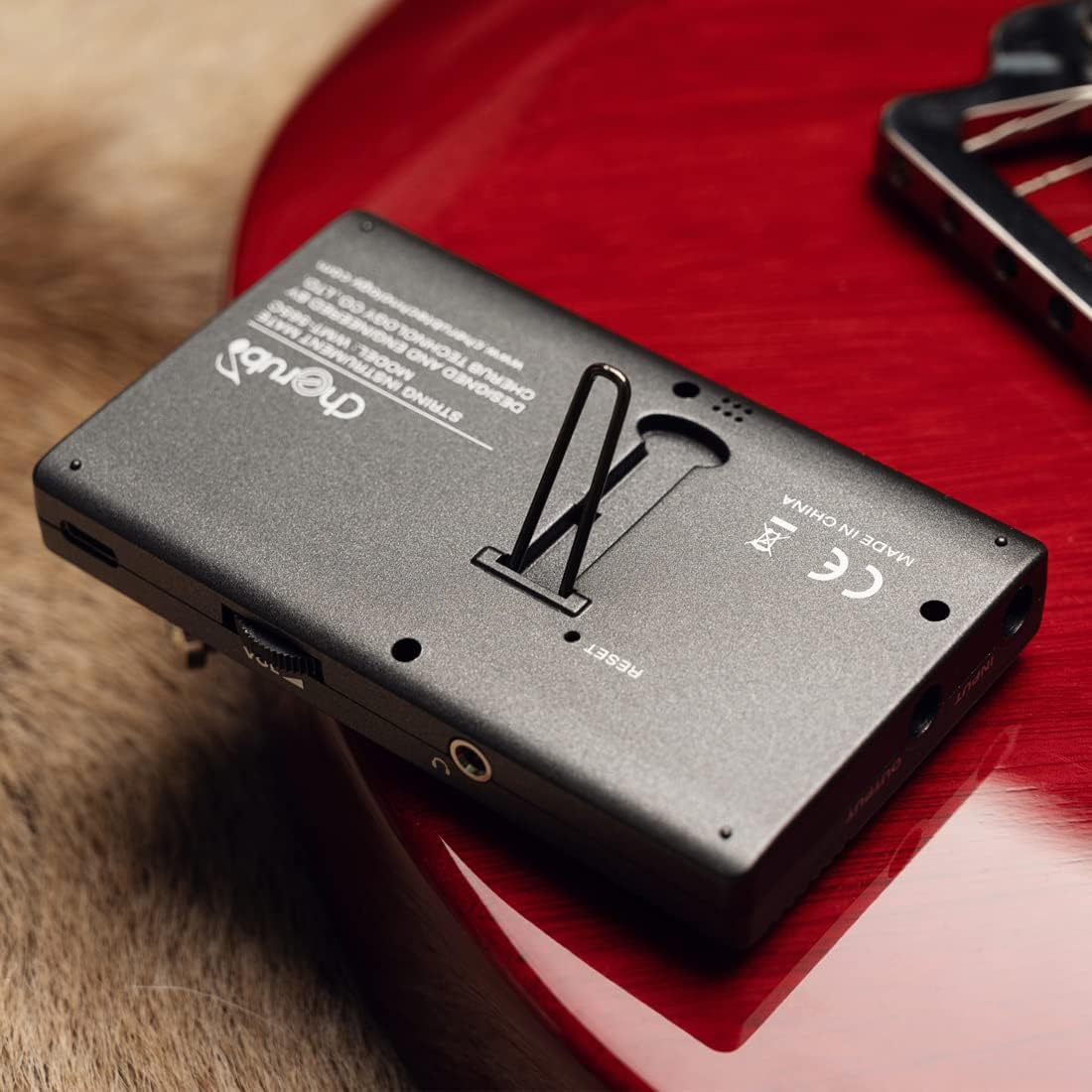
Figure 3: Device with Kickstand Extended
Enstriksyon Operasyon
Mòd Navigasyon
Peze a M/T button to switch between Metronome and Tuner modes. The current mode will be displayed on the screen.

Figure 4: WMT-565C in Tuner Mode with Guitar Connection
Mòd metronom
In Metronome mode, you can adjust the tempo, beat, and rhythm. Use the Leve/Desann arrow buttons to change values. The Forte button allows you to adjust the metronome's volume. You can also select between electronic sound and vocal count for practice.
Mode Tuner
The tuner supports various instruments and chromatic tuning. Use the Beat/Item button to cycle through different tuning items (e.g., Chromatic, Guitar, Bass, Violin, Ukulele). The display will show the note, string number (for specific instruments), and pitch deviation. The screen's color changes to indicate if the note is flat (red), sharp (red), or in tune (green).
Dèlko Ton
The tone generator function allows you to produce specific notes for ear training or manual tuning. Access this function through the mode selection and use the arrow buttons to select the desired note.
Siveyans Tanperati ak Imidite
The WMT-565C continuously monitors and displays the real-time temperature and humidity of the environment. This information is shown on the upper right corner of the LCD screen, allowing musicians to protect their instruments from adverse environmental conditions.

Figure 5: Tuner Mode with Environmental Data
Kontwòl souview

Figure 6: WMT-565C Control Layout
Videyo pwodwi ofisyèl la
Videyo 1: Yon overview of the Cherub WMT-565C Rechargeable Metro-Tuner's features and functions.
Antretyen
To ensure the longevity and optimal performance of your Cherub WMT-565C, follow these maintenance guidelines:
- Netwayaj: Sèvi ak yon twal mou epi sèk pou netwaye aparèy la. Evite itilize pwodui netwayaj abrazif oswa solvan.
- Depo: Sere aparèy la nan yon kote ki fre epi sèk, lwen limyè solèy dirèk ak tanperati ekstrèm.
- Swen batri: Recharge the device regularly, even if not in frequent use, to maintain battery health. Avoid fully discharging the battery for extended periods.
- Manyen: Handle the device with care to prevent drops or impacts that could damage the screen or internal components.
Depanaj
If you encounter any issues with your Cherub WMT-565C, consider the following:
- Aparèy pa limen: Asire w batri a chaje. Konekte aparèy la nan yon sous kouran avèk kab USB a epi eseye ankò.
- Akor ki pa egzak: Check that the correct tuning item (e.g., Guitar, Chromatic) is selected. Ensure the instrument's sound is clear and free from background noise if using the built-in microphone. If using a pickup cable, ensure it is securely connected.
- Metronome Sound Issues: Check the volume setting using the Forte button. Ensure the speaker is not obstructed.
- Malfonksyònman ekran: If the screen is unresponsive or displaying incorrectly, try restarting the device. If the issue persists, contact customer support.
Espesifikasyon
| Karakteristik | Spesifikasyon |
|---|---|
| Pwa atik | 5.6 ons |
| Dimansyon pake | 4.76 x 3.23 x 2.6 pous |
| Nimewo Modèl Atik | WMT-565C |
| Batri | 1 Lityòm Polymère pil obligatwa. (enkli) |
| Kalite batri | Lityòm Polymère |
| Non koulè | Nwa |
| Dat Premye Disponib | 22 me 2023 |
Garanti ak sipò
The Cherub WMT-565C comes with a standard manufacturer's warranty. Please refer to the product packaging or the official Cherub websit la pou wè tèm ak kondisyon garanti espesifik yo.
For technical support, troubleshooting assistance, or warranty claims, please contact Cherub customer service through their official websit oswa enfòmasyon kontak yo bay ak acha w la.