
OTOFIX IM2
Manyèl Itilizatè Zouti Pwogramasyon Kle OTOFIX IM2
Model: IM2 | Brand: OTOFIX
1. Pwodwi souview
The OTOFIX IM2 is an advanced key programming and diagnostic tool designed for professional locksmiths and automotive technicians. It combines comprehensive immobilizer functions, all-system diagnostics, and advanced ECU coding capabilities into a single, powerful device. Equipped with the XP1 Pro key programmer, it offers extensive coverage for various vehicle makes and models.
Karakteristik kle yo enkli:
- Locksmith-Level IMMO Services: Provides a wide range of immobilizer functions such as IMMO ECU reset/adaptation, data backup/restore, universal key generation, and key learning.
- All-in-one XP1 Pro Key Programmer: An enhanced key programmer supporting extensive MCU, EEPROM, and ECU component types, including key writing by dump, key unlocking, and frequency detection.
- Active Programming, ECU Coding, and Testing: Facilitates ECU recoding, relearning, recombination, customization, and offers bi-directional active tests to verify component functionality.
- Dyagnostik tout sistèm nan nivo OE: Capable of accessing all vehicle systems (e.g., PCM, ECM, ABS, SRS) to retrieve ECU information, monitor live data, and perform comprehensive scans.
- 40+ Service Functions: Includes commonly used maintenance services such as oil reset, SAS, ABS, EPB, TPMS, battery reset, and throttle services.
- Premium Hardware: Features an 8-core processor, 4+128GB memory, Android 10.0 OS, a 10.1-inch 1920x1200 touchscreen, and a 15,000 mAh battery for extended operation.

Figure 1.1: The OTOFIX IM2 Key Programming Tool, including the main tablet, XP1 Pro programmer, and various adapters, all housed within a durable carrying case.

Figure 1.2: A visual summary of the OTOFIX IM2's core functionalities, highlighting its capabilities in key programming, comprehensive diagnostics, and specialized immobilizer services.
2. Enstalasyon ak Premye Itilizasyon
This section outlines the steps for setting up your OTOFIX IM2 device for the first time.
2.1 Debale ak Idantifikasyon Konpozan
Upon opening the carrying case, verify that all components are present and undamaged. The full kit typically includes:
- OTOFIX IM2 Main Unit (Tablet)
- XP1 Pro kle pwogramè
- Main kab
- USB kab (2M)
- Mini USB kab
- AC/DC Adapter (12V)
- Spare Fuses (6x30 mm, 2PCS)
- Auxiliary Power Outlet Adapter
- USB pou Ethernet adaptè
- APB101 (USB Cable)
- APB104 (MCU_FQFP64)
- APB105 (MCU_FQFP80)
- APB106 (MCU_FQFP112)
- APB107 (MCU_FQFP144)
- APB108 (MCU_FQFP176)
- APB129 (EEPROM Adapter)
- APB125 (Mercedes-Benz Infrared Collector)
- APA002 (EEPROM Socket)
- APA101 (Signal Cable)
- APA103 (EEPROM Clamp)
- APA107 (ECU Cable)
- APA108 (MCU Cable)
- APA109 (MC9S12 Cable)
- Konekte kab
- Gid referans rapid
- Lis anbalaj
- Ka pote

Figi 2.1: Yon imaj detaye view of all components included in the OTOFIX IM2 professional kit, essential for various key programming and diagnostic tasks.
2.2 Limen ak Konfigirasyon Inisyal
- Connect the AC/DC Adapter to the OTOFIX IM2 main unit and a power outlet to charge the device. Ensure the device is fully charged before extensive use.
- Peze epi kenbe bouton pouvwa a pou limen aparèy la.
- Follow the on-screen prompts to complete the initial setup, including selecting your language (English), connecting to a Wi-Fi network, and registering your device.
- Perform a software update to ensure you have the latest features and vehicle coverage. This is crucial for optimal performance and compatibility.
3. Operating the OTOFIX IM2
The OTOFIX IM2 offers a user-friendly interface for various automotive tasks. This section provides an overview of its main operational modes.
3.1 IMMO Services
The IMMO function is designed for key programming and immobilizer system maintenance. It supports a wide range of functions for different vehicle brands.
- IMMO ECU Reset/Adaption: Used to reset or adapt the immobilizer control unit when replacing components.
- Sovgad/Restorasyon Done IMMO: Allows for backing up and restoring immobilizer data, including EEPROM data.
- Key Learning/Remote Learning: Guides through the process of adding new keys or remotes to the vehicle's immobilizer system.
- Universal Key Generation: Enables the creation of universal keys for specific applications.
- Smart & Expert Mode: Provides guided procedures for common tasks and advanced options for experienced users.

Figure 3.1: An in-depth look at the locksmith-level IMMO services provided by the OTOFIX IM2, detailing its capabilities for key programming and immobilizer system management.
3.2 XP1 Pro Key & Chip Programmer
The XP1 Pro is an integral part of the IM2 system, extending its capabilities for advanced key and chip programming.
- MCU Component Types: Supports programming for over 2342 types of Microcontroller Units.
- EEPROM Component Types: Compatible with over 953 types of EEPROM components.
- Immobilizer ECU Component Types: Works with over 257 types of immobilizer ECUs.
- Engine ECU Component Types: Supports over 94 types of engine ECUs.
- Key Unlocking: Features for unlocking various key types.
- Deteksyon frekans: Ability to detect remote key frequencies.
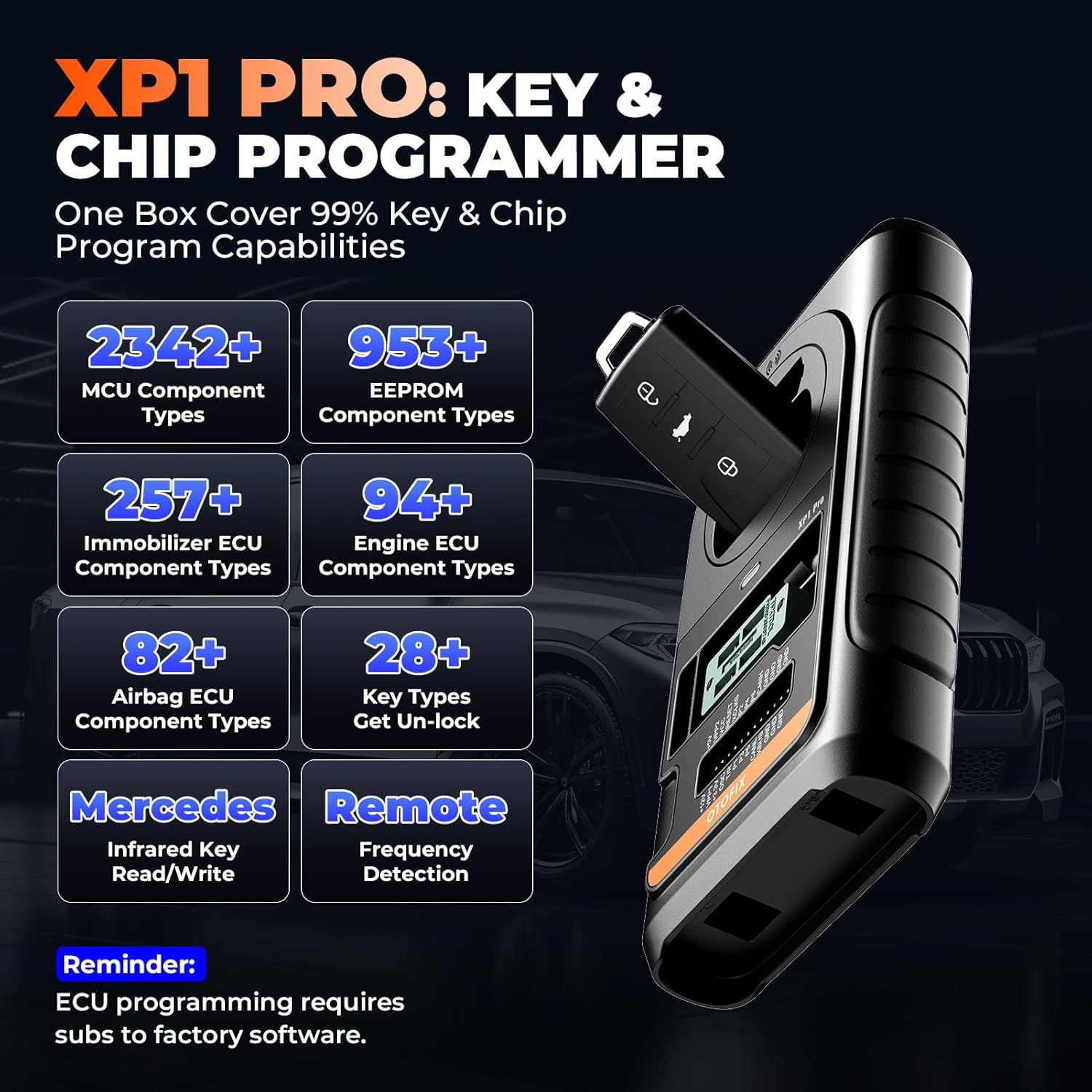
Figure 3.2: A closer look at the XP1 Pro Key & Chip Programmer, illustrating its extensive compatibility with various MCU, EEPROM, and ECU component types for comprehensive key programming.
3.3 ECU Coding and Service Functions
The IM2 provides advanced ECU coding capabilities and a wide array of service functions for vehicle maintenance.
- Rafrechi Fonksyon Kache yo: Activates hidden features in the vehicle's ECU.
- Recode Replaced Components: Programs new or replaced ECU components to match the vehicle.
- Customize OE-Settings: Allows modification of original equipment settings.
- Open/Close Comfort Functions: Controls various comfort features of the vehicle.
- Fix Complex ECU Issues: Addresses software-related problems within the ECU.
- 40+ Service Functions: Includes essential services like Oil Reset, EPB Reset, TPMS Reset, BMS Reset, Brake Bleed, SAS Reset, DPF Regen, and Headlamp ajisteman.

Figure 3.3: An illustration of the advanced ECU coding capabilities and the diverse range of over 40 service functions available on the OTOFIX IM2, designed to streamline vehicle maintenance.
3.4 OE All System Diagnostics and Active Tests
The diagnostic capabilities of the IM2 allow for comprehensive vehicle health checks and component testing.
- One Touch Scan All Systems: Quickly scans all accessible vehicle systems for diagnostic trouble codes (DTCs).
- One Touch Clear All DTCs: Clears all detected DTCs from the vehicle's systems.
- AutoVIN & Scan: Automatically identifies the vehicle and initiates a system scan.
- Done grafik an dirèk: Displays real-time sensor data in graphical format for easy analysis.
- Bi-directional Active Tests: Allows control of vehicle components (e.g., radiator fan, fuel pump, brakes) to verify their operational status.

Figure 3.4: Visual representation of the OTOFIX IM2's OE all-system diagnostic capabilities and bi-directional active tests, showcasing its ability to interact with and test various vehicle components.
3.5 Kouvèti Veyikil
The OTOFIX IM2 provides extensive vehicle coverage, supporting a wide range of models up to the latest years.
- 90% Key Programming via OBD: Most key programming tasks can be performed directly through the OBD port.
- 15,000+ Models Compatible: Broad compatibility with a vast number of vehicle models.
- Sipò Pwotokòl: Supports D-PDU/J2534/RP1210, CAN-FD (e.g., 2020+ GM & Chrysler models), DoIP (e.g., Volvo, Land Rover/Jaguar, BMW F/G Chassis), FCA SGW (requires registered AutoAuth), and Renault SGW (requires unlocking software & device).

Figi 3.5: Yon anlèview of the OTOFIX IM2's extensive vehicle coverage, detailing its compatibility with various automotive communication protocols and a wide range of car models.
4. Antretyen
Proper maintenance ensures the longevity and optimal performance of your OTOFIX IM2 device.
- Mizajou lojisyèl: Regularly check for and install software updates. The device includes 2 years of free updates, which are crucial for expanding vehicle coverage, adding new functions, and fixing bugs. Connect the device to a stable internet connection and navigate to the 'Update' section on the main menu.
- Netwayaj: Keep the device and its accessories clean. Use a soft, damp cloth to wipe the screen and exterior. Avoid using abrasive cleaners or solvents.
- Depo: Store the device in its original carrying case when not in use to protect it from dust, moisture, and physical damage. Store in a cool, dry place.
- Swen batri: To prolong battery life, avoid fully discharging the battery frequently. If storing for an extended period, ensure the battery is charged to about 50-70%.
- Enspeksyon kab: Periodically inspect all cables and connectors for signs of wear or damage. Replace any damaged cables immediately to prevent electrical issues or data transmission problems.
NAN. Depanaj
This section provides basic troubleshooting steps for common issues. For more complex problems, refer to the support section.
- Aparèy pa limen: Ensure the battery is charged. Connect the AC/DC adapter and try again. If the issue persists, contact technical support.
- Pa gen kominikasyon avèk machin nan:
- Verify that the OBDII cable is securely connected to both the vehicle's DLC (Data Link Connector) and the IM2 main unit.
- Check the vehicle's ignition status; it should be ON or in ACC mode as required by the procedure.
- Ensure the vehicle's battery has sufficient voltage.
- Confirm that the vehicle model and year selected on the IM2 match the actual vehicle.
- Software Freezes or Slow Performance:
- Rekòmanse aparèy la.
- Ensure there is sufficient storage space. Clear unnecessary files si sa nesesè.
- Perform a software update to resolve potential bugs.
- Key Programming Failure:
- Ensure the XP1 Pro programmer is correctly connected and powered.
- Verify that the correct key type and chip are being used.
- Follow all on-screen instructions precisely.
- Check for any vehicle-specific requirements or security gateway limitations.
6. Espesifikasyon
| Karakteristik | Spesifikasyon |
|---|---|
| Mak | OTOFIX |
| Nimewo Modèl | IM2 |
| Sistèm operasyon | Android 10.0 |
| Processeur | 8-nwayo |
| memwa | 4GB RAM & 128GB Storage |
| Gwosè ekran | 10.1 pous |
| Rezolisyon ekran | 1920 x 1200 |
| Batri | 15,000 mAh Lityòm-ion |
| Sous pouvwa | Batri Powered |
| Pwa atik | 9.1 Kilogram |
| Dimansyon pwodwi (L x W x H) | 19 x 44 x 66 cm |
| Lang | angle |
| UPC | 850051166213 |
7. Garanti ak sipò
OTOFIX is committed to providing excellent customer service and support for the IM2 Key Programming Tool.
7.1 Mizajou lojisyèl
The OTOFIX IM2 includes 2 zan aktyalizasyon lojisyèl gratis from the date of purchase. These updates provide access to the latest vehicle coverage, new functions, and performance enhancements. After the initial 2 years, subscription renewal may be required to continue receiving updates.
7.2 Sipò teknik
OTOFIX offers 24/7 timely response and lifetime technical support for the IM2 device. If you encounter any issues or have questions regarding the operation, features, or compatibility of your device, please do not hesitate to contact the OTOFIX support team. Contact information can typically be found on the OTOFIX official website or within the device's 'About' section.
Ask a question about this manual
Ask about setup, troubleshooting, compatibility, parts, safety, or missing instructions. Manuals+ will review the question and use this page’s manual context to help answer it.