
1. Entwodiksyon
This manual provides detailed instructions for the setup, operation, and maintenance of your Creative Sound Blaster Katana SE Multi-Channel Gaming Soundbar. Designed for an immersive audio experience, this soundbar features 180W peak power, a bi-amplified 4-driver design, Super X-Fi technology, and customizable RGB lighting. Please read this manual thoroughly before using your device to ensure optimal performance and safety.

Figure 1: Creative Sound Blaster Katana SE Gaming Soundbar
2. Enfòmasyon enpòtan sou sekirite
- Li enstriksyon sa yo.
- Kenbe enstriksyon sa yo.
- Fè atansyon tout avètisman yo.
- Swiv tout enstriksyon yo.
- Pa sèvi ak aparèy sa a toupre dlo.
- Netwaye sèlman ak yon twal sèk.
- Pa bloke okenn ouvèti vantilasyon. Enstale li dapre enstriksyon manifakti a.
- Pa enstale tou pre okenn sous chalè tankou radyatè, rejis chalè, recho, oswa lòt aparèy (tankou amplifiers) ki pwodui chalè.
- Pwoteje kòd elektrik la pou yo pa mache oswa kwense, sitou nan priz, resipyan konvenyans, ak pwen kote yo sòti nan aparèy la.
- Itilize sèlman atachman/akseswa manifakti a espesifye.
- Deploge aparèy sa a pandan tanpèt zèklè oswa lè li pa itilize pou yon peryòd tan ki long.
3. Pake kontni
Verifye ke tout atik yo prezan nan pakè ou a:
- Creative Sound Blaster Katana SE Soundbar
- Subwoofer (wired)
- Kontwòl Remote
- Adaptè pouvwa
- USB-C kab
- Kab optik
4. Pwodwi souview
The Sound Blaster Katana SE is an all-in-one soundbar designed for powerful and immersive audio. It features a sleek design with integrated controls and a front-facing display.
4.1. Soundbar Components
- Kontwòl Panel Top: Power, Volume Up/Down, Source, Mode, SXFI.
- Ekspozisyon Devan: Shows current source (USB, AUX, OPTICAL, BT, TV), volume level, and selected sound mode.
- Front Headphone Jack: For connecting headphones directly.
- Mikwofòn entegre: Pou kominikasyon vokal.
- RGB Lighting Strip: Customizable lighting effects located at the bottom of the soundbar.
- Chofè: Bi-amplified 4-driver design for clear and precise audio.

Figi 2: Devan view of the Sound Blaster Katana SE with RGB lighting
4.2. Koneksyon Panèl Dèyè
The rear panel provides various ports for connecting to your devices:
- HDMI Out (ARC): For connecting to a TV with Audio Return Channel support.
- SXFI Out: Dedicated port for Super X-Fi enabled headphones.
- Antre odyo USB: For digital audio connection to PC/Mac.
- Aux Nan: 3.5mm analog audio input.
- Optik nan: Antre odyo optik dijital.
- Sub Out: For connecting the wired subwoofer.
- Antre pouvwa: Pou adaptè pouvwa a.

Figure 3: Rear panel with HDMI ARC, SXFI Out, USB Audio In, Aux In, Optical In, Sub Out, and Power Input.
4.3. Subwoofer
The included wired subwoofer enhances bass response for a more dynamic audio experience.

Figi 4: Entèn view showing the soundbar's bi-amplified drivers and the subwoofer's design.
5. Enstalasyon
Follow these steps to set up your Sound Blaster Katana SE:
- Plasman: Place the soundbar on a stable surface below your TV or monitor. Position the subwoofer on the floor near the soundbar for optimal bass.
- Konekte subwoofer: Connect the wired subwoofer cable to the 'Sub Out' port on the soundbar's rear panel.
- Konekte pouvwa: Connect the power adapter to the soundbar's power input and then plug it into a wall outlet.
- Konekte Sous Odyo a: Choose your preferred audio connection method (HDMI ARC, Optical, USB, Aux, or Bluetooth) and connect the appropriate cable.
Video 1: Official product video demonstrating the Sound Blaster Katana SE's features and connectivity options.
6. Opsyon Koneksyon
The Sound Blaster Katana SE offers a wide range of connectivity to suit various devices:
- HDMI Out (ARC): Connect to your TV's HDMI ARC port for high-quality audio and control.
- Antre odyo USB: Ideal for connecting to PCs, Macs, or gaming consoles that support USB audio.
- Aux Nan: Sèvi ak yon kab odyo 3.5mm pou konekte ak aparèy ki gen yon pwodiksyon odyo analòg.
- Optik nan: For digital audio connection from TVs, game consoles, or other media players.
- Bluetooth 5.0: Pair wirelessly with your mobile devices, tablets, or computers for convenient audio streaming.
- SXFI Out: Connect Super X-Fi certified headphones for a personalized holographic audio experience.

Figure 5: Soundbar showcasing versatile connectivity with gaming consoles and mobile devices.
7. Operasyon Enstriksyon
7.1. Power On/Off
Peze bouton Power ki sou panèl anwo ba son an oswa sou kontwòl remote la pou limen oswa etenn aparèy la.
7.2. Kontwòl Volim
Use the Volume Up (+) and Volume Down (-) buttons on the soundbar or remote to adjust the audio level. The current volume will be displayed on the front panel.
7.3. Seleksyon Sous
Press the 'Source' button on the soundbar or remote to cycle through available input sources (HDMI ARC, USB, Aux, Optical, Bluetooth).
7.4. Mòd son
The soundbar features optimized sound modes for different content types. Press the 'Mode' button on the soundbar or remote to switch between:
- Mizik: Enhanced for musical playback.
- Sinema: Optimize pou odyo sinematik.
- Gaming: Tailored for immersive gaming soundscapes.
- Effects Off: Neutral audio profile.
7.5. Sèvi ak kontwòl remote la
The included remote control provides full functionality for the soundbar, including power, volume, source, mode, SXFI, RGB lighting, and custom buttons.
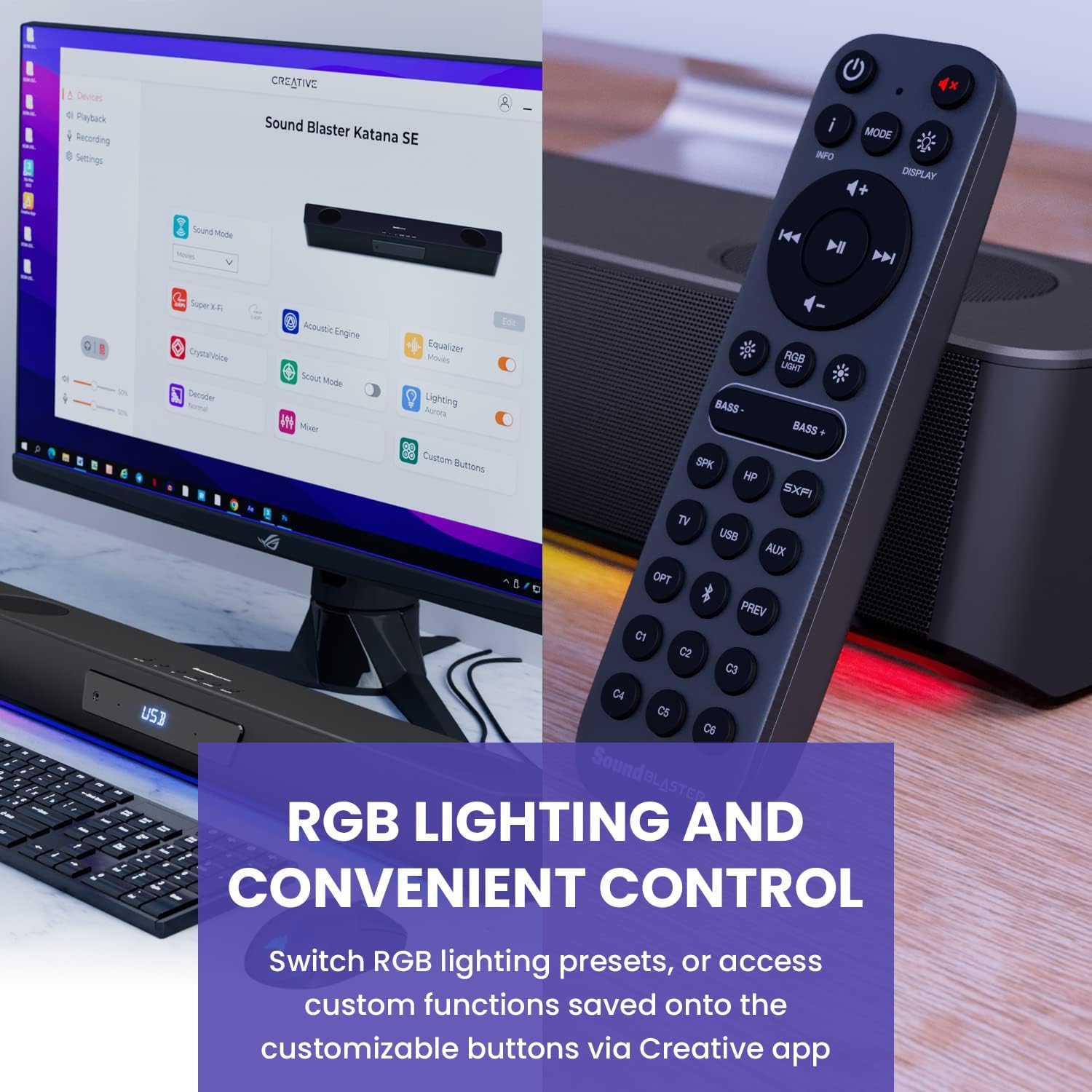
Figure 6: Remote control for the Sound Blaster Katana SE.
7.6. Creative App Customization
For advanced customization, download the Creative app on your PC or Mac. The app allows you to:
- Tune Audio Performance: Adjust EQ settings and activate Sound Blaster processing technologies.
- Customize RGB ekleraj: Select from various RGB presets or create your own custom lighting effects.
- Map Custom Functions: Assign specific commands to the six customizable buttons on the remote control.

Figure 7: Creative app interface showing sound mode, Super X-Fi, Acoustic Engine, Equalizer, CrystalVoice, Scout Mode, Lighting, Decoder, Mixer, and Custom Buttons.
8. Super X-Fi Technology
Super X-Fi technology personalizes your headphone audio experience for optimized and realistic listening. It recreates the soundstage of a multi-speaker system in your headphones.
- SXFI Battle Mode: Jwenn yon avantaj konpetitiftage in FPS games by accurately pinpointing enemy locations through enhanced audio cues.

Figure 8: Super X-Fi and SXFI Battle Mode for enhanced gaming audio.
9. Bati-an mikwofòn
The Sound Blaster Katana SE includes a built-in beamforming microphone, allowing you to participate in calls or in-game voice chat directly through the soundbar.
10. Ekleraj RGB
The integrated RGB lighting strip can be customized to match your setup or mood. Use the remote control to cycle through presets or the Creative app for advanced color and effect adjustments.
11. Antretyen
To ensure the longevity and performance of your Sound Blaster Katana SE:
- Kenbe aparèy la pwòp pa siye li ak yon twal mou, sèk.
- Avoid using liquid cleaners or aerosols.
- Asire ouvèti vantilasyon yo pa obstrue.
- Pa ekspoze aparèy la nan tanperati ekstrèm oswa imidite.
NAN. Depanaj
Si ou rankontre pwoblèm ak soundbar ou a, gade solisyon komen sa yo:
- Pa gen son: Check all cable connections (power, audio source, subwoofer). Ensure the correct input source is selected on the soundbar. Verify the volume is not muted or too low.
- Son defòme: Try reducing the volume. Check audio cable integrity. Ensure the audio source is providing a clean signal.
- Pwoblèm koneksyon Bluetooth: Ensure the soundbar is in Bluetooth pairing mode. Delete the soundbar from your device's Bluetooth list and re-pair. Move closer to the soundbar to reduce interference.
- Kontwòl Remote pa travay: Check battery levels and replace if necessary. Ensure there are no obstructions between the remote and the soundbar.
- Limyè RGB pa travay: Check settings in the Creative app. Ensure RGB lighting is enabled via the remote or app.
13. Espesifikasyon
| Karakteristik | Spesifikasyon |
|---|---|
| Non modèl | 51MF8415AA000 27585486 |
| Kalite Oratè | Ba son |
| Kalite aliye | Tabletop mòn |
| Karakteristik espesyal | Bass Boost, Built In Microphone, Radio, Stereo Pairing, USB Port |
| Itilizasyon Rekòmande Pou Pwodwi | For Gaming Consoles, For Computers |
| Aparèy konpatib | Odinatè Desktop, Laptop, Lektè MP3, Pwojektè, Telefòn entelijan, Tablèt, Televizyon |
| Konte inite | 1.0 Konte |
| Konfigirasyon chanèl son antoure | 5.1 |
| Koulè | 180W Peak Power with Bluetooth 5.0 |
| Konpozan ki enkli | Remote |
| Dimansyon pwodwi | 25.6"D x 4.3"W x 3.1"H |
| Pwa atik | 5.9 liv |
| Èske enpèmeyab | FO |
| Kalite garanti | Limite |
| Kantite Atik | 1 |
| Metòd kontwòl | Remote |
| Teknoloji kominikasyon san fil | Bluetooth |
| Gwosè Oratè | 1 pous |
| Sous pouvwa | Fil elektrik |
| Dyamèt tweeter | 1 pous |
| Nivo rezistans dlo | Pa reziste dlo |
| Kalite Pakè Kliyan | FFP |
| Kalite chofè odyo | Chofè dinamik |
| Teknoloji Koneksyon Subwoofer | San fil |
| Kantite Nivo Pouvwa | 1 |
| Itilizasyon espesifik pou pwodwi | Gaming Consoles, Computers |
| UPC | 054651195639 |
| Manifakti | Laboratwa kreyatif |
| Fòm | rectangular prism |
| Pwa atik | 5.9 liv |
| ASIN | B0C5DFMB93 |
| Nimewo modèl atik | MF8415 |
| Dat Premye Disponib | 16 me 2023 |
| Mak | Kreyatif |
| Oratè maksimòm pwodiksyon pouvwa | 100 Watts |
| Repons Frekans | 20000 Hz |
| Koneksyon Teknoloji | Bluetooth |
| Audio Sòti Mode | Antouraj, Stereo |
14. Garanti ak sipò
Your Creative Sound Blaster Katana SE comes with a Limited Warranty. For detailed warranty information, product registration, technical support, and customer service, please visit the official Creative websit la oubyen gade kat garanti ki nan pakè w la.