
1. Entwodiksyon
This manual provides detailed instructions for the setup, operation, maintenance, and troubleshooting of your Steelplay Adventure Controller for Nintendo Switch. Please read this manual thoroughly before using the product to ensure optimal performance and longevity.
2. Pake kontni
- Steelplay Adventure Controller
- USB Chaje Kab
- Manyèl Itilizatè (dokiman sa a)
3. Layout Kontwolè a
Familiarize yourself with the buttons and features of your Steelplay Adventure Controller.

Figi 1: Devan view of the Steelplay Adventure Controller. This image displays the controller's ergonomic design, featuring a teal main body, brown grips, and yellow accents on the analog sticks, D-pad, and face buttons. The layout includes two clickable analog sticks, a directional pad, A/B/X/Y action buttons, Home, Capture, Plus, Minus, and Turbo buttons.
- Stick analog gòch la: Pou mouvman ak kontwòl kamera.
- Stick analog dwat la: Pou kontwòl kamera oswa aksyon espesifik nan jwèt la.
- D-Pad: Antre direksyonèl.
- Bouton A/B/X/Y: Bouton aksyon.
- Bouton G/D: Bouton zepòl.
- Bouton ZL/ZR yo: Bouton deklanche.
- Bouton HOME: Retounen nan meni AKÈY Nintendo Switch la.
- CAPTURE Button: Li pran ekran oswa klip videyo.
- + (Plus) Button: Bouton kòmanse/poz.
- - (Minus) Button: Chwazi bouton.
- Bouton TURBO: For setting rapid-fire functionality (refer to operating section).
- Endikatè ki ap dirije: Display connection status, player number, and charging status.
4. Enstalasyon ak Koneksyon
4.1 Premye chaj
Before first use, fully charge the controller. Connect the USB charging cable to the controller's charging port and the other end to a USB power source (e.g., Nintendo Switch dock, USB wall adapter, computer USB port). The LED indicators will show charging status and turn off or change color when fully charged.
4.2 Pairing with Nintendo Switch
- On your Nintendo Switch HOME Menu, select "Controllers".
- Select "Change Grip/Order".
- On the Steelplay Adventure Controller, press and hold the bouton HOME ak la Y bouton simultaneously for a few seconds until the LED indicators start flashing rapidly. This indicates the controller is in pairing mode.
- The Nintendo Switch will detect the controller. Once detected, the LED indicators on the controller will stop flashing and remain solid, indicating a successful connection.
- Press the L+R buttons on the controller as prompted by the Switch screen to finalize the connection.
Once paired, the controller will automatically connect to your Nintendo Switch when powered on and within range.
5. Itilizasyon Kontwolè a
5.1 Kontwòl debaz yo
The Steelplay Adventure Controller functions similarly to official Nintendo Switch Pro Controllers. Use the analog sticks for movement, D-pad for directional input, and A/B/X/Y buttons for in-game actions. The L/R and ZL/ZR buttons provide additional input options.
5.2 Kontwòl Mouvman
The controller supports motion control functionality, allowing for immersive gameplay in compatible titles. Ensure your Nintendo Switch system software is up to date for optimal motion control performance.
5.3 TURBO Fonksyon
The TURBO function allows a button to be pressed repeatedly as long as it is held down, providing a rapid-fire effect.
- To activate TURBO: Peze epi kenbe la bouton TURBO, then press the desired action button (e.g., A, B, X, Y, L, R, ZL, ZR). The button will now have TURBO functionality.
- To deactivate TURBO: Peze epi kenbe la bouton TURBO again, then press the same action button. The TURBO function for that button will be turned off.
6. Antretyen
6.1 Netwayaj
Pou netwaye kontwolè ou a, sèvi ak yon twal mou epi sèk. Pou pousyè tè ki difisil pou netwaye, siye l yon ti kras.ampen the cloth with water and gently wipe the surface. Do not use harsh chemicals, solvents, or abrasive cleaners, as these can damage the controller's finish and internal components.
6.2 Depo
Store the controller in a cool, dry place away from direct sunlight, extreme temperatures, and high humidity. Avoid placing heavy objects on the controller to prevent damage to the buttons or casing.
6.3 Swen Batri
The controller contains a built-in Lithium-ion battery. To prolong battery life, avoid fully discharging the battery frequently. If storing the controller for an extended period, charge it to approximately 50% capacity every few months.
NAN. Depanaj
| Pwoblèm | Kòz posib | Solisyon |
|---|---|---|
| Controller does not connect to Switch. |
|
|
| Input lag or unresponsive buttons. |
|
|
| Kontwolè a pa chaje. |
|
|
8. Espesifikasyon
| Karakteristik | Detay |
|---|---|
| Mak | Steelplay |
| Nimewo Modèl | 3760352735322 |
| Koneksyon | Bluetooth (san fil) |
| Aparèy konpatib | Nintendo switch |
| Koulè | Multicolore (Teal, Brown, Yellow) |
| Karakteristik espesyal | Wireless, Motion Control, TURBO Function |
| Pwa | 185 gram |
| Dimansyon (L x W x H) | 16 x 11.5 x 6.3 santimèt |
| Kalite batri | 1 Lithium-ion (built-in) |
9. Garanti ak sipò
The product packaging indicates a 5-year warranty. For specific warranty terms, conditions, and support inquiries, please refer to the official Steelplay websit la oubyen kontakte sèvis kliyan yo dirèkteman. Kenbe prèv acha ou pou reklamasyon garanti.
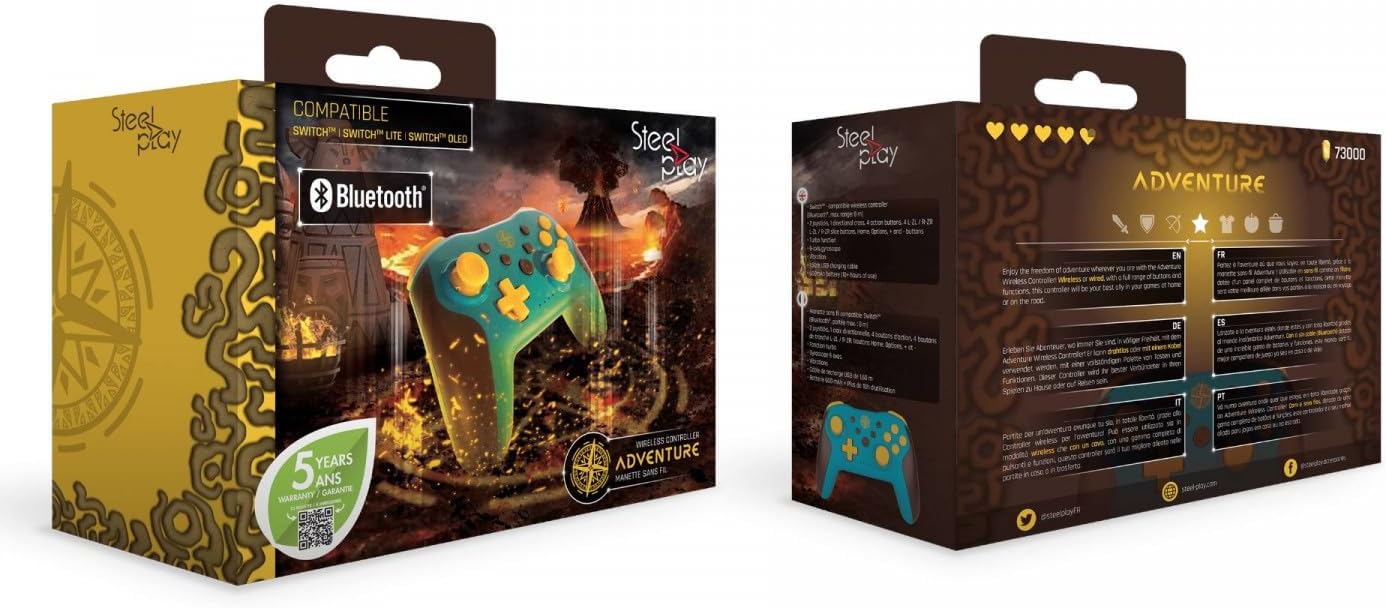
Figi 2: Packaging of the Steelplay Adventure Controller. The box prominently features the controller's design, compatibility with various Nintendo Switch models, Bluetooth logo, and a "5 years warranty" seal. The reverse side provides product information in multiple languages.