
FAO Schwarz Thunderbolt Jet X2
FAO Schwarz Thunderbolt Jet X2 Drone User Manual
Model: Thunderbolt Jet X2 | Brand: FAO Schwarz
Entwodiksyon
Welcome to the user manual for your new FAO Schwarz Thunderbolt Jet X2 Drone. This manual provides essential information for safe operation, setup, maintenance, and troubleshooting. Please read it thoroughly before operating your drone to ensure a safe and enjoyable experience.
Enfòmasyon sou Sekirite
- Toujou opere dron an nan zòn ouvè, klè, lwen moun, bèt ak obstak.
- Do not fly near airports, power lines, or restricted airspace.
- Ensure the drone's battery and remote control batteries are fully charged before each flight.
- Kenbe dwèt, cheve, ak rad lach lwen elis k ap vire yo.
- Pa opere li nan gwo van oswa move tan.
- Li rekòmande pou sipèvize yon granmoun pou itilizatè ki pi jèn yo.
Ki sa ki nan bwat la
Verifye ke tout konpozan yo prezan:
- FAO Schwarz Thunderbolt Jet X2 Drone
- Kontwòl Remote
- Rechargeable Drone Battery
- USB Chaje Kab
- Elis rezèv (si enkli)
- Manyèl Itilizatè (dokiman sa a)
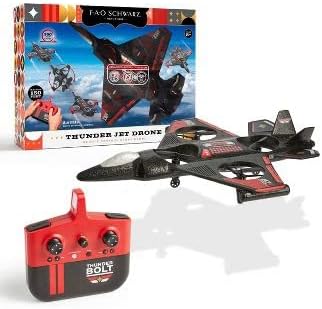
Image: The Thunderbolt Jet X2 Drone, its remote control, and the product packaging, showing the main components included.
Enstalasyon
1. Chaje batri dròn nan
- Locate the rechargeable drone battery.
- Konekte batri a ak kab chaje USB ki vini ak li a.
- Plug the USB cable into a standard USB power source (e.g., computer USB port, USB wall adapter).
- Limyè endikatè ki sou kab USB a ap montre eta chaj la (pa egzanp, wouj pou chaj, etenn pou chaj konplè).
- Anjeneral, li pran apeprè 60-90 minit pou chaje. Pa chaje twòp.
2. Enstale Batri Remote Kontwòl
- Louvri lòj batri a sou do a nan kontwòl remote la.
- Insert 3x AAA batteries (not included) into the compartment, ensuring correct polarity (+/-).
- Fèmen lòj batri a byen.

Imaj: Yon imaj detaye view of the remote control for the Thunderbolt Jet X2 Drone, highlighting its buttons and joysticks.
3. Konekte Dròn nan ak Telekòmand lan
- Mete abèy la sou yon sifas plat, nivo.
- Turn on the drone by pressing its power button. The drone's lights will flash.
- Vire sou kontwòl la aleka.
- Push the left joystick (throttle) all the way up, then all the way down.
- The drone's lights will become solid, indicating successful pairing.
Opere Dròn nan
Kontwòl debaz yo
- Joystick gòch (akseleratè): Up to ascend, down to descend.
- Joystick dwat (direksyon): Forward to move forward, backward to move backward, left to move left, right to move right.
- Bouton taye: Used to fine-tune the drone's stability if it drifts in any direction.
- One-Key Take-off/Landing Button: Peze pou dekole oswa ateri otomatikman.
- Bouton baskile 360°: Press this button, then push the right joystick in any direction to perform a flip.

Image: The Thunderbolt Jet X2 Drone flying in the air, with a hand holding the remote control in the foreground, illustrating active operation.
Premye vòl
- Ensure you are in a safe, open area.
- Mete abèy la sou yon sifas ki plat.
- Press the One-Key Take-off button, or slowly push the left joystick up to ascend.
- Practice hovering at a low altitude first.
- Use the right joystick for directional control.
- To land, press the One-Key Landing button or slowly pull the left joystick down until the drone lands.

Image: Three Thunderbolt Jet X2 Drones shown in different aerial maneuvers, demonstrating its agility and flight capabilities.
Antretyen
- Netwayaj: Use a soft, dry cloth to clean the drone and remote control. Do not use water or harsh chemicals.
- Enspeksyon elis: Regularly check propellers for damage (bends, cracks). Replace damaged propellers immediately using the provided spares.
- Swen batri: Store batteries in a cool, dry place. Do not leave batteries fully discharged for extended periods.
- Depo: When not in use, store the drone and remote in a safe place, away from direct sunlight and extreme temperatures.
Depanaj
| Pwoblèm | Kòz posib | Solisyon |
|---|---|---|
| Dron an pa reponn a kontwòl remote la. | Not paired; low battery; out of range. | Re-pair drone and remote; charge drone battery; replace remote batteries; ensure within 300 feet range. |
| Dron an ap derive pandan vòl la. | Needs trimming; uneven take-off surface. | Use trim buttons to adjust; ensure drone is on a flat surface before take-off. |
| Elis yo pa ap vire. | Obstruction; damaged propeller; motor issue. | Check for obstructions; replace damaged propellers; contact support if motor issue suspected. |
Espesifikasyon
| Karakteristik | Detay |
|---|---|
| Mak | FAO Schwarz |
| Non modèl | Thunderbolt Jet X2 |
| Koulè | Nwa |
| Rezolisyon Capture Videyo | 480p |
| Koneksyon Teknoloji | USB |
| Nivo konpetans | debutan |
| Kapasite batri | 850 Miliamp Orè |
| Fòma Capture Videyo | MP4 |
| Maksimòm Range | 300 pye |
| Materyèl | Plastik |
| Pwa atik | 1.61 liv |
| Dimansyon pake | 17.48 x 12.68 x 4.37 pous |
Garanti ak sipò
For warranty information or technical support, please refer to the contact details provided on the product packaging or visit the official FAO Schwarz websit la. Kenbe resi acha ou kòm prèv acha.
Ask a question about this manual
Ask about setup, troubleshooting, compatibility, parts, safety, or missing instructions. Manuals+ will review the question and use this page’s manual context to help answer it.